
Composite Rules
Composite Rules define a Business Process (BP) flow variant depending on the Record column values. In most cases, you can configure these Rules via the user interface. For a basic description, refer to the Add Composite Rules article.
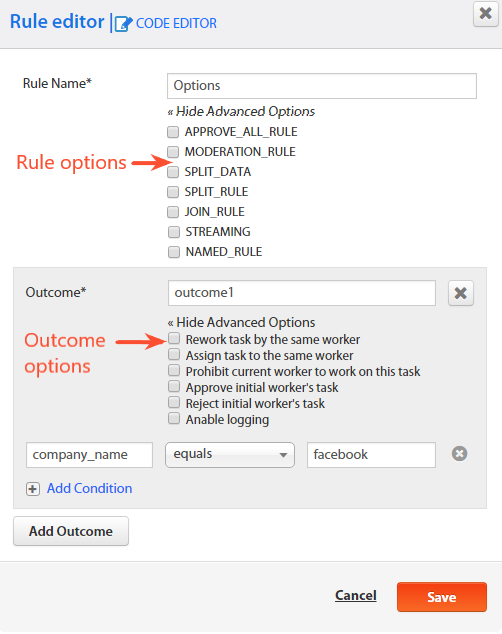
You can also create a custom Rule by editing the Composite Rule source code in the Drools language via Code Editor.
Composite Rule example
package com.freedomoss.requester;
# list any import classes here.
import java.util.Map;
import java.util.ArrayList;
import com.freedomoss.objective.model.CompositeRuleContext;
import com.freedomoss.objective.model.CompositeRuleDataItemContext;
import org.slf4j.Logger;

# declare any global variables here
global CompositeRuleContext source
global Logger log
global Map params

# RuleContext.SPIT_RULE:usa
rule "Rule context initialization"
auto-focus true
no-loop
agenda-group "initialization-group"
    when
        $ctx:CompositeRuleContext(initialized == false);
    then
        # insert processed facts into memory
        $ctx.updateWorkingMemory();
        # move to business rules
        kcontext.getKnowledgeRuntime().getAgenda().getAgendaGroup("calculation").setFocus();
end
# RuleOutcome.Definition={"outcomeId":"Group I","conditional":false,"conditions":[]}
# RuleOutcome.Definition={"outcomeId":"Group II","conditional":false,"conditions":[]}
# RuleOutcome.Definition={"outcomeId":"Group III","conditional":false,"conditions":[]}
# RuleOutcome.Definition={"outcomeId":"Group IV","conditional":false,"conditions":[]}
# RuleOutcome.Definition={"outcomeId":"Group V","conditional":false,"conditions":[]}
# RuleOutcome.Definition={"outcomeId":"outcome1","conditional":false,"conditions":[]}
rule "Send unprocessed result to unconditional outcome(s)"
agenda-group "calculation"
dialect "mvel"
salience 80
    when
        $ctx:CompositeRuleContext(initialized == true);
        $item:CompositeRuleDataItemContext();
    then
        $ctx.sendResultToUnconditionalOutcomes($item, true);
        $ctx.logExecutedRule(kcontext.getRule().getName() + " item:" + $item.toString());
end
rule "Logging all items"
agenda-group "calculation"
dialect "mvel"
salience 60
    when
        $ctx:CompositeRuleContext(initialized == true);
        $item:CompositeRuleDataItemContext(this memberOf $ctx.lastStepDataItems);
    then
        $ctx.logExecutedRule(kcontext.getRule().getName() + " item:" + $item.toString());
end
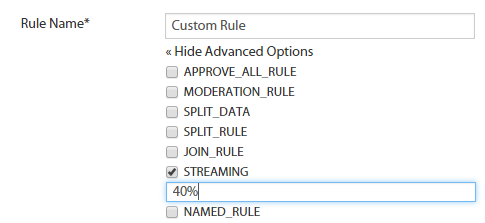
You can use additional functions related to Composite Rules by enabling Advanced Rule Options or Advanced Outcome Options.
Advanced Rule Options
APPROVE_ALL_RULE
If set, the Drools execution is replaced with a Java loop that unconditionally sends all Records to the next step.
MODERATION_RULE
The flag is used in the moderation flow before the Moderation Step.
SPLIT_DATA
The flag enables splitting Records for the next step according to the number of created Assignments.
For example, if one Record is sent to the first step with the 1+20 Adjudication Rule, 20 or 21 Assignments are created. Then, these Assignments go to the next step as input Records.
This feature can be used for Surveys, Training Tasks, and the moderation flow.
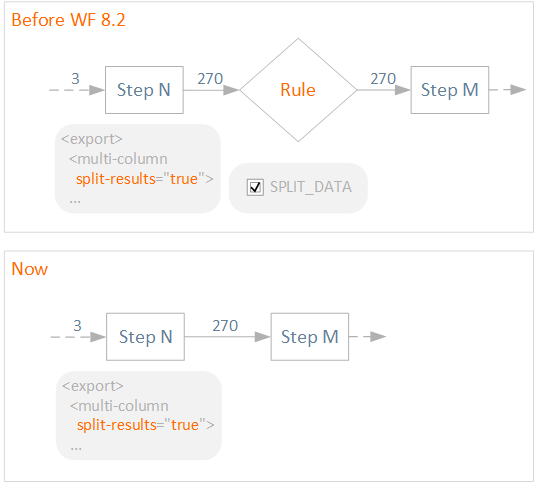
Create a Composite Rule with the SPLIT_DATA flag after a Bot Task using the multi-column Export plugin (with split-results="true") to split a single Record into multiple ones.
To minimize data errors when data record splitting is required, avoid adding the SPLIT_DATA rule after the step that splits records in its export section.
Previously, to produce multiple rows with split-results="true" after a step, it was necessary to create a rule with the SPLIT_DATA advanced option checked.
SPLIT_RULE and JOIN_RULE
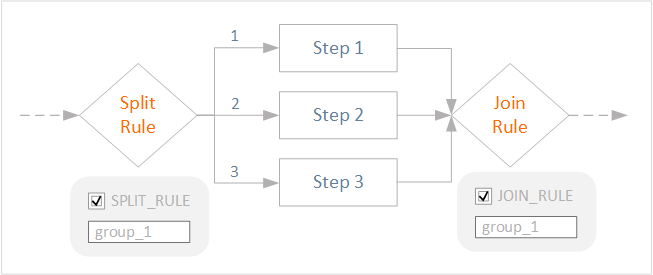
These flags are used in BPs where all Records going to the fork have to pass through all branches and join afterward. The step after the JOIN rule won't start until all branches are completed.
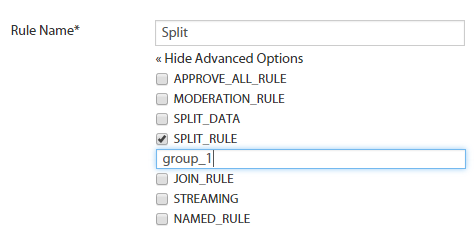
A group label—the value inserted after a flag—is used to differentiate between split-join groups in case they are used more than once, for example, if a BP has sub-processes with the split and join operations.
STREAMING
The flag overrides BP streaming settings for the subsequent step. If set, defines the number of tasks or a percentage value for streaming.
NAMED_RULE
The flag is used to build cut-off rules in an Automation BP according to model results. This rule is used after the extract step and allows you to generate a condition automatically.
Advanced Outcome Options
These options are used for the moderation flow.
| Option | Description |
|---|---|
| Rework task by the same worker | Used in a moderation flow for the moderation decision rule. A new assignment is created after the Moderation step and is distributed to the same worker. After reworking, a new assignment is created, whereas the original one is marked as In Review. The worker does not get a reward for reworking. |
| Assign task to the same worker | Used in the moderation flow for the moderation decision rule. A new assignment is created after the Moderation step and is distributed to the same worker. After reworking, a new assignment is created, whereas the original one is marked as Done. The worker gets a reward for each reworking iteration. |
| Prohibit current worker to work on this task | Used in the moderation flow. After the Moderation decision, the task is not available for reworking by the current worker. |
| Approve initial worker's task | After moderation, the worker gets a task reward. |
| Reject initial worker's task | After moderation, the worker DOES NOT get a reward. |
| Enable logging | Enables rule logging. The rule execution is recorded to rules.log. |
RegEXP in Conditions
RegEXP allows you to use OR in composite rules for a parameter.
For instance, num matches regexp 1\|2 means that the outcome accepts records with the num value of 1 OR 2. Otherwise, the record is redirected to the Default outcome.