
Post-Processing
Post-Processing is the final stage of the AutoML SDK pipeline performed after the model training. Post-Processing modifies the trained model output to fit the requirements of a customer by applying pre-defined rules. In rare cases, based on a separate ML model.
Generally, Post-Processing handles such field value modifications as adding, removing, changing (80% of cases), and grouping.
Example: A Post-Processor can change a date format from 11.07.2018 to a standard US format 07/11/2018.
import java.time.LocalDate;
import java.time.format.DateTimeFormatter;
import java.util.Locale;
import java.util.Optional;

import com.workfusion.vds.sdk.api.nlp.annotation.OnInit;
import com.workfusion.vds.sdk.api.nlp.model.Field;
import com.workfusion.vds.sdk.api.nlp.model.IeDocument;
import com.workfusion.vds.sdk.api.nlp.processing.ProcessingException;
import com.workfusion.vds.sdk.api.nlp.processing.Processor;

public class DatePostProcessor implements Processor<IeDocument> {

    private DateTimeFormatter inputDateFormatter;

    private DateTimeFormatter outputDateFormatter;

    @OnInit
    public void init() {
        // initialize formatter inside onInit method to prevent serialization issues
        inputDateFormatter = DateTimeFormatter.ofPattern("dd.MM.yyyy", Locale.ENGLISH);
        outputDateFormatter = DateTimeFormatter.ofPattern("MM/dd/yy");
    }

    @Override
    public void process(IeDocument document) throws ProcessingException {
        // find field for code 'date'
        Optional<Field> fieldOptional = document.findField("date");
        if (fieldOptional.isPresent()) {
            Field field = fieldOptional.get();
            LocalDate date = LocalDate.parse(field.getValue(), inputDateFormatter);
            field.setValue((date).format(outputDateFormatter));
        }
    }
}
In AutoML SDK, Post-Processors have a number of implementations depending on the problem being solved.
warning
All fields of a Post-Processor must be serializable. Although, the Post-Processor does not have to implement the serializable interface. Keep in mind that lambdas are not serializable by default.
If you cannot avoid using non-serializable fields for some reason, then you can do the following trick:
- Define a field and keep it
null. - Initialize the field in the
@OnInitmethod. - Do not initialize the field in a constructor.
A Post-Processor that uses non-serializable date formatter
Your Post-Processor converts dates from one format to another with help of DateTimeFormatter which is not Serializable. The correct initialization of the Post-Processor would be as follows.
public class DatePostProcessor implements Processor<IeDocument> {

    private DateTimeFormatter dateTimeFormatter;

    @OnInit
    public void init() {
        dateTimeFormatter = DateTimeFormatter.ofPattern("dd/MM/yyyy");
    }

    /* The Post-Processor implementation goes here */
}
A Post-Processor that uses a lambda
Let's say you have a bunch of common normalization functions grouped into the PostProcessingFunctions class. In your Post-Processor, you want to refer to one of the functions using a lambda. Then, in order to avoid issues with serialization the code should look the following way.
public class MyPostProcessor implements Processor {

    private Normalizer normalizer;

    @OnInit
    public void init() {
        normalizer = PostProcessingFunctions::removeLegalEndings;
    }

    /* The Post-Processor implementation goes here */
}
Normalization
Normalization is the process of changing the extracted values to a certain format. The extracted values may include:
- Numbers: 1k > 1000
- Dates: 11.07.2018 > 07/11/2018
- Prices: 100 > 100.00
- Currencies: $ > USD
- Addresses: NY Brooklyn 02356 Ralph Ave. > 02356 Ralph Ave. Brooklyn NY
- Organizations: WF or Workfusion Systems > WorkFusion
The following Normalizer converts a date format to ISO standard YYYY-MM-DD.
OcrDateNormalizer normalizer = new OcrDateNormalizer();
normalizer.normalize("11 Jul 18") => "2018-07-11";
normalizer.normalize("07/31/2015") => "2015-07-31";
For more normalization examples, refer to Post-Processing Examples.
API Basics
warning
Normalizers are not standalone components and thus should be used within a Post-Processor instance.
All Normalizers implement the Normalizer interface and have a normalize() method, which takes a string as a parameter and returns a normalized representation of this string. For normalizing numbers use the NumberNormalizer interface with a normalize(String text, String numberFormat) method. Refer to Java numberFormat documentation for details.
Normalizers follow these rules:
- Return
nullfor a null string. - Return
empty stringfor an empty string. - Return the original string if errors occur during normalization.
Here's an example of a Post-Processor which normalizes the Price value from $1,234,56 to 1234.56.
import java.util.Optional;

import com.workfusion.vds.sdk.api.nlp.model.Field;
import com.workfusion.vds.sdk.api.nlp.model.IeDocument;
import com.workfusion.vds.sdk.api.nlp.processing.ProcessingException;
import com.workfusion.vds.sdk.api.nlp.processing.Processor;
import com.workfusion.vds.sdk.nlp.component.processing.normalization.OcrAmountNormalizer;

public class AmountPostProcessor implements Processor<IeDocument> {

    public void process(IeDocument document) throws ProcessingException {
        Optional<Field> amount = document.findField("invoice_amount");
        if (amount.isPresent()) {
            Field amountField = amount.get();
            String value = amountField.getValue();
            OcrAmountNormalizer amountNormalizer = new OcrAmountNormalizer();
            amountField.setValue(amountNormalizer.normalize(value));
        }
    }
}
For full list of AutoML SDK OOTB Normalizersand details, refer to Javadocs.
OCR Errors Correction
Processed documents are generally scanned original invoices, checks, etc. During the document processing OCR may introduce errors due to damaged documents and low quality of scans. Post-Processing steps in to either fix the incorrect value, or remove it.
Fixing Value
For example, OCR output may contain the same recognition error in all documents. Post-Processing can fix incorrect values by introducing a rule (usually a regex replacing one character with another).
The following example shows an implementation of a Post-Processor for replacing G to 6, B to 8, O to 0 in Zip Codes.
import java.util.Optional;

import com.workfusion.vds.sdk.api.nlp.model.Field;
import com.workfusion.vds.sdk.api.nlp.model.IeDocument;
import com.workfusion.vds.sdk.api.nlp.processing.ProcessingException;
import com.workfusion.vds.sdk.api.nlp.processing.Processor;

public class ZipPostProcessor implements Processor<IeDocument> {

    public void process(IeDocument document) throws ProcessingException {
        Optional<Field> zipCode = document.findField("zip_code");
        if (zipCode.isPresent()) {
            Field zipCodeField = zipCode.get();
            String value = zipCodeField.getValue();
            String correctedValue = value.toUpperCase()
                .replaceAll("G", "6")
                .replaceAll("B", "8")
                .replaceAll("O", "0");
            zipCodeField.setValue(correctedValue);
        }
    }
}
note
Use this approach if the probability of positive correction is high enough for your case. In many cases, the probability threshold is calculated based on the results of model training.
Consider the following example.
- Comparing model training results (tagged value against data value) shows that character "G" is replaced with "6" in 98% of cases. This may be considered as a high positive correction probability and thus can be used in a Post-Processor to fix OCR errors.
- In other case, model training results may show that character "B" is replaced with "8" in 55% of cases and with "6" in 45% of cases. This is quite a low probability level and should not be used in a Post-Processor.
Depending on the use case requirements, it is generally recommended that values with low to medium level of positive correction probability should be skipped or removed by the Post-Processor.
Removing Value
Sometimes OCR may introduce a recognition error in 50% of cases while the other 50% are correct. If it's impossible to fix a field value, then Post-Processing can remove it.
Validation
When extracting Bank Card Numbers, IBANs, Zip Codes, CUSIPs, etc. it’s crucial to check them to make sure the extracted value is valid. In case, the extracted value is not valid, it’s usually removed.
For more information about CUSIP validation, refer to CUSIP documentation.
The following example validates the credit card number. Validation criteria: all characters are digits.
import java.util.Collection;

import com.workfusion.vds.sdk.api.nlp.model.Field;
import com.workfusion.vds.sdk.api.nlp.model.IeDocument;
import com.workfusion.vds.sdk.api.nlp.processing.ProcessingException;
import com.workfusion.vds.sdk.api.nlp.processing.Processor;

public class CreditCardPostProcessor implements Processor<IeDocument> {

   private static final String FIELD_NAME = "credit_card";

   @Override
   public void process(IeDocument document) throws ProcessingException {
       Collection<Field> fields = document.findFields(FIELD_NAME);
       fields.forEach(field -> {
           String value = field.getValue();
           if (!value.chars().allMatch(Character::isDigit)) {
               document.remove(field);
           }
       });
   }

}
Mapping to Reference Data
A Post-Processor can extract additional data not contained in the original Document using the reference data. For example, employer’s Name and Surname can help extract their unique company ID. Having extracted only zip code, you can map it to the city, and then extract this information even though it’s not initially present in the Document. Reference data can be taken from a database, an API request, a local dictionary, etc.
note
For the following example to work, provide a CSV dictionary zipcodes.csv file, and then put it into Classpath. Each record in the dictionary contains 3 columns, where the first column is the name of a city, and the next two represent a range of zip codes. For example:
- Huntsville, 35801, 35816
- Anchorage, 99501, 99524
- etc.
import java.io.File;
import java.nio.file.Paths;
import java.util.List;
import java.util.Optional;

import org.apache.commons.lang3.math.NumberUtils;

import com.google.common.collect.Range;
import com.google.common.collect.RangeMap;
import com.google.common.collect.TreeRangeMap;
import com.workfusion.vds.sdk.api.nlp.annotation.OnInit;
import com.workfusion.vds.sdk.api.nlp.model.Field;
import com.workfusion.vds.sdk.api.nlp.model.IeDocument;
import com.workfusion.vds.sdk.api.nlp.processing.ProcessingException;
import com.workfusion.vds.sdk.api.nlp.processing.Processor;
import com.workfusion.vds.sdk.nlp.component.dictionary.CsvDictionaryProvider;

public class ZipToCityPostProcessor implements Processor<IeDocument> {

    private RangeMap<Integer, String> zipToCities;

    @OnInit
    public void init() {
        try {
            // read zip dictionary from classpath
            File file = Paths.get(this.getClass().getResource("zipcodes.csv").toURI()).toFile();
            // use csv reader from components to read this file
            CsvDictionaryProvider provider = new CsvDictionaryProvider(file);
            List<List<String>> records = provider.getDictionary();
            // create guava range map based on file records to store zip->city relations
            zipToCities = TreeRangeMap.create();
            // fill this map
            records.forEach(record -> {
                String city = record.get(0);
                Integer beginZip = Integer.valueOf(record.get(1));
                Integer endZip = Integer.valueOf(record.get(1));
                zipToCities.put(Range.closed(beginZip, endZip), city);
            });
        } catch (Exception e) {
            throw new ProcessingException(e);
        }

    }

    @Override
    public void process(IeDocument document) throws ProcessingException {
        Optional<Field> zipCode = document.findField("zip_code");
        if (zipCode.isPresent()) {
            Field zipCodeField = zipCode.get();
            String value = zipCodeField.getValue();
            Integer zipCodeValue = NumberUtils.toInt(value, 0);
            String city = zipToCities.get(zipCodeValue);
            if (city != null) {
                // add new field for city, does not set begin and end because positions in text are not exists
                document.add(Field.descriptor()
                        .setName("city")
                        .setValue(city)
                        .setScore(zipCodeField.getScore()));
            }

        }
    }
}
Transformation
Transformation represents simple procedures like trimming, lower/upper case, capitalization, removing punctuation, special characters, etc.
Example: MINSK, BELARUS can be transformed into Minsk, Belarus.
The following code snippet replaces all fields with type ADDRESS with normalized letter case values using out-of-the-box Post-Processors: NormalizerProcessor and TextNormalizer.
import java.util.ArrayList;
import java.util.List;

import com.workfusion.vds.nlp.model.configuration.DefaultConfigurationContext;
import com.workfusion.vds.sdk.api.hypermodel.annotation.Named;
import com.workfusion.vds.sdk.api.nlp.configuration.FieldInfo;
import com.workfusion.vds.sdk.api.nlp.normalization.Normalizer;
import com.workfusion.vds.sdk.api.nlp.processing.Processor;
import com.workfusion.vds.sdk.nlp.component.processing.NormalizerProcessor;
import com.workfusion.vds.sdk.nlp.component.processing.normalization.TextNormalizer;
import com.workfusion.vds.sdk.nlp.component.util.FieldInfoUtils;

@Named("basePostProcessors")
    public List<Processor> getPostProcessors(DefaultConfigurationContext configurationContext) {
        List<Processor> processors = new ArrayList<>();
        List<FieldInfo> allFieldCodes = FieldInfoUtils.getAllChildren(configurationContext.getField());
        allFieldCodes.forEach(field -> {
            switch (field.getType()) {
                case ADDRESS:
                    // make only first letter capital, for example, mInsk->Minsk
                    Normalizer normalizer = TextNormalizer.builder()
                            .lowerCase()
                            .capitalize()
                            .build();
                    processors.add(new NormalizerProcessor(field.getCode(), normalizer));
            }
        });

        return processors;
}
Grouping
A model can extract multiple field values of the same type (for example, Currency, Quantity, and Price) that should be joined into a group according to their logical connection. For example, you may need to group Product Name, Amount and Price. Field values can be grouped based on their position in a document or words in a sentence, based on a table line, or based on some underlying custom logic.
Words
Field values grouped based on their position in a sentence.
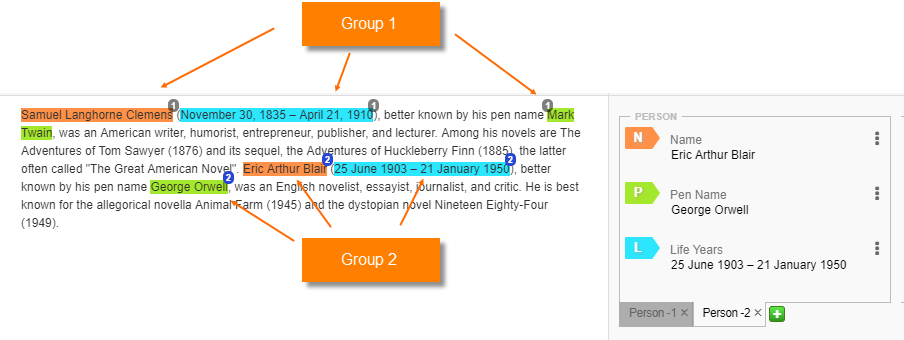
Table Cells
Field values grouped based on a line in a table.
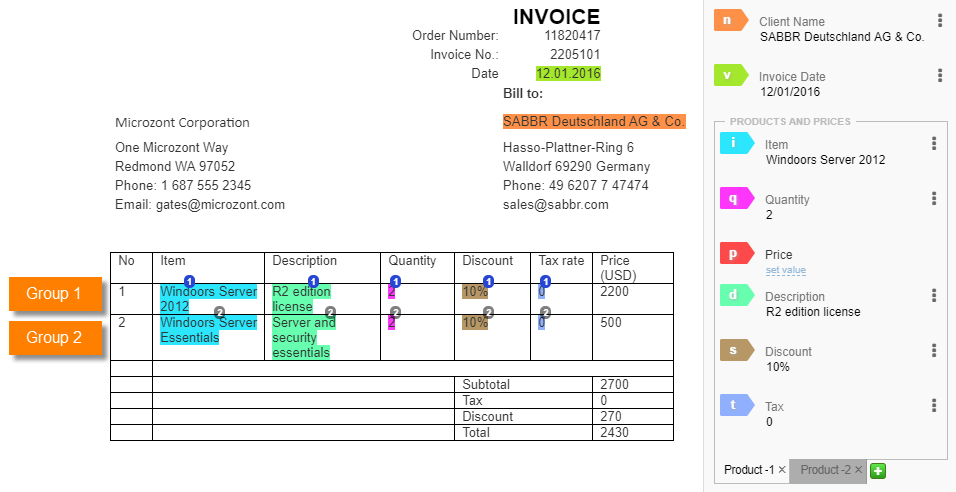
The group number information is saved in the tabnumber attribute of an appropriate tag. This attribute is then used in Control Tower to display tabs with grouped fields, as in the previous example (tabs Product-1, Product-2).
note
The tabnumber attribute starts with zero (0) and is incremented by one (1) with each next field group.
For more information, refer to the Examples page and documentation.