
Results analysis
Goal: To analyze the results of the ML model and propose ways to improve them.
Input: Test set, trained model.
Output: Report with statistics on test extraction, proposals on ML model improvements.
Results analysis steps
This stage of the Use Case implies proceeding with the following steps:
- Run ML model training.
- Run Information Extraction / Classification on a test set.
- Get ML model results.
- Run Business Process to get detailed statistics.
- Analyze results: Find reasons for mistakes and provide solutions.
1-2. Run model training & run IE/Classification on a test set
After splitting the data set into training and test sets, the Data Analyst and ML Engineer launch model training, then runs IE/Classification on a test set.
Make sure that the input file provided for extraction includes the following information:
- column with links to the original documents
- column with links to the OCRed documents
- column with tagged text (as XML content).
This is important because this information will be used in the next step: statistics calculation.
3. Get model results
After Model Execution on the test set, as output we'll get a file containing all the information from the input file (from steps 1 -2) and also a column with extracted text (as XML content).
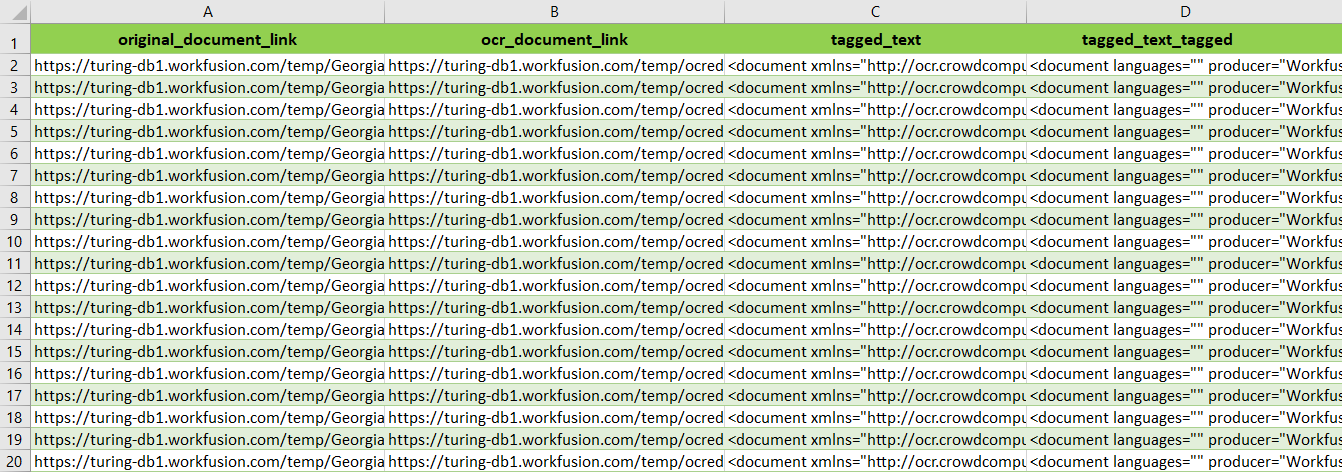
original_document_linkocr_document_linktagged_text(gold data)tagged_text_tagged(extracted values)
4. Run Business Process to get detailed statistics
To get detailed information as well as accurate statistics per field, the following business process can be used: Statistics aggregation v2.0. This business process transforms results of model instruction into a file which is structured and prepared for analysis information, with detailed extraction results on each document per field and aggregated statistics per each field.
The final result will look like this:
Raw Data
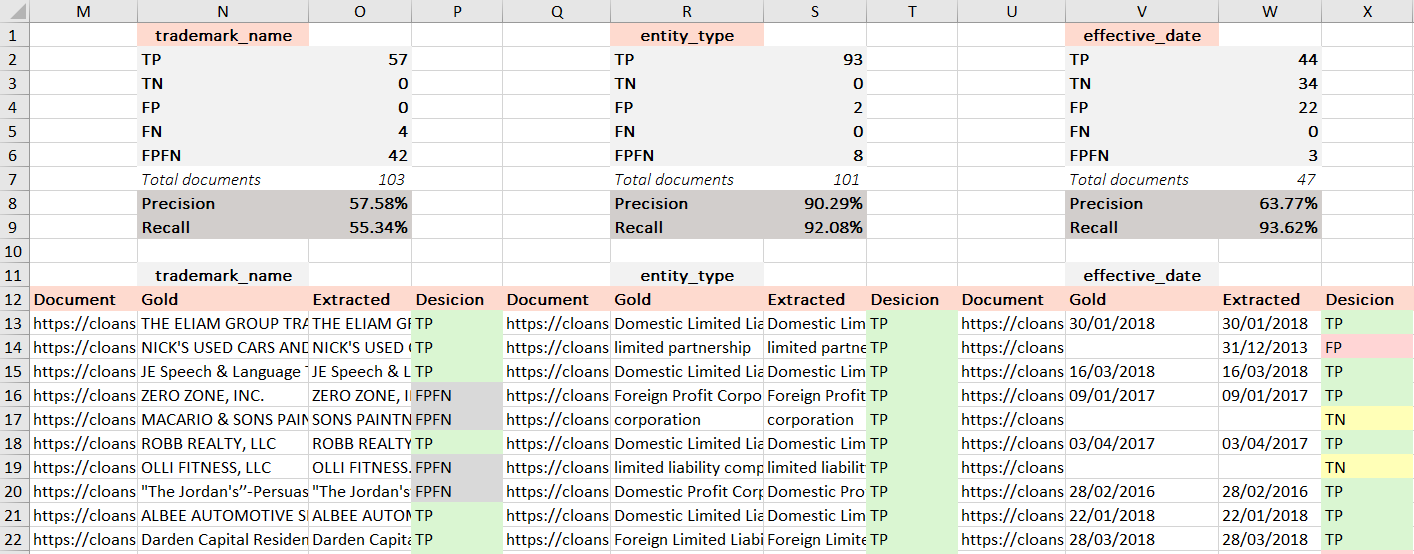
Deliverables
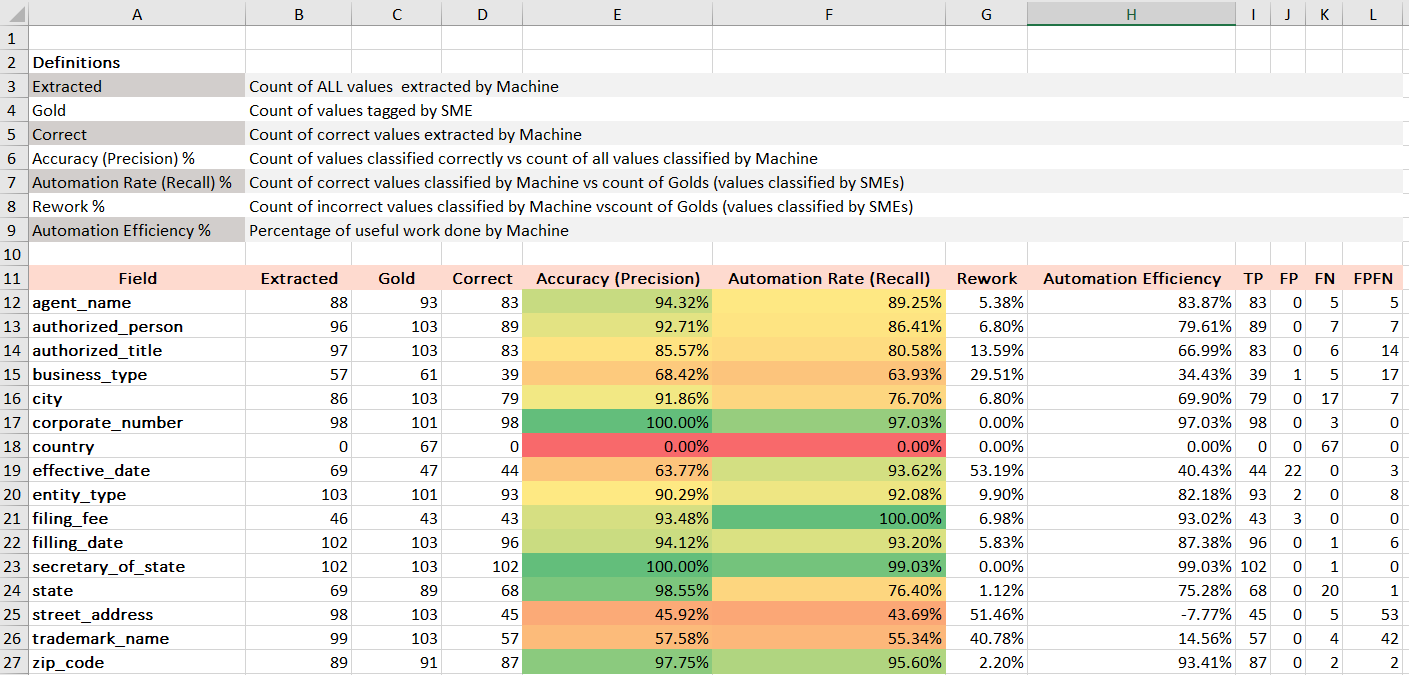
Running statistics aggregation BP
Input for BP: CSV file with results of Information Extraction.
Output: Excel file with calculated statistics per field.
To launch this BP, proceed with these steps:
- Upload IE results as Input data.
- Go to Params block in Design tab (double-click).
- Fill in all the fields (or correct if you have copied somebody's BP).
datastore_name: create datastore beforehand by yourself or it will be created automatically.gold: name of the column with manually tagged data.extracted: name of the column with extracted data.documents_count: number of records in the input file.S3_bucket/folder/name_to_save: specify a bucket/folder/name of the file where results will be stored on S3.
- Run a Business Process.
- Go to the Results tab and download Statistics.xlsx.
5. Analyze results: find mistakes and provide solutions
At this stage, the Data Analyst should thoroughly analyze the model results in order to understand possible reasons for each type of mistake. In case of Information Extraction, there are five possible types of results.
| Type of value | Definition | Gold Value | Extracted |
|---|---|---|---|
| TP (correct) | Value should be extracted, and it is extracted by the model. | WorkFusion 10 000.00 | WorkFusion 10 000.00 |
| TN (correct) | Value should not be extracted and nothing has been extracted by the model. | - | - |
| FP (mistake) | No value should be extracted, but the model has extracted something. | - | WorkFusion |
| FN (mistake) | Value should be extracted but the model has extracted nothing. | WorkFusion | - |
| FP-FN (mistake) | Value should be extracted, but the model has extracted this value with mistake. | WorkFusion Exxon Mobil 10000.00 01/01/2018 | W0rkfusi0n Exxon 100000 1st of January, 2018 |
| Value should be extracted, but the model has extracted something different. | WorkFusion 10000.00 01/01/2018 | Company name: 1700 08/10/2017 |
For more details about metrics and how to calculate them, go here.
Types of mistakes, reasons, and solutions
As TP and TN mean absolutely correct model answers, attention should be paid to FP, FP/FN and FN.
False positive (FP)
FP mistakes are unacceptable at this stage. DA should prepare data set very attentively in accordance with defined tagging rules and instructions.
Incorrect grouping for multi-value fields
Solution: Implement correct grouping in post-processing.
Missing values in the test set
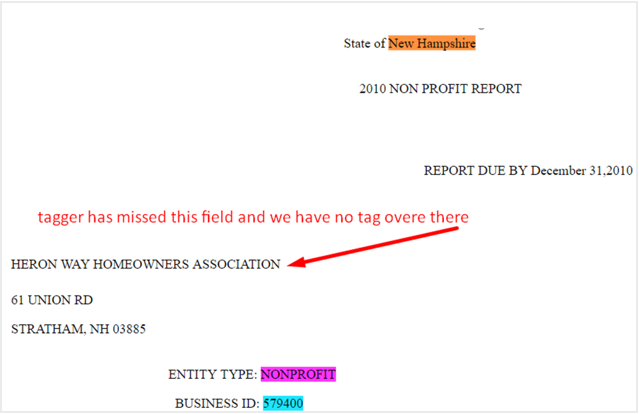
Solution: Correct gold data, and tag/re-tag all the existing values that were missed or wrongly tagged, or exclude such records from test set.
Mistakes in the test set, totally incorrect values are tagged
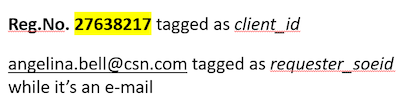
False positive, false negative (FP-FN)
Insufficient normalization (extra symbols, different data types)
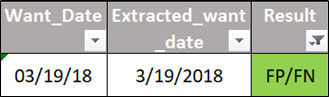
Solution: Normalize values in post-processing.
Inconsistent gold data
Variations in the values boundaries (for example, invoice_number field has gold value “xxxxx” and extracted value “xxxxx HAB” — both are correct from business point of view, but are not equal and cannot be compared to each other).
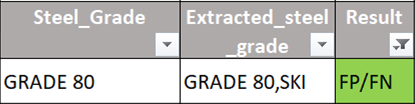
Solution:
- Correct all inconsistencies in the gold data:
- pre-process/normalize gold values
- re-tag incorrect documents or
- exclude them.
- If previous steps were applied, re-train the model.
- If gold data wasn't corrected, try to normalize values in post-processing.
Cases of incomplete tagging in the training set
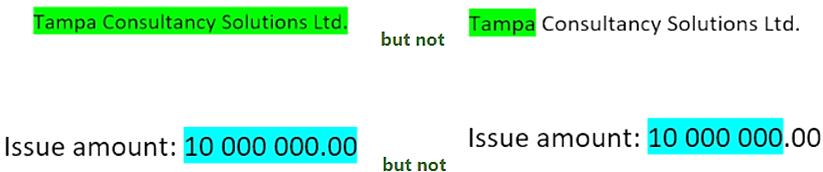
Solution: same as above.
OCR errors in extracted values
Example
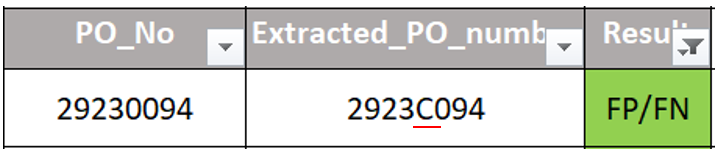
Solution:
- Analyze whether there is any logic that allows correcting these mistakes without generating other mistakes on the whole data set and possible unseen data. If yes, implement corresponding post-processing.
- If a rule can cover only part of cases without creating extra FPs, try to define the remaining part to remove these values so they will be handled manually.
Specific or broken document structure
OCR makes it impossible to tag the value completely.
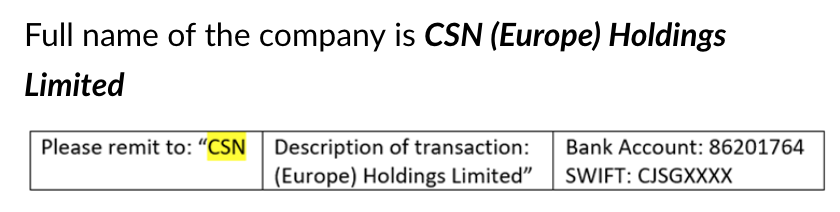
Solution:
- Check whether any logic can be applied to extract the value completely in post-processing without creating additional FPs. If yes, such post-processing should be applied.
- If post-processing cannot help, additional components should be added to the model (AutoML SDK).
False negative (FN)
Not enough examples in the training set
- Small overall number of examples of some field(s) in the training set.
- Small number of examples of the field in specific document structures.
Should be identified and communicated in advance.
Solution: Increase the number of examples in the training set, and/or retrain the model. Additional components can be added (AutoML SDK).
Tagging inconsistency in the training set
The field is tagged in different positions.
Solution: Correct/exclude inconsistencies for the field in the training set and retrain the model.
This kind of mistake shows that data set wasn’t prepared properly, which is DA‘s responsibility.
New document structure after OCR within known layout (a case of bad representation).
In test set, a document of known layout, which due to different initial quality after OCR has completely different appearance from the majority of other documents of this layout, i.e., this "new" layout is badly represented in training test and consequently is badly recognized in test set.
Solution:
- If the case is valid, raise in advance that it is badly represented
- If the case is invalid, estimate the impact of such documents and raise to Delivery Manager.
It is important to have enough documents of some specific structures, where this field is given in a way that's not very simple for extraction.
Complicated dependencies in extracting logic
Dependencies that haven’t been found by the out-of-the-box model.
Solution: Additional components (AutoML SDK).
Possible Reasons for Mistakes of Any Type
Mistakes in gold data
If the data set was collected thoroughly in compliance with defined tagging rules and instructions, this reason will be invalid.
Long free text
For example, it was decided to tag and, consequently, extract address as one element:
ADDRESS OF PRINCIPAL OFFICE
120 ANGELS RD
COLEBROOK, NH 03576
In such a case, the model considers an address line just as some free text without any specific shape and format. Moreover, there is high possibility that different parts of the text line will be situated in several XML elements.
Solution: Check if this value can be split into some independent parts — for example, the whole address line can be very difficult to extract as address formats usually differ from country to country or even in different documents' templates.
Model will be more confident about extracting city, street and zip separately.
Be careful with value splitting. Values like company_name cannot be split, as their parts cannot be considered independent and make sense only with the whole name.
Unusual/broken document structure
When required values surrounding were moved to another value.

Solution: Try to define some rule common for all such records that makes it possible to extract these values correctly. If such a rule is found and is applicable for post-processing, use it.
One more option is to collect all such cases together and use a separate model which will be trained on such specific cases. This option should be communicated to the Delivery Manager.
During the analysis of ML model results, the Data Analyst should always consider every mistake in terms of its frequency and impact on the business.
Frequency
Define whether a mistake is a single case or a regular one.
- Exception case: It can be easily removed from the data set without serious impact on statistics. Special attention should be paid to regular and frequent cases.
- Regular: frequent typical mistake, the correction of which can significantly improve the statistics (different spaces, commas, dots etc.) without affecting the value itself.

Business impact
Define how critical the mistake is, to define its priority for post-processing/extended ML implementation:
- Mistakes in critical fields that can affect business.
For example, we need to extract the price of product items our customer will deliver to the requester. The price provided in the document is "$.5525" which means 0.5525 US Dollars but the extracted price is 5525 which is 10,000 times bigger than the true value.
Be very careful with such fields. Even if one symbol was replaced or damaged (for example, during OCR) and therefore a field's value cannot be defined with 100% confidence, it's better to remove the extracted value completely to be handled manually.