
Automated testing in ODF
Automation based on test type
First, let's list all types of automatable tests we may introduce for complex implementations
Unit tests
Unit Tests are the tests that are built to test the code of an application and are usually built into the code itself. They target the coding standards like how the methods and functions are written. Developers themselves more often write these tests, however, in today's world, automation testers may also be asked to write them.
Executing these tests and getting no bugs from them will mean that your code will compile and run without any code issues. These tests usually do not target the functional aspects of the application and as they target code, it is more appropriate to automate them so that they can be run as and when required by the developer.
Smoke tests
The smoke test is a famous test performed in the test life cycle. These are post-build tests, they are executed immediately after any build is given out of the application to ensure that the application is still functioning after the build is done. This is a small test suite and is something that will be executed multiple times and thereby it makes sense to automate it. These tests will usually be of a functional nature and depending on the type of application a tool can be picked for them.
API tests
Applications built on the API architecture can perform this testing. In API testing, the testers validate the business layer of the application by checking the request-response combinations for the various API's on which the application is built. API Tests can also be done as a part of the integration tests below.
Integration tests
Integration test as the name itself suggests means testing the application by integrating all the modules and checking the functionality of the application. Integration testing can be done through API testing or can be done through the UI layer of the application.
UI tests
UI tests are done from the UI layer or the frontend of the application. These may target testing the functionality or simply test the UI elements of an application. Automating the UI to test the functionality is a common practice. However, automating the GUI features is one of the more complicated automation.
Regression tests
One of the most commonly automated test suites is the regression test suite. Regression is the test that is done at the end of testing a new module to ensure that none of the existing modules have been affected by it. It is repeated after each new iteration of testing and the main test cases stay fixed with usually a few new additions after a new iteration. As it is frequently run almost all the test teams try to automate this pack.
Security tests
Security testing can be both functional as well as a non-functional type of testing which involves testing the application for vulnerabilities. Functional tests will compose of tests related to authorization etc., whereas non-functional requirements maybe test for SQL injection, cross-site scripting, etc.
Performance tests
Performance tests are non-functional tests that target the requirements like testing of load, stress, scalability of the application.
Acceptance tests
Acceptance tests again fall under functional tests which are usually done to ensure if the acceptance criteria given by the client has been fulfilled.
Testing in automation use cases with ODF
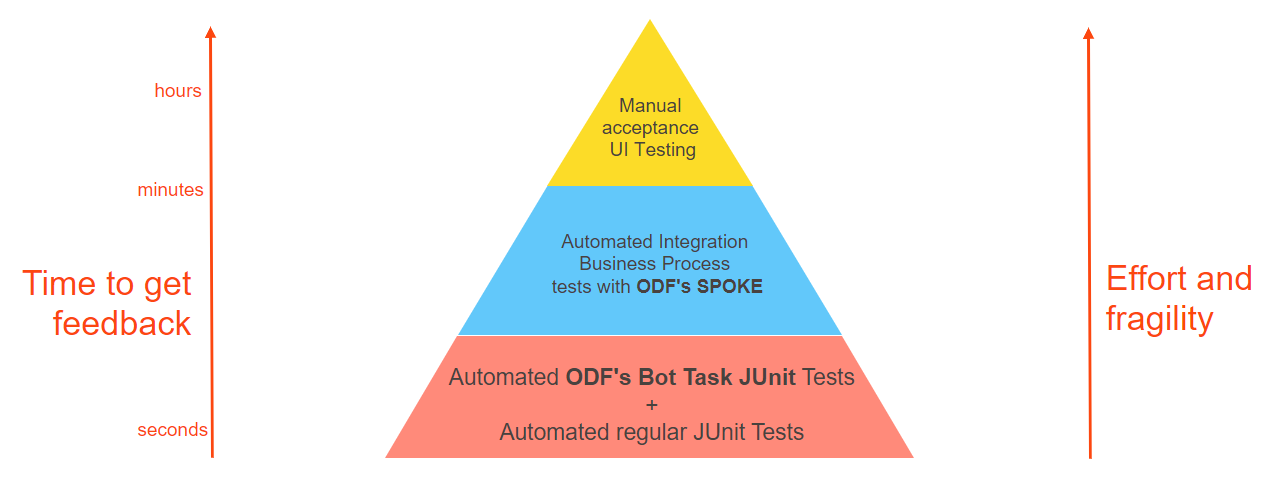
Described types of tests that can be automated eventually will lead to the same end results of a test suite being automated. For Use Case automation projects ODF provides several APIs allowing various types of automated testing. ODF core is designed with a "testability" idea in mind.
Unit
As the name implies, this phase tests the individual components, or units, of a software. Unit testing is the very first phase of testing and it could be automated. Automated Unit tests are written to test the code level. Bugs are identified in the functions, methods, and routines written by the developers. Developers have access to source code and they write unit tests to break the production code. Due to the presence of unit tests, whenever the code compiles, all unit tests run and tell us the result that if all the functionality is working. If any unit test fails, then it means that there is now a bug present in the production code.
All the above is 100% applicable for Use Cases implementation projects. Developers are recommended to add 2 types of automated unit tests:
- Regular JUnit tests
- JUnit-based Bot Task tests
Developer teams are welcome to define code coverage standards for their project. Test code-coverage validation and reporting tools like SonarQube or JaCoCo can be leveraged by development teams for transparent continuous unit test management.
note
Test-coverage tools are not part of ODF, should be added on top.
Integration
Integration test as the name itself suggests means testing the application by integrating all the modules and checking the functionality of the application. Integration testing can be done through API testing or can be done through the UI layer of the application.
In Use Case implementations based on ODF, case integration testing is approached via API. ODF provides SPOKE framework which is API allowing to execute business process bundles (with the possibility to mock any part of it) on any Control Tower environment and assert results in various ways.
Building Continuous Integration on top of test automation
Developers working in the Continuous Integration paradigm merge their changes with the main code as often as possible. That only sounds simple. Complex Use Case implementation is composed of various components built using a multiplicity of technologies. Thus there is a strong need for reliable frameworks for developers to operate in and integrate and validate the changes. The key component of the CI ecosystem is the test environment, which reduces the testing time by automatically spotting the most serious bugs in the early stages of software delivery. Automated code testing smoothes out the process. Frequently merging small pieces of code is a good way to avoid future conflicts - all team members have access to the latest code base and can ensure the compatibility of committed code on the go. Running regular integration testing is crucial to maintaining software consistency.
ODF provides a recommendation of CI pipeline build-out based on the stack:
- Git
- Maven
- Nexus
- Jenkins
note
CI server is not provided by standard IA Cloud Enterprise infrastructure and should be configured additionally by the development team with assistance from IT.
Benefits automated testing brings to Use Case implementation
It is definitely an extra cost to build an environment for, maintain, and run automated tests. So, why do we do it? All benefits can be combined into two major outcomes:
- Automated tests help you release faster by reducing the amount of manual testing needed for each release. That is why automated tests and Continuous Integration are essential if you release more than once every two weeks. You may find that release cycles are getting longer because it takes more and more time to test increasingly complex systems. This is a signal that you need automated testing.
- By providing immediate feedback, automated tests give developers the confidence to make changes. If your developers spend their time fixing a lot of small things but don't have the confidence to make significant changes, you need automated testing. However, while automated tests will tell you if you broke something that used to work, they are not very good at finding bugs in new features. Bugs usually come from a lack of understanding or perspective that will also be present in the tests.
Now, let's look deeper into automated testing benefits.
1. Faster feedback cycle
Without test automation, feedback for newly developed features can take a while. Test automation helps you reduce the feedback cycle and bring faster validation for phases in the development of your implementation. Test automation is especially useful because it helps you detect problems or bugs early on during the development phase, which increases the team's efficiency.
2. Team saves time
By automating your testing procedure, your team has to spend less time validating newly developed features. It also improves communication with other departments like marketing, design, or product owners who rely on the results of these tests. These departments can easily check the logs of the automated tests and see what's happening.
3. Reduced business expenses
When using an automated test environment, your company will save money as fewer resources are spent on testing your implementation. The idea is that you should not be doing any manual testing. Over the course of a whole project, this can make a big difference. Of course, installing and setting up an automated testing environment takes time and resources.
4. Higher test coverage
Manual testing puts limits on how many tests you can verify. Automation allows you to spend time writing new tests and adding them to your automated test suite. This increases the test coverage for your product, so more features are properly tested resulting in a higher quality application. Also, automated testing allows developers to write more in-depth tests that test complex use cases. Lengthy tests that are often avoided during manual testing can be run unattended.
5. Better insights
Automated testing provides better insights than manual testing when some tests fail. Automated software testing not only gives insights into the application but also shows you the memory contents, data tables, file contents, and other internal program states. This helps developers determine what's gone wrong.
6. Improved accuracy
Even the best testing engineer will make mistakes during manual testing. Especially when testing a complex use case, faults can occur. On the other side, automated tests can execute tests with 100-percent accuracy as they produce the same result every time you run them.
7. Automated testing provides more features
An automated test suite can help you with more features - for example, simulating thousands of virtual users interacting with your web application to see how the application behaves. It's impossible to simulate this kind of behavior by doing manual testing. Features like this save developers a lot of time!
8. Less stress on QA team
By implementing an automated testing strategy, you allow your QA team to spend time on tasks other than manual testing. Besides that, the job description of a QA engineer gets more interesting once you remove the repetitive element of manual testing. For many QA engineers, testing automation creates the opportunity to build new tools to further optimize the current testing suite or extend it with new features. Now that you know what the benefits of automated testing are, let's take a deeper look at what kind of tests exist.
9. Quickly determine the stability of your build
Test automation helps you to automate tests to determine the stability of your build. Often, smoke testing is used to validate stability. However, smoke testing is slow and requires manual input from the testing engineer such as setting up databases with test data. Furthermore, smoke testing can be automated through test automation. You can automatically generate and prepare the right databases to run smoke tests. Therefore, you can quickly determine the stability of the build. In summary, the goal is to be able to release a build as fast as possible and automatically validate its stability.
10. Eliminate human error
Manual testing opens up the opportunity for humans to make mistakes. Especially for complex scenarios, it makes sense to use test automation to avoid mistakes. You can still make mistakes, even with test automation. However, the rate of mistakes is significantly lower when using test automation for your test suite.