
Annotators
Annotators help to extract structured information from unstructured data. As documents pass through the processing pipeline, Annotators analyze words, phrases, named entities in unstructured content, and then create Elements.
Elements are represented as Tokens, Sentences, Named Entities, or Entity Boundary Elements and are used for further content analysis.
Annotator Implementation
To create a custom Annotator and use it in AutoML SDK configuration, follow these steps:
- Implement an Annotator interface.
- Add Annotator to configuration.
Implementing Annotator Interface
All custom Annotator classes should implement an Annotator interface, as in the following example.
import com.workfusion.vds.sdk.api.nlp.annotator.Annotator;
import com.workfusion.vds.sdk.api.nlp.model.IeDocument;

public class MyAnnotator implements Annotator<IeDocument> {

    @Override
    public void process(IeDocument document) {
        // TODO put your code here
    }

}
Typically, Annotator should analyze a text in a Document and add elements based on this text.
The following example creates Sentence elements between dots.
import java.util.regex.Matcher;
import java.util.regex.Pattern;

import com.workfusion.vds.sdk.api.nlp.annotator.Annotator;
import com.workfusion.vds.sdk.api.nlp.model.IeDocument;
import com.workfusion.vds.sdk.api.nlp.model.Sentence;

public class SentenceAnnotator implements Annotator<IeDocument> {

    @Override
    public void process(IeDocument document) {
        Pattern pattern = Pattern.compile("\\.");
        Matcher matcher = pattern.matcher(document.getText());
        int index = 0;
        while (matcher.find()) {
            // add sentence into document
            document.add(Sentence.descriptor()
                    .setBegin(index)
                    .setEnd(matcher.start()));
            index = matcher.end();
        }
    }

}
Adding Annotator to Configuration
To embed your Annotator into the model pipeline, add it to the AutoML SDK configuration.
import java.util.ArrayList;
import java.util.List;

import com.workfusion.vds.sdk.api.hypermodel.annotation.ModelConfiguration;
import com.workfusion.vds.sdk.api.hypermodel.annotation.Named;
import com.workfusion.vds.sdk.api.nlp.annotator.Annotator;

@ModelConfiguration
public class AnnotatorConfiguration {

    @Named("annotators")
    public List<Annotator> annotators() {
        List<Annotator> annotators = new ArrayList<>();
        annotators.add(new SentenceAnnotator());
        return annotators;
    }

}
For detailed information about the configuration, refer to the AutoML SDK Configuration section.
warning
All fields of an Annotator must be serializable. Although the Annotator does not have to implement the serializable interface. Keep in mind that lambdas are not serializable by default.
If you cannot avoid using non-serializable fields for some reason, then you can do the following trick:
- Define a field and keep it
null. - Initialize the field in the
@OnInitmethod. - Do not initialize the field in a constructor.
An Annotator that uses non-serializable date formatter
Your Annotator converts dates from one format to another using DateTimeFormatter, which is not serializable. The correct initialization of the Annotator would be as follows.
public class DateNerAnnotator implements Annotator {

    private DateTimeFormatter dateTimeFormatter;

    @OnInit
    public void init() {
        dateTimeFormatter = DateTimeFormatter.ofPattern("dd/MM/yyyy");
    }

    /* The Annotator implementation goes here */
}
An Annotator that uses a lambda
Let's say you want to create an Annotator that has a function as a class member. In your Annotator, you would want to refer to one of the functions using a lambda. Then, to avoid issues with serialization, the code should look the following way.
public class MyAnnotator implements Annotator {

    private Function<Element, Integer> function;

    @OnInit
    public void init() {
        function = e -> e.getBegin()
    }

    /* The Annotator implementation goes here */
}
OOTB Annotators Implementation
The majority of all Digital Worker implementations apply several common Annotators, most of which are reusable. AutoML SDK contains most used Annotators optimized and ready out-of-the-box with AutoML SDK API. These Annotators are intended to cover general use cases without any need to write your own from scratch.
To use OOTB Annotators, add them to your AutoML SDK configuration. You can configure the following types of Annotators for the document processing pipeline:
Tokenizer
There's an Annotator used in all cases—a Tokenizer—which splits a Document into separate Tokens. Tokens are the smallest elementary units of a Document, usually words separated by spaces or other special characters.
The following example shows how a Sentence is split into Tokens.
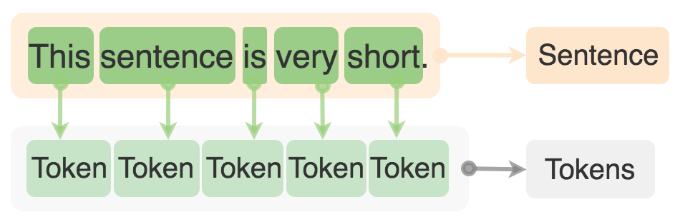
The following Tokenizer splits text by spaces (dot, comma, etc.).
import com.workfusion.vds.sdk.api.hypermodel.annotation.ModelConfiguration;
import com.workfusion.vds.sdk.api.hypermodel.annotation.Named;
import com.workfusion.vds.sdk.api.nlp.annotator.Annotator;
import com.workfusion.vds.sdk.nlp.component.annotator.tokenizer.SplitterTokenAnnotator;

@ModelConfiguration
public class MyModelConfiguration {

    @Named("annotators")
    public Annotator annotators() {
        return new SplitterTokenAnnotator("\\W+");
    }

}
For more information about Tokenizers, refer to TokenAnnotator documentation.
The following code sample is an example of a Tokenizer which creates Sentence elements.
import com.workfusion.vds.sdk.api.hypermodel.annotation.ModelConfiguration;
import com.workfusion.vds.sdk.api.hypermodel.annotation.Named;
import com.workfusion.vds.sdk.api.nlp.annotator.Annotator;
import com.workfusion.vds.sdk.api.nlp.model.Content;
import com.workfusion.vds.sdk.api.nlp.model.Sentence;
import com.workfusion.vds.sdk.nlp.component.annotator.tokenizer.SplitterTokenAnnotator;

@ModelConfiguration
public class MyModelConfiguration {

    @Named("annotators")
    public Annotator annotators() {
        // create a Sentence elements inside Content element(Content element equal full document)
        return new SplitterTokenAnnotator(Sentence.class, Content.class, "[.!?]\\s+");
    }

}
Entity Boundary Annotator
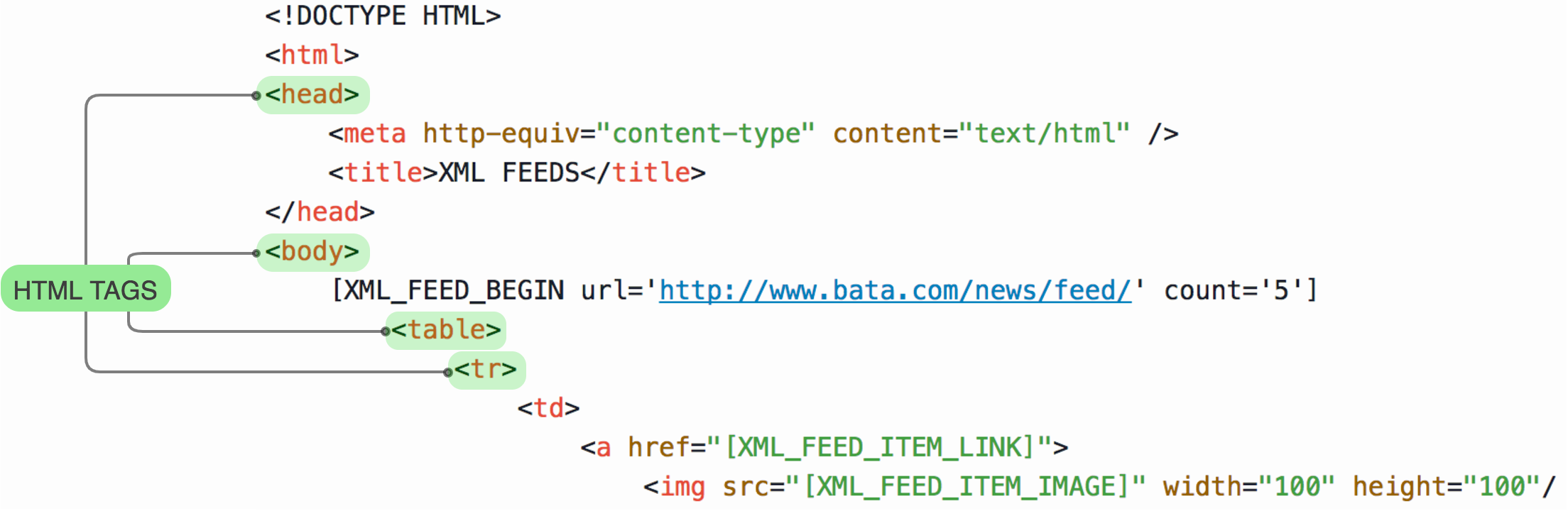
Entity Boundary Annotator is an optional Annotator which creates Elements of type Entity Boundary based on text chunks between the specific HTML boundary tags.
Entity Boundary Annotator supports the following Elements:
- Boundary HTML tags:
body,code,h1,h2,h3,h4,h5,h6,head,li,p,pre,table,th,title,tr. - Document elements: Cell, Table, Sentence, Row.
note
Add Entity Boundary Annotator before NER Annotators in a model configuration. NER Annotators do not analyze the whole document, but only the text inside each Entity Boundary Element. This approach improves the training performance and helps to avoid creating NER Elements for independent Tokens that adjoin in an AutoML Document, but placed in different HTML blocks in the original document, and thus most likely refer to different logical parts.
The following figure shows boundary HTML tags that split the document, and are used to create Entity Boundary elements.
NER Annotators
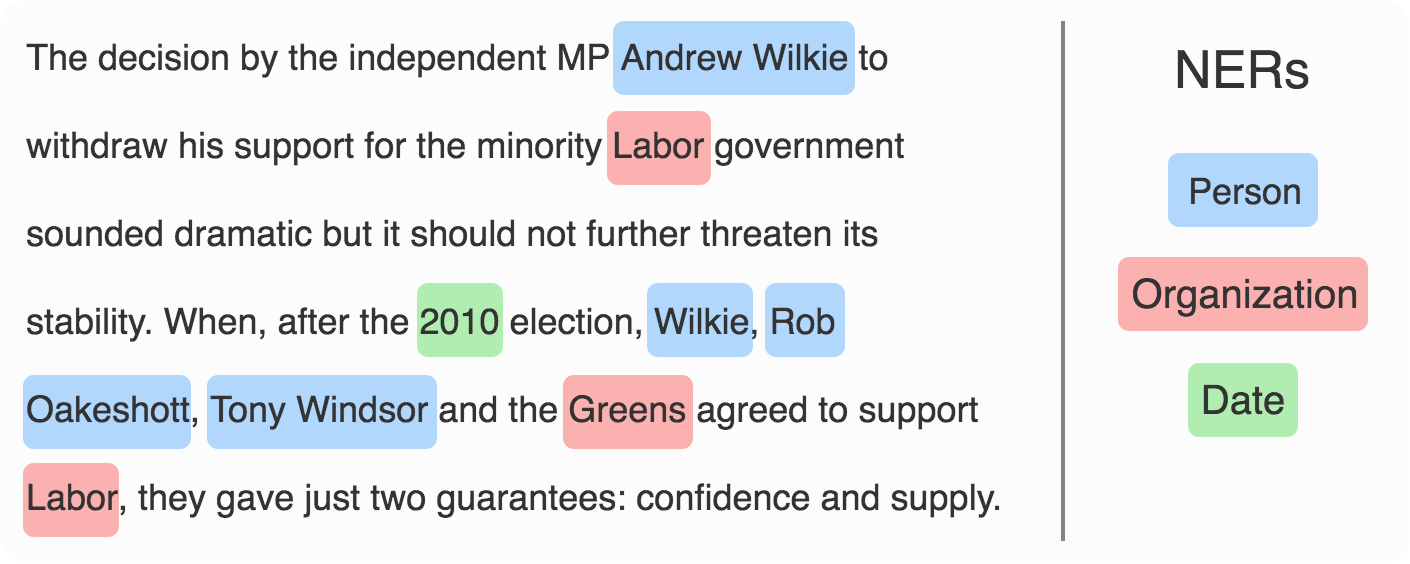
Named entity recognition (NER) is a subtask of information extraction that searches for words or patterns in the input text. It then classifies Named Entities in text into pre-defined types such as names of persons, organizations, locations, etc. When a NER Annotator finds a proper NER mention in a text, Annotator labels its type.
The following example contains a text with Named Entities: Persons, Dates, and Organizations. The NER Annotator finds each of them in the text and then creates a corresponding Element type.
Dictionary NER Annotators
Dictionary NER Annotator creates Named Entity Elements based on word lists from dictionaries. AutoML SDK allows to re-use out-of-the-box dictionary-matching algorithm — Aho-Corasick to add and configure a dictionary for each Named Entity mention type that should be annotated.
To configure a dictionary NER Annotator, follow these steps:
- Create a dictionary file, and then put it to the [project-dir]/ main/resources/ project folder.
- Define a dictionary reader.
- Add a NER Annotator.
Here's an example of Country Named Entity Annotator, which uses the Aho-Corasick alghorithm. In this case, a dictionary source file countries.csv in folder [project-dir]/main/resource/dictionary/.
Afghanistan
Aland Islands
Albania
Algeria
...
etc
Note that in the following example, we also apply a Tokenizer and an Entity Boundary Annotator before a NER Annotator, which creates Named Entity Elements with attribute type country.
import java.util.ArrayList;
import java.util.List;

import com.workfusion.vds.sdk.api.hypermodel.annotation.ModelConfiguration;
import com.workfusion.vds.sdk.api.hypermodel.annotation.Named;
import com.workfusion.vds.sdk.api.nlp.annotator.Annotator;
import com.workfusion.vds.sdk.api.nlp.configuration.IeConfigurationContext;
import com.workfusion.vds.sdk.nlp.component.annotator.EntityBoundaryAnnotator;
import com.workfusion.vds.sdk.nlp.component.annotator.ner.AhoCorasickDictionaryNerAnnotator;
import com.workfusion.vds.sdk.nlp.component.annotator.tokenizer.SplitterTokenAnnotator;
import com.workfusion.vds.sdk.nlp.component.dictionary.CsvDictionaryKeywordProvider;

@ModelConfiguration
public class MyModelConfiguration {

    @Named("annotators")
    public List<Annotator> annotators(IeConfigurationContext context) {
        List<Annotator> annotators = new ArrayList<>();
        // Adding a Tokenizer
        annotators.add(new SplitterTokenAnnotator("\\W+"));
        // Adding an Entity Boundary Annotator
        annotators.add(new EntityBoundaryAnnotator());
        annotators.add(new AhoCorasickDictionaryNerAnnotator("country",
                // Provider is used to read the CSV dictionary file from classpath
                new CsvDictionaryKeywordProvider(context.getResource("classpath:dictionary/countries.csv"))));
        return annotators;
    }

}
Here is a list of dictionaries with Named Entities that can be created for your use cases:
- Countries, cities, states.
- Companies, agencies, institutions.
- Nationalities or religious groups.
- Persons, including fictional.
- Airports, buildings, highways, bridges.
- Titles of books, songs.
- Named events like sports events, battles, wars.
- Any named language.
- Absolute or relative dates or periods.
- Times smaller than a day.
- Ordinal numbers.
- Monetary values, including units.
- Measurements, like weight, distance.
Regex Annotators
Regex Annotator detects email addresses, URLs, phone numbers, zip codes, IBANs, CUSIP numbers, or any other entity that can be identified using a regular expression.
The following example of a NER Annotator is used to find bank codes that consist of 5 digits. It uses the default implementation of BaseRegexNerAnnotator which analyzes the text from Entity Boundary Elements according to the provided pattern, and then creates Named Entity Elements with type bankCode.
note
Entity Boundary Annotator is added before NER Annotators.
import java.util.ArrayList;
import java.util.List;

import com.workfusion.vds.sdk.api.hypermodel.annotation.ModelConfiguration;
import com.workfusion.vds.sdk.api.hypermodel.annotation.Named;
import com.workfusion.vds.sdk.api.nlp.annotator.Annotator;
import com.workfusion.vds.sdk.nlp.component.annotator.EntityBoundaryAnnotator;
import com.workfusion.vds.sdk.nlp.component.annotator.ner.BaseRegexNerAnnotator;
import com.workfusion.vds.sdk.nlp.component.annotator.tokenizer.SplitterTokenAnnotator;

@ModelConfiguration
public class MyModelConfiguration {

    @Named("annotators")
    public List<Annotator> annotators() {
        List<Annotator> annotators = new ArrayList<>();
        annotators.add(new SplitterTokenAnnotator("\\W+"));
        // Adding an Entity Boundary Annotator before a NER Annotator to create Entity Boundary elements
        annotators.add(new EntityBoundaryAnnotator());
        annotators.add(BaseRegexNerAnnotator.getJavaPatternRegexNerAnnotator("bankCode", "\\b(\\d{5})\\b"));
        return annotators;
    }

}