
Package assets into DW Variation Asset Bundle
note
The article describes a DW Variation Asset Bundle.
For details on the structure of a DW Asset Bundle, refer to Package assets into DW Asset Bundle.
You can generate a Digital Worker (DW) Variation Asset Bundle in one of the two ways:
- Using the DW Variation Asset Bundle migration API. For instructions, see the API documentation.
- Via the Control Tower UI. For a detailed workflow, refer to the Digital Worker configuration variations guide.
important
A DW Variation Asset Bundle depends on a Digital Worker it relates to. It does not have its own BCBs, models, and so on.
Control Tower starts generation asynchronously and prepares a DW Variation Asset Bundle with the following structure:
├── business-process
├── configuration_payload.json
├── meta-info.json
├── variation.json
A sample DW Variation Asset Bundle can look as follows:
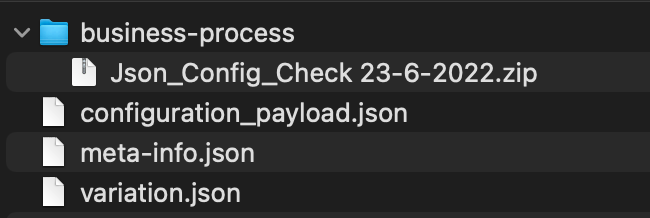
business-process
The directory contains all Business Process packages linked to the variation and available as zip files.
configuration_payload.json
The file contains exported settings.
A sample configuration_payload.json file looks as follows:
{
    "default_configuration":
    {
        "select":"factiva",
        "countries":[],
        "factivaSearchServiceUrl":"httpsApiBetaDowjonesCom",
        "factivaUsernameNamespaceUserId":"FactivaUser1",
        "numberOfArticlesToExtract":"15"
    }
}
meta-info.json
The meta-info.json file is required and must be a valid JSON file. The structure is as follows:
{
    "WF_VERSION":"10.2.5.23-SNAPSHOT",
    "DATA_MODEL_VERSION":"0.1.0",
    "USE_CASE_CODE":"UCDEMO3",
    "INSTANCE":"example.workfusion.com",
    "MULTI_CONFIGURATION":true,
    "AUTHOR":"User1",
    "USE_CASE_VERSION":"0.1.0",
    "PACKAGE_DATE":"2022-07-18 09:48:55",
    "NAME":"odf-install"
}
USE_CASE_CODE and USE_CASE_VERSION should contain the code and any of the versions of the Digital Worker the variation relates to. Restrictions that apply to the USE_CASE_CODE and USE_CASE_VERSION parameters are the same as for the DW Asset Bundle | meta-info.json.
variation.json
The variation.json file is required as it allows to distinguish between a DW Asset Bundle and a DW Variation Asset Bundle.
The file can be empty or can contain the VARIATION_NAME attribute, for example:
{ "VARIATION_NAME" : "MyVariation" }
The import behavior depends on whether variation.json is empty or not:
- The file is empty: a new variation is created, and its name is generated automatically. The VariationX postfix is added right after the DW name and version, for example, Version 0.1.0-Variation1.
- The file contains a variation name:
- If there is no variation with such a name, a new variation with the name specified in
variation.jsonis created. - If a variation with the same name already exists, Business Processes (
/business-process) and configuration settings (configuration_payload.json) are replaced with data from a newly imported variation.
- If there is no variation with such a name, a new variation with the name specified in
important
Unlike for the DW Asset Bundle import, there are no special import strategies for a DW Variation Asset Bundle.