
Bot Task JUnit
Bot Task JUnit is a JUnit 5 API for running and testing Bot Tasks. You can use it for running Tasks locally from an IDE of choice during development and/or for executing tests in a CI/CD pipeline.
Add Bot Task JUnit dependencies to existing project
To start working with Bot Task JUnit, add the following dependencies to your project:
bot-task-junit—the library that contains API required for writing JUnit tests for Bot Tasks.bot-execution-engine—the engine responsible for running Bot Tasks, compatible with the current ODF version.odf2-junit—the library that contains functionality for supporting ODF 2 features in bot-task-junit:BotTaskFactoryfor configuring Java-based task tests andOrmSupportfor operating with DB entities.
Both libraries are published on repository.workfusion.com. Usually, the repository is already a part of each ODF project. You don't have to configure anything additionally.
Add bot-task-junit and bot-execution-engine as test dependencies to a BCB module that contains Bot Tasks to be tested:
<dependencies>
    <dependency>
       <groupId>com.workfusion.odf</groupId>
       <artifactId>bot-task-junit</artifactId>
       <version>${latest.version}</version>
       <scope>test</scope>
    </dependency>
    <dependency>
        <groupId>com.workfusion.studio</groupId>
        <artifactId>bot-execution-engine</artifactId>
        <version>${odf.compatible.version}</version>
        <scope>test</scope>
    </dependency>
    <!-- ODF2 helper module -->
    <dependency>
        <groupId>com.workfusion.odf2</groupId>
        <artifactId>odf2-junit</artifactId>
        <version>${odf2.version}</version>
    </dependency>
</dependencies>
note
We recommend using the latest 0.0.7 version of bot-task-junit since it contains the most recent features and bug fixes.
At the same time, choose bot-execution-engine based on the ODF version your project is built. The relevant version of bot-execution-engine is specified in the dependency management of the ODF's BOM file.
tip
We propose using AssertJ, which is the library with a rich set of assertions. Basically, you can use any assertions library you are used to, but mind that all the examples below are written with the help of AssertJ.
Bot Task JUnit test in a nutshell
The first thing to do is write a simple test that helps to launch a Bot Task:
import org.junit.jupiter.api.Test;

import com.workfusion.odf.test.junit.WorkerJUnitConfig;
import com.workfusion.odf.test.launch.BotTaskResult;
import com.workfusion.odf.test.launch.LaunchSettingsFactory;
import com.workfusion.odf.test.launch.WorkerAgent;
import com.workfusion.studio.bot.model.LaunchSettings;

import static org.assertj.core.api.Assertions.assertThat;

@WorkerJUnitConfig
class TransactionSupplierTest {

    @Test
    void shouldCreateTransaction(WorkerAgent agent, LaunchSettingsFactory settingsFactory) {
        // given
        LaunchSettings settings = settingsFactory.builder()
                .botTask("configs/main/OdfTransactionSupplier.xml")
                .build();

        // when
        BotTaskResult actualResult = agent.run(settings);

        // then
        assertThat(actualResult.getOutputData().getRecords()).hasSize(1);
    }
}
import org.junit.jupiter.api.DisplayName;
import org.junit.jupiter.api.Test;

import com.workfusion.odf.test.junit.WorkerJUnitConfig;
import com.workfusion.odf.test.launch.BotTaskUnit;
import com.workfusion.odf.test.launch.OutputData;
import com.workfusion.odf2.junit.BotTaskFactory;

import static org.assertj.core.api.Assertions.assertThat;

@WorkerJUnitConfig
class GenericTaskExampleTest {

    @Test
    @DisplayName("should run bot task without transaction")
    void shouldRunBotTaskWithoutTransaction(BotTaskFactory botTaskFactory) {

        // given
        BotTaskUnit genericTask = botTaskFactory.fromClass(GenericTaskExample.class);

        // when
        OutputData outputData = genericTask.buildAndRun();

        // then
        assertThat(outputData.getRecords()).hasSize(1);
    }
}
The @WorkerJUnitConfig annotation is mandatory. It tells JUnit to ensure that all related environment (worker, in-memory database, S3 mock server, and others) is started before test execution. Here, you can see that the WorkerAgent and LaunchSettingsFactory classes are used as test parameters. JUnit makes sure these parameters are populated with valid objects from the @WorkerJUnitConfig context.
ODF: WorkerAgent
WorkerAgent is a class responsible for launching Bot Tasks for the first version of ODF:
interface WorkerAgent {

    /**
     * Blocks current thread and waits until bot task execution is completed.
     *
     * @param settings launch settings to be used for creating worker's task
     * @return execution result
     */
    BotTaskResult run(LaunchSettings settings);

    /**
     * Blocks current thread and waits specified time until bot task execution is completed.
     *
     * @param settings launch settings to be used for creating worker's task
     * @param timeout the maximum amount of time to wait
     * @return execution result
     */
    BotTaskResult run(LaunchSettings settings, Duration timeout);

}
WorkerAgent provides two methods to run Bot Tasks. Both of them are blocking methods, but the second one lets you set up a timeout. If a Bot Task fails to complete its execution in a set time, an exception is thrown. Also, you have to provide the LaunchSettings object to run a Bot Task.
ODF 2: BotTaskUnit
ODF 2 introduces the BotTaskUnit class representing a single isolated Bot Task independently configured and executed on the local or remote worker. The BotTaskUnit methods behave in a builder-pattern manner and don't perform any operations until the buildAndRun() method is called:
import org.junit.jupiter.api.DisplayName;
import org.junit.jupiter.api.Test;

import com.workfusion.odf.test.junit.WorkerJUnitConfig;
import com.workfusion.odf.test.launch.BotTaskUnit;
import com.workfusion.odf.test.launch.InputData;
import com.workfusion.odf.test.launch.OutputData;
import com.workfusion.odf2.junit.BotTaskFactory;

import static org.assertj.core.api.Assertions.assertThat;

@WorkerJUnitConfig
class GenericTaskExampleTest {

    @Test
    @DisplayName("should run bot task without transaction")
    void shouldRunBotTaskWithoutTransaction(BotTaskFactory botTaskFactory) {
        // given
        BotTaskUnit genericTask = botTaskFactory
                .fromClass(GenericTaskExample.class)
                .withInputData(InputData.fromResource("input-data.csv"))
                .withS3(cfg -> cfg.withEndpointUrl("localhost:3040"))
                .withOcr(cfg -> cfg.withApiBaseUrl("localhost:3041"))
                .withSecureEntries(cfg -> cfg.withEntry("alias", "key", "value"))                ;

        // when
        OutputData outputData = genericTask.buildAndRun();

        // then
        assertThat(outputData.getRecords()).hasSize(1);
    }
}
You can create the BotTaskUnit class instance using BotTaskFactory.
Provide settings that don't exist in BotTaskUnit using the com.workfusion.odf.test.launch.BotTaskUnit#withCustomSettings method of a builder for some uncommon cases.
botTaskUnit.withCustomSettings(settings -> {
          ProxySettings proxySettings = settings.getProxySettings();
          proxySettings.setEnabled(true);
          proxySettings.setServer("https://proxy.server.url");
      })
Input data provisioning
Input data is configured using the com.workfusion.odf.test.launch.InputData object. Let's take a look at the factory methods of this class:
public class InputData {

    /**
     * Creates {@link InputData} from the provided CSV file path, relative to `src/test/resources` or current project.
     */
    public static InputData fromResource(String inputFilePath);

    /**
     * Creates {@link InputData} from the provided CSV file path, relative to `src/test/resources` or current project.<p/>
     * Start and end indexes specify records range which should be processed from the provided CSV file.
     */
    public static InputData fromResource(String inputFilePath, int startIndex, int endIndex);

    /**
     * Creates temporary single column {@link InputData} from the provided content.
     */
    public static InputData of(String header, String... values);

    /**
     * Creates temporary multi columns {@link InputData} from the provided content.
     */
    public static InputData of(List<String> headers, List<String>... rows);

}
Basically, you can create input data from a CSV file or a String directly before test execution. The first approach might be useful when you have a huge input and want to keep it away from a test or reuse it for multiple tests. In this case, you put a CSV file with prepared input data under src/test/resources and specify its path in a test:
@WorkerJUnitConfig
class InputDataTest {
    @Test
    void someTest(LaunchSettingsFactory settingsFactory) {
         LaunchSettings settings = settingsFactory.builder()
                         .inputData(InputData.fromResource("input-data-from-resources.csv"))
                         .build();
    }
}
@WorkerJUnitConfig
class InputDataTest {
    @Test
    void someTest(BotTaskFactory botTaskFactory) {
        BotTaskUnit genericTask = botTaskFactory
                .fromClass(GenericTaskExample.class)
                .withInputData(InputData.fromResource("input-data.csv"));
    }
}
The second approach is useful when you have just a couple of columns or want to pass a runtime value as input data:
@WorkerJUnitConfig
class InputDataTest {
    @Test
    void someTestWithSingleColumn(LaunchSettingsFactory settingsFactory) {
        LaunchSettings settings = settingsFactory.builder()
                       .inputData(InputData.of("header", "value-1", "value-2", getRuntimeValue()))
                       .build();
    }

    @Test
    void someTestWithMultipleColumns(LaunchSettingsFactory settingsFactory) {
        LaunchSettings settings = settingsFactory.builder()
                       .inputData(InputData.of(
                               asList("column_1", "column_2", "column_3"),
                               asList("value_1", "value_2", "value_3")))
                       .build();
    }
}
@WorkerJUnitConfig
class InputDataTest {
    @Test
    void someTestWithSingleColumn(BotTaskFactory botTaskFactory) {
        BotTaskUnit genericTask = botTaskFactory
                .fromClass(GenericTaskExample.class)
                .withInputData(InputData.of("header", "value-1", "value-2", getRuntimeValue()));
    }

    @Test
    void someTestWithMultipleColumns(BotTaskFactory botTaskFactory) {
        BotTaskUnit genericTask = botTaskFactory
                .fromClass(GenericTaskExample.class)
                .withInputData(InputData.of(
                               asList("column_1", "column_2", "column_3"),
                               asList("value_1", "value_2", "value_3")));
    }
}
Data Stores state provisioning
There are two ways of creating Data Store tables for test execution:
- Use the
com.workfusion.odf.test.datastore.Datastoresobject which can be injected into any test class method annotated as@Test,@BeforeAll,@BeforeEach,@AfterEach, and@AfterAll. - If you have ORMLite and an object data model, use the
com.j256.ormlite.table.TableUtils#createTable(ConnectionSource, Class)method.
ODF: Data Stores codebase creation using API
You can specify required Data Stores using CSV files or code-based configuration:
- Call the
Datastores.addFrom()method with paths to your CSV files or directories containing those. Each CSV file is used to create a separate table; the filename is used as a table name, with the file content populating it. The path can be relative to the project root orsrc/main/resourcesorsrc/test/resources. - Call
Datastores.add()to invoke a builder to define a table structure and content on the fly without any file. - Call
Datastores.add(DatastoreSchema.ODF_TRANSACTIONS)to create an empty ODF transactions Data Store.
@WorkerJUnitConfig
class DatastoresTest {

    @Test
    void shouldCreateTransaction(Datastores datastores) {
        // will add all .csv files from 'datastore1' directory
        datastores.addFrom("/datastore1");

        // will add 'some_data.csv' file
        datastores.addFrom("/datastores/some_data.csv");

        // you can specify any number of files and/or directories in any combination
        datastores.addFrom("/datastore1", "/datastore2", "/datastores/some_data.csv", "/datastores/some_other_data.csv");

        // you can define a table with code, without files
        datastores.add(datastoreBuilder -> datastoreBuilder
                        .name("some_table")
                        .headers("a", "b", "c")
                        .row("1", "2", "3")
                        .row("4", "5", "6"));

        // you can define empty ODF transaction datastore
        datastores.add(DatastoreSchema.ODF_TRANSACTIONS);

        // you can define ODF transaction datastore containing your Transaction objects
        datastores.add(datastoreBuilder -> datastoreBuilder
                        .schema(DatastoreSchema.ODF_TRANSACTIONS)
                        .row("id1", "runId1", InternalStorageFormats.toJson(new Transaction()))
                        .row("id2", "runId2", InternalStorageFormats.toJson(new Transaction())));
    }

}
ODF 2: ORM and Entity classes
ORMLite has built-in utility classes for creating, updating, and deleting tables using entity classes. ODF 2 provides functionality for operating with standard entity types. To use the functionality, add the odf2-junit module to your test scope.
The module contains the com.workfusion.odf2.junit.OrmSupport implementation, which allows you to manage tables using entity classes and provide ready to use repository classes for operating with built-in entities:
Use
OrmSupport#createTablesto create tables before starting a Bot Task:ormSupport.createTables(Transaction.class, Email.class, Attachment.class);Use
OrmSupport#clearTablesorOrmSupport#clearAllCreatedTablesto clear table content between test executions:ormSupport.clearTables(Email.class, Attachment.class);Use
OrmSupport#dropTablesorOrmSupport#dropAllCreatedTablesto drop tables after test execution:ormSupport.dropTables(Email.class, Attachment.class);Use repository classes to perform operations with entities. You can create simple CRUD repositories using
OrmSupport:OrmLiteRepository<Email> emailRepository = ormSupport.getRepository(Email.class);OrmSupportcontains getters for standard repositories and functionality for generating a repository for entity classes:@BeforeAll public void setUp(OrmSupport ormSupport) { TransactionRepository transactionRepository = ormSupport.getTransactionRepository(); MonitorRepository monitorRepository = ormSupport.getMonitorRepository(); OrmLiteRepository<Email> emailRepository = ormSupport.getRepository(Email.class); }
Data Stores scopes
Any approach of working with a Data Store object that you are using can have one of three scopes that define the lifecycle of configured tables:
CLASSscope—Tables defined in the@BeforeAllmethods are kept until all tests are finished. It means that changes made in one test are visible to others depending on the order of execution.EACH_TESTscope—Tables defined in@BeforeEachmethods are dropped and re-created between test methods. It means that all tests see the data the way you define it, without interference between tests.TESTscope—Tables defined in the@Testmethod itself are dropped right after the method is finished. It means the data is invisible to other tests.
@WorkerJUnitConfig
class DatastoresTest {

    @BeforeAll
    public static void configureGlobalData(Datastores datastores) {
        datastores.addFrom("global_data.csv");
    }

    @BeforeEach
    public static void configureDataForEachTest(Datastores datastores) {
        datastores.addFrom("each_test_data.csv");
    }

    @Test
    void someTest(Datastores datastores) {
        datastores.addFrom("data.csv");

        // 'global_data' is visible and all changes made will last until all tests in this class are finished
        // 'each_test_data' table is visible, but any change to it will be lost between tests
        // 'data' table is visible, but will be deleted right after the test
        // 'other_data' table from other test does not exist in this moment
    }

    @Test
    void someOtherTest(Datastores datastores) {
        datastores.addFrom("other_data.csv");

        // 'global_data' is visible and all changes made will last until all tests in this class are finished
        // 'each_test_data' table is visible, but any change to it will be lost between tests
        // 'other_data' table is visible, but will be deleted right after the test
        // 'data' table from other test does not exist in this moment
    }
}
@WorkerJUnitConfig
class DatastoresTest {

    @BeforeAll
    public static void configureGlobalData(OrmSupport ormSupport) {
        ormSupport.createTables(GlobalEntity.class);
    }

    @BeforeEach
    public static void configureDataForEachTest(OrmSupport ormSupport) {
        ormSupport.createTables(EachTestEntity.class);
    }

    @Test
    void someTest(OrmSupport ormSupport) {
        ormSupport.createTables(Entity.class);

        // GlobalEntity.class is visible and all changes made will last until all tests in this class are finished
        // EachTestEntity.class table is visible, but any change to it will be lost between tests
        // Entity.class table is visible, but will be deleted right after the test
        // OtherEntity.class table from other test does not exist in this moment
    }

    @Test
    void someOtherTest(Datastores datastores) {
        ormSupport.createTables(OtherEntity.class);

        // GlobalEntity.class is visible and all changes made will last until all tests in this class are finished
        // EachTestEntity.class table is visible, but any change to it will be lost between tests
        // Entity.class table is visible, but will be deleted right after the test
        // OtherEntity.class table from other test does not exist in this moment
    }
}
caution
- Data Store names are sanitized according to a simple rule: any symbol that is not a Latin letter, a digit, or an underscore, is replaced with an underscore; for example, "my-table-01.csv" turns into "my_table_01".
- Unlike in WorkFusion Studio, changes made in Data Stores aren't saved to working copies of CSV files but lost after tests are finished. To access contents of Data Stores, use the
Datastores.read()method, which returns aDatastoreTableobject.
Reading data from Data Stores
To read data from a specific Data Store, use the Datastores.read() method. It returns the com.workfusion.odf.test.datastore.table.DatastoreTable object with data from the Data Store.
While working with ORM and a data model, use repositories provided by OrmSupport.
@WorkerJUnitConfig
class DatastoresTest {

    @Test
    void shouldAssertDatastoreRecords(Datastores datastores) {
        DatastoreTable datastoreTable = datastores.read("datastore_name");

        // assert that datastore is not empty
        assertThat(datastoreTable.isEmpty()).isFalse();

        // assert that datastore has only 2 rows
        assertThat(datastoreTable.getRowCount()).isEqualTo(2);

        // assert that datastore has correct headers
        assertThat(datastoreTable.getColumns()).containsExactly("column1", "column2");

        // assert that some row has specific data
        assertThat(datastoreTable.getRow(0)).containsExactly("value1", "value2");
        assertThat(datastoreTable.getLastRow()).containsExactly("value3", "value4");
        assertThat(datastoreTable.getValues(1)).isEqualTo(ImmutableMap.of(
            "column1", "value3",
            "column2", "value4"
        ));

        // assert that some column has specific data
        assertThat(datastoreTable.getColumn("column1")).containsExactly("value1", "value3");

        // assert that cell has specific value
        assertThat(datastoreTable.getValue(0, "column1")).isEqualTo("value1");
    }
}
@Test
public void testTransaction(OrmSupport ormSupport) {
    Optional<Transaction> transaction = ormSupport.getTransactionRepository().findById(transactionUuid);
    assertThat(transaction).isPresent()
            .map(Transaction::getStatus)
            .contains(TransactionStatus.PROCESSING_COMPLETED.toString());
}
Also, you can print DatastoreTable in a user-friendly format:
@WorkerJUnitConfig
class DatastoresTest {
    @Test
    void shouldPrintDatastoreRecords(Datastores datastores) {
        DatastoreTable datastoreTable = datastores.read("datastore_name");

        // Print full table
        System.out.println(datastoreTable);

        // Return 'TablePrinter' object
        TablePrinter tablePrinter = datastoreTable.getTablePrinter();

        // Print exact rows
        System.out.println(tablePrinter.printTable(0, 0));

        // Print exact columns
        System.out.println(tablePrinter.printTable("column1"));

        // Print exact rows and columns
        System.out.println(tablePrinter.printTable(0, 0, "column1"));
    }
}
OCR mocking
For each test run, there is an underlying in-memory service that can mock real OCR behavior. To interact with this service, inject the com.workfusion.odf.test.ocr.OcrMock object into any test class method annotated as @Test, @BeforeAll, @BeforeEach, @AfterEach, and @AfterAll. OcrMock helps to respond with any desired text for any desired image.
@WorkerJUnitConfig
class OcrTest {
    @Test
    void shouldRunOcrTask(OcrMock ocrMock) {
        ocrMock.shouldReturn("Lorem ipsum dolor sit amet").forImage("/img/ocr-test-image.png");
    }
}
@WorkerJUnitConfig
class OcrTest {
    @Test
    void shouldRunOcrTask(OcrMock ocrMock) {
        ocrMock.shouldReturn("Lorem ipsum dolor sit amet").forImage("/img/ocr-test-image.png");
    }
}
In this example, ocrMock is configured to respond with "Lorem ipsum dolor sit amet" when an image at "/img/ocr-test-image.png" is submitted. This is called an expectation. A test author can define any number of expectations for different images. There is also an option to create a default expectation that results in the same text for any image submitted unless this image is covered with a more specific expectation.
In the following example, OcrMock returns "Default result" for any submitted image except hypothetical "a.png", for which "Specific result" is returned.
@WorkerJUnitConfig
class OcrTest {
    @Test
    void shouldRunOcrTask(OcrMock ocrMock) {
        ocrMock.shouldReturn("Default result").forAnyImage();
        ocrMock.shouldReturn("Specific result").forImage("a.png");
    }
}
@WorkerJUnitConfig
class OcrTest {
    @Test
    void shouldRunOcrTask(OcrMock ocrMock) {
        ocrMock.shouldReturn("Default result").forAnyImage();
        ocrMock.shouldReturn("Specific result").forImage("a.png");
    }
}
OCR scopes
OcrMock can have one of three scopes that define the lifecycle of expectations:
- Expectations created in the
@BeforeAllmethods are kept until all tests are finished. - Expectations created in the
@BeforeEachmethods are deleted and re-created between test methods. It means that OCR tasks created from those expectations are invisible to other tests. - Expectations created in the
@Testmethod itself are deleted right after the method is finished. It means these expectations and corresponding tasks are invisible to other tests.
@WorkerJUnitConfig
class OcrTest {
    @BeforeEach
    void setUpOcr(OcrMock ocrMock) {
        ocrMock.shouldReturn("Lorem ipsum dolor sit amet").forImage("/img/ocr-test-image.png");
    }

    @Test
    void shouldRunOcrTask(WorkerAgent agent, LaunchSettingsFactory settingsFactory)  {
        // given
        String imagePath = Paths.get(getClass().getResource("/img/ocr-test-image.png").toURI()).toString();

        LaunchSettings settings = settingsFactory.builder()
                .botTask("configs/main/bot-task-with-ocr.xml")
                .inputData(InputData.of("image_to_ocr", imagePath))
                .build();

        // when
        String actualOcrResult = agent.run(settings).getOutputData().getFirstRecord().get("ocr_result");

        // then
        assertThat(actualOcrResult).isEqualTo("Lorem ipsum dolor sit amet");
    }
}
@WorkerJUnitConfig
@TestMethodOrder(MethodOrderer.OrderAnnotation.class)
class OcrServiceTest {

    private static final String BUCKET_NAME = "doc-upload";
    private static final String IMAGE_KEY = "lorem-ipsum.png";
    private static final String MOCK_RESULT = "Lorem ipsum dolor sit amet";

    private static Path imagePath;

    private static OcrMock ocrMock;

    private static Transaction transaction;
    private static String taskId;
    private static String ocrType;
    private static String ocrExportType;

    @BeforeAll
    static void beforeAll(OrmSupport ormSupport, OcrMock ocrMock) throws URISyntaxException, SQLException {
        ormSupport.createTables(Transaction.class, ConfigEntity.class, ErrorEntity.class, JoinEntity.class);
        ormSupport.getConfigRepository().create(new ConfigEntity(OdfConfigurationItem.OCR_S3_BUCKET.getPropertyName(), BUCKET_NAME));
        transaction = ormSupport.getTransactionRepository().startNewTransaction();

        imagePath = getResource(IMAGE_KEY).toAbsolutePath();

        OcrServiceTest.ocrMock = ocrMock;
        ocrMock.shouldReturn(
                MOCK_RESULT,
                "<document><page height='7' width='13'><charParams content='X', t='T', r='R', b='B', l='L' /></page></document>",
                "Lorem ipsum dolor sit amet")
                .withPages("page")
                .forImage(imagePath.toString());
    }

    @Test
    @Order(1)
    @DisplayName("should submit image to OCR")
    void shouldSubmitImageToOCR(S3MockClient s3Client, BotTaskFactory botTaskFactory) {
        // given
        s3Client.createBucket(BUCKET_NAME);
        s3Client.putObject(BUCKET_NAME, IMAGE_KEY, imagePath.toFile());

        // when
        final Map<String, String> result = botTaskFactory.fromClass(TestSubmitToOcrTask.class)
                .withInputData(InputData.of(
                        ImmutableList.of(TaskVariable.TRANSACTION_ID.toString(),
                                TaskVariable.TRANSACTION_STATUS.toString(),
                                "document-url"),
                        ImmutableList.of(transaction.getUuid().toString(),
                                transaction.getStatus(),
                                s3Client.getUrl(BUCKET_NAME, IMAGE_KEY).toString())))
                .buildAndRun()
                .getFirstRecord();

        // then
        assertThat(result)
                .containsKey(TaskVariable.OCR_TASK_ID.toString())
                .containsEntry(TaskVariable.OCR_TYPE.toString(), OcrType.TOD.toString())
                .containsEntry(TaskVariable.OCR_EXPORT_TYPE.toString(), OcrConfiguration.DEFAULT_EXPORT_FORMAT.toString());

        taskId = result.get(TaskVariable.OCR_TASK_ID.toString());
        ocrType = result.get(TaskVariable.OCR_TYPE.toString());
        ocrExportType = result.get(TaskVariable.OCR_EXPORT_TYPE.toString());
    }

    @Test
    @Order(2)
    @DisplayName("should retrieve OCR result")
    void shouldRetrieveOcrResult(S3MockClient s3Client, BotTaskFactory botTaskFactory) {
        // given
        s3Client.createBucket(BUCKET_NAME);

        // when
        Map<String, String> result = botTaskFactory.fromClass(TestRetrieveOcrResultTask.class)
                .withInputData(InputData.of(
                        ImmutableList.of(TaskVariable.TRANSACTION_ID.toString(),
                                TaskVariable.TRANSACTION_STATUS.toString(),
                                TaskVariable.OCR_TASK_ID.toString(),
                                TaskVariable.OCR_TYPE.toString(),
                                TaskVariable.OCR_EXPORT_TYPE.toString()),
                        ImmutableList.of(transaction.getUuid().toString(),
                                transaction.getStatus(),
                                taskId,
                                ocrType,
                                ocrExportType)))
                .buildAndRun()
                .getFirstRecord();

        // then
        assertThat(result).containsKey("ocr-xml");

        final String mockResult = s3Client.getObjectAsString(BUCKET_NAME,
                StringUtils.substringAfter(result.get("ocr-xml"), BUCKET_NAME + "/"));

        assertThat(mockResult).isEqualTo(MOCK_RESULT);
    }

    private static Path getResource(String name) throws URISyntaxException {
        URL resource = OcrTaskWithMockTest.class.getClassLoader().getResource(name);
        Objects.requireNonNull(resource, String.format("Unable to find resource '%s' on classpath", name));
        return Paths.get(resource.toURI());
    }

}
As OCR in ODF 2 works asynchronously, procedures of sending a request and receiving a response are split into two tasks going in a special order.
S3 mocking
For each test run, there is an underlying in-memory S3 server ready to handle user requests. To interact with this server, inject the com.workfusion.odf.test.s3.S3MockClient object into any test class method annotated as @Test, @BeforeAll, @BeforeEach, @AfterEach, and @AfterAll.
@WorkerJUnitConfig
class S3Test {
    @BeforeEach
    void setUpS3(S3MockClient s3Client) {
        s3Client.putObject("test-bucket", "test-file.txt", "test file content");
    }
}
The mock client works the same way as a real Amazon S3 client and has most of its methods. For example, you can create a bucket before test execution and populate it with objects from test resources or receive a test object as a String for assertion after Bot Task execution.
Explore the S3MockClient interface to see all methods and their descriptions.
@WorkerJUnitConfig
class S3Test {
    @Test
    void shouldRunBotTask(WorkerAgent agent, LaunchSettingsFactory settingsFactory, S3MockClient s3Client) {
        // given
        s3Client.createBucket("test-bucket");

        LaunchSettings settings = settingsFactory.builder()
                .botTask("configs/main/bot-task-with-s3-interaction.xml")
                .build();

        // when
        agent.run(settings, Duration.ofSeconds(10));

        // then
        assertThat(s3Client.getObjectAsString("test-bucket", "created-file.txt")).isNotEmpty();
    }
}
@WorkerJUnitConfig
class S3Test {
    @Test
    void shouldRunBotTask(BotTaskFactory botTaskFactory, S3MockClient s3Client) {
        // given
        s3Client.createBucket("test-bucket");

        // when
        botTaskFactory.fromClass(PutToS3Task.class)
                .buildAndRun();

        // then
        assertThat(s3Client.getObjectAsString("BUCKET_NAME","created-file.txt")).isNotEmpty();
    }
}
S3 scopes
S3MockClient can have one of three scopes that define the lifecycle of uploaded buckets and objects:
Buckets and objects created in the
@BeforeAllmethods are kept until all tests are finished. It means that changes made in one test are visible to others depending on the order of execution.Buckets and objects created in the
@BeforeEachmethods are deleted and re-created between test methods. It means that all tests see the data the way you define it, without interference between tests.Buckets and objects created in the
@Testmethod itself are deleted right after the method is finished. It means this data is invisible to other tests.
Secrets Vault provisioning and mocking
There are two ways of working with Secrets Vault entries in Bot Task JUnit:
- set up a Bot Task test with mock secret entries
- connect to the external Secrets Vault server, for example, HashiCorp
We recommend using mock entries in all possible scenarios because it usually helps to eliminate dependencies on external services, which is a good idea for a test.
Here is an example of how you can mock Secrets Vault entries before running a Bot Task:
@WorkerJUnitConfig
class SecretVaultTest {
    @Test
    void shouldRunBotTaskWithSecretEntries(WorkerAgent agent, LaunchSettingsFactory settingsFactory) {
        // given
        LaunchSettings settings = settingsFactory.builder()
                .botTask("configs/main/SecretVaultProcessor.xml")
                .secureEntries(cfg -> cfg
                        .withEntry("alias-1", "key-1", "value-1")
                        .withEntry("alias-2", "key-2", "value-2"))
                .build();

        // then
        assertThatCode(() -> agent.run(settings)).doesNotThrowAnyException();
    }
}
@WorkerJUnitConfig
class SecretVaultTest {
    @Test
    void shouldRunBotTaskWithSecretEntries(BotTaskFactory botTaskFactory) {
        // when
        Map<String, String> actualRecord = botTaskFactory.fromClass(SecretsVaultTask.class)
                .withInputData(InputData.of("alias", "new-entry"))
                .withSecureEntries(cfg -> cfg.withEntry("new-entry", "entry-key", "entry-value"))
                .buildAndRun()
                .getFirstRecord();

        // then
        assertThat(actualRecord.get("secrets-vault-get-key")).isEqualTo("entry-key");
        assertThat(actualRecord.get("secrets-vault-get-value")).isEqualTo("entry-value");
    }
}
There might be circumstances when mocking Secrets Vault entries is not sufficient. For example, you have to connect to an external service and use real credentials. Exposing credentials inside test code poses formidable security risks. That is why for these scenarios, the external Secrets Vault server, for example, HashiCorp, must be used.
Basically, you have to provide connection settings to the Secrets Vault server using the @TestPropertySource annotation:
@WorkerJUnitConfig
@TestPropertySource("classpath:secret-vault-settings.properties")
class SecretVaultTest {
    @Test
    void shouldRunBotTaskWithSecretEntries(WorkerAgent agent, LaunchSettingsFactory settingsFactory) {
        // given
        LaunchSettings settings = settingsFactory.builder()
                .botTask("configs/main/SecretVaultProcessor.xml")
                .build();

        // then
        assertThatCode(() -> agent.run(settings)).doesNotThrowAnyException();
    }
}
@WorkerJUnitConfig
@TestPropertySource("classpath:secret-vault-settings.properties")
class SecretVaultTest {
    @Test
    void shouldRunBotTaskWithSecretEntries(BotTaskFactory botTaskFactory) {
        // when
        final BotTaskUnit task = botTaskFactory.fromClass(SecretsVaultTask.class);

        // then
        assertThatCode(task::buildAndRun).doesNotThrowAnyException();
    }
}
Here is an example of the secret-vault-settings.properties file. Mind to put it in the src/test/resources folder:
secure.storage.type=VAULT
secure.storage.safe.internal=safe_internal
secure.storage.platformId=platform_id
secure.storage.serverApi=https://localhost:8200
secure.storage.client.certificate=/path/to/certificate
secure.storage.client.keyPass=key_pass
secure.storage.applicationId=application_id
note
If secret-vault-settings.properties contains any sensitive information, do not commit it directly to the source code repository. Instead, make sure this file appears during the test runtime only, for example, during a CI/CD build.
Assertions
Output data
The com.workfusion.odf.test.launch.OutputData object helps to manipulate output data, for example, the CSV data created by the export Web-Harvest plugin. You can obtain it from BotTaskResult after the Bot Task execution is completed. The following example shows how to assert output data:
@WorkerJUnitConfig
class OutputDataTest {
    @Test
    void shouldAssertOutputData(BotTaskFactory botTaskFactory) {
        final OutputData outputData = botTaskFactory
                .fromClass(OutputDataTaskExample.class)
                .buildAndRun();

        // assert that file with output data is created
        assertThat(outputData.getFile()).exists();

        // assert that file with output data contains exact content
        assertThat(outputData.getFile()).hasContent("expected content");

        // assert that output data contains only two columns with exact names
        assertThat(outputData.getHeaders()).containsExactly("column-1", "column-2");

        // assert that output data contains exact values in specific column
        assertThat(outputData.getColumnValues("column-1")).containsExactly("value 1", "value 2");

        // assert that output data contains exact values in specific column
        assertThat(outputData.getColumnValues("column-1", Integer::valueOf)).containsExactly(1, 2, 3);

        // assert that output data contains exact value in specific cell
        assertThat(outputData.getValue("column-1", 1)).isEqualTo("value 2");
    }
}
Data Stores
During execution, Bot Tasks produce data stored inside various Data Stores. It might be good to assert this data at the end of a test to make sure everything works as expected. To do so, you can use the Datastores.read() method. It returns the com.workfusion.odf.test.datastore.table.DatastoreTable object with data from the requested Data Store:
@WorkerJUnitConfig
class DatastoresTest {
    @Test
    void shouldAssertDatastoreRecords(Datastores datastores) {
        DatastoreTable datastoreTable = datastores.read("datastore_name");

        // assert that datastore is not empty
        assertThat(datastoreTable.isEmpty()).isFalse();

        // assert that datastore has only 2 rows
        assertThat(datastoreTable.getRowCount()).isEqualTo(2);

        // assert that datastore has correct headers
        assertThat(datastoreTable.getColumns()).containsExactly("column1", "column2");

        // assert that some row has specific data
        assertThat(datastoreTable.getRow(0)).containsExactly("value1", "value2");
        assertThat(datastoreTable.getLastRow()).containsExactly("value3", "value4");
        assertThat(datastoreTable.getValues(1)).isEqualTo(ImmutableMap.of(
            "column1", "value3",
            "column2", "value4"
        ));

        // assert that some column has specific data
        assertThat(datastoreTable.getColumn("column1")).containsExactly("value1", "value3");

        // assert that cell has specific value
        assertThat(datastoreTable.getValue(0, "column1")).isEqualTo("value1");
    }
}
The following example shows how to assert ODF transactions:
@WorkerJUnitConfig
class OdfTransactionTest {
    @Test
    void shouldAssertOdfTransaction(WorkerAgent agent, LaunchSettingsFactory settingsFactory) {
        // run bot task which produce ODF transactions
        agent.run(settingsFactory.builder().botTask("configs/main/TransactionSupplier.xml").build());

        DatastoreTable transactionsTable = datastores.read("_odf_transactions");
        List<Transaction> transactions = transactionsTable.getColumnValues("transaction_data", InternalStorageFormats::fromJson);

        // assert that only one transaction is created
        assertThat(transactions).hasSize(1);

        // assert that only one document is created
        assertThat(transactions.get(0).getDocs()).hasSize(1);

        Document actualDocument = transactions.get(0).getDocs().get(0);

        // assert that document has specific data
        assertThat(actualDocument.getName()).isEqualTo("expected name");
        assertThat(actualDocument.getType()).isEqualTo("expected type");
        assertThat(actualDocument.getExtractedFields()).isEmpty();
    }
}
In ODF 2, Data Stores are used for persisting state of a data model used in the Digital Worker implementation. To access this data, you must use repositories. The OrmSupport class provides an easy way to create a repository for a given entity.
import org.junit.jupiter.api.BeforeAll;
import org.junit.jupiter.api.DisplayName;
import org.junit.jupiter.api.Test;

import com.workfusion.odf.test.junit.WorkerJUnitConfig;
import com.workfusion.odf2.client.model.Email;
import com.workfusion.odf2.core.orm.model.Transaction;
import com.workfusion.odf2.core.orm.model.TransactionStatus;
import com.workfusion.odf2.core.orm.repository.OrmLiteRepository;
import com.workfusion.odf2.core.orm.repository.TransactionRepository;
import com.workfusion.odf2.junit.OrmSupport;

import static org.assertj.core.api.Assertions.assertThat;
import static org.mockito.Mockito.mock;

@WorkerJUnitConfig
public class DataStoresTest {

    TransactionRepository transactionRepository;
    OrmLiteRepository<Email> emailRepository;

    @BeforeAll
    public void setUp(OrmSupport ormSupport) {
        transactionRepository = ormSupport.getTransactionRepository();
        emailRepository = ormSupport.getRepository(Email.class);
    }

    @Test
    @DisplayName("Should get entities from datastores")
    public void shouldGetEntitiesFromDatastores() {
        final Email email = mock(Email.class);

        // get all existing transactions and check for its statuses
        assertThat(transactionRepository.findAll())
                .hasSize(5)
                .extracting(Transaction::getStatus)
                .containsOnly(TransactionStatus.INTAKE_IN_PROGRESS.toString());

        // get email by uuid and check subject
        assertThat(emailRepository.findById(email.getUuid()))
                .isNotEmpty()
                .map(Email::getSubject)
                .isEqualTo("subject");
    }
}
RPA tasks
important
If you require to run an RPA task from a JUnit test, IA Cloud Developer is mandatory. Make sure to install it in your local environment. You may check a compatible version from the Compatibility matrix section.
A JUnit test for the RPA task looks completely the same as a regular Bot Task JUnit test. The only thing that changes is that you have to replace the @WorkerJUnitConfig annotation in favor of @IacDeveloperJUnitConfig. The following listing shows an RPA test example:
@IacDeveloperJUnitConfig
class RpaIntegrationTest {
    @Test
    void shouldRunRpaTask(WorkerAgent agent, LaunchSettingsFactory settingsFactory) {
        // given
        LaunchSettings settings = settingsFactory.builder()
                .botTask("configs/main/rpa-task.xml")
                .build();

        // when
        BotTaskResult actualResult = agent.run(settings);

        // then
        assertThat(actualResult.getOutputData().getRecords()).hasSize(1);
    }
}
import org.junit.jupiter.api.Disabled;
import org.junit.jupiter.api.DisplayName;
import org.junit.jupiter.api.Test;

import com.workfusion.odf.test.junit.IacDeveloperJUnitConfig;
import com.workfusion.odf.test.launch.BotTaskUnit;
import com.workfusion.odf2.client.task.rpa.InvoicesRpaTask;
import com.workfusion.odf2.client.task.rpa.MultipleRpaDriversTask;
import com.workfusion.odf2.junit.BotTaskFactory;

import static org.assertj.core.api.Assertions.assertThatCode;

@IacDeveloperJUnitConfig
class RpaIntegrationTest {
    @Test
    void shouldRunRPABotTask(BotTaskFactory botTaskFactory) {
        // given
        BotTaskUnit multipleRpaDriversTask = botTaskFactory.fromClass(MultipleRpaDriversTask.class);

        // then
        assertThatCode(multipleRpaDriversTask::buildAndRun).doesNotThrowAnyException();
    }
}
IA Cloud Developer integration
Changing just one annotation might sound like a small transformation, but in reality, it completely changes the test lifecycle. Instead of setting up an in-memory environment (queues, workers, and others), @IacDeveloperJUnitConfig does the following:
- searches for the IA Cloud Developer installation
- connects to Secrets Vault to obtain required settings and credentials
- establishes a connection with RabbitMQ
- puts a task to the RabbitMQ and waits until the worker from IA Cloud Developer completes the task
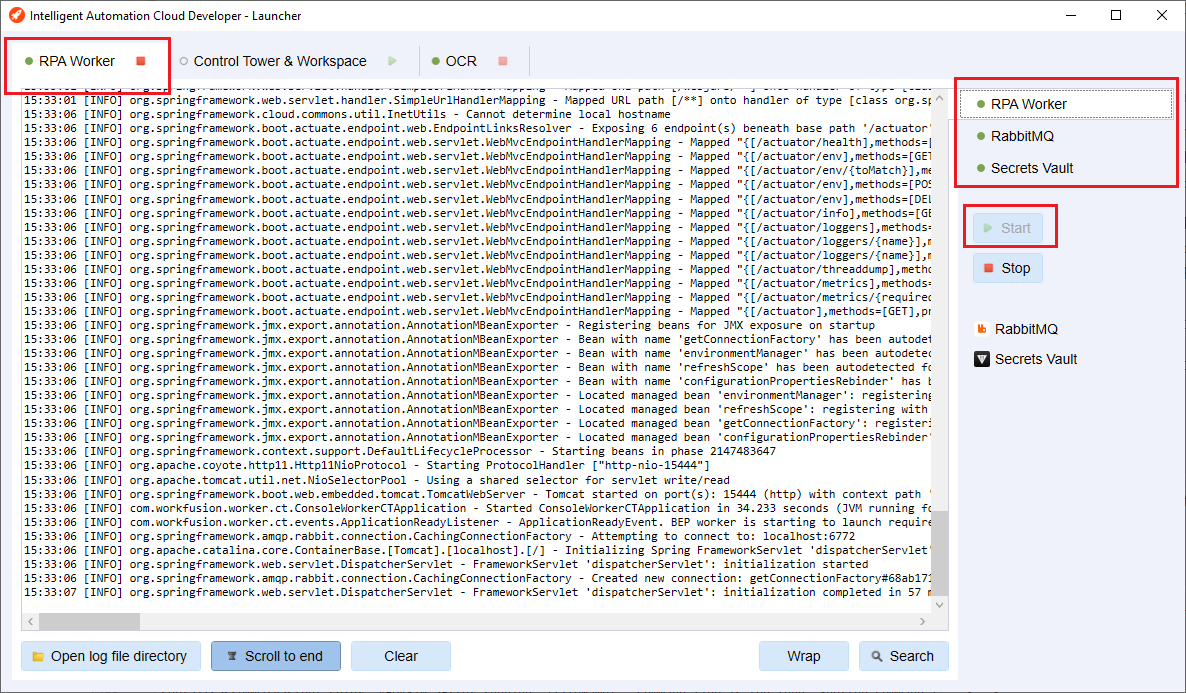
Install and launch IA Cloud Developer before running an RPA test. In the example below, the RPA Worker group is started. It already contains Secrets Vault, RabbitMQ, and RPA Worker.
note
If IA Cloud Developer is unavailable, the test fails with ConnectException: Connection refused: connect.
It is important to highlight that the test tries to use all services directly from IA Cloud Developer, including File Storage, OCR, and Secrets Vault. Mind to put your test files directly to File Storage or save credentials to Secrets Vault if required. You should start the related services before running the test.
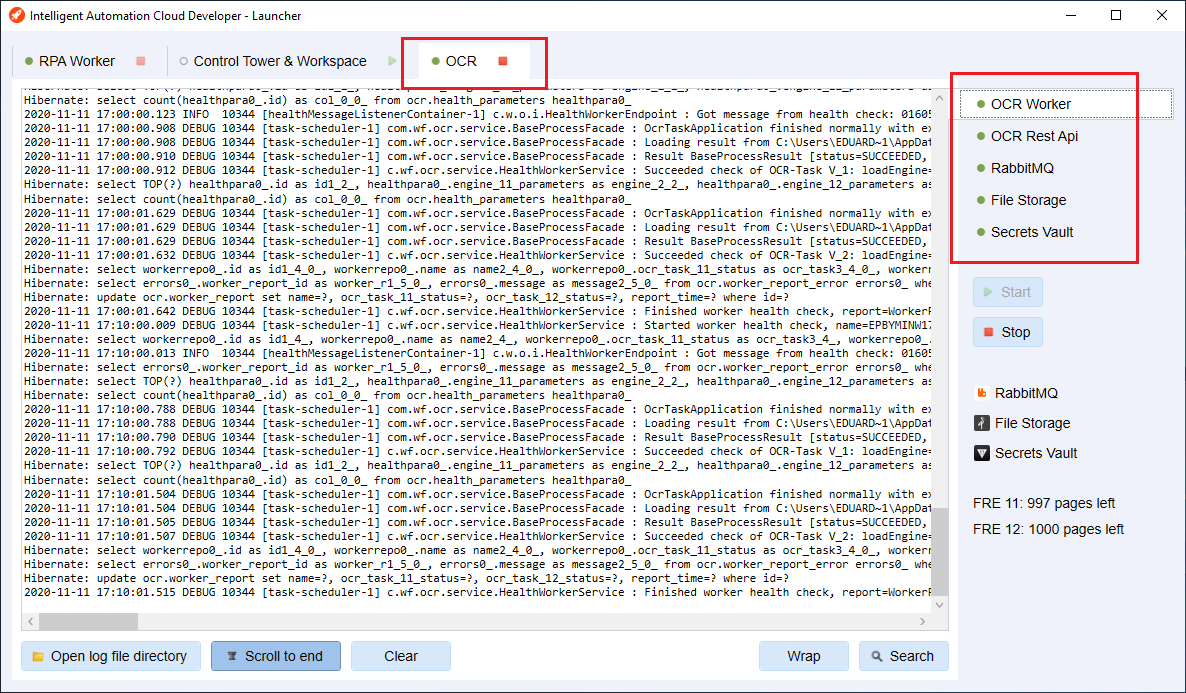
The rest of the components located in the OCR group include:
- OCR Worker
- OCR Rest API
- RabbitMQ
- File Storage
- Secrets Vault
Using mocks together with IA Cloud Developer
At some point, you may find that you want to use, for example, real OCR from the IA Cloud Developer installation and, at the same time, mock S3 behavior instead of using real File Storage. By default, @IacDeveloperJUnitConfig tries to use ALL services from the IA Cloud Developer installation (both OCR and File
Storage in this case). You can change this behavior if needed. Here is an example of how to do it:
@IacDeveloperJUnitConfig
class RpaIntegrationTest {
    @Test
    void shouldRunOcrTaskWithS3MockClient(WorkerAgent agent, LaunchSettingsFactory settingsFactory, S3MockClient s3Client) {
        // given
        s3Client.createBucket("doc-upload");

        LaunchSettings settings = settingsFactory.builder()
                .botTask("configs/main/ocr-task.xml")
                .s3(cfg -> cfg.withEndpointUrl(s3Client.getServerEndpoint()))
                .build();

        // when
        BotTaskResult actualResult = agent.run(settings);

        // then
        assertThat(actualResult.getOutputData().getRecords()).hasSize(1);
    }
}
import org.junit.jupiter.api.Disabled;
import org.junit.jupiter.api.Test;

import com.workfusion.odf.test.junit.IacDeveloperJUnitConfig;
import com.workfusion.odf.test.launch.BotTaskUnit;
import com.workfusion.odf.test.s3.S3MockClient;
import com.workfusion.odf2.client.task.rpa.MultipleRpaDriversTask;
import com.workfusion.odf2.junit.BotTaskFactory;

import static org.assertj.core.api.Assertions.assertThatCode;

@IacDeveloperJUnitConfig
class RpaIntegrationTest {
    @Test
    void shouldRunRPAWithMockedS3BotTask(BotTaskFactory botTaskFactory, S3MockClient s3Client) {
        // given
        s3Client.createBucket("doc-upload");

        BotTaskUnit multipleRpaDriversTask = botTaskFactory.fromClass(MultipleRpaDriversTask.class)
                .withS3(cfg -> cfg.withEndpointUrl(s3Client.getServerEndpoint()));

        // then
        assertThatCode(multipleRpaDriversTask::buildAndRun).doesNotThrowAnyException();
    }
}
AutoML tasks
caution
Bot Task JUnit does not work with AutoML tasks.
Known issues
Error running '%fileName%': Command line is too long. Shorten command line for %fileName% or also for JUnit default configuration
Symptoms
When running a Bot Task JUnit test from Intellij IDEA for the first time, you might see the following error:
Error running '%fileName%': Command line is too long. Shorten command line for %fileName% or also for JUnit default configuration.
Solution
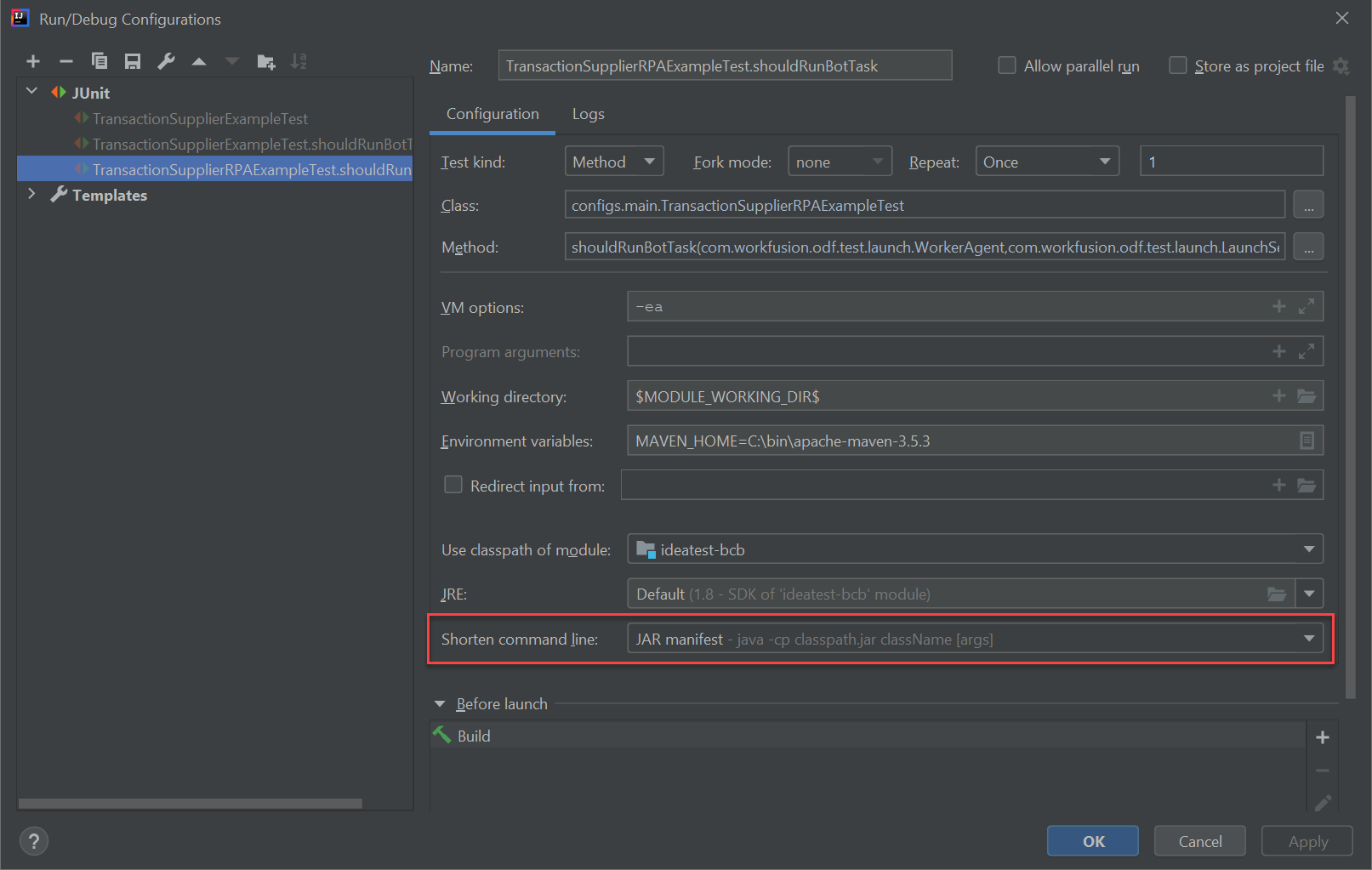
In the Run/Debug Configuration dialog, navigate to the Shorten command line field and choose JAR manifest from the dropdown list.
For more details, refer to the blog post from JetBrains.
Could not initialize class okhttp3.OkHttpClient
Symptoms
If you are trying to run a test and using the ODF version prior to 10.1.0.25, you might see the following error in the console:
java.lang.NoClassDefFoundError: Could not initialize class okhttp3.OkHttpClient
Solution
Exclude com.xing.qa.selenium.grid:selenium-api from the bot-execution-core dependency in your pom.xml:
<dependency>
    <groupId>com.workfusion.spa.bot</groupId>
    <artifactId>bot-execution-core</artifactId>
    <scope>provided</scope>
    <exclusions>
        <exclusion>
            <artifactId>selenium-api</artifactId>
            <groupId>com.xing.qa.selenium.grid</groupId>
        </exclusion>
    </exclusions>
</dependency>
Exception opening port (port may be in use)
Symptoms
When running a test on Windows OS, you may experience the following exception saying that the port is already in use:
Exception opening port "port_number" (port may be in use), cause: "java.net.BindException: Address already in use: JVM_Bind" [90061-200]
The exception occurs quite rarely. Usually, it means that during the test configuration, the operating system returned a free port, but at the runtime, the port had already been taken by some other process. bot-task-junit cannot re-configure
itself at this stage and fails with an error.
Solution
Restart the failed test.