
Deployment overview
The guide is intended for developers and IT Operations, as well as Support Engineers engaged in import and export of Business Processes. It describes Asset Bundle import automation as part of Open Development Framework (ODF).
Introduction
An Asset Bundle is a zip archive containing Digital Worker resources (assets), such as Business Processes, Data Stores, Bot Configs, and so on. Asset Bundles enable easy import of Digital Workers or specific resources from one environment to another, for example, from a project in the development environment to the staging one.
The diagram below represents the flow of Asset Bundle import and key involved components.
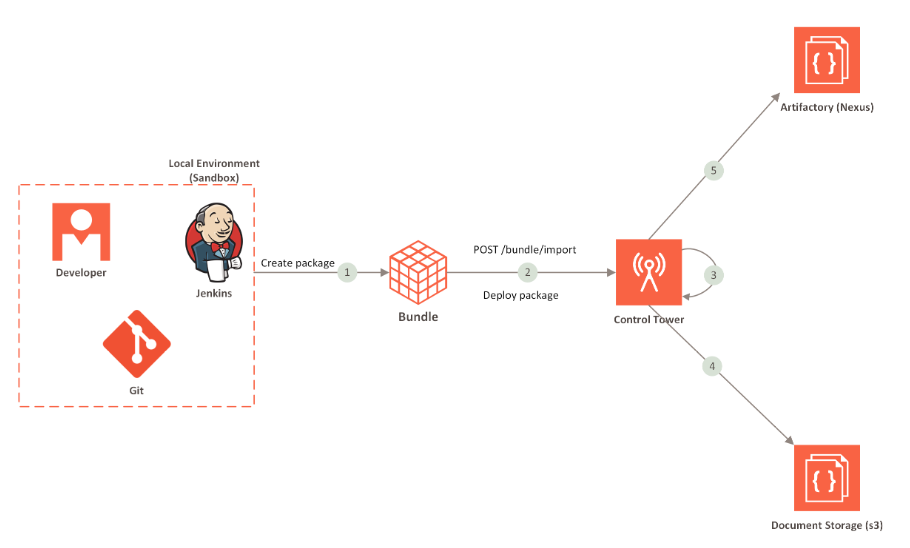
Typically, it takes the following steps to complete the Asset Bundle import flow:
- An Asset Bundle is packaged in the development environment.
- The Asset Bundle is deployed to CT.
- CT parses the Asset Bundle and imports its components.
- CT uploads S3 resources and AutoML artifacts from the Asset Bundle to the Document Storage.
- CT uploads Bot Config Bundles (BCBs) and other JAR dependencies to Artifactory (Nexus).
- CT imports Business Process(es).
note
For Asset Bundle deployment, ITOps use the CT UI or the migration API. For development teams, the recommendation is to follow publish with the Maven approach.
Asset Bundle components
Each Asset Bundle can include the following components:
- Business Process packages
- ML models
- Data Stores
- Bot Config Bundles
- Operations
- Templates
- Bot Configs
- S3 resources
- Meta info JSON file
- Automation training sets
Asset Bundle structure
For import and deployment, the Asset Bundle components are to be structured as shown below.
├── artifactory-dependency
├── automl
│   ├── model
│   └── artifact
├── bot-config
├── business-process
├── datastore
├── s3
├── template
│   └── macro
├── training-set
├── use-case
│   ├── bot-task
│   ├── business-process
│   └── manual-task
└── meta-info.json
For detailed instructions on packaging assets for deployment and a sample Asset Bundle structure, see the guide.