
System redundancy
Summary
A warm backup site is already stocked with hardware representing a reasonable facsimile of that found in your data center, the connectivity is also already established.
Current solution provides the duplication of critical components or functions of a system with the intention of increasing reliability of the system. When critical solution components (hardware power supplies, CPUs, data storage devices) fail or become degraded, solution failures can be avoided or minimized by providing redundant copies of these components that can be brought on-line quickly or that operate in parallel to their counterparts.
The Business Continuity considers the following list of redundant resources, assuming that the servers technical specification is the same as defined in the installation guide.
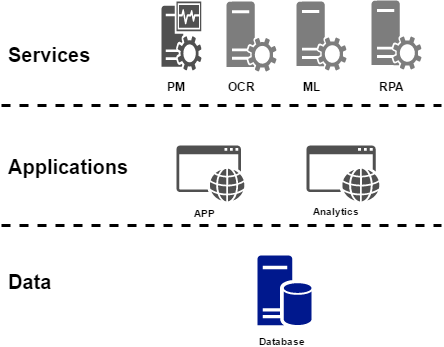
Each component contains its own operational data, and overall system data integrity should be preserved across the layers.
| System | Alias | Warm Site | Notes |
|---|---|---|---|
| Database | db.* | Yes | |
| ML | ml.* | Yes | |
| OCR | ocr.* | Yes | |
| PM | pm.* | Yes | Provides less business critical functions. RPO and RTO can be relaxed for the solution cost reduction. |
| APP | wfapp.*, wfapp-s3.*, (bucket).wfapp-s3.* | Yes | |
| BI | bi.* | Yes | Provides less business critical functions. RPO and RTO can be relaxed for the solution cost reduction. |
Data integrity
The section describes how the solution will fully account
for the methods for handling data integrity – such as queuing or real
time backup.
Data integrity must be planned for to prevent data loss or corruption
that may result in significant disruption in the solution, thus
impacting the users and potentially the business.
There are following Data Integrity enforcement measures in the
WorkFusion system DR architecture:
- Regular DB backups provide a high-fidelity restoration points to the system.
- Internal system mechanisms of exceptions handling allow to fail-over in case of minor data integrity loss without operation level degradation.
Business critical system components also have HA Solutions are based on a synchronous NAS replication which grants transnational integrity, allowing to minimize related risks. Other components are using data snapshots which also grant instance-based integrity.
System(s) recovery
To restore service, the last backups from your off-site storage facility must be delivered, and bare metal restoration completed, before the real work of recovery can begin.
The use of a redundant system[s] operating in parallel with a primary system prevents the loss of a minimal amount of data and is used to reconstruct the data on the primary system. The Disaster Recovery section identifies and describes the procedures for keeping warm stand by systems in sync with the primary system and for starting up their operations, and the procedures for reconstructing lost or corrupted data.
DNS switch over
It is required to have DNS names for the applications and database servers, so that smooth switch over could be done in case of disaster recovery i.e. switch the applications/database from one server to another (warm site). Fail over from a main site to the Warm Site occurs by a global DNS switch approach as the most efficient software DR best practice.
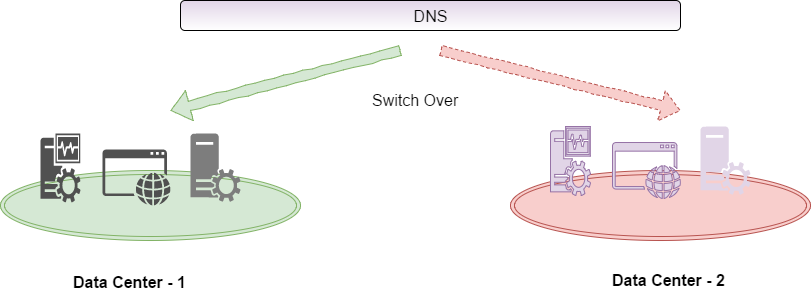
The communication between servers should be configured by using DNS aliases. Installation procedure assumed DNS aliases applied instead of IP's or hostnames.
Required DNS aliases, passive DR zones application can have their own dns post-fixed with dr (Recommended). The recommended dr prefix is for testing the dr instances independently.
| Server | DNS (Active) | Notes |
|---|---|---|
| Application (Workfusion App) | wfapp.<customername>.com | Workfusion apps including Control Tower, Workspace. |
| Database (MySQL, MongoDB, PostgresSQL) | db.<customername>.com:<Port> | Different DB services are identified using port., for example, MySQL Port is 3306 |
| Machine Learning | ml.<customername>.com | |
| OCR | ocr.<customername>.com | |
| RPA | rpa.<customername>.com | The rpa servers are clustered machine (Windows) |
Business Intelligence |
bi.<customername>.com | |
| Performance Monitor | apm.<customername>.com |
Disaster Recovery plan
It is important to ensure that the WorkFusion system Warm Site hosting time should be minimized in order to provide optimal performance and usability to business operations. This requirement can be achieved by focusing on Main Site recovery operations right after the Fail Over to the Warm Site operations completed.
To get the sequence of switching back from active Warm Site back to restored Main Site, please use the recommended sequence.
Sequence 1: Performance Monitor (APM/PM)
Overview
WorkFusion Performance Monitor is a proprietary system, allowing to measure and control the application health by analyzing multiple metrics of the target system. This application component should be restored before any other components. This is required to monitor the health of other application/system components switch over.
The DNS switch to preserve a component FQDN while an actual endpoint IP address might differ.
Recovery procedure
Login to APM server via SSH and run the following commands:
INSTALL_DIR/apps/wfagent/wfagent start
http://apm.*:10101/components Mind that the update period of components state is about three minutes.
Sequence 2: Data base/S3 Recovery (data integrity)
Overview
The data base and the S3 data store should be recovered once sequence 1 is done, this is an important step for forthcoming applications to be up and running.
Database
After validation that replicated DB datafiles are in consistent state, start the necessary RDBMS services (see details below) namely:
- MySQL
- PostgreSQL
- Solr and MongoDB
If DB datafiles are not in consistent state, DB backup restore operation might be required.
S3 Data Store
S3 Datastore is a No-SQL data storage system built on top of Riak platform to provide AWS-S3-compliant API. The Datastore is used by the core product itself as well as by client apps and Business Processes, which means that the data loss prevention measures should be applied for this component.
Riak-based systems allow eventual consistency of the data, so NAS replication is sufficient to provide reliable restoration point with minimal data loss.
Recovery procedure
- Log in to DB server via SSH and run the following commands:
INSTALL_DIR/apps/wfagent/wfagent start
INSTALL_DIR/apps/s3emu/s3emu.init start

rm -f INSTALL_DIR/apps/mysql/subsys/*
rm -f INSTALL_DIR/apps/mysql/data/*.pid
INSTALL_DIR/apps/mysql/mysql.service start
chmod +x INSTALL_DIR/apps/pgsql/9.4/data/postgresql-9.4.service
INSTALL_DIR/apps/pgsql/9.4/data/postgresql-9.4.service start
INSTALL_DIR/apps/mongodb/mongod.service start
INSTALL_DIR/apps/solr/solr.init start
Switch over to the Warm Site instance occurs in the same way, by a DNS switch to preserve a component FQDN while an actual endpoint IP address might differ.
Open APM Web UI and check current components state http://apm.*:10101/components
Mind that the update period of components state is about three minutes.
Sequence 3: Application and services
Overview
WorkFusion Core Application is a Java Tomcat system which uses DBs and
S3 Document Storage for data management so the fail over of this
component will depend on the results of underlying levels restoration.
Other app data is a temporary operational data which might not be
preserved, and system log files which will be replicated by the NAS
Mirror. The switch over to Warm Site instance occurs the same way, by a
DNS switch to preserve a component FQDN while an actual endpoint IP
address might differ.
Recovery procedure
- Log in to APP server via SSH and run the following commands:
INSTALL_DIR/apps/wfagent/wfagent start
INSTALL_DIR/apps/nginx/nginx.service start
INSTALL_DIR/apps/php-fpm/php-fpm.service start
INSTALL_DIR/apps/rpa_manager/rpa_manager start
INSTALL_DIR/apps/webapps/tomcat.init start
INSTALL_DIR/apps/nlp-uima-rest/tomcat-nlp-uima-rest.init start
INSTALL_DIR/apps/tabula/tabula start
- Open APM Web UI and check current components state http://apm.*:10101/components Mind that the update period of components state is about three minutes.
Sequence 4: OCR Server
Overview
OCR Services is a shared stateless component which only stores current in-progress request so the NAS Mirroring is sufficient to provide a data required to recover the service. In case of any in-progress entry is lost, the request might be resubmitted by the core application services. Fail over to the Local Server or the Warm Site instance occurs the same way, by a DNS switch to preserve a component FQDN while an actual endpoint IP address might differ.
Recovery procedure
- Log in to OCR server via SSH and run the following commands:
INSTALL_DIR/apps/wfagent/wfagent start
/var/lib/workfusion/apps/ABBYY/FREngine11/Bin/abbyy-fre11-licensing-service start
Activate ABBYY OCR SDK as described in the Activating OCR license offline guide.
Run the command:
INSTALL_DIR/apps/ocr/ocr2.init start
- Log in to APP server via SSH and reload the Nginx configuration:
INSTALL_DIR/apps/nginx/nginx.service reload
Mind that the update period of components state is about three minutes.
Sequence 5: RPA
Overview
RPA cluster consists of a set of Windows-based machines with stateless components pre-provisioned. No operational data is required to be restored in order to recover the service, which means that the fail over procedure include only configuration switch.
Switch over to Warm Site instance occurs by a DNS switch to preserve a component FQDN while an actual endpoint IP address might differ.
Sequence 6: Machine Learning (ML)
Overview
ML Services is a shared stateless component which operates with a two major types of data:
- In-progress request data so the NAS Mirroring is sufficient to provide a data required to recover the service. In case of any in-progress entry is lost, the request might be resubmitted by the core application services.
- Static rarely updated file-based data, which means that NAS Mirror can provide a reliable recovery of N-1 version of the model which is enough for the most cases. To ensure that the most recent data model is recovered, staging or backup data can be used.
Fail over to the Warm Site instance occurs the same way, by a DNS switch to preserve a component FQDN while an actual endpoint IP address might differ.
Recovery procedure
- Log in to ML server via SSH and run the following commands:
INSTALL_DIR/apps/wfagent/wfagent start
INSTALL_DIR/apps/rabbitmq/rabbitmq-server.service start
INSTALL_DIR/apps/ducc/ducc.init start
INSTALL_DIR/apps/vds/vds.init start
- Log in to APP server via SSH and reload the Nginx configuration:
INSTALL_DIR/apps/nginx/nginx.service reload
Sequence 7: Business Intelligence (BI)
Overview
BI components is a Tableau-based service, used for system metrics collection, processing and visualization. This service is not required for a normal business operations of the WorkFusion platform, so the switch over procedure for this component allows of operational data lost between backup points (RPO is about 24 hours). Switch over from a main site to the Warm Site instance occurs by a DNS switch to preserve a component FQDN while an actual endpoint IP address might differ.
Recovery procedure
Diaster Recovery strategy for WorkFusion Analytics is to restore data from latest backup or a Virtual Machine snapshot.
Restore primary server to secondary server:
- Copy backup's file from primary (or NAS) to DR instance
- Open command line and run commands:
cd <INSTALL_DIR>\9.3\bin
tabadmin stop
tabadmin restore <backup_path_and_filename>
tabadmin start
Installation of WorkFusion for DR
When installation WorkFusion components for DR - there are general and component-specific principles. This guide will describe general setup of components for DR and then, where applicable, component-specific details.
Primary datacenter (Main Site)
Prerequisites:
- Request DNS aliases assigned to all instances.
- Shared volume (NAS) is attached to some location on all Linux machines.
Installation steps are as follows:
- Go through the Infrastructure Preparation section of the installation guide.
- Set up all components using a shared directory as the installation path (
INSTALL_DIR).
DR datacenter (Warm Site)
Go through the Infrastructure Preparation section of the installation guide.
APP installation instructions
DR datacenter (Warm Site)
An additional installation steps is to copy all crontab task for root and WF_APPS_USER from Primary datacenter to the Warm datacentre.
crontab -l
crontab -u WF_APPS_USER -l
DB installation instructions
DR datacenter (Warm Site)
An additional installation step is to copy all crontab task for root and WF_APPS_USER from Primary datacenter to the Warm datacentre.
crontab -l
crontab -u WF_APPS_USER -l
OCR installation instructions
DR datacenter (Warm Site)
Additional installation steps are as follows:
Install ABBYY SDK to
<INSTALL_DIR>/apps/ABBYY.Change a permission for the ABBYY folder.
Perform OCR license activation (use the previously activated license or a new license).
Copy all crontab task for root and WF_APPS_USER from Primary datacenter to the Warm datacentre:
crontab -l
crontab -u WF_APPS_USER -l
ML installation instructions
DR datacenter (Warm Site)
Additional installation steps are as follows:
Copy files
WFUSER_HOME_DIR/.sshandWFUSER_HOME_DIR/duccfrom Primary datacenter to the same path in the Warm datacentre.Make symlink.
mkdir -p INSTALL_DIR/apps/ducc/eval
ln -s INSTALL_DIR/apps/ducc/eval WFUSER_HOME_DIR/ducc
If the ML instance uses custom SSH implementation, configure pass wordless authentication for a WorkFusion user.
Copy the
WFUSER_HOME_DIR/.bash_profilefile from Primary datacenter to the same path in the Warm datacentre.Copy the
/etc/ld.so.conf.d/workfusion.conffile from Primary datacenter to the same path in the Warm datacentre.
RPA installation instructions
DR datacenter (Warm Site)
Set up RPA Server the same way as in Primary datacenter. For more details, see the RPA installation guide.
BI installation instructions
Primary datacenter
Installation steps are as follows:
Follow the WorkFusion Analytics installation guide to install the needed software.
Schedule periodic (daily) backups. Open the command line and run the commands:
cd  <INSTALL_DIR>\9.3\bin
tabadmin backup <backupfilename> -d
copy <original_backup_path_and_filename> <network_drive_or_other_location_path_and_name>
DR datacenter (Warm Site)
Installation steps are as follows:
- Set up BI Server the same way as in Primary datacenter.
- Activate a license.
- Stop BI Server processes.