
Add multiple Hubs and register new Nodes
Prerequisites
- You have a physical/virtual RPA server up and running with at least 1 hub and 1 node.
- Additional Bot users are created, and a Remote Desktop role is assigned to them.
- You have an installation user with Admin rights.
- RPA server is in line with system requirements.
- Typical requirements for 5 bots are as follows:
- 8 cores
- 16 GB RAM
- 250 GB HDD
- Typical requirements for 10 bots are as follows:
- 16 cores
- 32 GB RAM
- 500 GB HDD
Task
Deploy an independent hub with associated nodes using the following steps:
On the RPA server, go to $Drive:\RPA\wfagent\conf\directory and make a backup of the environment.yml file. As soon as it is done, create a copy of environment.yml and name it environment1.yml.
Edit these configuration files. The following variables should be duplicated and renamed environment.yml
- environment.yml:
- From:
rpa_hub_hostname: rpa.example.com rpa_hub_port: 4444 rpa_hub_protocol: http- To:
rpa_hub01_hostname: rpa.example.com rpa_hub01_port: 10443 rpa_hub01_protocol: http- environment1.yml:
- From:
rpa_hub_hostname: rpa.example.com rpa_hub_port: 4444 rpa_hub_protocol: http- To:
rpa_hub02_hostname: rpa.example.com rpa_hub02_port: 10444 rpa_hub02_protocol: http- Note: The port number needs to be changed from the default, 4444, to the port number specified in hub01.json and hub02.json files accordingly.
Rename the wfagent-hub.yml file to wfagent-hub01.yml and copy it as wfagent-hub02.yml and so on. You may create any number of the configs as required, depending on the number of hubs configured on the server.
Change the value of the server.port parameter from 10000 to any non-used port number in both wfagent-hub01.yml and wfagent-hub02.yml files. For example:
wfagent-hub01.yml: ------server.port: 10007
wfagent-hub02.yml ---server.port: 10008
Change the logging folder name in both wfagent-hub01.yml and wfagent-hub02.yml files. For example:
wfagent-hub01.yml: logging.folder: logs/hub01
wfagent-hub02.yml logging.folder: logs/hub02
Change the values of the following parameters in the
datasourcessection in both wfagent-hub01.yml and wfagent-hub02.yml files. For example:- From:
datasources: -{ id: RpaHub, protocol: "%rpa_hub_protocol%", host: "%rpa_hub_hostname%", port: "%rpa_hub_port%", type: http } -{ id: PmMaster, protocol: http, host: "%pm_hostname%", port: "%pm_port%", type: http } -{ id: NginxTcp, type: tcp, host: "%rpa_hub_hostname%", port: "%rpa_nginx_port%"}- To:
- wfagent-hub01.yml:
datasources: -{ id: RpaHub01, protocol: "%rpa_hub01_protocol%", host: "%rpa_hub01_hostname%", port: "%rpa_hub01_port%", type: http } -{ id: PmMaster, protocol: http, host: "%pm_hostname%", port: "%pm_port%", type: http } -{ id: NginxTcp, type: tcp, host: "%rpa_hub01_hostname%", port: "%rpa_nginx_port%"}- wfagent-hub02.yml:
datasources:
        -{ id: RpaHub02, protocol: "%rpa_hub02_protocol%", host: "%rpa_hub02_hostname%", port: "%rpa_hub02_port%", type: http }
        -{ id: PmMaster, protocol: http, host: "%pm_hostname%", port: "%pm_port%", type: http }
        -{ id: NginxTcp, type: tcp, host: "%rpa_hub02_hostname%", port: "%rpa_nginx_port%"}
Change the values of RPA Bot Relay parameters in the
componentssection in both wfagent-hub01.yml and wfagent-hub02.yml files. For example:- From:
-id: rpa.hub name: "RPA Bot Relay" group: rpa.server alerts: [ rpa.hub]- To:
- wfagent-hub01.yml:
-id: rpa.hub01 name: "RPA Bot Relay 1" group: rpa.server alerts: [ rpa.hub01 ]- wfagent-hub02.yml:
-id: rpa.hub02
        name: "RPA Bot Relay 2"
        group: rpa.server
        alerts: [ rpa.hub02 ]
Change the values of the following parameters in the
alertssection in both wfagent-hub01.yml and wfagent-hub02.yml files. For example:- From:
alerts: -id: rpa.hub triggers: -{ metric: rpa.hub.slots.status, points: 15, neq: 0, message: "RPA Hub slots API call failed" } -{ metric: rpa.hub.console.http.code, neq: 200, message: "RPA Hub is not responding properly" } -{ metric: rpa.hub.hc.status, neq: 0, message: "HealthcheckAPI call failed", type: partial_outage} -{ metric: rpa.hub.hc.http.code, neq: 200, message: "HealthcheckAPI has bad response code", type: partial_outage} -{ metric: rpa.hub.hc.health.check.errors, neq: 0, message: "HealthcheckAPI response contains errors", type: partial_outage} -{ metric: rpa.hub.hc.health.check.warnings, neq: 0, message: "HealthcheckAPI response contains warnings", type: partial_outage}- To:
- wfagent-hub01.yml:
alerts: -id: rpa.hub01 triggers: -{ metric: rpa.hub01.slots.status, points: 15, neq: 0, message: "RPA Hub 1 slots API call failed" } -{ metric: rpa.hub01.console.http.code, neq: 200, message: "RPA Hub 1 is not responding properly" } -{ metric: rpa.hub01.hc.status, neq: 0, message: "HealthcheckAPI call failed", type: partial_outage} -{ metric: rpa.hub01.hc.http.code, neq: 200, message: "HealthcheckAPI has bad response code", type: partial_outage} -{ metric: rpa.hub01.hc.health.check.errors, neq: 0, message: "HealthcheckAPI response contains errors", type: partial_outage} -{ metric: rpa.hub01.hc.health.check.warnings, neq: 0, message: "HealthcheckAPI response contains warnings", type: partial_outage}- wfagent-hub02.yml:
        alerts:
           -id: rpa.hub02
            triggers:
                -{ metric: rpa.hub02.slots.status, points: 15, neq: 0, message: "RPA Hub 2 slots API call failed" }
                -{ metric: rpa.hub02.console.http.code, neq: 200, message: "RPA Hub 2 is not responding properly" }
                -{ metric: rpa.hub02.hc.status, neq: 0, message: "HealthcheckAPI call failed", type: partial_outage}
                -{ metric: rpa.hub02.hc.http.code, neq: 200, message: "HealthcheckAPI has bad response code", type: partial_outage}
                -{ metric: rpa.hub02.hc.health.check.errors, neq: 0, message: "HealthcheckAPI response contains errors", type: partial_outage}
                -{ metric: rpa.hub02.hc.health.check.warnings, neq: 0, message: "HealthcheckAPI response contains warnings", type: partial_outage}
Enable in the respective nodes in the
processessection in both wfagent-hub01.yml and wfagent-hub02.yml files. For example:- wfagent-hub01.yml:
-id: rdp1 expression: "cmd/c start /wait node1.RDP" directory: "rdp" enabled: "${environment.node1_enabled:true}"- wfagent-hub02.yml:
    -id: rdp2
        expression: "cmd/c start /wait node2.RDP"
        directory: "rdp"
        enabled: "${environment.node2_enabled:true}"
Change the name of rpa.bot_relayprocess and specify the respective name of the *.bat file in the
processessection in both wfagent-hub01.yml and wfagent-hub02.yml files. For example:- From:
-id: rpa.bot_relay expression: "cmd/c start /wait start-hub.bat" directory: "../rpa-grid" tag: "hub"- To:
- wfagent-hub01.yml:
-id: rpa.bot_relay01 expression: "cmd/c start /wait start-hub01.bat" directory: "../rpa-grid" tag: "hub"- wfagent-hub02.yml:
        -id: rpa.bot_relay02
            expression: "cmd/c start /wait start-hub02.bat"
            directory: "../rpa-grid"
            tag: "hub"
Comment on the following processes in the
processessection in wfagent-hub02.yml file only:- wfagent-hub02.yml:
    -id: rpa.nginx
    expression: "cmd/c start /wait start_nginx.bat"
    directory: "../nginx"
    tag: "nginx"

    -id: rpa.filebeat
    expression: "cmd/c start /wait filebeat-pipeline.bat ${environment.agent.hostname} ${environment.pm_hostname} ${environment.logstash_port}“${environment.logstash_port}"
    directory: "../filebeat"
    tag: "filebeat"
Change the values of RPA-related metrics in the
checkssection in both wfagent-hub01.yml and wfagent-hub02.yml files. For example:- From:
#RPA related metrics -id: rpa.hub.slots description: "Generate robot metrics from RPA Hub" type: http schedule: 30 expression: "/grid/api/hub" source: RpaHub parameters: request: GET body: "{\"configuration\":[\"newSessionRequestCount\",\"slotCounts\"]}" evaluate: -{ id: http.json, arg: newSessionRequestCount, type: int, metric_name: waiting } -{ id: http.json, arg: slotCounts.free, type: int, metric_name: free } -{ id: http.json, arg: slotCounts.total, type: int, metric_name: max } -{ id: expression, arg: "%max% -%free%", type: int, metric_name: running } -id: rpa.hub.console type: http source: RpaHub description: "Generates list of all nodes of a hub" expression: "/grid/console" schedule: 60 evaluate: -{ id: rpa.agent.items, arg: nodes } -id: rpa.hub.hc type: http-json source: RpaHub description: "Get RPA Hub health check info" expression: "/grid/admin/HealthCheckHubServlet" schedule: 60 evaluate: -{ id: health.check, arg: rpa.hub}- To:
- wfagent-hub01.yml:
#RPA related metrics -id: rpa.hub01.slots description: "Generate robot metrics from RPA Hub 1" type: http schedule: 30 expression: "/grid/api/hub" source: RpaHub01 parameters: request: GET body: "{\"configuration\":[\"newSessionRequestCount\",\"slotCounts\"]}" evaluate: -{ id: http.json, arg: newSessionRequestCount, type: int, metric_name: waiting } -{ id: http.json, arg: slotCounts.free, type: int, metric_name: free } -{ id: http.json, arg: slotCounts.total, type: int, metric_name: max } -{ id: expression, arg: "%max% -%free%", type: int, metric_name: running } -id: rpa.hub01.console type: http source: RpaHub01 description: "Generates list of all nodes of a hub 1" expression: "/grid/console" schedule: 60 evaluate: -{ id: rpa.agent.items, arg: nodes } -id: rpa.hub01.hc type: http-json source: RpaHub01 description: "Get RPA Hub 1health check info" expression: "/grid/admin/HealthCheckHubServlet" schedule: 60 evaluate: -{ id: health.check, arg: rpa.hub01}- wfagent-hub02.yml:
        -id: rpa.hub01.slots
         description: "Generate robot metrics from RPA Hub 2"
         type: http
         schedule: 30 expression: "/grid/api/hub"
         source: RpaHub02
           parameters:
           request: GET
           body: "{\"configuration\":[\"newSessionRequestCount\",\"slotCounts\"]}" evaluate:
           -{ id: http.json, arg: newSessionRequestCount, type: int, metric_name: waiting }
           -{ id: http.json, arg: slotCounts.free, type: int, metric_name: free }
           -{ id: http.json, arg: slotCounts.total, type: int, metric_name: max }
           -{ id: expression, arg: "%max% -%free%", type: int, metric_name: running }

        -id: rpa.hub02.console
         type: http
         source: RpaHub02
         description: "Generates list of all nodes of a hub 2"
         expression: "/grid/console"
         schedule: 60
         evaluate:
           -{ id: rpa.agent.items, arg: nodes }

        -id: rpa.hub02.hc
         type: http-json
         source: RpaHub02
         description: "Get RPA Hub 2 health check info"
         expression: "/grid/admin/HealthCheckHubServlet"
         schedule: 60
         evaluate:
           -{ id: health.check, arg: rpa.hub02}
Take any of the wfagent-node.yml files as a template and duplicate them according to the number of nodes:
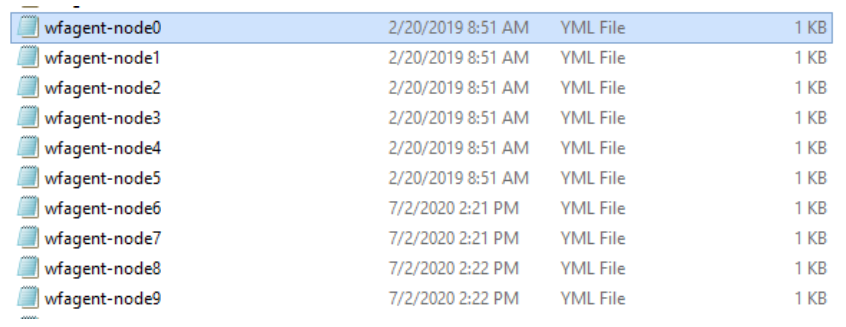
Modify the newly created files. The following example is for node7:
---
server.port: 10008
node_id: 7

environment.node_port: 5007
Navigate to
$Drive:/RPA/wfagent/bin.Copy wfagent-hub.bat to wfagent-hub1.bat
Edit wfagent-hub.bat:
- From:
@ECHO OFF cd %~dp0 set config=conf\environment.yml,conf\wfagent-hub.yml call wfagent.cmd run Hub "%config%"- To:
    @ECHO OFF

    cd %~dp0
    set config=conf\environment.yml,conf\wfagent-hub01.yml
    call wfagent.cmd run Hub "%config%"
Edit wfagent-hub1.bat:
- From:
@ECHO OFF cd %~dp0 set config=conf\environment.yml,conf\wfagent-hub.yml call wfagent.cmd run Hub "%config%"- To:
    @ECHO OFF

    cd %~dp0
    set config=conf\environment1.yml,conf\wfagent-hub02.yml
    call wfagent.cmd run Hub "%config%"
Edit wfagent-node*.bat files. The following examples are for node1 and node 7, running under Hub1 and Hub 2, respectively.
- wfagent-node0.bat:
@ECHO OFF cd %~dp0set config=conf\environment.yml,conf\wfagent-node-common.yml,conf\wfagent-node0.yml call wfagent.cmd run Node0 "%config%"- wfagent-node7.bat:
    @ECHO OFF

    cd %~dp0set config=conf\environment1.yml,conf\wfagent-node-common.yml,conf\wfagent-node7.yml
    call wfagent.cmd run Node7 "%config%"
Navigate to
C:/RPA/rpa-grid.Copy hub.json to hub1.json.
Change the port in hub.json and hub1.json.
- hub.json:
"host": null, "port": 10443, "newSessionWaitTimeout": 300000,- hub1.json:
    "host": null,
    "port": 10444,
    "newSessionWaitTimeout": 300000,
Copy any of logback-node*.xml files to logback-nodeN.xml.
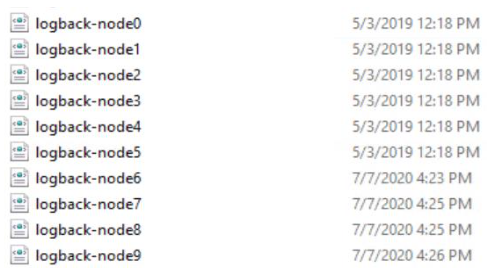
Edit the logback-nodeN.xml files accordingly. The following example is for node7:
- logback-node7.xml:
    "servlets": ["org.openqa.grid.selenium.workfusion.grid.web.HealthCheckNodeServlet"],
      "maxSession":2,
      "port":5001,
      "host": "127.0.0.1",
      "hubPort":10443,
      "hubHost":"127.0.0.1",
      "nodePolling":2000,
      "cleanUpCycle":2000,
      "timeout":600000
Copy any of nodeX.json files to nodeN.json.
Edit the nodeN.json files accordingly. The following examples are for node1 and node7, connected to Hub1 and Hub2, respectively.
- Node1.json
"servlets": ["org.openqa.grid.selenium.workfusion.grid.web.HealthCheckNodeServlet"], "maxSession":2, "port":5001, "host": "127.0.0.1", "hubPort":10443, "hubHost":"127.0.0.1", "nodePolling":2000, "cleanUpCycle":2000, "timeout":600000- Node7.json
    "servlets": ["org.openqa.grid.selenium.workfusion.grid.web.HealthCheckNodeServlet"],
      "maxSession":2,
      "port":5007,
      "host": "127.0.0.1",
      "hubPort":10444,
      "hubHost":"127.0.0.1",
      "nodePolling":2000,
      "cleanUpCycle":2000,
      "timeout":600000
Copy the logback-hub.xml to logback-hub1.xml.
Edit logback-hub1.xml.
- logback-hub1.xml:
    <property name="LOG_DIR" value="../logs"/>
    <property name="LOG_FILE_NAME" value="rpa-hub1"/>
Navigate to
C:/RPA/wfagent/rdp.Create a copy of any nodeX.rdp files and name them accordingly:
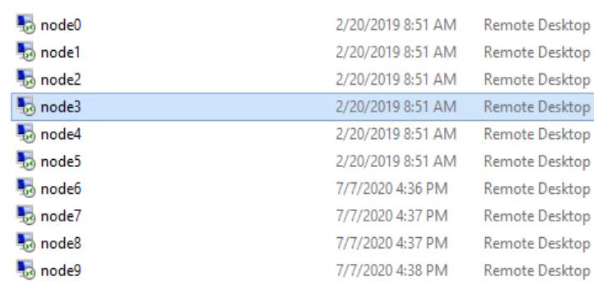
Edit the newly created files. The following example is for node7:
Node7.rdp
bitmapcachepersistenable:i:1
full address:s:127.0.0.8
Create scheduled tasks for launching Hub and Nodes under each user on login. Open the command prompt and create tasks:
SchTasks/Create /SC onlogon/TN "Hub1" /TR "C:\RPA\wfagent\bin\wfagent-hub1.bat" /RU Hub /IT /F
SchTasks/Create /SC onlogon/TN "wfagent-node5" /TR "C:\RPA\wfagent\bin\wfagent-node5.bat" /RU BotUser6 /IT /F
SchTasks/Create /SC onlogon/TN "wfagent-node6" /TR "C:\RPA\wfagent\bin\wfagent-node6.bat" /RU BotUser7 /IT /F
SchTasks/Create /SC onlogon/TN "wfagent-node7" /TR "C:\RPA\wfagent\bin\wfagent-node7.bat" /RU BotUser8 /IT /F
SchTasks/Create /SC onlogon/TN "wfagent-node8" /TR "C:\RPA\wfagent\bin\wfagent-node8.bat" /RU BotUser9 /IT /F
SchTasks/Create /SC onlogon/TN "wfagent-node9" /TR "C:\RPA\wfagent\bin\wfagent-node9.bat" /RU BotUser10 /IT /F
Log in to APP via ssh.
Switch to run time user.
Navigate to
$Installation_Folder/rpa-manager/grid-router/quota.Edit the user.xml file. Add entries for each browser.
vi user.xml
<qa:browsersxmlns:qa="urn:config.gridrouter.qatools.ru">
    <browser name="chrome" defaultVersion="1.0">
<region name="hub1">
                <host name="rpa.example.com " port="443" count="5"/>
                <host name="rpa.example.com " port="444" count="5"/>
            </region>
Restart rpa-manager.
wfmanagerrestart rpa-manager