Upgrade from v9.2.0.0 to v9.2.0.1
This guide describes the steps to apply patch_9.2.0.1 to SPA v9.2.0.0.
Prerequisites
- You have WorkFusion SPA 9.2.0.0 installed.
- All actions for applying patch_9.2.0.1 must be performed as <WF_USER>. The Root user is not required.
Upgrade procedure
Prepare DB server for patching
On the DB server, create the <install_dir>/patches/patch_9.2.0.1 directory, download, and extract the patch into it:
$ mkdir -pv <install_dir>/patches/patch_9.2.0.1
$ cd <install_dir>/patches/patch_9.2.0.1
$ curl -o 'patch_9.2.0.1.tar.gz' '<patch download url>'
$ tar xzf patch_9.2.0.1.tar.gz --strip-components=1
You will see the following directory structure:
-rwxr-xr-x. 1 wfuser wfuser     2817 Mar 10 08:53 patch_9.2.0.1.sh
-rw-rw-r--. 1 wfuser wfuser 58858237 Mar  9 12:50 patch_9.2.0.1.tar.gz
drwxr-xr-x. 3 wfuser wfuser       19 Mar  9 10:39 sources
-rw-r--r--. 1 wfuser wfuser       58 Mar  9 13:15 vars
On the DB server, in file <install_dir>/patches/patch_9.2.0.1/vars, fill in the credentials for the MySQL server:
export MYSQL_ADMIN='<put your mysql admin username here>'
export MYSQL_PASS='<put your mysql admin password here>'
On the DB server, verify the correctness of the specified credentials:
$ source <install_dir>/patches/patch_9.2.0.1/vars
$ <install_dir>/mysql/usr/bin/mysqlcheck -h 127.0.0.1 -P 3306 -u$MYSQL_ADMIN -p$MYSQL_PASS --check-upgrade --all-databases
You will see a similar output:
mysql.columns_priv                                 OK
mysql.db                                           OK

........ (lots of similar output) .....

wfdb.worker_interest                               OK
wfdb.workeractivitylog_test                        OK
On each Linux server, stop all WorkFusion services:
$ wfmanager stop all
Upgrade DB server
To upgrade DB on the DB server, execute the following command:
$ cd <install_dir>/patches/patch_9.2.0.1
$ ./patch_9.2.0.1.sh upgrade_mysql
You will see the following output:
Wed Mar 10 08:54:59 UTC 2021 Backing up mysql binaries and configuration...
mkdir: created directory ‘backup/mysql_5_7_18’
Wed Mar 10 08:55:02 UTC 2021 Extracting mysql components...
Wed Mar 10 08:55:12 UTC 2021 Restoring mysql configuration...
Wed Mar 10 08:55:15 UTC 2021 Adapting mysql configuration to new version...
Wed Mar 10 08:55:19 UTC 2021 Verifying mysql upgrade status
mysql: started
mysqlcheck: [Warning] Using a password on the command line interface can be insecure.
mysql.columns_priv                                 OK
mysql.db                                           OK

--- similar output ---

wfdb.worker_interest                               OK
wfdb.workeractivitylog_test                        OK
Wed Mar 10 08:55:36 UTC 2021 Mysql update completed. Check for any errors in output
Inspect the output of the MySQL status for any errors or not-ok statuses. It must return the status 'OK' for each test, as in the example earlier. If the check is successful, execute the following commands to update the database schema:
$ cd <install_dir>
$ mysql/usr/bin/mysql_upgrade -h 127.0.0.1 -P 3306 -u$MYSQL_ADMIN -p$MYSQL_PASS
In case the execution is successful and has no errors in the output, restart the MySQL process:
$ wfmanager restart mysql
Start WorkFusion services on all Linux servers
On all Linux servers, DB > VDSmaster > APP > OCR > APM > VDSslave, run the following command as <WF_USER>.
$ wfmanager start all
Post-upgrade steps
After the upgrade, on the APP server, check a Business Process as <WF_USER>:
$ cd /tmp/workfusion-full-package-9.2.0.0-1387/
$ ./install.sh check_raw app -e @/tmp/config_overrides.yml -e test_rpa=true -e test_ocr=true -e test_ml=true
After patching is completed and all services are running, make sure that
the html.ftl template in Control Tower doesn't contain an expired
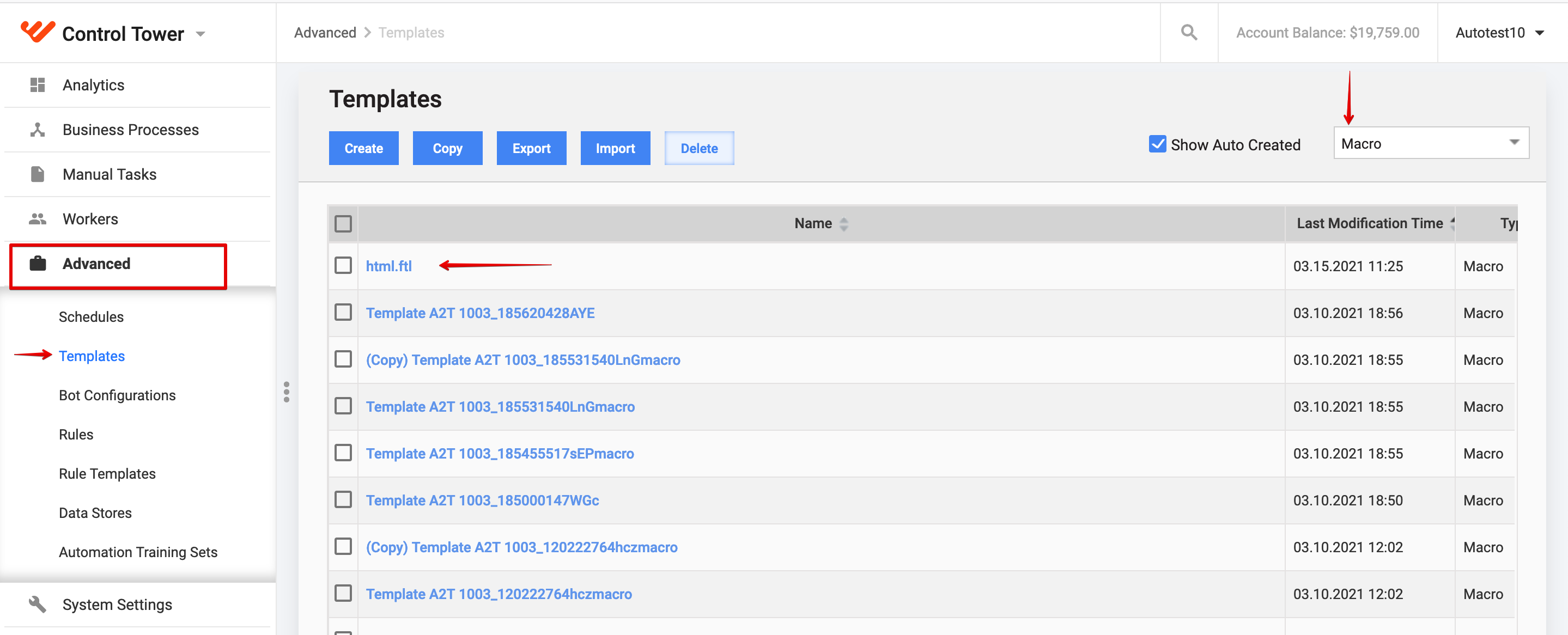
setting for the expirationDate. To do that, in Control Tower, click
Advanced > Templates, select filter 'Macro', find
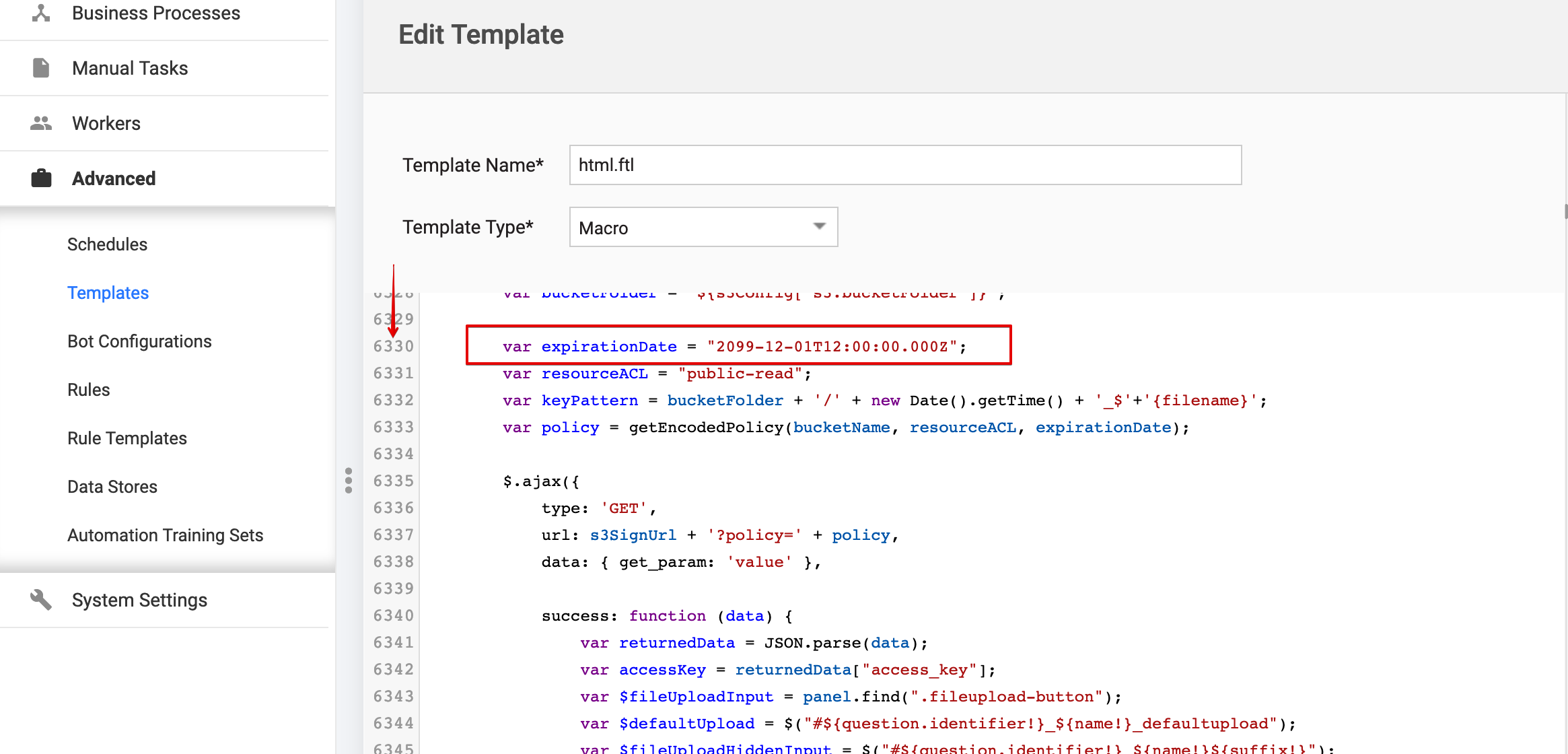
html.ftl. In row number 6330, you will find:
var expirationDate = "2020-12-01T12:00:00.000Z";
Ensure that it is set to:
var expirationDate = "2099-12-01T12:00:00.000Z";