
SSO integration
important
Before starting SSO integration, the IdP metadata (file or URL) must be requested from the security team.
SAML 2.0
SAML (Security Assertion Maskup Language) is an XML-based, open-standard data format for exchanging authentication and authorization data among parties, in particular, between an identity provider (IdP) and a service provider (SP).
The SAML specification defines three roles:
- the principal (typically a user)
- the Identity provider (IdP)
- the service provider (SP)
In the use case addressed by SAML, the principal requests a service from the service provider. The service provider requests and obtains an identity assertion from the identity provider. On the basis of this assertion, the service provider can make an access control decision. In other words, it can decide whether to perform some service for the connected principal.
Before delivering the identity assertion to the SP, the IdP may request some information from the principal (such as a username and password) in order to authenticate the principal. SAML specifies the assertions between the three parties: in particular, the messages that assert identity that are passed from the IdP to the SP. In SAML, one identity provider may provide SAML assertions to many service providers. Similarly, one SP may rely on and trust assertions from many independent IdPs.
SAML does not specify the method of authentication at the identity provider; it may use a username and password, or other form of authentication, including multi-factor authentication. A directory service such as LDAP, RADIUS, or Active Directory that allows users to log in with a user name and password is a typical source of authentication tokens at an identity provider. 3 The popular Internet social networking services also provide identity services that in theory could be used to support SAML exchanges.
Use case
SAML Web Browser SSO (Service Provider initiated authentication):
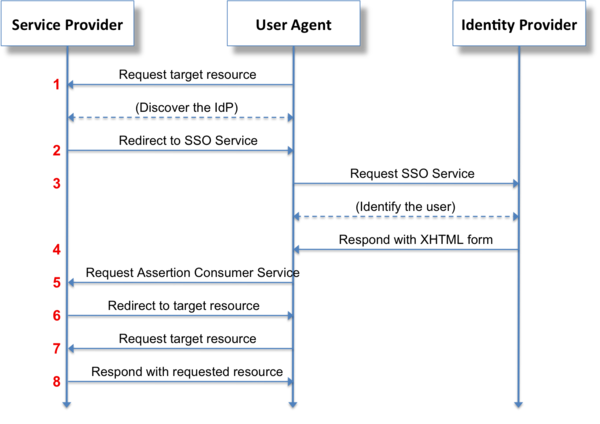
Request the target resource at the SP. The principal (via an HTTP user agent) requests a target resource at the service provider: https://sp.example.com/myresource
The service provider performs a security check on behalf of the target resource. If a valid security context at the service provider already exists, skip steps 2–7.
Redirect to the SSO Service at the IdP.
The service provider determines the user's preferred identity provider (by unspecified means) and redirects the user agent to the SSO Service at the identity provider: https://idp.example.org/SAML2/SSO/Redirect?SAMLRequest=request
The value of the SAMLRequest parameter is the Base64 encoding of a deflated <samlp:AuthnRequest> element.
- Request the SSO Service at the IdP.
The user agent issues a GET request to the SSO service at the identity provider where the value of the SAMLRequest parameter is taken from the URL query string at step 2. The SSO service processes the AuthnRequest and performs a security check. If the user does not have a valid security context, the identity provider identifies the user (details omitted).
Respond with an XHTML form. The SSO service validates the request and responds with a document containing an XHTML form:
  <form method="post" action="https://sp.example.com/SAML2/SSO/POST" ...>
    <input type="hidden" name="SAMLResponse" value="response" />
    ...
    <input type="submit" value="Submit" />
  </form>
The value of the
SAMLResponseparameter is the base64 encoding of a<samlp:Response>element.Request the Assertion Consumer Service at the SP.
The user agent issues a POST request to the assertion consumer service at the service provider. The value of the
SAMLResponseparameter is taken from the XHTML form at step 4.Redirect to the target resource.
The assertion consumer service processes the response, creates a security context at the service provider and redirects the user agent to the target resource.
Request the target resource at the SP again.
The user agent requests the target resource at the service provider (again): https://sp.example.com/myresource
Respond with requested resource.
Since a security context exists, the service provider returns the resource to the user agent.
Control Tower SAML integration
Security profiles
Two security profiles for SAML are supported: PKIX and MetaIOP.
The desired profile is specified in the SAML metadata file.
- In case of PKIX,
java.security.cert packageis utilized for assertion and validation of the certificates. It implements RFC 5280. - In case of MetaIOP, trusted certificates are not mandatory. Other mechanisms are used for validation, for example, explicitly supplying the keys to trust.
related documentation
SSO properties are migrated from workfusion.xml to /conf/workfusion.properties and Secure Storage.
Application properties
<TOMCAT_HOME>/conf/workfusion.properties
| Property Name | Value | Description |
|---|---|---|
|
true |
Enables or disables SSO (SAML 2.0 protocol) authentification for Control Tower. Accepted values: true/false |
|
|
Base URL of Control Tower (Service Provider). Used in SP metadata. (see Service Provider metadata example) |
|
60 |
Maximum difference between local time and time of the assertion creation which still allows message to be processed. |
workfusion.properties sample:
## option to enable/disable SSO authentication
wf.sso.saml.enable=true

## base url used during generation SP metadata
wf.sso.saml.entity.base.url=https://HOSTNAME/workfusion

## response skew in seconds
wf.sso.saml.response.skew=60
Secure properties
These are properties placed in Secure Storage
| Property Name | Value | Description |
|---|---|---|
|
|
Local path to a file with IdP metadata parameters. |
|
|
URL that points to a file with IdP metadata parameters. Should be provided by customer.
This parameter is an alternative to wf.sso.saml.idp.file.metadata, which is a recommended option.
|
|
workfusion-metadata-id |
A unique string. ID of Service Provider. |
|
|
Name of attribute that will be used for authentication. u id for LDAP, sAMAcountName for Active Directory. Should be provided by customer. |
Secure Storage sample properties:
## url to IdP metadata, use url or file
#wf.sso.saml.idp.metadata=none

## path to IdP metadata file
wf.sso.saml.idp.file.metadata=/path/to/local/metadata

## some unique name
wf.sso.saml.sp.metadata=wf-sp-hostname

## the name of an attribute taken from IdP response that contains username
wf.sso.saml.username.attribute=uid
Service Provider metadata example
For example Control Tower is installed and available by URL https://example-host-name/workfusion
Metadata for this Service Provider can be generated and downloaded by the URL https://example-host-name/workfusion/saml/metadata.
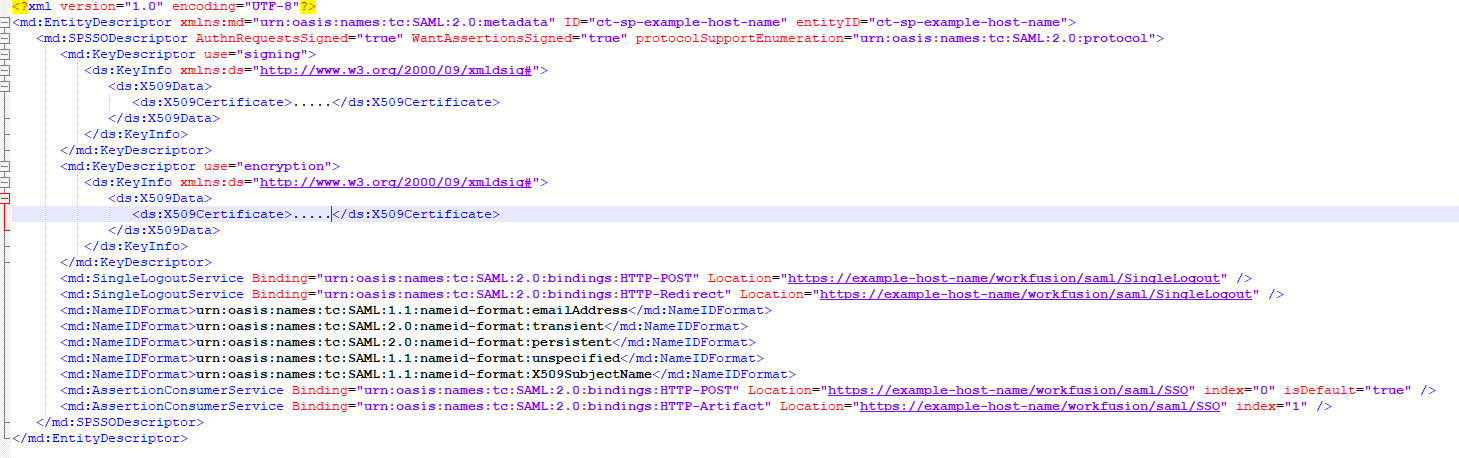
The ID and entityID attributes are configured via the wf.sso.saml.sp.metadata property.
Identity Provider metadata example
Usually IdP metadata is provided by security team. It can be file or URL.
The file should be placed on the application server (SP) and be accessible for Service Provider (Control Tower). It is configured via the wf.sso.saml.idp.file.metadata property.
If URL provided, it can be configured via wf.sso.saml.idp.metadata.
Both properties wf.sso.saml.idp.file.metadata and wf.sso.saml.idp.metadata cannot be configured at the same time.
There is an example of IdP metadata:
<IDPSSODescriptor/>must contain information about login/logout endpoints:SingleSignOnService,SingleLogoutServiceand attribute(s) descriptionsaml:Attribute.<saml:Attribute/>is username attribute name and must be mapped viawf.sso.saml.username.attribute/ws.sso.saml.username.attributein Secure Storage, for example,wf.sso.saml.username.attribute=ACCOUNT. The value of this mapped attribute in IdP response will be used for authorization.
Identity Provider authentication response
After an user logged in on IdP side the server sends response to SP (CT/WS) and this response must include username attribute(s) configured (if not encrypted) in wf.sso.saml.username.attribute or/and ws.sso.saml.username.attribute.
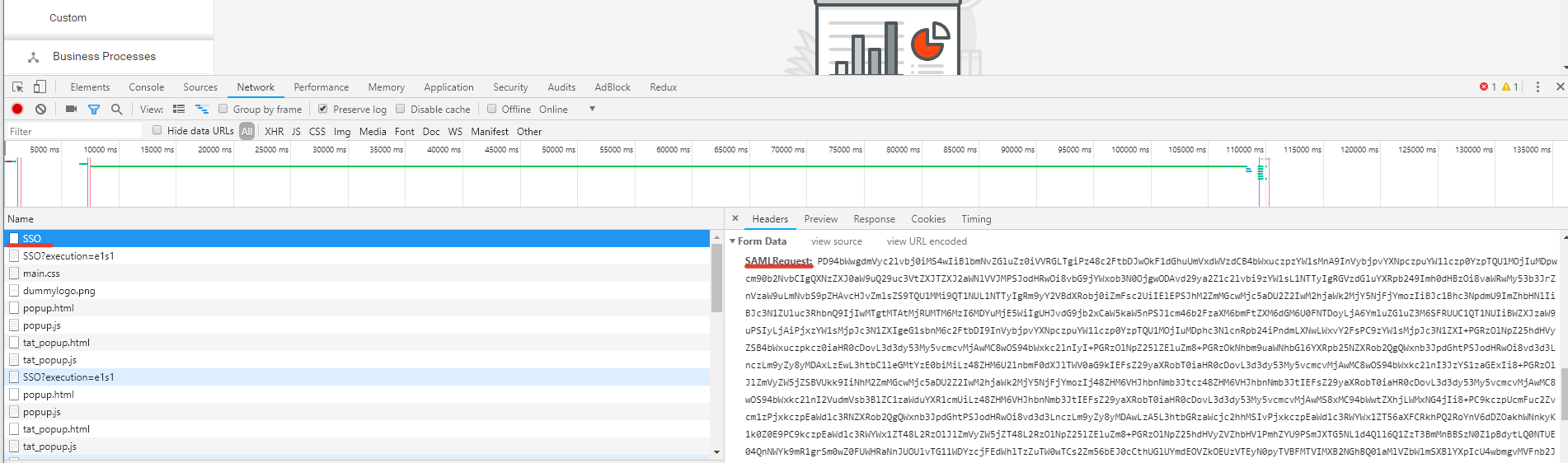
To catch SamlResponse from IdP, use a debuger(F12) in the browser
and then try to log in. Then select the SSO name among all names of the Network tab and there will be present decoded SamlResponse. Copy this value and decode it using the https://www.samltool.com/decode.php tool.
a. There is an example of IdP response with not encrypted data:
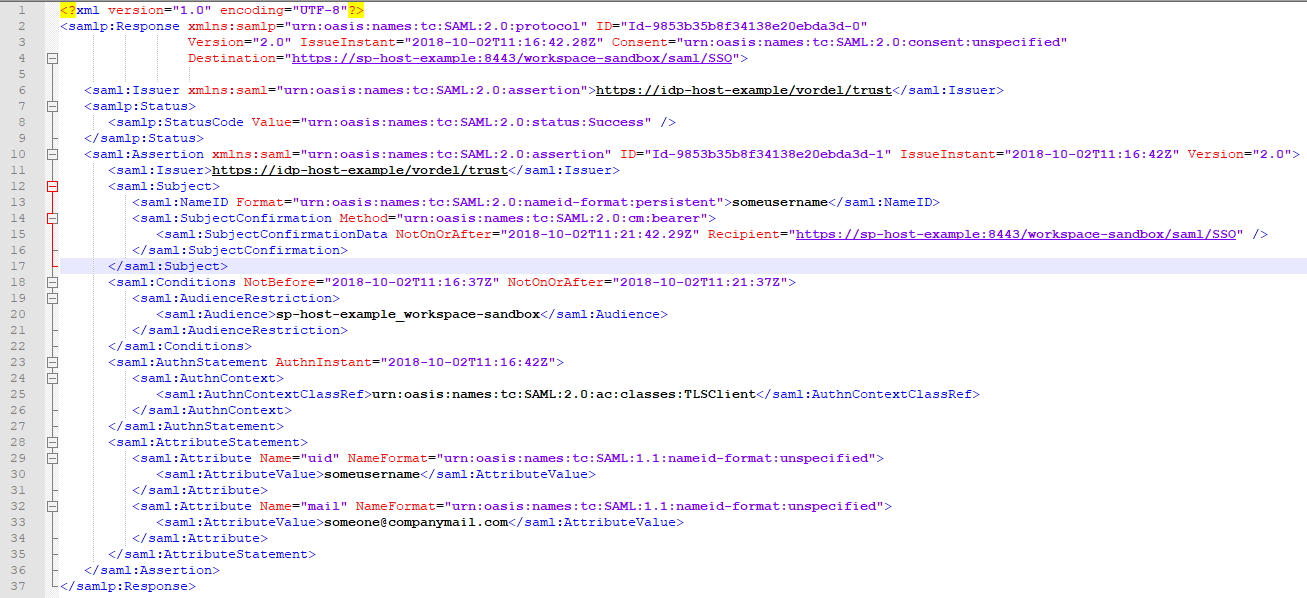
The destination attribute in Response should contain an URL that points to tag into SP metadata.
The <saml:Audience/> tag from <saml:AudienceRestriction/> must contain a value of wf.sso.saml.sp.metadata/ws.sso.saml.sp.metatdata from Vault (depends on component you are configuring SSO for).
<saml:AtributeValue> is "someusername" and will be used for authentication on SP side (if configuration is wf.sso.saml.username.attribute=uid).
Here is an example
wf.sso.saml.sp.metadata = test.workfsuin.com_workspace-sandbox
--------------------------------------------------------------
In this case, Audience will look like:

<saml:AudienceRestriction xmlns:saml="urn:oasis:names:tc:SAML:2.0:assertion">
        <saml:Audience>test.workfusion.com_workspace-sandbox</saml:Audience>
</saml:AudienceRestriction>
b. There is an example of IdP response with encrypted data:
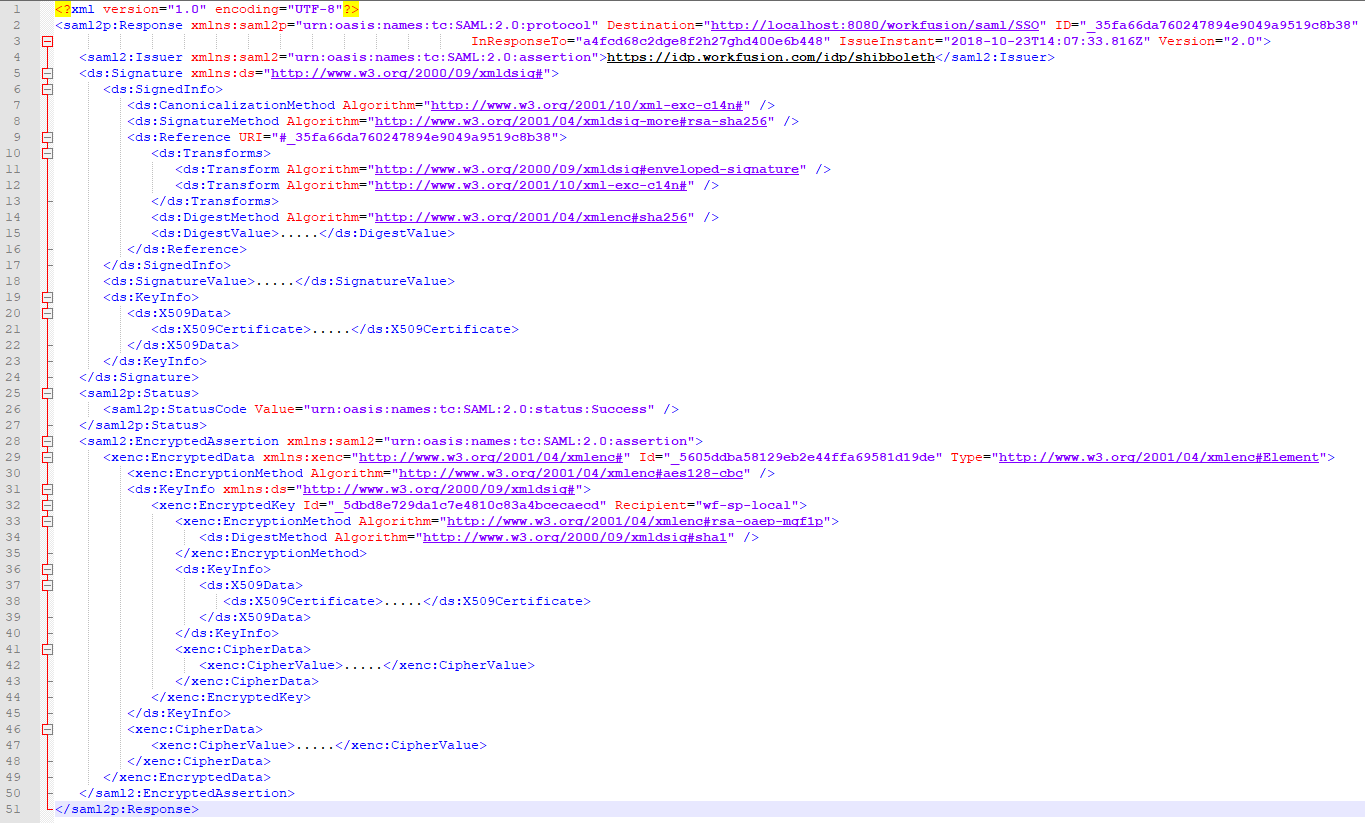
IdP and SP metadata description table
| Tag | Source | Description |
|---|---|---|
EntityDescriptor | IdP/SP metadata | main metadata's tag with ID/EntityID attributes |
IDPSSODescriptor | IdP metadata | IdP configuration description |
SPSSODescriptor | SP metadata | SP configuration description |
SingleSignOnService | IdP metadata | Endpoint to sign on |
SingleLogoutService | IdP/SP metadata | Endpoint to sign out |
AssertionConsumerService | SP metadata | SP endpoint to assert response from IdP side |
saml:Atribute | IdP metadata/response | Attribute description goes from IdP side |
saml:AtributeValue | IdP response | Attribute value |
saml:AudienceRestriction | IdP response | Container for saml:Audience tag |
saml:Audience | IdP response | SP EntityID for which the response is sent (used in response Assertion) |
samlp:StatusCode | IdP response | Response status, success example value (urn:oasis:names:tc:SAML:2.0:status:Success) |
Configuration
Before enabling SSO user with Administrator role and username that fits your SSO account should be created in CT.
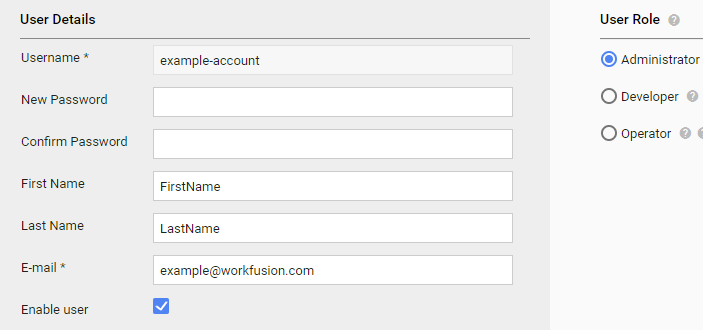
Configure application and secure properties to enable SSO:
## workfusion.properties file
wf.sso.saml.enable=true
wf.sso.saml.entity.base.url=https://control-tower-host/workfusion
## Secure Storage
wf.sso.saml.idp.file.metadata=/path/to/ipd/metadata/provided/by/security/team
wf.sso.saml.sp.metadata=unique-service-provider-name
wf.sso.saml.username.attribute=ACCOUNT //the name of the attribute into SSO response with username, usually described in IdP metadata file.
Restart the application server (tomcat).
Navigate to URL https://control-tower-host/workfusion/saml/metadata. The metadata file will be downloaded. Send it to security team to be added into Identity Provider (SSO server).
Open any CT page. From now, you'll be redirected to your Identity Provider Login Page. Enter your account and you are in.
User authentication and authorization
This implementation assumes that the user who is going to log in via the identity provider (IdP) already exists in Control Tower.
Admin user who is responsible for creation new users and assigning privileges should be created at first directly through database.
Admin user must create new users with usernames that already exists in IdP.
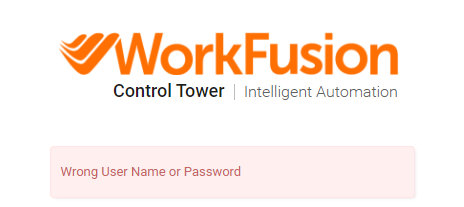
If user that is deleted, disabled or doesn't exist in WorkFusion trying to login he will be redirected to WF login failed screen with a validation message.
User authorization takes place on the WorkFusion side. Admin user can manage user roles.
IdP configuration
Assertion Consumer Service, EntityID and Public Key can be found in the metadata XML file.
Service Provider metadata can be downloaded by the URL: https://<instance>/workfusion/saml/metadata, for example, https://SOMESITE.WORKFUSION_HOSTNAME/workfusion/saml/metadata.
LDAP/AD authorization
Control Tower supports SSO authentication together with LDAP/AD authorization.
How to enable LDAP/AD auhotization and map user groups is described in LDAP and AD integration.
WorkSpace SAML integration
SSO properties are migrated from workspace.xml to /conf/workspace.properties and Secure Storage.
Application properties
| Property Name | Value | Description |
|---|---|---|
|
true |
Enables or disables SAML 2.0 protocol for Control Tower. Accepted values: true/false |
|
or |
Base url of Workfusion SAML provider. |
|
60 |
Maximum difference between local time and time of the assertion creation which still allows message to be processed. |
workspace.properties (workspace-sandbox.properties) sample:
## option to enable/disable SSO authentication
ws.sso.saml.enable=true

## base url used during generation SP metadata
ws.sso.saml.entity.base.url=https://WORKSPACE_HOSTNAME/workspace

## response skew in seconds
ws.sso.saml.response.skew=60
Secure properties
| Property Name | Value | Description |
|---|---|---|
|
|
Path to file with IdP metadata parameters (the recommended option). |
|
|
URL that points to a file with IdP metadata parameters. Should be provided by customer.
This parameter is an alternative to wf.sso.saml.idp.file.metadata, which is the recommended option.
|
|
|
A unique string. ID of Service Provider, is used for generating Service Provider metadata. https://<instance>/workspace/saml/metadata |
|
|
Name of the attribute that will be used for authentication. |
Secure Storage sample properties:
## url to IdP metadata, use url or file
#ws.sso.saml.idp.metadata=none

## path to IdP metadata file
ws.sso.saml.idp.file.metadata=/path/to/local/metadata

## unique string, identifies Service Provider
ws.sso.saml.sp.metadata=ws-sp-hostname

## the name of an attribute taken from IdP response that contains user's email address
ws.sso.saml.username.attribute=mail
caution
Mind that at least one of the idp properties should be set. Otherwise, you'll get the "No IdP was configured" page.
User authentication and authorization
- This implementation assumes that the user who is going to log in via the identity provider (IdP) already exists in WorkSpace.
- Requester should be created at first directly through the database. Their email in IdP must be equal to the username in WorkSpace.
- A Worker can get registered by himself. Their email in IdP must be equal to the username in WorkSpace.
- If the user that is deleted, disabled or doesn't exist in WorkSpace, while trying to login via IdP the user will be redirected to index page with a validation message.
- A disabled (non active) user can be activated by email or by a Requester.
After enabling the SSO authentication, when you log in to Workspace, in the Username field, type user's login, as it is specified in IdP.
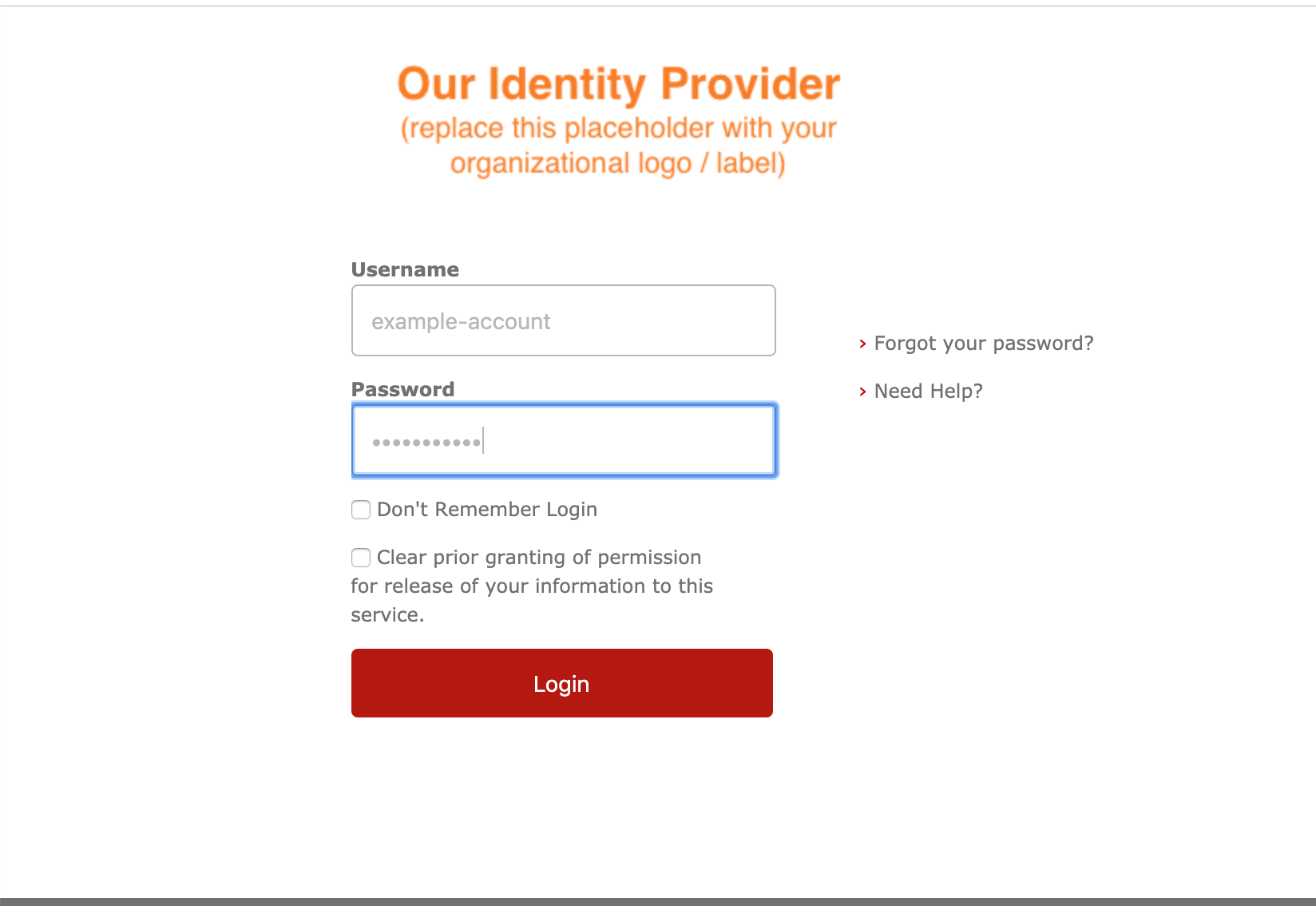
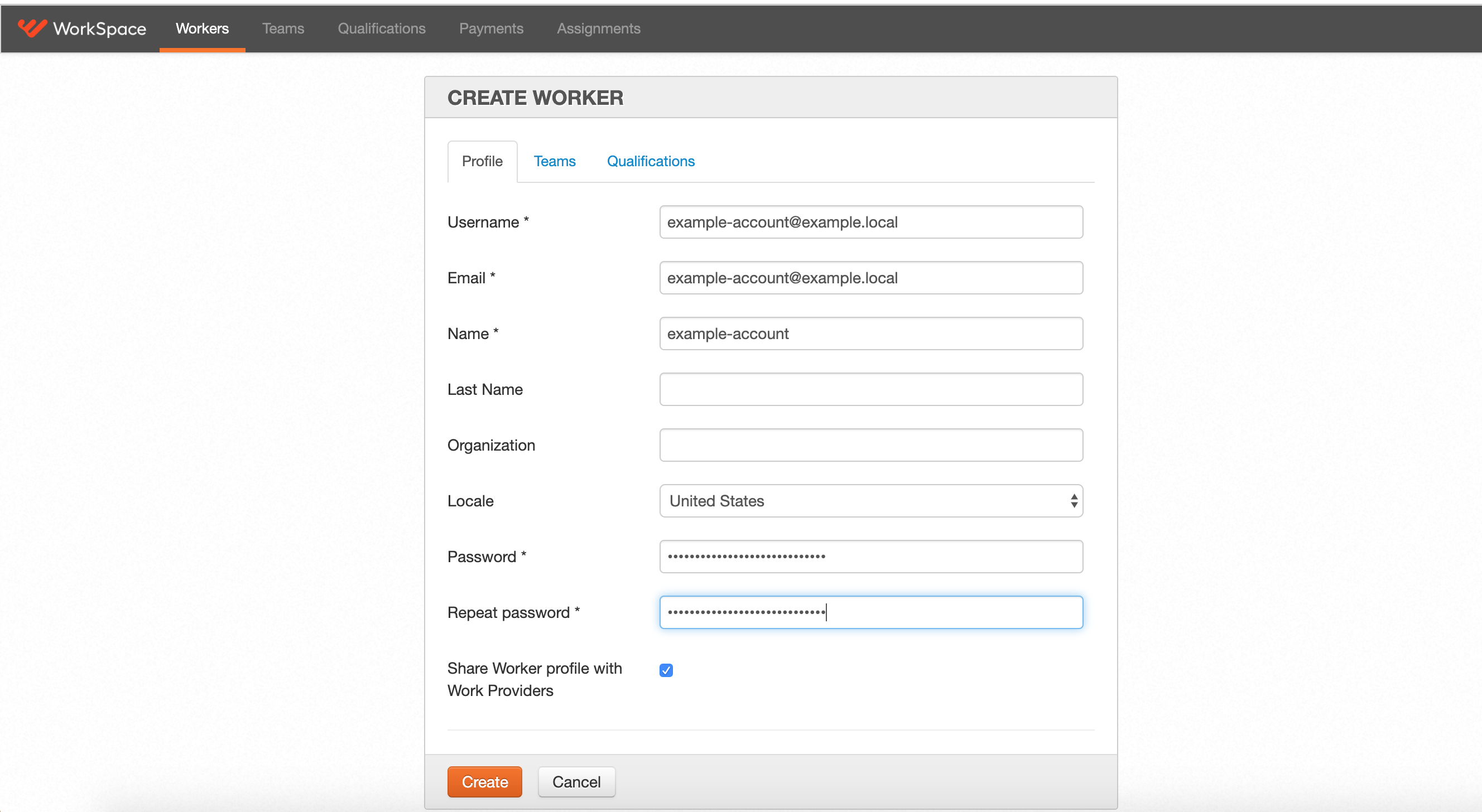
See the example, how to register Worker for further SSO integration. Pay attention that the username must be the same as the user's email in IdP.
IdP configuration
Assertion Consumer Service, EntityID and Public Key can be found in the metadata XML file.
Service Provider metadata can be downloaded by the URL: https://<instance>/workspace/saml/metadata
Troubleshooting
IdP configured with URL via wf.sso.saml.idp.metadata with the following exception in log
Expand to learn more
ExtendedMetadataDelegate [DEBUG] Initializing delegate HTTPMetadataProvider [ERROR] Error retrieving metadata from https://idp.somehost.com/idp/metadata

javax.net.ssl.SSLHandshakeException:
sun.security.validator.ValidatorException: PKIX path building failed:
sun.security.provider.certpath.SunCertPathBuilderException: unable to
find valid certification path to requested target at
sun.security.ssl.Alerts.getSSLException(Alerts.java:192)
To resolve the issue, do as follows:
Get SSL certificate from https://idp.somehost.com.
Add it to Java trust store:
${INSTALL_DIR}/java/bin/keytool -keystore
${INSTALL_DIR}/java/jre/lib/security/cacerts -import -file
/opt/wf_installer/certificates/idp.crt -alias idp
IdP metadata configured via two options wf.sso.saml.idp.metadata and wf.sso.saml.idp.file.metadata at the same time
Expand to learn more
In this case the metadata file loaded from URL is used. See more details in the log:
MetadataManager \[DEBUG\] Creating metadata
reload timer with interval 10000 MetadataManager \[DEBUG\] Clearing
metadata cache MetadataManager \[DEBUG\] Reloading metadata
MetadataManager \[DEBUG\] Refreshing metadata provider
org.opensaml.saml2.metadata.provider.HTTPMetadataProvider@fe4b559
MetadataManager \[DEBUG\] Setting trust verification for metadata
provider
org.opensaml.saml2.metadata.provider.HTTPMetadataProvider@fe4b559
MetadataManager \[DEBUG\] Revocation checking not forced MetadataManager
\[DEBUG\] Adding PKIX trust anchor startcom for metadata verification of
provider
org.opensaml.saml2.metadata.provider.HTTPMetadataProvider@fe4b559
MetadataManager \[DEBUG\] Adding PKIX trust anchor apollo for metadata
verification of provider
org.opensaml.saml2.metadata.provider.HTTPMetadataProvider@fe4b559
MetadataManager \[DEBUG\] Created new trust manager for metadata
provider
org.opensaml.saml2.metadata.provider.HTTPMetadataProvider@fe4b559
MetadataManager \[DEBUG\] Adding signature filter MetadataManager
\[DEBUG\] Initializing extendedMetadataDelegate
org.opensaml.saml2.metadata.provider.HTTPMetadataProvider@fe4b559
ExtendedMetadataDelegate \[DEBUG\] Initializing delegate MetadataManager
\[DEBUG\] Initializing provider data
org.opensaml.saml2.metadata.provider.HTTPMetadataProvider@fe4b559
MetadataManager \[DEBUG\] Found metadata EntityDescriptor with ID
MetadataManager \[DEBUG\] Remote entity
https://idp3.workfusion.com/idp/shibboleth available MetadataManager
\[DEBUG\] Metadata provider was initialized
org.opensaml.saml2.metadata.provider.HTTPMetadataProvider@fe4b559
MetadataManager \[DEBUG\] Refreshing metadata provider
org.opensaml.saml2.metadata.provider.FilesystemMetadataProvider@51291730
MetadataManager \[DEBUG\] Setting trust verification for metadata
provider
org.opensaml.saml2.metadata.provider.FilesystemMetadataProvider@51291730
MetadataManager \[DEBUG\] Revocation checking not forced MetadataManager
\[DEBUG\] Adding PKIX trust anchor startcom for metadata verification of
provider
org.opensaml.saml2.metadata.provider.FilesystemMetadataProvider@51291730
MetadataManager \[DEBUG\] Adding PKIX trust anchor apollo for metadata
verification of provider
org.opensaml.saml2.metadata.provider.FilesystemMetadataProvider@51291730
MetadataManager \[DEBUG\] Created new trust manager for metadata
provider
org.opensaml.saml2.metadata.provider.FilesystemMetadataProvider@51291730
MetadataManager \[DEBUG\] Adding signature filter MetadataManager
\[DEBUG\] Initializing extendedMetadataDelegate
org.opensaml.saml2.metadata.provider.FilesystemMetadataProvider@51291730
ExtendedMetadataDelegate \[DEBUG\] Initializing delegate MetadataManager
\[DEBUG\] Initializing provider data
org.opensaml.saml2.metadata.provider.FilesystemMetadataProvider@51291730
MetadataManager \[DEBUG\] Found metadata EntityDescriptor with ID
MetadataManager \[WARN\] Provider
org.opensaml.saml2.metadata.provider.FilesystemMetadataProvider@51291730
contains entity https://idp3.workfusion.com/idp/shibboleth with IDP
which was already contained in another metadata provider and will be
ignored MetadataManager \[DEBUG\] Remote entity
https://idp3.workfusion.com/idp/shibboleth available MetadataManager
\[DEBUG\] Metadata provider was initialized
org.opensaml.saml2.metadata.provider.FilesystemMetadataProvider@51291730
MetadataManager \[DEBUG\] Reloading metadata was finished
Illegal URL syntax error in log
Expand to learn more
SamlConfig \[ERROR\] Illegal URL syntax
org.opensaml.saml2.metadata.provider.MetadataProviderException: Illegal
URL syntax at
org.opensaml.saml2.metadata.provider.HTTPMetadataProvider.(HTTPMetadataProvider.java:89)
Secure Storage property wf.sso.saml.idp.metadata must be null or configured with the correct URL.
Create a file with properties, for example:
sso.properties:wf.sso.saml.sp.metadata=prod-app2.workfusion.com wf.sso.saml.idp.metadata= wf.sso.saml.idp.file.metadata=/opt/workfusion/workfusion/conf/prod-app2.workfusion.com.xml wf.sso.saml.username.attribute=shortnameUpload created properties into Vault.
./loader.sh workfusion sso.properties
Signature trust establishment failed for metadata entry
Expand to learn more
ExtendedMetadataDelegate \[DEBUG\] Initializing delegate 2018-07-17
12:18:17 \[localhost-startStop-1\] SignatureValidationFilter \[ERROR\]
Signature trust establishment failed for metadata entry
https://sso.example.com AbstractReloadingMetadataProvider \[ERROR\]
Error filtering metadata from
/opt/workfusion/workfusion/conf/wfapp.workfusion.com.xml
org.opensaml.saml2.metadata.provider.FilterException: Signature trust
establishment failed for metadata entry
Probably, the signature value () section into IdP metadata file configured "incorrectly" (some customers doesn't have this issue with signature value). As a workaround to avoid this issue, you should ask customer not to include this section into IdP metadata file.
SSO Health Check error
Expand to learn more
2018-08-06 06:20:28 \[localhost-startStop-1\] ContextLoader \[ERROR\]
Context initialization failed
org.springframework.beans.factory.BeanCreationException: Error creating
bean with name 'org.springframework.security.filterChains': Cannot
resolve reference to bean
'org.springframework.security.web.DefaultSecurityFilterChain#6' while
setting bean property 'sourceList' with key \[6\]; nested exception is
org.springframework.beans.factory.BeanCreationException: ............
Invocation of init method failed; nested exception is
java.lang.IllegalArgumentException: Metadata must be set ... 2018-08-06
06:38:29 \[localhost-startStop-1\] SsoHealthChecker \[ERROR\] Error
parsing the identity provider's (IdP) metadata file
/opt/workfusion/workfusion/conf/prod-app1.workfusion.com.xml for Single
Sign On Authentication. Premature end of file.
org.xml.sax.SAXParseException; Premature end of file.
The correct path to IdP metada file should be configured via wf.sso.saml.idp.file.metadata in Secure Storage.
Metadata includes wantAssertionSigned but neither Response nor included Assertion is signed
Expand to learn more
2018-10-02
11:27:05
org.springframework.security.saml.websso.WebSSOProfileConsumerImpl
\[DEBUG\] Verifying issuer of the Response 2018-10-02 11:27:05
org.springframework.security.saml.websso.WebSSOProfileConsumerImpl
\[DEBUG\] Validation of authentication statement in assertion failed,
skipping org.opensaml.common.SAMLException: Metadata includes
wantAssertionSigned, but neither Response nor included Assertion is
signed at
org.springframework.security.saml.websso.WebSSOProfileConsumerImpl.verifyAssertionSignature(WebSSOProfileConsumerImpl.java:422)
... 2018-10-02 11:27:05
org.springframework.security.saml.SAMLAuthenticationProvider \[DEBUG\]
Error validating SAML message org.opensaml.common.SAMLException:
Response doesn't have any valid assertion which would pass subject
validation
The root cause is that into SP metadata we have the following attribute: WantAssertionsSigned="true". It is by default. But the
SamlResponse from IDP did not contain a signature for Response or
Assertion according to the log file. To fix this issue, the customer
enabled the Assertion to be signed as true on the SSO side.
To disable WantAssertionsSigned for testing purposes, edit install_dir/workfusion/webapps/workfusion/WEB-INF/classes/saml-security.xml and add "" to the "metadataGeneratorFilter" section. Then restart the needed service.
Access is denied is shown in log file
Expand to learn more
GenericExceptionResolver \[ERROR\] Access is denied
org.springframework.security.access.AccessDeniedException: Access is
denied at
org.springframework.security.access.vote.AffirmativeBased.decide(AffirmativeBased.java:84)
The root cause is the following:
- User does not exist.
- User is blocked.
- There is an issue with validating
samlResponse.
To troubleshoot, enable debug/trace for SAML component or check if user exists in DB (account table for WS and ApplicationUser table for CT).
Open log4j file for particular component:
-------------------------------------------------------------- Control
Tower : install_dir/workfusion/conf/wf-log4j.properties
log4j.logger.org.springframework.security=TRACE
log4j.logger.com.freedomoss.workfusion.web.security.saml=TRACE
--------------------------------------------------------------
WorkSpace: Production -
install_dir/workspace_production/webapps/workspace/WEB-INF/log4j.properties,
Sandbox -
install_dir/workspace_sandbox/webapps/workspace-sandbox/WEB-INF/log4j.properties
log4j.logger.org.springframework.security=TRACE
log4j.logger.com.freedomoss.virtualizer.security.saml=TRACE
-------------------------------------------------------------
Then restart workfusion/workspace/sandbox components.
Using your own SSL certificate for signing IdP response data
Expand to learn more
SSL certificate cannot be configured via workfusion.properties and Secure Storage, and this is a known issue.
See the workaround below:
Add your certificate into SAML key storage:
/webapps/workfusion/WEB-INF/classes/saml/keystore/samlKeystore.jksThe example command:
keytool -keystore
/webapps/workfusion/WEB-INF/classes/saml/keystore/samlKeystore.jks
-importcert -file ./certificate.pem alias
Open
/webapps/workfusion/WEB-INF/classes/spring/saml-security.xmland change the certificate alias "apollo" to and password "nalle123" to new password (if changed).
The same operations should be done for workspace_production and workspace_sandbox.
Adding more detailed logs and enable DEBUG/TRACE level
Expand to learn more
You should update log4j properties with DEBUG level or TRACE (more detailed).
Open the log4j file for a particular component:
```
-------------------------------------------------------------- Control
Tower (DEBUG level by default):
install_dir/workfusion/conf/wf-log4j.properties
log4j.logger.org.springframework.security=TRACE
log4j.logger.com.freedomoss.workfusion.web.security.saml=TRACE
--------------------------------------------------------------
WorkSpace: Production -
install_dir/workspace_production/webapps/workspace/WEB-INF/log4j.properties,
Sandbox -
install_dir/workspace_sandbox/webapps/workspace-sandbox/WEB-INF/log4j.properties
log4j.logger.org.springframework.security=TRACE
log4j.logger.com.freedomoss.virtualizer.security.saml=TRACE
-------------------------------------------------------------
```
- Restart the
workfusion/workspace/sandboxcomponents.
SSO+LDAP: What is the best configuration if you want to have the same users with access to all three components (CT/WS-p/WS-s)
Expand to learn more
In this case to minimize effort on user management on the LDAP side, we propose to use the same LDAP groups for all components.
workfusion.properties:
ldap.group.base=cn=Group1-Admin,ou=groups,o=company\|cn=Group2-Dev,ou=groups,o=company
------------------------------------------------------------
workspace.properties:  ldap.worker.groups=Group1-Admin,Group2-Dev
ldap.requester.groups=WorkSpace-Requestor
------------------------------------------------------------
workspace.properties:  ldap.worker.groups=Group1-Admin,Group2-Dev
ldap.requester.groups=WorkSpace-Requestor
Example scenario: When SSO is enabled for all three components it means when you want to open sandbox/workspace web pages after the first successful login to CT via SSO. In this case you will not be redirected to SSO to enter credentials, but the system will try to authorize you with the worker role for the already logged-in user on CT and if that user is not a part of the worker LDAP group, you will get an error.
SSO and LDAP health check results (if ERROR) should be used for troubleshooting
Expand to learn more
Configuration and health check:
\[OK\] example   { "name": "Single Sign On
Authentication", "status": "OK", "errorCount": 0, "warningCount": 0,
"errors": \[\], "warnings": \[\], "infos": \[ "Please make sure that IdP
is configured with SP metadata (it can be downloaded here
https:///workfusion/saml/metadata)" \], "components": \[\] } SSO Health
chek \[ERROR\] example   { "name": "Single Sign
On Authentication", "status": "ERROR", "errorCount": 1, "warningCount":
0, "errors": \[ "Problem with IdP metadata: SingleSignOnService does not
have location" \], "warnings": \[\], "infos": \[ "Please make sure that
IdP is configured with SP metadata (it can be downloaded here
https://gcb-wf-app.nam.nsroot.net:8443/workfusion/saml/metadata)" \],
"components": \[\] } This section is available in workfusion.out.log
file.
For SSO troubleshooting with LDAP/AD authorization, refer to LDAP and AD integration.