Set Bot Task alerts and forced stop
Occasionally, a Bot Task may get stuck due to a problem in logic, leading to Business Process execution issues. To enable detection of such situations, the following mechanisms were implemented:
Stucked task alerting
Stucked task forced stop
Stucked task alerting
The alerting mechanism works as described below:
A time limit for Bot Task execution is pre-configured for each Worker type within BEP (Bot Execution Platform). Workers monitor task execution time based on the limits. If a limit is exceeded, the corresponding Worker starts sending warnings to the client supplying the Worker with tasks (for example, Control Tower (CT) or RPA server).
Task processing is not terminated. However, warnings about Bot Tasks executed too long are displayed on the CT's user interface at pre-configured intervals.
Re-configuration
To change the pre-configured time limit and warning interval:
Go to the following paths in ZooKeeper:
/config/worker-ct-rpa//config/worker-ct//config/worker-ocr-v1//config/worker-ocr-v2/
Set up the following parameters for each Worker type:
execution.task.processing.alarm.threshold.secondsdefines the amount of time (in seconds) after which a Worker starts sending alerts. The default value is 3,600 seconds.execution.task.processing.time.check-interval.secondsdefines how often the task execution time is checked and warnings are sent to a client system and Worker log. The default value is 5 seconds.
Advanced configuration
The alerting mechanism is based on individual client-Worker event data contracts. These enable Workers to send event data converted into a format suitable for handling by a client. For example, a CT Worker sends events incapsulating com.freedomoss.crowdcontrol.webharvest.EventDto, and Control Tower, being a client, can handle such events as alerts.
For now, such contracts are ensured for CT and RPA Workers. For other Worker types, you need to implement GenericWorkerEventConverter. See the sample code for a CT Worker converter below:
Sample code
@Component
public class CtGenericWorkerEventConverter implements GenericWorkerEventConverter<CTTaskInputData, EventDto> {

    private static final String LEVEL = "WARN";

    @Override
    public boolean isApplicable(GenericWorkerEventType genericWorkerEventType) {
        return GenericWorkerEventType.COMMON.equals(genericWorkerEventType);
    }

    @Override
    public WorkerEvent<EventDto> convert(TaskInput<CTTaskInputData> taskInput, String message) {
        Map<String, Object> metadata = taskInput.getMetadata();

        EventDto eventDto = EventBuilder.createEvent(
                (Long) metadata.get(WebharvestTaskMetadataConstants.STEP_ID),
                (Long) metadata.get(WebharvestTaskMetadataConstants.TASK_ID),
                message,
                null,
                LEVEL
        );
        return new WorkerEvent<>(eventDto, System.currentTimeMillis());
    }
}
To support different types of generic events triggering alerts, specify the GenericWorkerEventType parameter for your converter. Note that, currently, only the GenericWorkerEventType.COMMON type is used for sending time execution alerts.
Stuck task forced stop
Currently, the task processing time is configured to 12 hours maximum. The restriction relates to the RabbitMQ server's delivery acknowledgment timeout. To enable a forced stop for stuck Bot Tasks, follow the steps:
In Control Tower, select a Business Process (BP) and go to the Workflow tab.
Within the BP, select the required bot step and go to the Design tab.
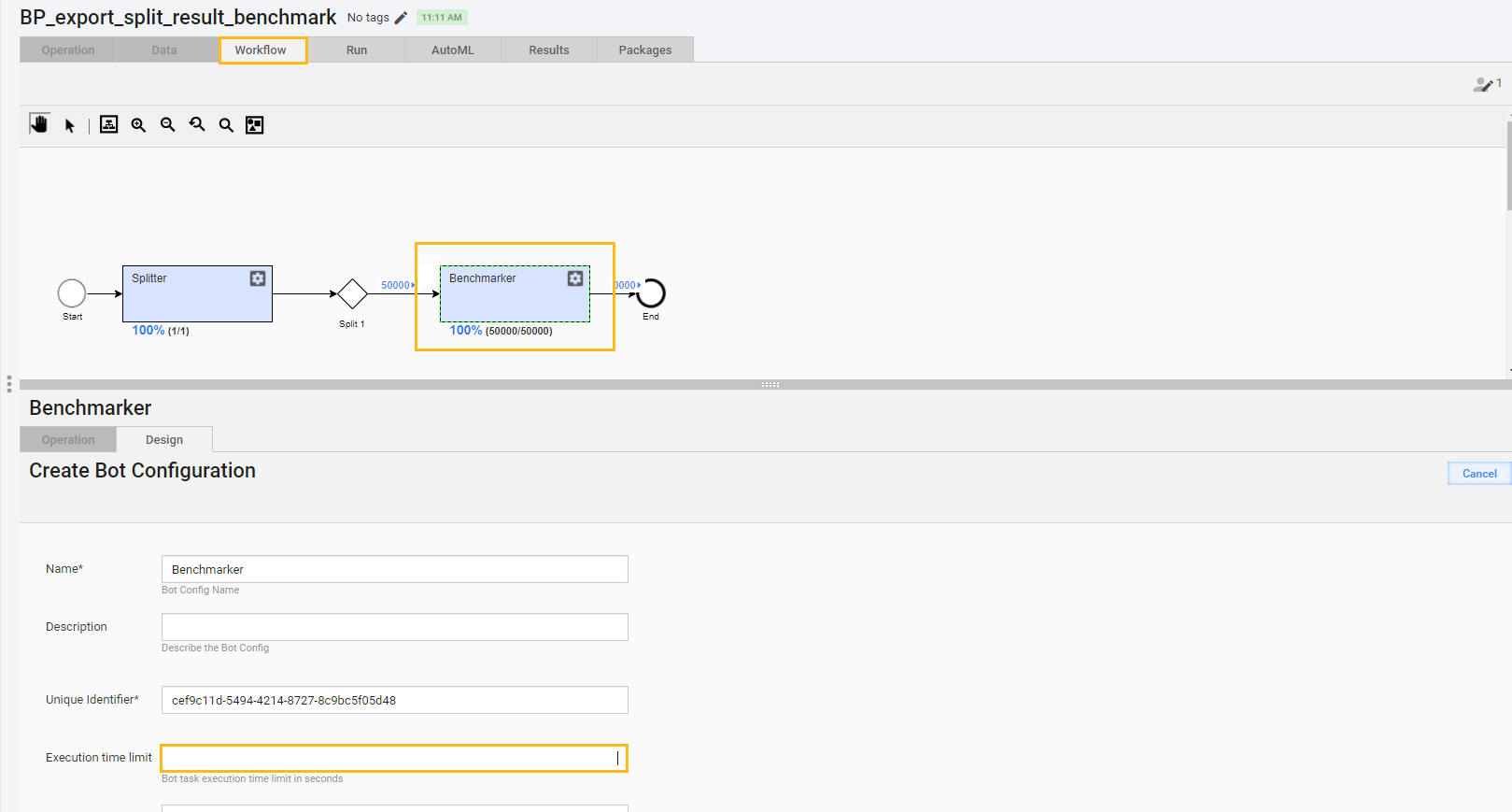
In the Execution time limit field, specify a value within the range from 1 to 43,200 seconds, and click Save. Mind that the Execution time limit property should be equal or less the RabbitMQ delivery acknowledgment timeout.
The changes are also applied to duplicated tasks and BPs.
After you define the parameter, it is passed to the Bot Task metadata. Subsequently, Workers check each incoming task against the preset time limit. When the limit is exceeded, Workers terminate processing of the task and return an error.
In case it is impossible to terminate a task execution thread smoothly, a Worker shutdown is initiated. A control event is sent to the Worker Management Service to stop the Worker.
For troubleshooting tips, refer to the following support guides: