Extract machine-readable zone
The machine-readable zone (MRZ) is typically found on official travel or identity documents of many countries. It can have two or three lines of machine-readable data. A new profile allows processing MRZ written in accordance with ICAO Document 9303.
Extract MRZ
To process MRZ, do as follows:
- Activate a new profile to extract MRZ.
- Set the
machineReadableZonevalue to the profile parameter. The result of recognition is returned in the XML format.
note
Only the XML format is supported and is used by default. Thus, you can omit the exportFormat parameter.
warning
The profile is supported by FREngine 12 only. Use API for FREngine 12: /api/v2/..
Explore field types
In the table below, there are possible MRZ field types:
| Field type | Description | Example |
|---|---|---|
MrzType | The number of lines in MRZ. It can have one of the following values:
| 2-line MRZ: P<USATRAVELER<<HAPPY<<<<<<<<<<<<<<<<<<<<< 3400072370USA6707046F1608078910000193<113538 |
Line1 | All characters of the first line of the machine-readable zone | P\<RUSMALBORSKYI\<\<KOVBOJ\<\<\<\<\<\<\<\<\<\<\<\<\<\<\<\<\<\<\<\<\< |
Line2 | All characters of the second line of the machine-readable zone. | 7553279419RUS8712242M2104131<<<<<<<<<<<<<<02 |
Line3 | All characters of the third line of the machine-readable zone (if exists). | |
DocumentType | The document type. It is the first character of the first line. | P indicates a passport. |
DocumentSubtype | The document subtype (if exists). It is the second character of the first line. | |
IssuingCountry | Code of the issuing state (ISO 3166-1 alpha-3 code). | USA |
LastName | Surname. | TRAVELER |
GivenName | One or several given names separated with the space character. | HAPPY |
DocumentNumber | The number of a document. | 340007237 |
DocumentNumberVerified | The Boolean value that specifies whether the checksum over the document number matches the check digit. It can have one of the following values:
| true |
DocumentNumberCheck | The check digit over the document number. | 0 |
Nationality | Nationality (ISO 3166-1 alpha-3 code). | USA |
BirthDate | Date of birth in the following format: YYMMDD. | 670704 |
BirthDateVerified | The Boolean value that specifies whether the checksum over the birth date matches the check digit. It can have one of the following values:
| true |
BirthDateCheck | The check digit over the birth date. | 6 |
Sex | Sex. It can have one of the following values:
| |
ExpiryDate | Date of expiry in the following format: YYMMDD. | 200807 |
ExpiryDateVerified | The Boolean value that specifies whether the checksum over the expiry date matches the check digit. It can have one of the following values:
| true |
ExpiryDateCheck | The check digit over the expiry date. | 8 |
PersonalNumber | Personal number. The personal number and its check digit are optional in MRZ. | |
PersonalNumberVerified | The Boolean value that specifies whether the checksum over the personal number matches the check digit. It can have one of the following values:
| true |
PersonalNumberCheck | The check digit over the personal number. The personal number and its check digit are optional in MRZ. | |
OptionalDataLine1 | Optional data from the first line of the 3-line MRZ. | |
OptionalDataLine2 | Optional data from the second line of the 3-line MRZ. | |
Checksum | The check digit over the document number, birth date, expiry date, personal number, optional data, and their check digits. | 8 |
ChecksumVerified | The Boolean value that specifies whether the checksum over the document number, birth date, expiry date, personal number, optional data, and their check digits matches the check digit. It can have one of the following values:
| true |
View document examples
2-line MRZ
You can find a 2-line MRZ in a U.S. passport.
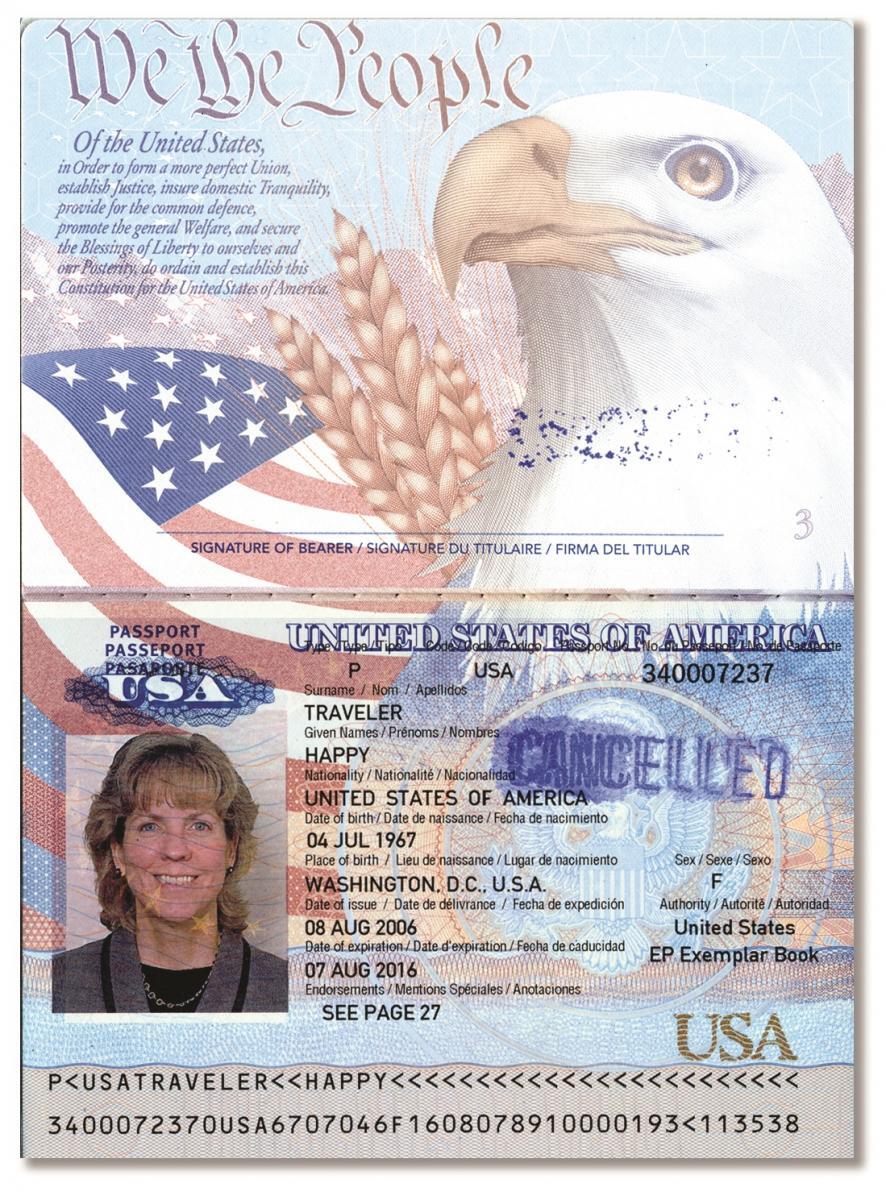
Extracting 2-line MRZ output
<?xml version="1.0" encoding="UTF-8" standalone="yes"?>
<MRZData>
    <Field Type="IssuingCountry">
        <Value>USA</Value>
        <Region>
            <Rect>83,1073,129,1090</Rect>
        </Region>
        <Chars>
            <Char>
                <Value>U</Value>
                <Rect>83,1073,94,1090</Rect>
            </Char>
            <Char>
                <Value>S</Value>
                <Rect>100,1073,111,1090</Rect>
            </Char>
            <Char>
                <Value>A</Value>
                <Rect>117,1073,129,1090</Rect>
            </Char>
        </Chars>
    </Field>
    <Field Type="LastName">
        <Value>TRAVELER</Value>
        <Region>
            <Rect>134,1073,266,1090</Rect>
        </Region>
        <Chars>
            <Char>
                <Value>T</Value>
                <Rect>134,1073,146,1090</Rect>
            </Char>
            <Char>
                <Value>R</Value>
                <Rect>152,1073,163,1090</Rect>
            </Char>
            <Char>
                <Value>A</Value>
                <Rect>169,1073,180,1090</Rect>
            </Char>
            <Char>
                <Value>V</Value>
                <Rect>185,1073,198,1090</Rect>
            </Char>
            <Char>
                <Value>E</Value>
                <Rect>204,1073,214,1090</Rect>
            </Char>
            <Char>
                <Value>L</Value>
                <Rect>221,1073,232,1090</Rect>
            </Char>
            <Char>
                <Value>E</Value>
                <Rect>238,1073,249,1089</Rect>
            </Char>
            <Char>
                <Value>R</Value>
                <Rect>255,1073,266,1089</Rect>
            </Char>
        </Chars>
    </Field>
    <Field Type="GivenName">
        <Value>HAPPY</Value>
        <Region>
            <Rect>306,1072,386,1089</Rect>
        </Region>
        <Chars>
            <Char>
                <Value>H</Value>
                <Rect>306,1072,317,1089</Rect>
            </Char>
            <Char>
                <Value>A</Value>
                <Rect>323,1072,334,1089</Rect>
            </Char>
            <Char>
                <Value>P</Value>
                <Rect>340,1072,352,1089</Rect>
            </Char>
            <Char>
                <Value>P</Value>
                <Rect>357,1072,369,1089</Rect>
            </Char>
            <Char>
                <Value>Y</Value>
                <Rect>374,1072,386,1089</Rect>
            </Char>
        </Chars>
    </Field>
    ...
    <Line1>
        <Value>P<USATRAVELER<<HAPPY<<<<<<<<<<<<<<<<<<<<<<<<</Value>
        <Region>
            <Rect>49,1072,797,1090</Rect>
        </Region>
    </Line1>
    <Line2>
        <Value>3400072370USA6707046F1608078910000193<113538</Value>
        <Region>
            <Rect>48,1114,798,1134</Rect>
        </Region>
    </Line2>
    <Checksum>
        <Value>8</Value>
        <Verified>true</Verified>
    </Checksum>
</MRZData>
3-line MRZ
You can find 3-line MRZ in a U.S. passport card.
Extracting 3-line MRZ output
<?xml version="1.0" encoding="UTF-8" standalone="yes"?>
<MRZData>
    <Field Type="IssuingCountry">
        <Value>USA</Value>
        <Region>
            <Rect>107,427,187,457</Rect>
        </Region>
        <Chars>
            <Char>
                <Value>U</Value>
                <Rect>107,428,128,457</Rect>
            </Char>
            <Char>
                <Value>S</Value>
                <Rect>138,427,156,457</Rect>
            </Char>
            <Char>
                <Value>A</Value>
                <Rect>167,428,187,457</Rect>
            </Char>
        </Chars>
    </Field>
    <Field Type="DocumentNumber">
        <Value>C03004964</Value>
        <Checksum>
            <Value>6</Value>
            <Verified>true</Verified>
        </Checksum>
        <Region>
            <Rect>199,425,458,456</Rect>
        </Region>
        <Chars>
            <Char>
                <Value>C</Value>
                <Rect>199,427,216,456</Rect>
            </Char>
            <Char>
                <Value>0</Value>
                <Rect>227,426,248,456</Rect>
            </Char>
            <Char>
                <Value>3</Value>
                <Rect>257,426,276,456</Rect>
            </Char>
            <Char>
                <Value>0</Value>
                <Rect>287,425,308,456</Rect>
            </Char>
            <Char>
                <Value>0</Value>
                <Rect>317,425,338,456</Rect>
            </Char>
            <Char>
                <Value>4</Value>
                <Rect>348,426,368,456</Rect>
            </Char>
            <Char>
                <Value>9</Value>
                <Rect>377,425,397,456</Rect>
            </Char>
            <Char>
                <Value>6</Value>
                <Rect>407,426,427,456</Rect>
            </Char>
            <Char>
                <Value>4</Value>
                <Rect>438,426,458,456</Rect>
            </Char>
        </Chars>
    </Field>
    ...
    <Line1>
        <Value>IPUSAC030049646<<10<30<B22<498</Value>
        <Region>
            <Rect>49,422,941,457</Rect>
        </Region>
    </Line1>
    <Line2>
        <Value>8101017M1911297USA<<0754052296</Value>
        <Region>
            <Rect>46,472,940,507</Rect>
        </Region>
    </Line2>
    <Line3>
        <Value>TRAVELER<<HAPPY<<<<<<<<<<<<<<<</Value>
        <Region>
            <Rect>47,524,940,557</Rect>
        </Region>
    </Line3>
    <Checksum>
        <Value>6</Value>
        <Verified>false</Verified>
    </Checksum>
</MRZData>
troubleshooting
For troubleshooting tips, refer to the following support guides: