Optimize OCR process
A standard WorkFusion OCR use case provides a set of Bot Configurations that can be re-used or extended to address custom OCR challenges.
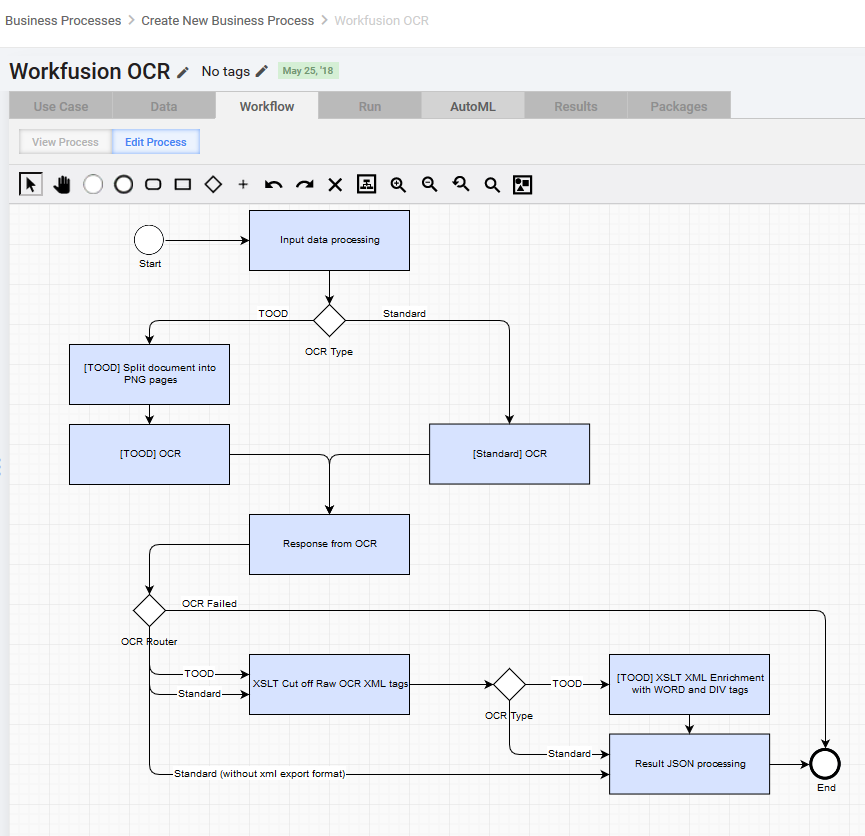
OCR architecture
The UML diagram is as follows:
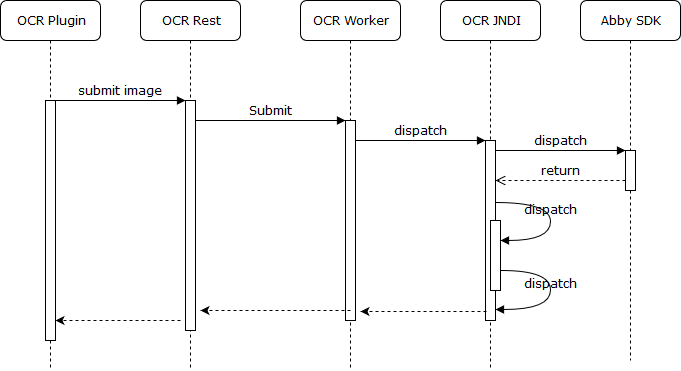
The usage example is as follows:
     <var-def name="submitImage">
        <http url="${ocr_url}/submitImage" method="post" multipart="true">
            <http-param name="file" isfile="true">
                <http url="${original_document_url}" />
            </http-param>
        </http>
    </var-def>

    <var-def name="taskId">
        <xpath expression="string(//response/task/@id)">
            <var name="submitImage" />
        </xpath>
    </var-def>

      <script><![CDATA[
        //-------------------------------------------------------making processDocument url-------------------------------------------------------
      .....
    ]]></script>

    <var-def name="processDocument">
        <http url="${processDocumentUrl.toString()}" method="get" />
    </var-def>
Metrics and licensing
WorkFusion OCR capabilities are limited by the corresponding license. Every OCR license can be checked via Platform Monitor or directly via URL. Upon the OCR license expiration, WorkFusion provides license upgrades.
Every OCR document processing request provides a short metrics snippet to estimate the OCR load and predict the task completion.
<metrics averagePagesPerDoc="6.0" tasksInQueue="12" processedPages="260.0" timeInterval="300"/>
Client features comparison
| OCR plugin | OCR REST | |
|---|---|---|
| Execution | Synchronous | Asynchronous |
| Input format | PDF, TIFF, JPEG, PNG | PDF, TIFF, JPEG, PNG |
| OCR result format | TXT, XML, HTML, PDF | TXT, XML, HTML, PDF |
| Usage | Low age volume, good document quality, no SLA, OCR test | Enterprise-grade BP |
Common parameters
| Parameter | Recommended value | Notes |
|---|---|---|
| Export format | xmlForCorrectedImage | |
| Document language | Language parameter must be supported by the license | |
| Character recognition variance | false | |
| Allowed region type | BT_Table,BT_Text,BT_Separator,BT_SeparatorGroup,BT_AutoAnalysis | |
| Custom region | ||
| Change DPI | ||
| Correct orientation | true | |
| Correct skew | true | |
| Invert image | ||
| Discard color image | ||
| Remove color objects | ||
| Remove color object types |
caution
Bar code recognition does not work with TOOD OCR. The page is empty with the bar code region specified. Use standard OCR to get barcodes working.
Optimization instructions
- Validate source image DPI. Recommended DPI for all source documents is 300-350. When resolution is 25% lower than recommended by WorkFusion, it is suggested to add image pre-processing parameter Change DPI or use ImageMagick to bump up the DPI to suggested level.
- When DPI is significantly lower, for example is within 72-110 DPI, increasing the DPI increases OCR recognition errors.
- It is suggested to use color documents within OCR process. A color image, since it has different colors presence, adds ability to remove RGB color channels prior to the processing, decreasing the document noise and providing a way to stabilize the image prior to applying gray-scale conversion.
- When looking at poor quality documents the only three pre-processing techniques proven to work within WorkFusion OCR Rest:
- Adjusting contrast
- Adjusting brightness
- Inverting an image
- The OCR recognition result varies upon applying Allowed Region Type parameter values in a certain order. When setting array of two elements BT_Table, BT_Text as the value, the OCR result XML will have more OCR blocks as tables, than when the array has elements in reverse order BT_Text, BT_Table.
- See also Improve OCR Results for more improvements.