Use Nexus repositories in WorkFusion ecosystem
WorkFusion uses Nexus Repository OSS to enable centralized artifacts management for each Work.AI environment. Nexus is the industry leader in repository management, providing:
- A single source of truth for all of your components, binaries, and build artifacts
- Efficient distribution of parts and containers to developers
- Deployment at more than 100,000 organizations globally
Using the Nexus Repository Manager and software supply chain automation tools requires understanding of a few concepts and terms like Component, Repository, Repository Format. For more details, refer to:
- The Basics—Components, Repositories, and Repository Formats
- An Example—Maven Repository Format
- Repository Management
- Software Supply Chain Automation
Nexus repository variations in WorkFusion ecosystem
- Work.AI environment Nexus. Each cloud and on-prem Work.AI platform environment comes with its own Nexus instance. It is installed with other WorkFusion components by default. Note that each of the DEV, QA, UAT, PROD environments has its own Nexus.
- Public WorkFusion Nexus. WorkFusion provides public Nexus for education purposes. Thus, you can start automation even before the server-based DEV environment is available. It's heavily used in the ODF and ODF 2 frameworks and is available for the public at https://repository.workfusion.com.
- Local Work.AI Developer Nexus. The local workstation environment based on Work.AI Developer also contains a local Nexus instance. It is used mostly for project deployment to the local Control Tower.
Work.AI environment Nexus
The Work.AI cloud and on-prem repositories allow publishing and retrieving versioned libraries and their dependencies by providing a single central source of artifacts accessible from this environment. You need it to meet Work.AI security criteria restricting the build process to download any artifacts and binaries from an outer network or the Internet. Nexus provides multiple repositories, each having its dedicated role:
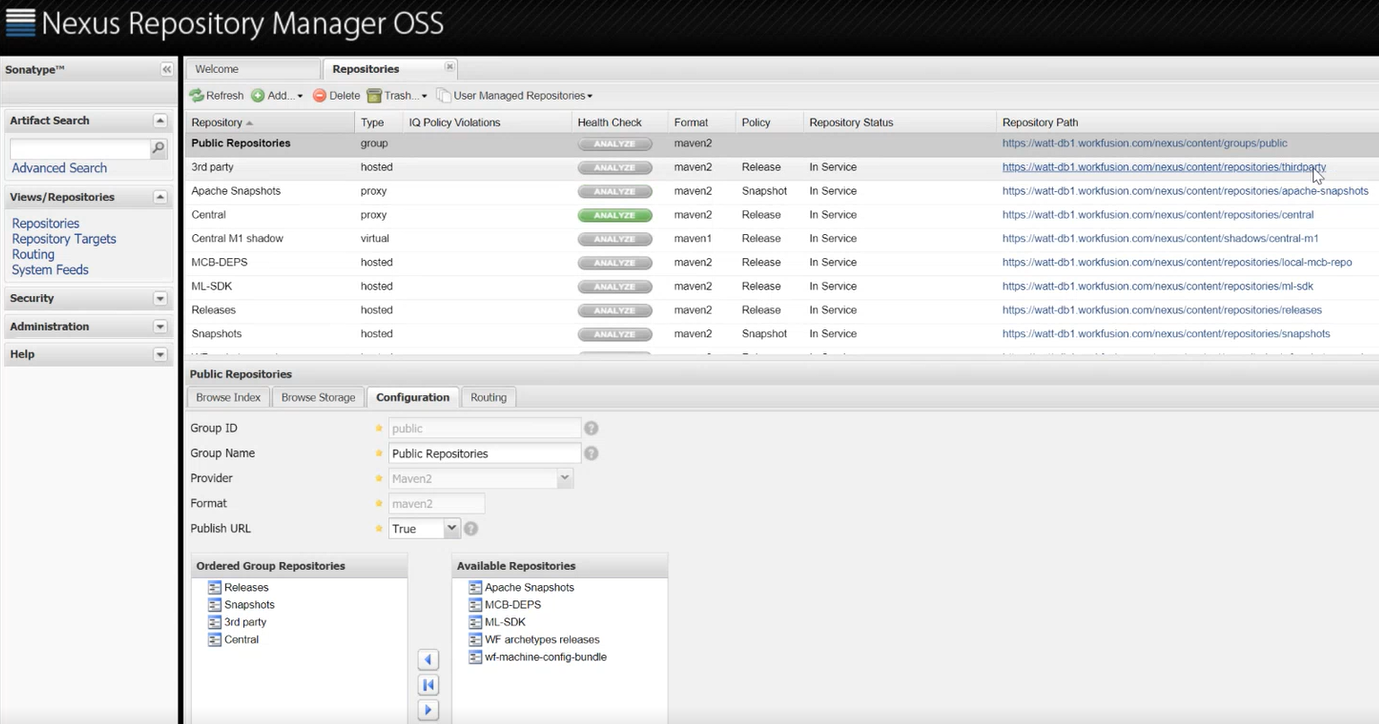
WorkFusion Nexus uses a repository group to provide multiple repositories via a single URL.
Standard WorkFusion repositories are as follows:
- WorkFusion Dependencies, or
/wf-dependencies, where the Maven build downloads all dependencies for a project based on ODF and ODF 2. - AutoML SDK WorkFusion Dependencies, or
/ml-sdk, where the Maven build downloads all dependencies for a project based on WorkFusion AutoML SDK. - Deploy BCB to Control Tower, or
/wf-machine-config-bundle, containing the JAR files for Control Tower to download upon the application start or after clicking the Get bot configurations button. Potentially, you can configure several Control Towers on one Nexus repository for them to download BCB files from the repository. When you deploy an Asset Bundle, the Import API automatically puts the BCBs into the repository for Control Tower to fetch. - WorkFusion Archetypes, or
/archetypes, is the public repository you can access without authentication. When you start a project in Eclipse or IDEA, a repository with archetypes is provided. Download all the archetypes from it. - Releases, or
/releases, and Snapshots, or/snapshots, where you publish your own JAR libraries to share them with teams. To use the repository, specify it in the Maven'ssettings.xmlfile. - Central M1 shadow and Central standard Nexus OSS repositories are not configured out-of-the-box with WorkFusion installation. The repositories enable organizations to control components allowed into a repository from an external proxied repository, such as the Central Repository. Such control can be a prerequisite for organizations unwilling or unable to trust the entire contents of an external public repository.
If an organization develops mission-critical code, they are likely to subject every third-party dependency to intense scrutiny and testing before making the component available to build a release or support a development team.\ Another common experience is an organization that needs to proxy to the Central Repository or any other public repository but wants to limit access to specific versions of components or prevent dependencies on all components contained under a specific group. Some organizations are more amenable to trusting the contents of a remote proxied repository, like the Central Repository, but they also need the ability to block certain dependencies. To learn more, see Procurement Suite.
Public WorkFusion Nexus
The WorkFusion Repository is a feature that allows you to package Bot Tasks in Eclipse and publish them to a repository in the WorkFusion instance for further use in Business Processes. These artifacts contain everything needed to build a project or run a Bot Task, including Java and Groovy classes, input data, Data Stores, and any required settings. Use the following URL: https://repository.workfusion.com.
Most repositories in public Nexus are password-protected, while the WorkFusion Archetypes repository is available without authentication.
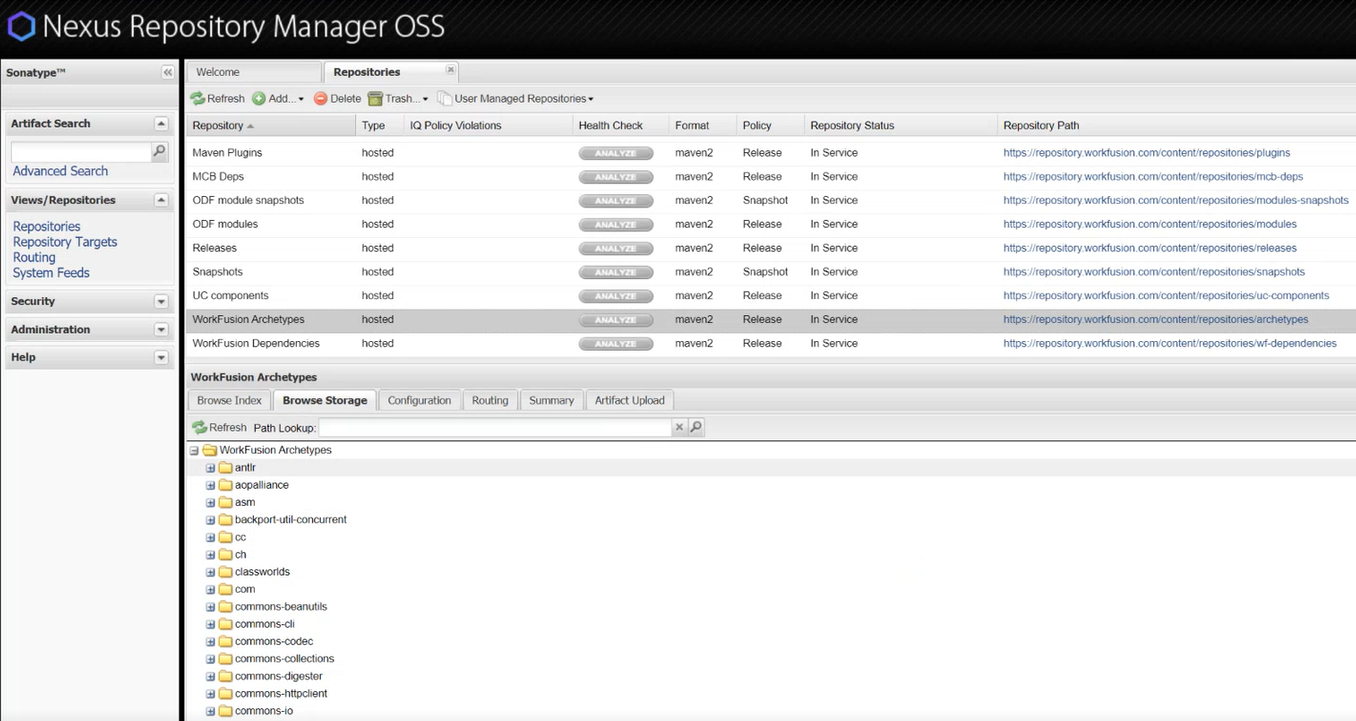
To enable access to protected repositories, specify credentials in settings.xml.
The complete repository structure is similar to the previously discussed on-prem repository with some additional repositories:
- All Dependencies Group, or
/dependencies, is a group of repositories to provide a single URL for Releases, Snapshots, WorkFusion Dependencies, Maven Plugins, ODF Modules. - IDEA Plugins, or
/idea-plugins, provides versions of WorkFusion IDEA IDE plugins and is used in IDEA's Marketplace as a source of the WorkFusion plugin. - Maven Plugins, or
/plugins, provides WorkFusion-originated Maven plugins for development, such as the version plugin. - MCB/BCB Dependencies, or
/mcb-deps, is the obsolete repository previously used by Maven to build MCB and BCB projects containing Java and Groovy classes and XML Bot Tasks only. It is kept for backward compatibility. - ODF Modules, or
/modules, and ODF Modules Snapshots, or/modules-snapshots, are used to distribute ODF-based modules separately. - AI Digital Worker Components, or
/uc-components, are used to share independent libraries and to leverage components in ODF and ODF 2-based automations.
Local Work.AI Developer Nexus
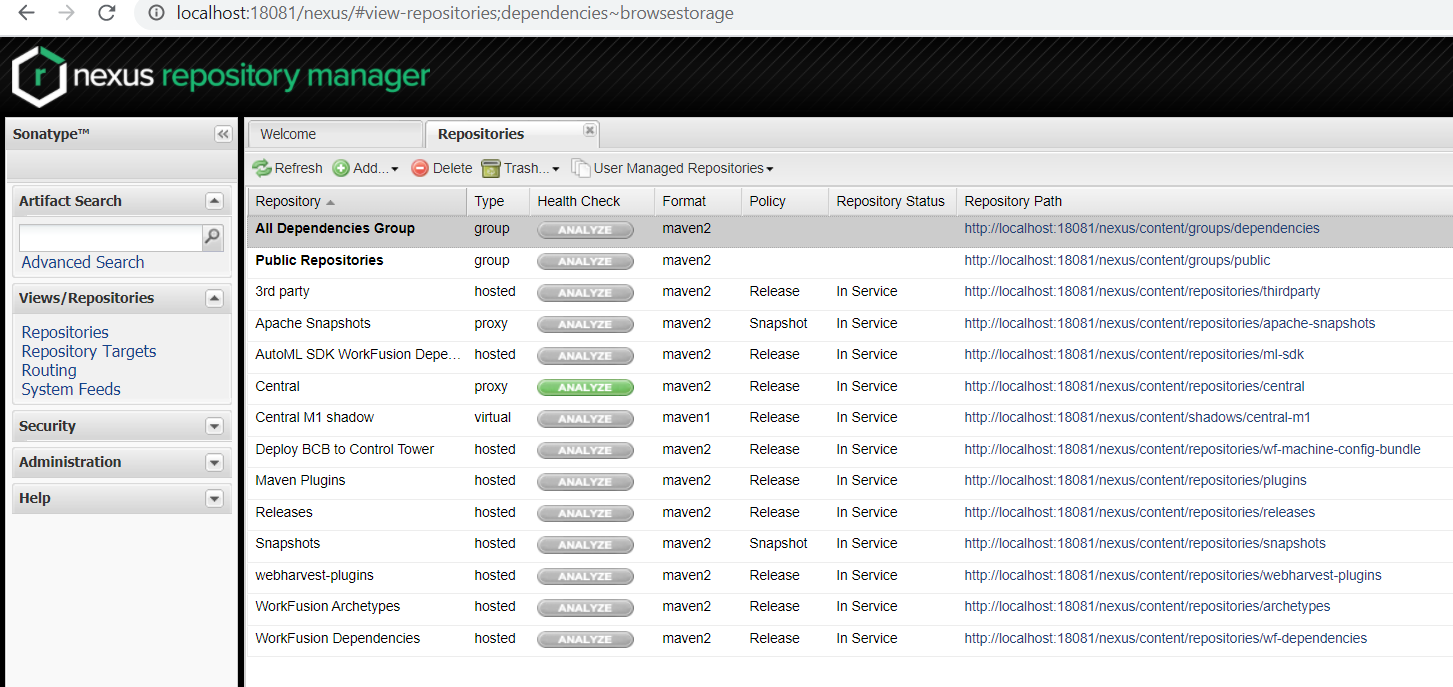
The local workstation environment based on Work.AI Developer also contains a local Nexus instance used for project deployment to the local Control Tower. For example, use the /wf-machine-config-bundle repository only.
After you installed Work.AI Developer and launched the Control Tower & WorkSpace group, Nexus starts. You can access it via the URL: http://localhost:18081/nexus. To manage it, authenticate using credentials specified during the Work.AI Developer installation process.
Need of manual Nexus dependencies update
The Work.AI platform installer installs Nexus and creates all required repositories. Also, it puts dependencies on a certain version of ODF, ML SDK, BCB into those repositories.
Sometimes, you need to use the latest ODF version, which depends on the WorkFusion Worker API of a different version than already contained in the on-prem Nexus. Thus, this new ODF version can have different dependencies.
To avoid reinstalling the entire Work.AI platform, publish new ODF dependencies. Follow the Troubleshoot server ODF guide containing the archive of the latest ODF dependencies for different platform versions and walking you through the update process in detail.