Share Folder connector
High-level description
Share Folder Connector is a pre-defined template that extracts files from a shared folder using the Samba (SMB) protocol and stores them in shared storage (S3), where they can be further used in a Business Process.
The connector currently supports the SMB v1 protocol only because the embedded JCIFS library supports this version.

The step before Share Folder Connector must be the Share Folder Connector Settings step created from the Share Folder Connector Settings configuration.
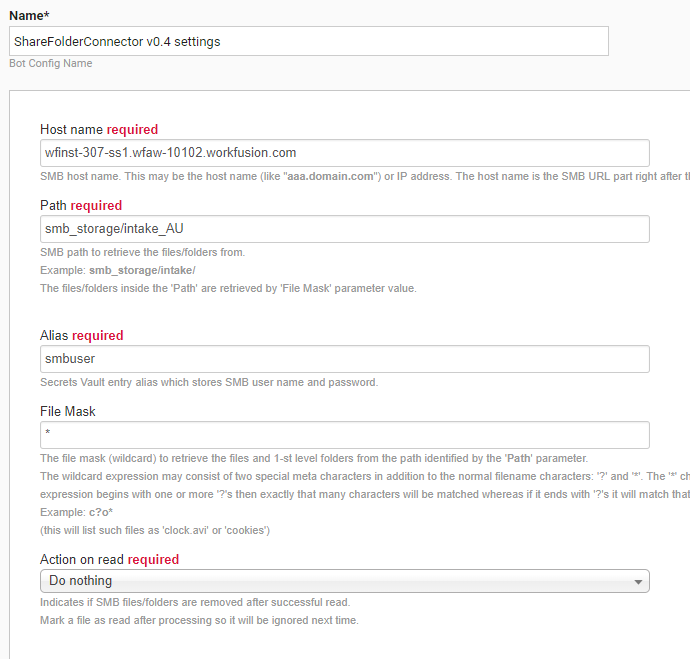
Parameters
The parameters are as follows:
- Hostname: required; SMB network hostname.
- Path: required; path on the given host that serves as the home path for extracting files.
- Alias: required; Secrets Vault entry alias that stores SMB network username and password. The username (the secret entry key value) can be a username or a domain and user combination in the
DOMAIN/USERNAMEformat. - File Mask: wildcard expression used to retrieve files from Path. The expression can contain normal filename characters along with two special metacharacters:
*matches any number of characters in part of a filename.?matches a single character. If the expression starts with one or more?, it matches exactly that number of characters. If it ends with?, it matches that number of characters or fewer.
The *.* wildcard matches only files or folders with an extension (a limitation of the JCIFS library). Only one file mask can be specified in the field. For example, you cannot enter *.gif, *.jpg. The File Mask field is optional; if omitted, the default mask * will be used.
- Action on read: action performed after an SMB file or folder is successfully read. Available options are as follows:
- Mark file as read marks the file as read after processing so it will be ignored in future runs.
- Delete file on read indicates if SMB files or folders are removed after they are successfully read.
- Do nothing (default) leaves SMB files or folders unchanged.
How to use
- Create the first step as a Bot Task.
- Double-click it on the diagram.
- Select ETL > Share Folder Connector Settings.
- Double-click it again and populate with parameter values properly.
- Go to the side panel on the right > the Bot tab (Other). Drag the Share folder connector Bot Config from the Intake Bots BCB. Its name is Intake Bots v0.4-dev (Share folder connector).
How it works
The Share Folder Connector performs the following actions:
- Reads files from the SMB path specified by the Path parameter (or home path), using File Mask. A single transaction is created for each file.
- Reads files from the immediate child subfolders of the home path. In this case, a single transaction is created for each subfolder, containing all its files. Files from subfolders are always read using the
*wildcard. - Logs its actions. Logs are available in the Business Process Results tab > Event log.
See an example showing transactions created after the Share Folder Connector processes two files from the SMB path:
{
  "meta": {
  },
  "id": "5e05d02c-8e64-42e1-9338-56fd7d5101d1",
  "docs": [
    {
      "meta": {
      },
      "id": "3ea6c683-e066-408a-83c6-f99d777f0db6",
      "name": "Document1.txt",
      "type": null,
      "textLink": null,
      "taggedTextLink": null,
      "originalDocumentLink": "https://wfinst-307-92-ct1-s3.workfusion.com:443/intake-bucket/shared-folder/d1b93d2d-97b7-4472-8012-4c41703427a5.txt",
      "extractedFields": {
      },
      "origin": null,
      "merged": false
    }
  ]
}