Move SQL database files to another location
If SQL Server is installed on the C drive, the disk runs out of free space sooner or later. To move the existing database, follow the steps below:
Stop all WorkFusion services with
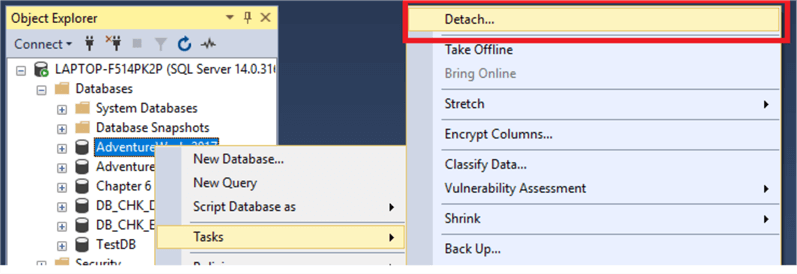
wfmanager stop all.Right-click the database you want to detach in SQL Server Management Studio (SSMS) and select Tasks > Detach.
Move your database MDF and LDF files from the original location to a new one.
To change the new location permission, open Powershell as Administrator and run the command:
Get-Acl -Path 'C:\Program Files\Microsoft SQL Server\MSSQL13.MSSQLSERVER\MSSQL\DATA' | Set-Acl -Path 'F:\workfusion_data'In SSMS, run the query:
CREATE DATABASE workfusion
    ON (FILENAME = 'F:\workfusion_data\workfusion.mdf'),
    (FILENAME = 'F:\workfusion_data\workfusion_log.ldf')
    FOR ATTACH;
To check the database file location, run the command:
SELECT name, physical_name AS CurrentLocation, state_desc
FROM sys.master_files
WHERE database_id = DB_ID(N'workfusion');
Start the service and check the Control Tower login page.