
Context of enterprise automation
To understand the value of Open Development Framework, let's get into the context of complex automation Use-Case delivery. Let's consider three key technical drivers:
- Enterprise software development process
- Clean use case design
- Pre-packaged reusable components
Software development life cycle
Assuming you are a part of a successful team who are given the time, resources, and tools to allow focus on building and shipping enterprise-grade software building standards, with a focus on quality. The idea behind this initiative is to establish a company-wide environment allowing effective use-case automation and code reuse. WorkFusion wishes to share several most important industry-standard technics which made work of similar teams very successful.
Automated testing
Writing automated tests at the same time as the software is tremendously satisfying, as it proves the software is doing what it is supposed to do before it reaches a customer. The other major benefit of writing automated tests is that they allow you to confidently make changes or extensions to the behavior of your software in the future, ensuring that you haven't broken any existing functions!
Continuous integration
A continuous integration system continuously monitors your source code repository. When a newer version is released, the system automatically:
- downloads and compiles it on another machine
- runs unit and integration tests, proving that the code is functioning as expected; it can also tell you if you don’t have enough test coverage
- deploys the new version to a test server
Within just a few minutes of pushing some changes, you know that your software is technically correct, it passes the tests on another machine, it can be deployed to a server, and it works!
Continuous deployment
Continuous deployment is the next step after Continuous Integration. Once your software is proven to work in Test, it should automatically flow into UAT and then onto your Production servers. The key concept of continuous deployment is that lots of small releases are way less risky than fewer big releases. If something goes wrong with the release, you only have a small set of changes to check over to find the problem.
Peer code review
Successful teams follow the agreement that no code gets merged into the "master" code branch without being reviewed by another team member — this keeps code quality high as there is no hidden dodgy code! Code review is a learning opportunity for everyone who works on a project. Code review, also referred to as peer review, is a systematic examination of software source code. It's conducted to find bugs and improve the overall quality of the software.
So why bother with code review? The benefits or the goals of code review are as follows.
- Finding bugs early, when they are cheap to fix.
- Compliance to coding standards. Code review helps maintain a consistent coding style across the company.
- Teaching and sharing knowledge. During the review, team members gain a better understanding of the codebase and learn from each other.
- Consistent design and implementation. Peer review helps maintain a due level of consistency in software design and implementation.
- Higher software security. Applications with a high level of security benefit from the targeted security reviews.
- Team cohesion. Review discussions save team members from isolation and bring them closer to each other.
- Confidence of stakeholders. You build trust in stakeholders about the technical quality of execution.
Working in awesome team
It is inspiring to work in a company with a ton of talented software developers and technical folks. There is always someone to talk to when you are trying to figure out something. WorkFusion recommends working in small "pods" of three or four Automation Engineers plus a Quality Assurance person supported by a Product Owner who focuses on business requirements and Delivery Manager who is responsible for overall success, cross-communication, and timeline.
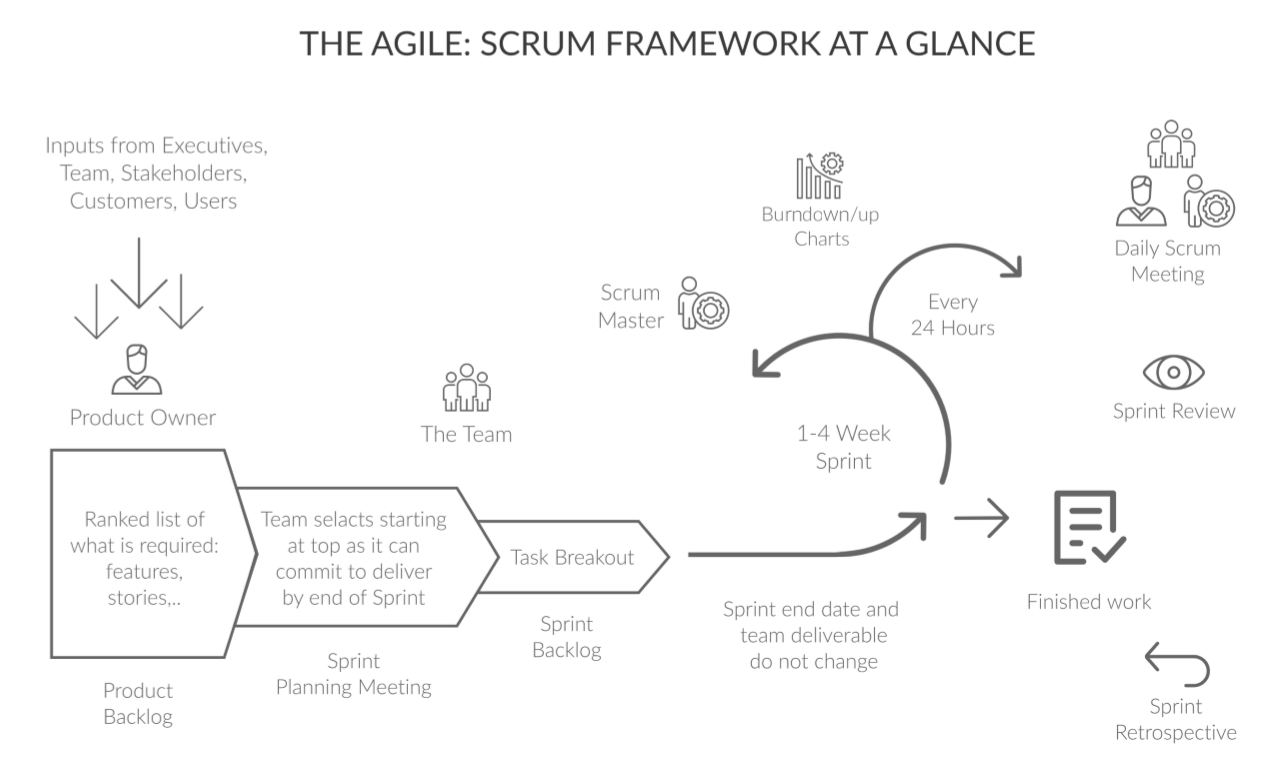
Teams are given a lot of autonomy — it is a team responsibility to commit to a body of work to be completed in a "sprint" iteration. Anything that won't fit in the sprint is put on the "backlog" and is considered for inclusion in a future sprint by the Product Owner. It is a great way of working as it keeps everyone engaged in what we are trying to achieve.
How to organize such productive teamwork? We practice SCRUM methodology for WorkFusion Product development, so do our Client and Partner successful automation teams who use WorkFusion.
Scrum is an iterative software development and product management method that applies Agile principles. According to it, the project development is handled in short iterations to allow for business and engineering flexibility. The main idea behind Scrum and, ultimately, Agile is to deliver value to customers continuously. If you look closer, Scrum is mostly used for long-term complex projects that require business and engineering flexibility.
The basic Scrum principle is iterative development. The entire project timeline is broken down into short iterations called sprints. During each sprint – each usually lasting two weeks – a team commits to deliver on a set of user stories, concise product feature descriptions. Short iterations ensure that the team prioritizes the features that are actually needed and can be adjusted after receiving feedback. In the best-case scenario, each sprint delivers a small product increment that functions, is QA-approved, and can be handed to stakeholders or end-users to get their opinions.
Clean use case design
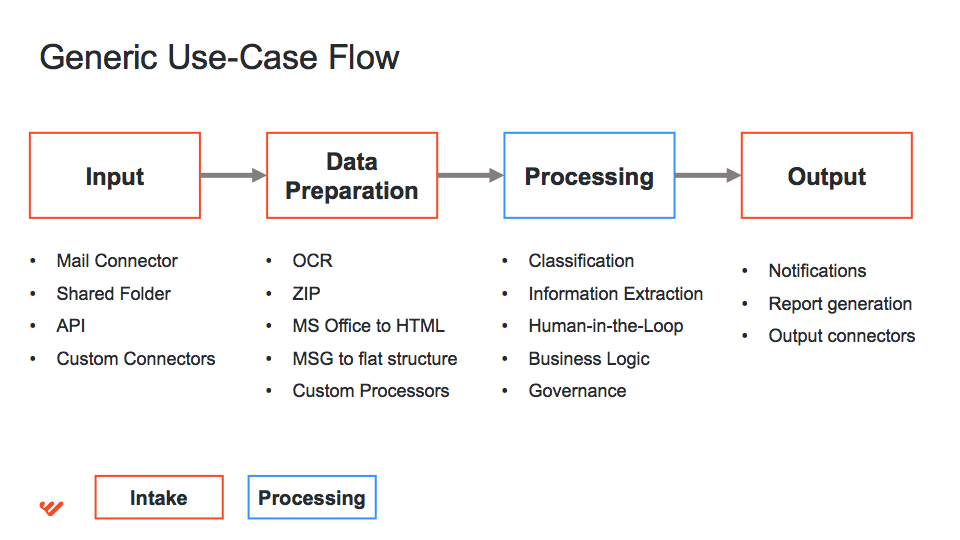
The majority of use cases consists of three main swim lanes, as shown below; the first and third blocks are called Intake.
- Input+Data Preparation - connecting to a target application or a service and downloading data like documents. In most of the cases, some preprocessing is required for documents like OCR, extraction of attachments of an MSG file, etc.
- Processing - this is where all processing logic happens. It can be information extraction or classification, manual tasks, validation, etc.
- Output - preparing and submitting the results of processing to some system. It can involve report generation, sending emails, interacting with legacy systems.
Pre-packaged reusable components
Reusable software components are designed to apply the power and benefit of reusable, interchangeable parts from other industries to the field of software construction. Other industries have long profited from reusable components. Reusable electronic components are found on circuit boards. A typical part of your car can be replaced by a component made from one of many different competing manufactures. Lucrative industries are built around parts construction and supply in most competitive fields. The idea is that standard interfaces allow for interchangeable, reusable components. Reusable automation software components can appear on various solution levels:
- simple bot methods: work with remote files; CRUD operations with data storage; send specific RPA instructions within the bot, etc.
- advanced processes: reusable OCR process; set of processes for Data Analyst; Cognitive process; email connector, etc.