
Convert Bot Config to ETL Form
Bot Form (ETL) is a special Bot Config type intended for flexible re-using by defining all initial parameters (variables) through a UI form, not through direct code editing.
The feature allows including Bot Configs into BPs and setting their initial parameters and input and output data without editing the code.
| Sample Form 1 | Sample Form 2 |
|---|---|
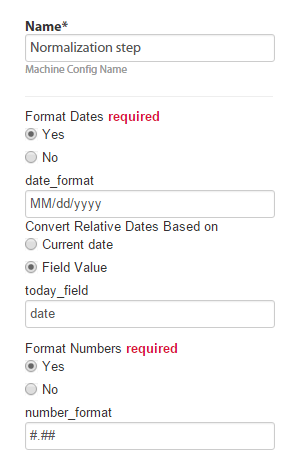 | 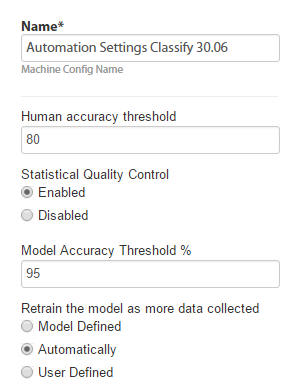 |
The goal of the topic is to convert a simple Bot config to a user-friendly ETL form. The ETL Form code is as follows:
<?xml version="1.0" encoding="UTF-8"?>
<config>
   <var-def name ="amount">
       <#noparse>
         <template>${{{input_column_name}}}</template>
       </#noparse>
   </var-def>

   <var-def name ="output">
       <template>Pass</template>
   </var-def>
   <case>
     <#noparse>
       <if condition="${Integer.valueOf(amount.toString()) >= {{amount_limit}}}">
       <var-def name ="output">
           <template>Fail</template>
       </var-def>
       </if>
     </#noparse>
   </case>
   <export include-original-data="true">
     <single-column name="{{result_column_name}}" value="${output}"/>
   </export>
</config>
A Bot Configuration has the Input column, the If statement, and the Output column.
The form can define:
- input column name:
{{input_column_name}} - limit for <if> condition:
{{amount_limit}} - output column name:
{{result_column_name}}
In the above case, specify the input column that contains number, specify the value of 100, and the result output column name.
Convert basic Bot Configuration to Form
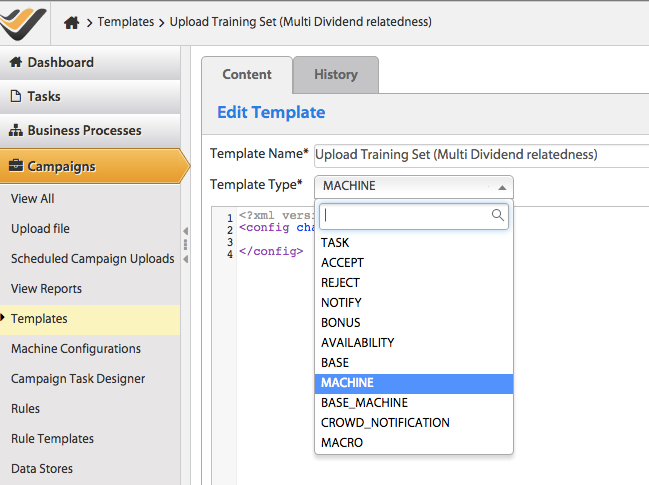
Create a template: Use your existing Bot configuration code to go to Campaigns > Templates and create a new template with the Bot code. Select the Template Type = BASE_MACHINE.
To create a Use Case, go to System Settings > Use cases:
Select Template and Name.
Specify Type as ETL.
Go to Advanced Mode > Add Answers:
- Input Column Name:
input_column_name - Condition:
amount_limit - Output Column Name:
result_column_name
- Input Column Name:
Edit the code for all three values to go from, for example,
${input_column_name}to:{{input_column_name}}to get a column name.${{{input_column_name}}}to get the value of this column, not its name.
Save the ETL config. Use the
<#noparse>directive to fix a validation error in the<if>condition. For more information, see here.
Add a Bot Task to BP.
Form examples
RSS feed retrieval
Expand to learn more
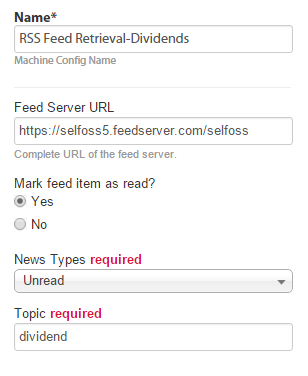
<?xml version="1.0" encoding="UTF-8"?>
<config>
<var-def name="selfossUrl">
<template>{{selfossurl}}</template>
</var-def>
<var-def name="mark_as_read_var">
<template>{{mark_as_read}}</template>
</var-def>
<script></script>
<while condition="true" index="idx" maxloops="40">
<var-def name="offset">
<script return="offset_result"></script>
</var-def>
<var-def name="itemsUrl">
<template>${selfossUrl}/items?items=200&offset=${offset}&
type={{type}}&topic={{topic}}&tag={{topic}}</template>
</var-def>
<var-def name="itemsJson">
<http url="${itemsUrl}" cookie-policy="browser" method="GET"/>
</var-def>
<script><![CDATA[
org.json.JSONArray jsonArr = new org.json.JSONArray(itemsJson.toString());
int jsonArrLength = jsonArr.length();
for (int i=0; i<jsonArrLength; i++) {
org.json.JSONObject jsonItem = jsonArr.getJSONObject(i);
String jsonItemContent = jsonItem.get("content");
String jsonItemSourceTitle = jsonItem.get("sourcetitle");
String jsonItemLink = jsonItem.get("link");
String jsonItemDateTime = jsonItem.get("datetime");
String jsonItemUid = jsonItem.get("uid");
String jsonTitle = jsonItem.get("title");
String itemId = jsonItem.get("id") != null ? jsonItem.get("id").toString(): "unknown" ;
Map exportItem = new HashMap();
exportItem.put("newsLink", jsonItemLink);
exportItem.put("sourceTitle", jsonItemSourceTitle);
exportItem.put("dateTime", jsonItemDateTime);
exportItem.put("feedUid", jsonItemUid);
exportItem.put("title", jsonTitle);
exportItem.put("feed_id", itemId);
uniqueMap.put(jsonItemContent, exportItem);
feedIds.add(itemId);
}
]]></script>
</while>
<var-def name="itemIds">
<script return="result"></script>
</var-def>
<case>
<if condition="${'${' + 'mark_as_read_var.toBoolean()' + '}'}">
<loop item="itemId">
<list>
<var name="itemIds"/>
</list>
<body>
<empty>
<var-def name="markResult">
<http url="${selfossUrl}/mark/${itemId}" cookie-policy="browser" method="POST"/>
</var-def>
</empty>
</body>
</loop>
</if>
</case>
<script></script>
<export include-original-data="false">
<multi-column list="${exportItems}">
<put-to-column-getter name="source" property="sourceTitle"/>
<put-to-column-getter name="feed_uid" property="feedUid"/>
<put-to-column-getter name="feed_link" property="newsLink"/>
<put-to-column-getter name="date_time" property="dateTime"/>
<put-to-column-getter name="feed_title" property="title"/>
<put-to-column-getter name="feed_id" property="feed_id"/>
</multi-column>
</export>
</config>
SSI database lookup
Expand to learn more
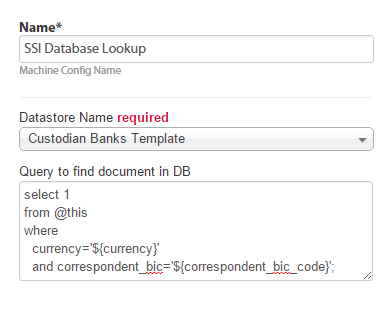
<?xml version="1.0" encoding="UTF-8"?>
<config charset="UTF-8">
<var-def name="db_name">{{db_name}}</var-def>
<var-def name="custodian_bank_swift"><template>${custodian_bank_swift}</template></var-def>
<var-def name="custodian_bank_name"><template>${custodian_bank_name}</template></var-def>
<var-def name="currency"><template>${currency}</template></var-def>
<var-def name="correspondent_bic"><template>${correspondent_bic}</template></var-def>
<var-def name="ssi_exists"><template>false</template></var-def>
<var-def name="ssi_document">
<datastore name="Custodian Banks Template">
{{check_query}}
</datastore>
</var-def>
<var-def name="ssi_exists">
<script return="result"></script>
</var-def>
<var-def name="jobUUID">
<script return="uuid"></script>
</var-def>
<export include-original-data="true">
<single-column name="ssi_exists" value="${ssi_exists}"/>
<single-column name="job_uuid" value="${jobUUID}"/>
</export>
</config>
Cut chapter from PDF (split PDF)
Expand to learn more
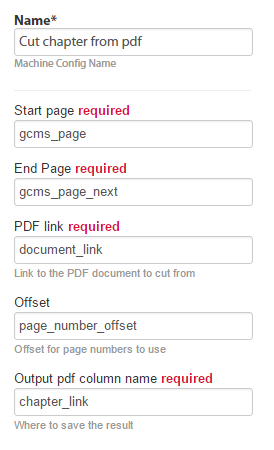
<?xml version="1.0" encoding="UTF-8"?>
<config>
<var-def name='toc_start'><template>${{{start_page}}}</template></var-def>
<var-def name='toc_end'><template>${{{end_page}}}</template></var-def>
<var-def name='document_link'><template>${{{pdf_document_link}}}</template></var-def>
<var-def name='offset'><template>${{{offset}}}</template></var-def>
<script></script>
<var-def name="cuttedDoc">
<s3 bucket='temp_bucket'>
<s3-put-public path='TR/OCR/split/${docUuid}.pdf' content-type="application/pdf" content-disposition="inline">
<script return="output.toByteArray()"/>Skip escaping
Expand to learn more
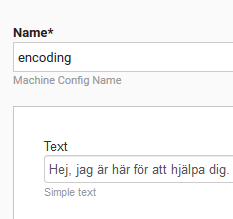
<?xml version="1.0" encoding="UTF-8"?>
<config charset="UTF-8">
    <var-def name="message">
        <script return="result">
            String result = org.apache.commons.lang3.StringEscapeUtils.unescapeJava("{{text}}");
        </script>
    </var-def>
    <export include-original-data="true">
        <single-column name="message" value="${message}" />
    </export>
</config>