
Set up Price Rules
Price Rules are intended to update Task price automatically, for example, every day. This function helps promote slow Tasks by gradually increasing the Task price.
Add Price Rule
To add a Price Rule for a specific Task:
Go to Run Task > Advanced Options > Adjudication.
Select a Price Strategy in the appropriate dropdown.
Set all the Price Strategy parameters:
- Max Price
- Increment price time
- Increment price value
- Max price
- Min price
Click the Save button and save the Task.
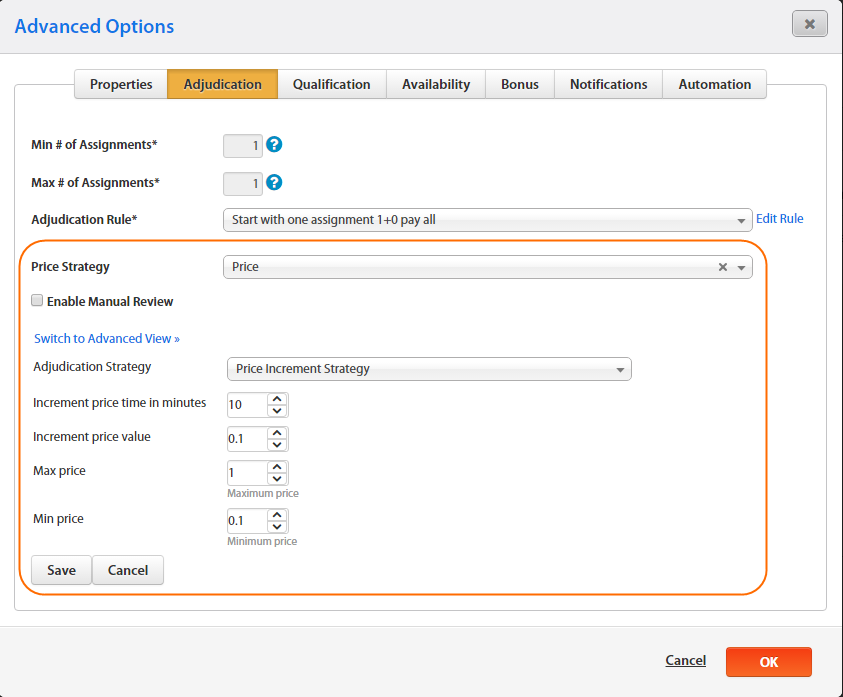
You can also edit main rule parameters by clicking the Switch to Advanced View link.
Price Rule example
package com.freedomoss.requester;
import com.freedomoss.objective.model.PriceRuleContext;
import org.slf4j.Logger;
import java.util.Date;
import java.lang.Double;
import java.util.Map;
#declare any global variables here
global PriceRuleContext source
global Logger log
global Map params
rule "Price Rule initialization global"
auto-focus true
no-loop
agenda-group "initialization-group"
 when
  $ctx: PriceRuleContext(initialized == false);
 then
  # insert processed facts into memory

$ctx.getProperties().put('minAmount', new Double(0.1));
$ctx.getProperties().put('maxAmount', new Double(1000));
$ctx.getProperties().put('delta', new Double(0.1));
$ctx.getProperties().put('factor', new Long((new Date().getTime() - $ctx.getRun().getStartDate().getTime())/(60000)));
  $ctx.getProperties().put('newAmount',
                           (Double)$ctx.getProperties().get('minAmount') + (Double)$ctx.getProperties().get('delta') * (Long)$ctx.getProperties().get('factor'));
  $ctx.updateWorkingMemory();
  # move to business rules
  kcontext.getKnowledgeRuntime().getAgenda().getAgendaGroup("calculation").setFocus();
end
rule "1. Set new price"
agenda-group "calculation"
dialect "mvel"
salience 100
 when
  $ctx: PriceRuleContext(initialized == true);
  eval($ctx.getProperties().get('newAmount') < $ctx.getProperties().get('maxAmount'));
 then
  $ctx.setNewReward(Math.round((Double)$ctx.getProperties().get('newAmount') * 100)/100.00);
  $ctx.logExecutedRule(kcontext.getRule().getName());
end
rule "2. Set max price"
agenda-group "calculation"
dialect "mvel"
salience 90
 when
  $ctx: PriceRuleContext(initialized == true);
  eval($ctx.getProperties().get('newAmount') >= $ctx.getProperties().get('maxAmount'));
 then
  $ctx.setNewReward(Math.round((Double)$ctx.getProperties().get('maxAmount') * 100)/100.00);
  $ctx.logExecutedRule(kcontext.getRule().getName());
end
rule "3. Logging data"
agenda-group "calculation"
dialect "mvel"
salience 10
 when
  $ctx: PriceRuleContext(initialized == true);
 then
  $ctx.logData();
end
Create Price Rule
To create a Price Rule:
- Go to Campaigns > Rules.
- Click the Create button.
- Select Rule Type = Price.
- In the Adjudication Strategy field, select the Rule Template or click the Switch to Advanced View link and write the Drools code in the code editor (see the code example above).
- Save the Price Rule.
caution
Do not select the increase time lower than five minutes as a job starts every five minutes.