
Configure reward and execution time
If you are using external Workforces, for example MTurk or Upwork (integrated via WorkSpace), you can do the following actions on the Run Task tab:
- Set Reward per Task.
- Estimate the Task execution time.
Set reward per task
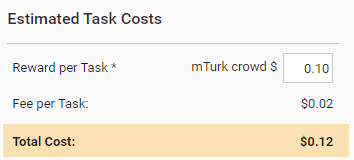
The Estimated Task Costs section is intended to:
- Set the Reward per Task.
- View Fee per Task. The fee depends on the endpoints' policies of the selected Reward and Estimated Costs.
- View the calculated Total Cost.
Total Cost = (Reward per Task + Fee per Task) * Min # of Assignments * Number of Records / Block Size
See the Min # of Assignments description in the Adjudication topic.
The Total Cost value also depends on the Adjudication Rule, Bonus Rule, and Price Strategy.
To speed up the Task execution, raise the Reward per Task.
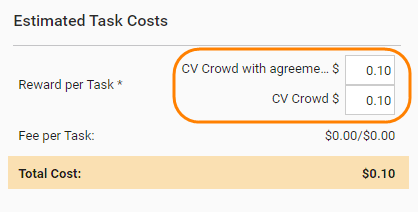
When your Workforce consists of two or more Crowds, set Reward per Task for each Crowd independently.
Estimate execution time
To measure the time needed for Task execution:
In the Worker Reward block, click Estimate. The Task appears just as it would for a Worker.
Complete the Task, and once you are done click the Estimate button on the Task Preview.
The time spent is displayed in the Seconds per Task field.
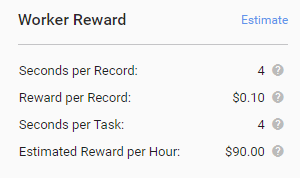
Seconds per Record: estimated time required to complete one Record from the input Data file. Equals to (Seconds per Task / Block Size).
Reward per Record: the monetary compensation estimated for each Record in the input Data file. Equals to (Reward per Task / Block Size).
Seconds per Task: estimated time required to complete one Task from the input Data file.
Estimated Reward per Hour: the amount a Worker earns acting with the same speed as Seconds per Task during an hour. Equals to (Reward per Task * 3600 / Seconds per Task).