
Cold backup and restore
Currently, this backup and restore process cannot be used as a part of the migration process if DNS names are changed. This is due to the fact that VAULT DB component will contain records with old DNS names from the previous installation.
This backup script can backup/restore only SPA data components.
From SPA 9.0.0 on, TLS certificates, config.yml and secrets.yml can be found in the distr archive in backup directory once the backup is performed. You can use them in the restore process.
important
In SPA 8.5.X, backup scripts were incorporated in the Ansible installer.
Since SPA 9.0, backup scripts are a part of the product and located in <INSTALL_DIR>/tools/cold-backup.
General information
Ansible installation comes with the script that implements the following cold backup solution design:
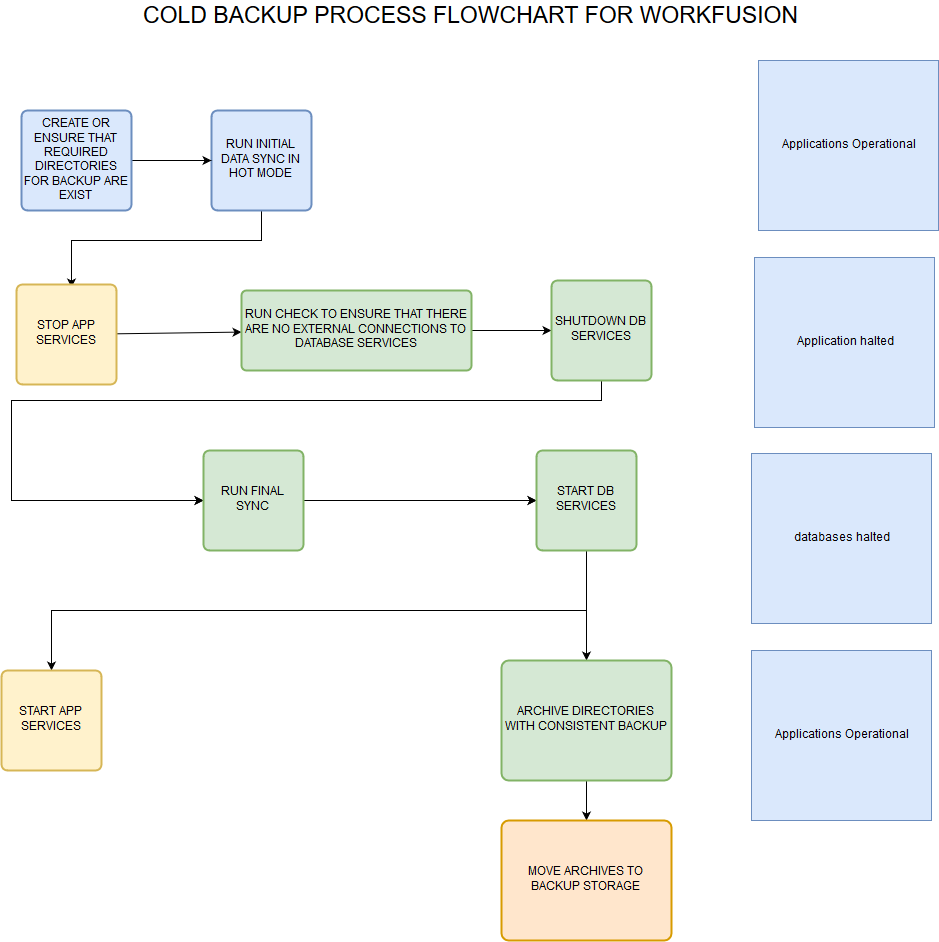
Backup script
Backup script syntax
wf-backup.sh { OPERATION } { COMPONENT } { ROLE }
$ ./wf-backup.sh
Usage:
 ./wf-backup.sh {prepare,backup,restore}
{all,mysql,postgresql,riak,minio,mongodb,vault,nexus,rpa-manager,distr} {apm,db,app} [EXTRA_VARS...]
Examples:
./wf-backup.sh prepare all db
./wf-backup.sh backup all db
./wf-backup.sh restore all db
./wf-backup.sh backup rpa-manager app
./wf-backup.sh restore rpa-manager app
./wf-backup.sh backup mongodb apm
./wf-backup.sh restore mongodb apm
Available procedures
Backup script supports 3 possible operation:
- Prepare (optional) hot-sync data. It is part of Backup operation, but can be launched separately before the main backup process to achieve minimal downtime.
- Backup. All SPA services are turned off, components are archived. Once completed, the services are restarted.
- Restore. The script searches for backup archives in the backup directory and performs the restore process.
Components for backup
Depending on Server ROLE (APM, DB, APP), the script supports backup and restore of the next components:
DB ROLE:
- mysql
- postgres
- minio
- mongodb
- vault
- nexus
APM ROLE:
- mongodb
APP ROLE:
- rpa-manager
Variables used in backup script
$ cat secrets.yml

mysql_admin_user : mysql

mysql_admin_pass: mysql

postgresql_admin_user: postgres

$ cat config.yml

install_dir: /opt/workfusion

backup_directory: '{{ install_dir }}/backup'
Backup procedure
DB Server
Run prepare (hot-sync step).
$ ./wf-backup.sh prepare all dbThe script copies (hot-sync) all DB components to
{{ backup_directory }}.Result:
$ ls -1 /opt/workfusion/backup/

mongodb_db

mysql

nexus

postgres

riak

rpa-manager

vault
Shut down APP services. This step should be executed not on DB Server, but run manually on APP Server.
$ wfmanager stop allRun the main backup step.
./wf-backup.sh backup all dbThe script checks if there are no external connections to WF databases, shuts WF services down, than performs cold-sync of database components files. After all, the files are archived.
As result in your
{{ backup directory }}you will find the archives with backups of components' content:$ ls -1 /opt/workfusion/backup/ ... mongodb_db-1516797995.tar.gz mysql-1516797995.tar.gz nexus-1516797995.tar.gz postgres-1516797995.tar.gz riak-1516797995.tar.gz vault-1516797995.tar.gzMove these archives to the backup storage.
APP Server
Run the main backup step.
$ ./wf-backup.sh backup all appResult:
$ ls -1 /opt/workfusion/backup/
rpa-manager-1516800559.tar.gz
Move this archive to the backup storage.
APM Server
Run the main backup step.
$ ./wf-backup.sh backup all apmResult:
$ ls -1 /opt/workfusion/backup/

mongodb_apm

mongodb_apm-1516865538.tar.gz
Move this archive to the backup storage.
Restore procedure
DB server
Run the installation first (as root).
$ ./install.sh precheck db && ./install.sh preinstall db
$ su - wfuser
$ ./install.sh install db && ./install.sh check db
Put backup archives with DB components into the backup directory.
Run the restore command.
All services on APP Server should be stopped.
./wf-backup.sh restore all dbVerify that services started successfully.
$ wfmanager status
APM Server
Run the installation first (as root).
$ ./install.sh precheck apm && ./install.sh preinstall apm
$ su - wfuser
$ ./install.sh install apm && ./install.sh check apm
Put backup archives with APM components into the backup directory.
Run the restore command:
$ ./wf-backup.sh restore all apmVerify that services started successfully.
$ ./wfmanager status
APP Server
Run the installation first (as root).
$ ./install.sh precheck app && ./install.sh preinstall app
$ su - wfuser
$ ./install.sh install app && ./install.sh check app
Put backup archives with APP components into the backup directory.
Run the restore command:
$ ./wf-backup.sh restore all appVerify that services started successfully.
$ ./wfmanager status