
Scaling RPA
Overview
WorkFusion Platform provides solution for auto scaling up of the RPA Systems. It's important to understand the calculations and the parallel execution which is supplied out of the box by WorkFusion product.
It is also important that appropriate decisions are being taken for fast processing of the RPA.
Transition architecture
The scale management is to be calculated on the basis of RPA to be done on the client applications.
Decision factors:
- How fast the client application, e.g. how long it take to read the screen, and so on.
- Can parallel processing be performed on application on same RDP node?
This solution uses RPA Manager for distribution of load among the registered RPA Unit(s).
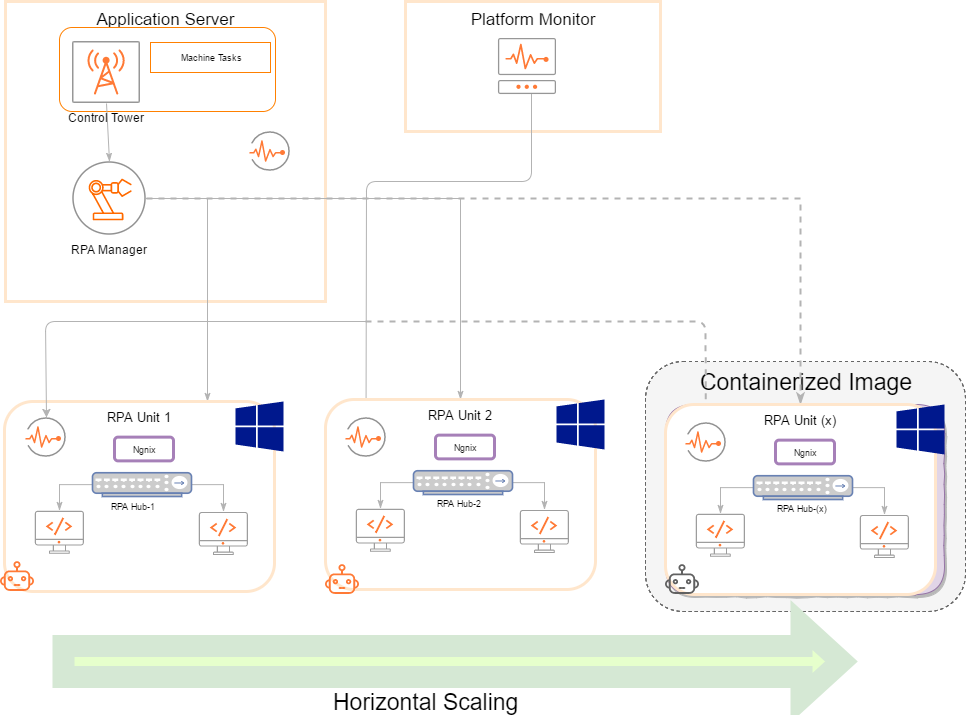
Scaling Solution Details
WorkFusion Control tower sends BOT/Machine Tasks to RPA manager where they are queued up, so that available RPA Unit can pick up tasks for execution.
Important considerations for achieving scaling up:
- Horizontal scaling up can be achieved by putting up RPA Units to the RPA Manager.
- For task distribution strategies refer to Task distribution strategies.
- For segregating the tasks or business process steps, WorkFusion Platform can be configured accordingly. Refer to RPA distribution and segregation management.
- Number of BOT calculations.
- WorkFusion provides multi-threaded execution of BOT task using the out-of-the-box Bot Source configuration.
- Use Node capabilities for distributing the robot RPA tasks.
RPA scaling Unit definition
The RPA Unit can be a containerized Windows image, containing the following components:
- Nginx
- RPA Hub
- RPA Nodes (1 to 2 nodes is the most efficient from resource use perspective and easy of maintenance)
RPA development best practices
- Use
driver.getPageSourceto get the complete DOM of HTML web page.- This will help in avoiding multiple hoping and hopups to RPA node.
- User HTML page source and then use XPath to read elements in the Groovy script.
- Use
driver.executeScript(String script, Object... args)for enhanced performance- Some times reading the RPA user interface like Swing Applet having lots of columns and rows can be a costly call, so it is recommended to use the RPA unit script execution and return the desired output in JSON to Groovy script.
- It is important to note the timeouts of driver script.