Handle exceptions
As you probably know, if a Bot Task throws an exception, the platform stops the execution of the entire Business Process (BP). In most real-life scenarios, such behavior is unacceptable. Instead, you would usually react to the exception by retrying the attempt, asking a human operator to intervene, trying to proceed with other records, or using any combination of these strategies.
ODF 2 offers a developer the means to define a component that serves as a single entry point to the error handling logic and overrides this centralized behavior on the per-runner or per-task basis.
Chain of responsibility
The best place to start discovering error handling mechanisms in ODF 2 is the central class of the framework: com.workfusion.odf2.core.Odf. In the runTask() method, all the code that deals with the task execution is covered with the try-catch clause:
try {
    // code omitted for clarity

    final TaskRunnerOutput result = runner.run(odfTask);
    return result;

    // code omitted for clarity

} catch (RetryRequiredException e) {
    // code omitted for clarity; this case will be discussed later on this page, don't focus on it now

} catch (Exception e) {
    return runner.handleException(odfTask, injector.instance(ErrorHandlingLogic.class), e);
}
If the exception is raised during the task execution, ODF calls the runner.handleException() method and returns its result as the task output. The OdfTaskRunner interface defines the handleException() method in the following way:
default OdfOutput handleException(T task, ErrorHandlingLogic logic, Exception e) {
    return task.handleException(logic, e);
}
By default, the handling is delegated further to the method of the task itself. The OdfTask method looks like this:
default OdfOutput handleException(ErrorHandlingLogic logic, Exception e) {
    return logic.handleException(e, this);
}
Therefore, the whole chain of responsibility is ODF > Runner > Task > ErrorHandlingLogic.
In the end, the responsibility of handling the exception falls to the ErrorHandlingLogic instance. At any intermediate step, the handleException() method can be overriden to add some logic specific to the runner or task in question.
ErrorHandlingLogic
Let's return to ErrorHandlingLogic and the way it is instantiated in the Odf class. injector.instance(ErrorHandlingLogic.class) asks the dependency injection container to construct the class. But if you look into it, ErrorHandlingLogic is an interface:
public interface ErrorHandlingLogic {

    OdfOutput handleException(Exception e, OdfTask odfTask);

}
The DI container cannot create an instance of the interface. It needs some module to provide an implementation for it. By default, DefaultErrorHandlingModule is used for this purpose:
public class DefaultErrorHandlingModule implements OdfModule {

    @Provides
    @Singleton
    public ErrorHandlingLogic failFastErrorHandling() {
       return new FailFastErrorHandling();
    }

}
Here, you see a simple DI module that tells the framework that the instance of the FailFastErrorHandling class should be used as FailFastErrorHandling:
public class FailFastErrorHandling implements ErrorHandlingLogic {

    @Override
    public OdfOutput handleException(Exception e) {
        throw new OdfFrameworkException(
                String.format("Exception was thrown inside ODF task '%s': %s", odfTask.getClass().getName(), e.getMessage()), e);
    }

}
It is the default error handling behavior of ODF 2 at last. It is not useful in production, and thus it should be replaced by a custom solution. See the following section for more information.
Providing own ErrorHandlingLogic
As you know, each ODF 2-based BCB must contain a file named usecase.properties. It is used to provide the framework with essential configuration properties. One of these properties tells ODF 2 which error handling module to use:
code=${usecase.code}
name=${usecase.name}
version=${usecase.version}
errorHandlingModule=com.your.package.CustomErrorHandlingModule
If your usecase.properties file looks like this, ODF 2 tries to load com.your.package.CustomErrorHandlingModule and add it to the list of DI modules. The module must define a provider for the ErrorHandlingLogic implementation:
public class CustomErrorHandlingModule implements OdfModule {

    @Provides
    @Singleton
    public ErrorHandlingLogic failFastErrorHandling() {
       return new YourCustomErrorHandling();
    }

}
Now, you have a class with the handleException() method called when an exception occurs.
Exception classes
ODF 2 does not make any assumptions about exception classes used in implementations. Anything thrown in the Bot Task code is dealt with in the same way—with a singular exception, which is RetryRequiredException.
RetryRequiredException is a way to stop the Bot Task execution and ask ODF 2 to schedule it to be relaunched by the Work.AI platform. OdfTask.cancelAndRetryAfter() is a convenience method to throw it.
One more exception type that you need to be aware of is OdfFrameworkException. This class is used when the framework encounters some irrecoverable internal error. It is processed exactly in the same way as any other exception.
Error handling and Transactions
ODF 2 provides an abstract error handling class that contains recommended logic to use with Transactions—com.workfusion.odf2.transaction.errorhandling.AbstractPersistingErrorHandling. This class assumes that a Transaction status must be changed after encountering an exception. The change is also propagated to parent and sibling Transactions if the current Transaction is a split one.
To take advantage of this logic, you can extend this class and provide it in your own error handling module.
Multiprocess error handling
ODF 2 provides the out-of-the-box ErrorHandlingLogic intended to work in an AI Agent designed in the multi-process style. To use it, change usecase.properties like this:
errorHandlingModule=com.workfusion.odf2.multiprocess.MultiProcessErrorHandlingModule
The idea of this method is to provide non-blocking exception handling in an AI Agent. In this context, non-blocking means that after an exception in your code gets thrown, the BP execution doesn't stop and can proceed with other records. The exception is reflected in the Control Tower event log as a warning. The design paradigm allows your automation to serve without problem-driven restarts and manual data preparations. In this way, you can handle exceptions properly according to the unique AI Agent business logic design.
In short, the principle is to record all unhandled exceptions to a table in Data Stores and change the status of the corresponding Transaction to reflect that. Therefore, if a Transaction makes it to the end of the BP, this does not mean it is successful because you still have to check its status.
When MultiProcessErrorHandlingLogic.handleException() is called, it behaves in the following way:
- An exception is logged into the Control Tower log with the
WARNstatus. - The
ErrorStatusfield of the Transaction entity is set toHAS_ERROR. ErrorEntitywith the error information is created and linked to the failed Transaction.- If the failed Transaction is a sub-transaction created by splitting, the error status is propagated to its parent Transaction and all of its siblings.
- If there is no Transaction for the current record,
MultiProcessErrorHandlingcannot operate with Transaction statuses, which is the core of the entire multiprocess mechanics. In this case, the exception is passed to already describedFailFastErrorHandling.
MultiProcessErrorHandlingLogic is based on previously described AbstractPersistingErrorHandling.
Provided with the ODF 2 Example project, the Error Handling BP is expected to analyze an error and attempt a recovery, for example, using a Manual Task to prompt human operators the actions to address the issue. In any case, an invalid Transaction never returns to the common data flow. At the end of the respective BP, its status is set to ABORTED.
As a developer of the Error Handling BP, if you want to recover your Transaction from the erroneous state, create a new Transaction with any applicable status and assign any required entities from the aborted Transaction to be processed again. For details on Transactions, refer to the Create and process user Transactions guide.
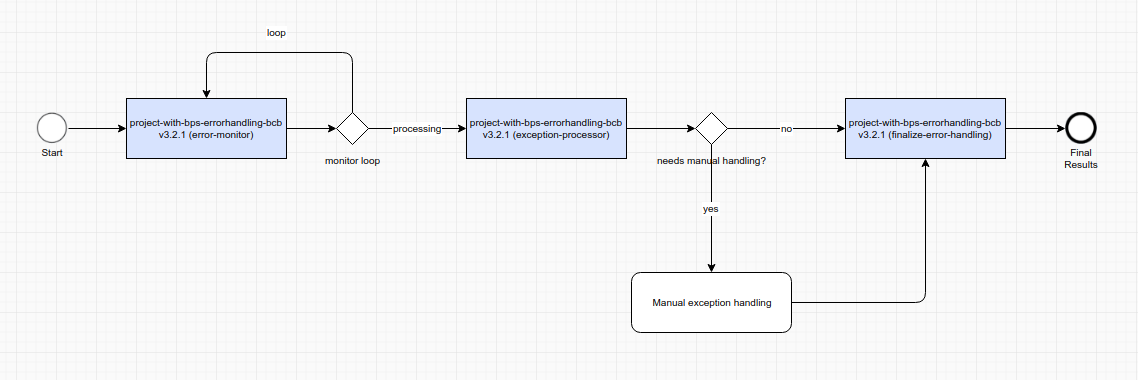
Error Monitor specifically looks for Transactions with the HAS_ERROR status and passes them down the Error Handling BP. It is the only case when a Transaction can be processed by two BPs simultaneously. It can take time to reach the end of the BP where the Transaction was originally in, whereas Error Monitor can find it faster. Therefore, Transactions with error-related statuses must not be processed in any way because Error Handling Bot Tasks can already process them.
In the Error Handling BP, you can find an example of implementing a simple handling logic when any non-business exceptions are routed to a custom Manual Task to be displayed to an operator with all available details. In this example, the Transaction status is changed to ABORTED. ExceptionProcessorTask is a sample implementation of automated actions with an exception:
@BotTask
public class ExceptionProcessorTask implements ErrorHandlingTask {

    private final Logger logger;

    @Inject
    public ExceptionProcessorTask(Logger logger) {
        this.logger = logger;
    }

    @Override
    public boolean isNeedManualErrorHandling(ErrorEntity errorEntity) {
        return !errorEntity.getType().equals(ErrorType.BUSINESS);
    }

    @Override
    public void automationHandling(Transaction transaction) throws OdfException {
        logger.info("Handling error in transaction '{}'", transaction.getUuid());
    }

    @Override
    public TransactionStatus updateTransactionStatus() {
        return TransactionStatus.ABORTED;
    }

}
In many cases, there is no way to automate exception handling, so the human-in-the-loop step is needed. To showcase how to include a Manual Task into the Exception Processing BP, the ODF 2 Example project provides one out-of-the-box. To enable operators to manually manage the Transaction status (in the sample Manual Task, between the ABORTED and COMPLETED statuses), the last Bot Task in the BP, provided out-of-the-box with ODF 2, checks the _sys_new_transaction_status variable. If the latter exists, the Bot Task sets its value as the Transaction status.
@BotTask
public class FinalizeErrorHandlingTask implements TransactionProcessorTask {

    private final TaskInput taskInput;

    @Inject
    public FinalizeErrorHandlingTask(TaskInput taskInput) {
        this.taskInput = taskInput;
    }

    @Override
    public boolean shouldProcessTransaction(CurrentTransaction currentTransaction) {
        return TransactionStatus.ERROR_IN_PROGRESS.appliesTo(currentTransaction);
    }

    @Override
    public void doWithTransaction(Transaction transaction) {
        final String newTransactionStatus = taskInput.getVariable(TaskVariable.NEW_TRANSACTION_STATUS)
                .orElse(TransactionStatus.ABORTED.name());

        transaction.setStatus(newTransactionStatus);
    }

}
The provided simple exception handling case is for illustration only. Your case is unique to the business logic you implement. Follow the proposed design pattern to handle exceptions in BPs. Build the processing logic by implementing and extending the available interfaces.
Dealing with exceptions
When you deal with exceptions in a BP, it is important to distinguish between the ones covered by the multiprocess exception handling and the causes outside of ODF 2.
When the multiprocess error handling mechanism is enabled, it logs the following warning: "Error was raised inside ODF task." Check the ds_uc_<uc_name>_exception_v<version> table for a complete stack trace. If the exception is wrapped in OdfFrameworkException, something happened within the framework code. For example, the configuration is incorrect, or there’s a database issue, and so on. In any case, act the same way as you usually do to handle stack traces.
If an actual error appears in the Control Tower error log, it means either of the two things:
- The multiprocess error handling behavior is disabled. Act as you usually do to handle stack traces.
- Something happened outside of the ODF 2 code. Analyze the stack trace in the Control Tower error log. Look into the RPA Worker log. Most likely, it is an infrastructure-related issue.
To access the Control Tower and RPA Worker logs via Work.AI Developer, use the Launcher application. To access logs via the Work.AI platform, use Platform Monitor as described in the following guides:
Example of customized error handling
The ODF 2 Example project not only showcases the usage of MultiProcessErrorHandling, but also demonstrates how per-task customization can be done. First, let's refresh how it is organized.
There are four BPs, called Intake, Processing, Submission, and Error Handling. A Transaction passes through Intake, Processing, and Submission in turn:
- Intake emulates reading emails from a hypothetical external system and storing them as the
Emailobjects with multipleAttachments. - Processing checks
Attachmentsfor the correctness and aggregates them intoInvoice, one per eachEmail. - Submission emulates sending
Invoicesto some hypothetical external system. - Error Handling deals with exceptions only.
Let's look at EmailToInvoiceConverterTask that belongs to the Processing BP. It is the task responsible for validation of Attachments. Attachments have different types. Some of them are legit, like PDF or TXT. Some are considered incorrect, and for them exceptions are raised. Specifically, for demonstration purposes, there are "FAIL", "RETRY", and "LOG-AND-FORGET" attachment types telling what exactly is done with the corresponding Transaction:
private void validateAttachment(Attachment attachment) {
    if (Objects.equals("FAIL", attachment.getType())) {
        throw new IllegalStateException(String.format("Email '%s' contains FAIL attachment", attachment.getEmail().getUuid()));

    } else if (Objects.equals("LOG-AND-FORGET", attachment.getType())) {
        throw new IllegalStateException(String.format("Email '%s' contains LOG-AND-FORGET attachment", attachment.getEmail().getUuid()));

    } else if (Objects.equals("RETRY", attachment.getType())) {
        throw new IllegalStateException(String.format("Email '%s' contains RETRY attachment", attachment.getEmail().getUuid()));
    }
}
As you can see, each of these "incorrect" attachment types results in IllegalStateException.
Now, let's look at the handleException() method of this task:
@Override
public OdfOutput handleException(ErrorHandlingLogic logic, Exception e) {
    if (e instanceof IllegalStateException && e.getMessage().contains("LOG-AND-FORGET")) {
        return logAndForgetBehavior.abortTransaction();
    }

    if (e instanceof IllegalStateException && e.getMessage().contains("RETRY")) {
        return retryTransactionBehavior.retryTransaction();
    }

    return InputConverterTask.super.handleException(logic, e);
}
As you can see, the "LOG-AND-FORGET" attachment results in the logAndForgetBehavior.abortTransaction() call, and the "RETRY" attachment causes retryTransactionBehavior.retryTransaction(). In the case of "FAIL", the handling is delegated into your configured instance of ErrorHandlingLogic, that is MultiProcessErrorHandling in case of the Example project.
Now, logAndForgetBehavior and retryTransactionBehavior are pretty simple components extracted to separate classes for clarity. Let's look at "RETRY" first.
public class RetryTransactionBehavior {

    private final Logger logger;

    private final CurrentTransaction currentTransaction;

    private final EmailRepository emailRepository;
    private final AttachmentRepository attachmentRepository;

    @Inject
    public RetryTransactionBehavior(Logger logger, CurrentTransaction currentTransaction, EmailRepository emailRepository, AttachmentRepository attachmentRepository) {
        this.logger = logger;
        this.currentTransaction = currentTransaction;
        this.emailRepository = emailRepository;
        this.attachmentRepository = attachmentRepository;
    }

    public OdfOutput retryTransaction() {
        final Transaction transaction = currentTransaction.get();

        logger.warn("Transaction {} will be retried (this is intended behavior for demonstration purposes)", transaction.getUuid());

        final List<Email> emails = emailRepository.findAll(transaction.getUuid());

        for (Email email : emails) {
            for (Attachment attachment : email.getAttachments()) {
                if (Objects.equals(attachment.getType(), "RETRY")) {
                    attachment.setType("LOG-AND-FORGET"); // so we will not retry it infinitely; also to demonstrate another behavior
                    attachmentRepository.update(attachment);
                }
            }
        }

        transaction.setStatus(TransactionStatus.INTAKE_COMPLETED.name()); // so it will be picked by Processing monitor again
        currentTransaction.updateIfLoaded();

        return new SingleResult(); // empty result, because we do not want to propagate transaction further into BP
    }

}
Perform the following steps:
- Find all
Attachmentsof the"RETRY"type belonging to the current Transaction and change it to"LOG-AND-FORGET". - Change the status of the current Transaction to
"INTAKE_COMPLETED". - Make your Bot Task to return an empty result.
Returning an empty result means that the following tasks of this BP do not process the current Transaction as they do not receive a Transaction ID. Changing the status to "INTAKE_COMPLETED" causes your ProcessingMonitorTask to treat this Transaction as if it just appeared and resend it into the BP, so after a while this Transaction reaches your EmailToInvoiceConverterTask again.
If you left it as "RETRY", you would cause an infinite loop of retries. Instead of that, this time your Transaction causes another kind of error and is handled by logAndForgetBehavior:
public class LogAndForgetBehavior {

    private final Logger logger;

    private final CurrentTransaction currentTransaction;

    private final EmailRepository emailRepository;
    private final AttachmentRepository attachmentRepository;

    @Inject
    public LogAndForgetBehavior(Logger logger, CurrentTransaction currentTransaction, EmailRepository emailRepository, AttachmentRepository attachmentRepository) {
        this.logger = logger;
        this.currentTransaction = currentTransaction;
        this.emailRepository = emailRepository;
        this.attachmentRepository = attachmentRepository;
    }

    public OdfOutput abortTransaction() {
        final Transaction transaction = currentTransaction.get();

        logger.warn("Transaction {} was aborted (this is intended behavior for demonstration purposes)", transaction.getUuid());

        final List<Email> emails = emailRepository.findAll(transaction.getUuid());

        for (Email email : emails) {
            attachmentRepository.deleteAll(email.getAttachments());
        }

        emailRepository.deleteAll(emails);

        transaction.setStatus(TransactionStatus.ABORTED.name());
        transaction.setErrorStatus(TransactionStatus.ABORTED.name());
        currentTransaction.updateIfLoaded();

        return currentTransaction.toTaskOutput();
    }

}
In the abortTransaction() method, you delete all the data belonging to the Transaction and set its Status and ErrorStatus to "ABORTED". With these statuses, the Transaction is skipped by all the following tasks and not picked by any existing monitor. It simply reaches the end of the current BP and is not processed anymore.
The example shows that even having a centralized facility responsible for the error handling mechanism, you can use the overridden handleException() methods to create custom handling scenarios wherever it is required.