Compliance Link connector
The Compliance Link (CLink) connector integrates LNRS Compliance Link with Tara and Evelyn to automate compliance and sanctions-screening case reviews. You can use it to process assigned CLink cases without manually transferring case information or decisions.
The connector performs the following actions:
Checks CLink at the configured interval for cases assigned to the designated CLink agent user.
Selects the oldest eligible cases within the configured processing limits and retrieves matches marked as in workflow.
Sends the matches to Tara for PSS screening or Evelyn for NSS screening.
Updates the corresponding CLink matches with the AI Agent's decisions and review notes.
Requirements
Make sure the following setup is complete:
You have the CLink API base URL and account ID.
A dedicated CLink agent user exists for the account and screening type.
CLink has an OAuth2 client for the connector, with a client ID and client secret stored as secret entries in Secrets Vault.
Configuration
To configure the connector, complete the following steps:
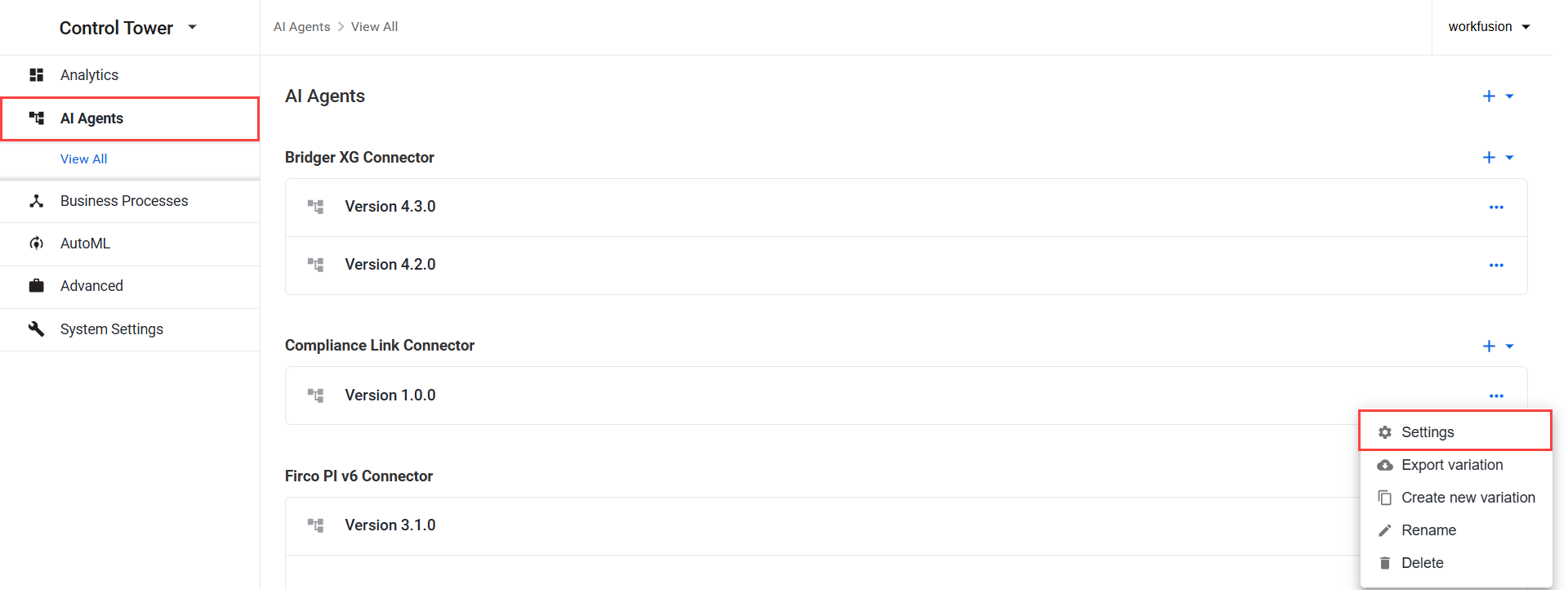
In Control Tower, go to Digital Workers (Work.AI 10.2.9 or earlier) or AI Agents (Work.AI v10.3 or later) and find Compliance Link Connector.
- Open the Actions menu next to the connector variation and click Settings.
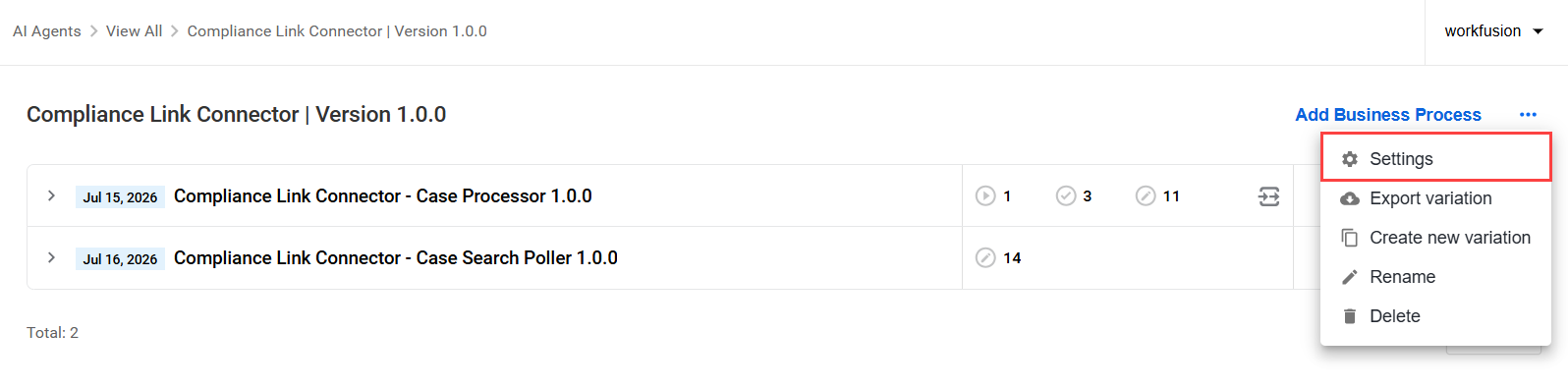
- Open the connector variation and, next to Add Business Process, click the Actions menu, and select Settings.
On the General tab, configure the following settings:
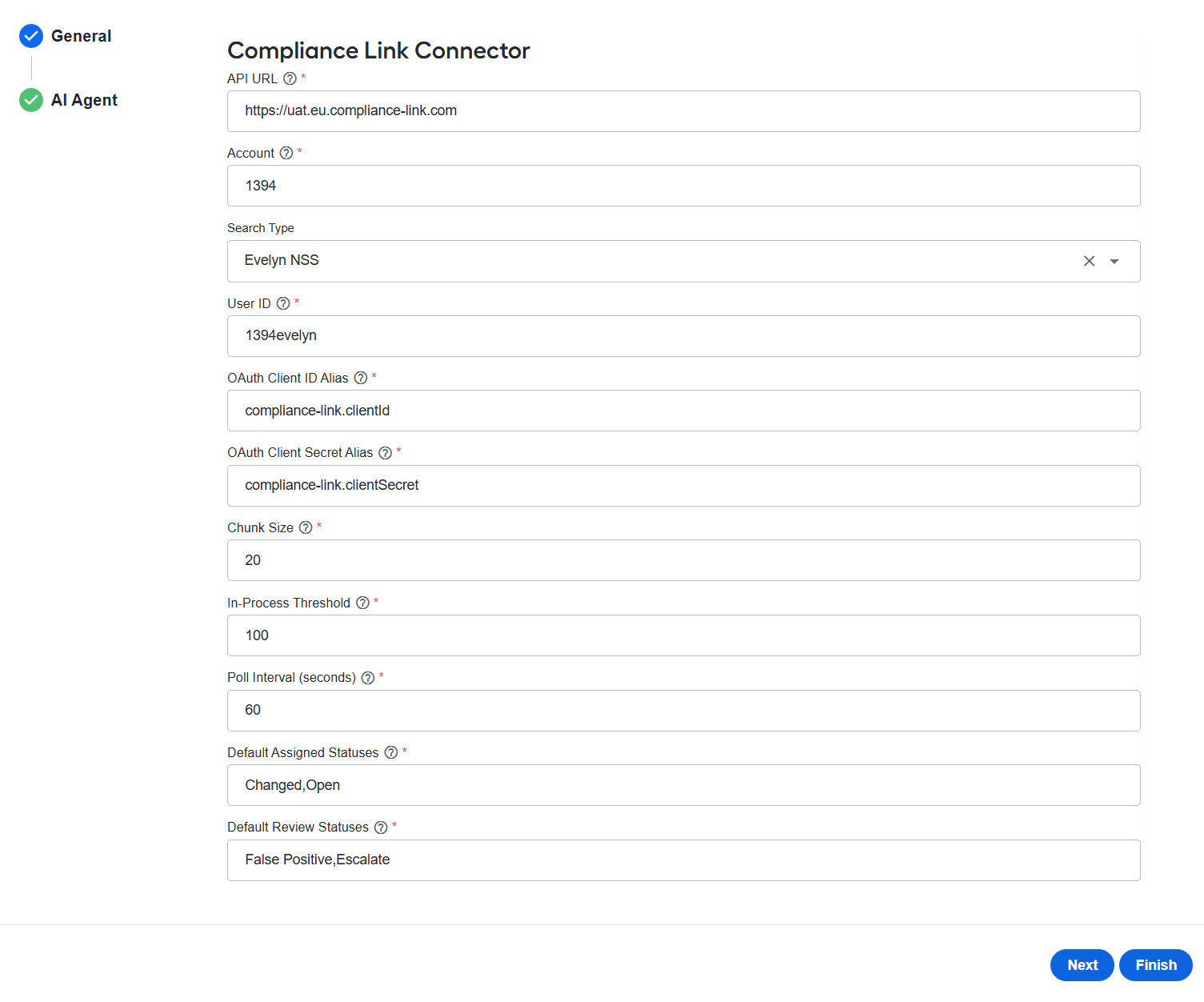
In the API URL field, enter the CLink API base URL.
In Account, enter the CLink account ID containing the cases to process..
In Search Type, select Tara PSS or Evelyn NSS as needed.
In User ID, enter the dedicated CLink agent user whose assigned cases the connector should process. The user must correspond to the selected search type.
In OAuth Client ID Alias, enter the alias of the Secrets Vault entry containing the CLink OAuth client ID (
client_id), for example,compliance-link.clientId.In OAuth Client Secret Alias, enter the alias of the Secrets Vault entry containing the CLink OAuth client secret (
client_secret), for example,compliance-link.clientSecret.
The aliases must exactly match the names of the corresponding secret entries. For more details, see Manage secret entries in Secrets Vault.
In Chunk Size, enter the maximum number of cases that a single search can return. The value must be at least
1.In In-Process Threshold, enter the maximum number of cases that can be processed concurrently for the account. The value must be at least
1.
When this threshold is reached, the connector waits until processing capacity becomes available before accepting more cases. Cases that exceed the remaining capacity are not lost and can be returned by CLink during a later search.
In Poll Interval (seconds), enter the number of seconds between checks for new CLink cases. The value must be at least
1.In Default Review Statuses, enter the default statuses returned to CLink as a comma-separated list. For Evelyn NSS processing, enter the false positive status first and the escalation status second, for example,
False Positive,Escalate.
On the AI Agent tab, in the Signal ID field, specify the signal ID for the AI Agent that receives the results.
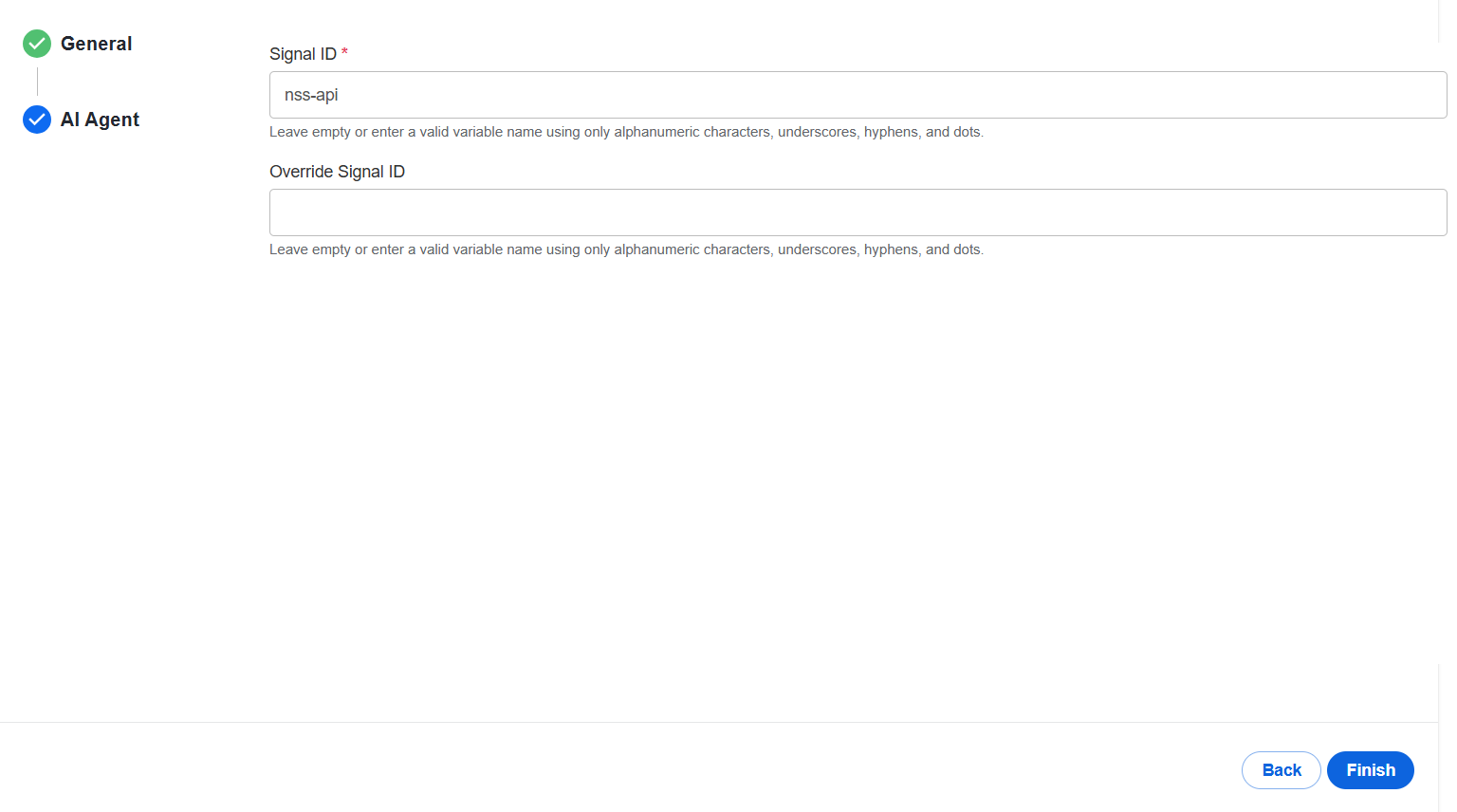
Click Finish.
When setting Chunk Size, In-Process Threshold, and Poll Interval (seconds), consider the expected case volume and the processing capacity of your environment.
Application properties
The following application properties control the location and version of the FreeMarker templates used by the connector. To customize these settings, override the properties in ZooKeeper at /config/application,compliance-link.
| Property | Default value | Description |
|---|---|---|
connector.complianceLink.templatesVersion | Connector artifact version (set during the Maven build) | Specifies the version folder containing the S3 request-mapping templates. |
connector.complianceLink.pssTemplateUri | s3:doc-upload/compliance-link-connector/templates/{templatesVersion}/pss_request_mapping.ftl | Specifies a direct URI for the PSS request-mapping template, overriding the version-based location. |
connector.complianceLink.nssTemplateUri | s3:doc-upload/compliance-link-connector/templates/{templatesVersion}/nss_request_mapping.ftl | Specifies a direct URI for the NSS request-mapping template, overriding the version-based location. |
complianceLinkCaseUpdateBodyFromPSSTemplate | Not set (configured at runtime) | Specifies the URI of the FreeMarker template that builds the case-update body from a Tara response. |
complianceLinkCaseUpdateBodyFromNSSTemplate | Not set (configured at runtime) | Specifies the URI of the FreeMarker template that builds the case-update body from an Evelyn response. |
errorMessageBody | Not set (configured at runtime) | Specifies the URI of the FreeMarker template that generates the {"errorMessage": "..."} payload used by the error-handler route. |
Workflow
The connector uses two Business Processes (BPs) that work together to find eligible CLink cases and process their matches:
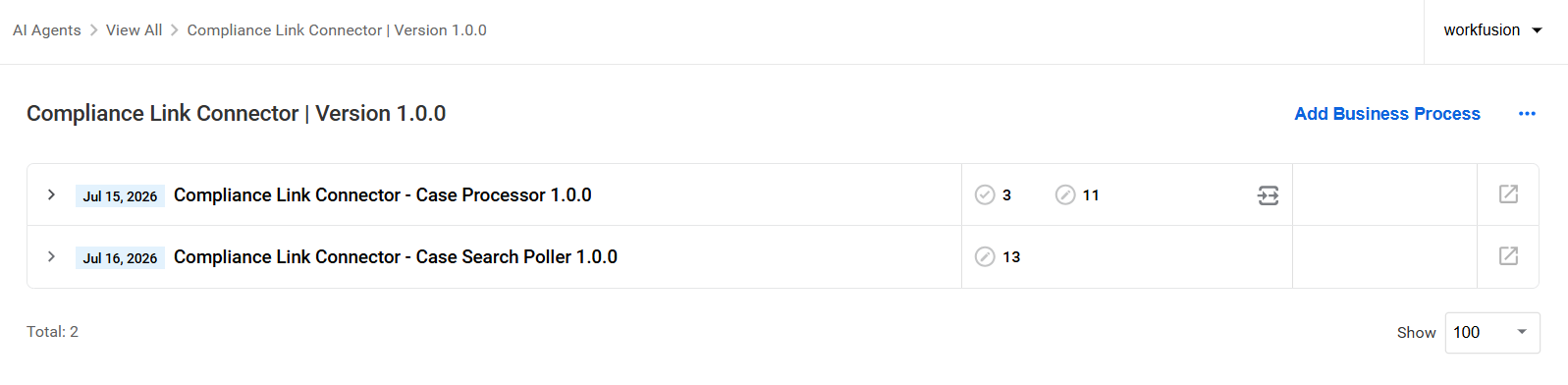
Compliance Link Connector - Case Processor performs per-case processing and returns the results to the poller.
Compliance Link Connector - Case Search Poller continuously searches for eligible cases and starts case processing.
Compliance Link Connector - Case Processor
The Compliance Link Connector - Case Processor BP starts automatically for each case selected by the Case Search Poller BP. It retrieves the case and its eligible matches, sends them to the appropriate AI Agent, and returns the resulting decisions to CLink.
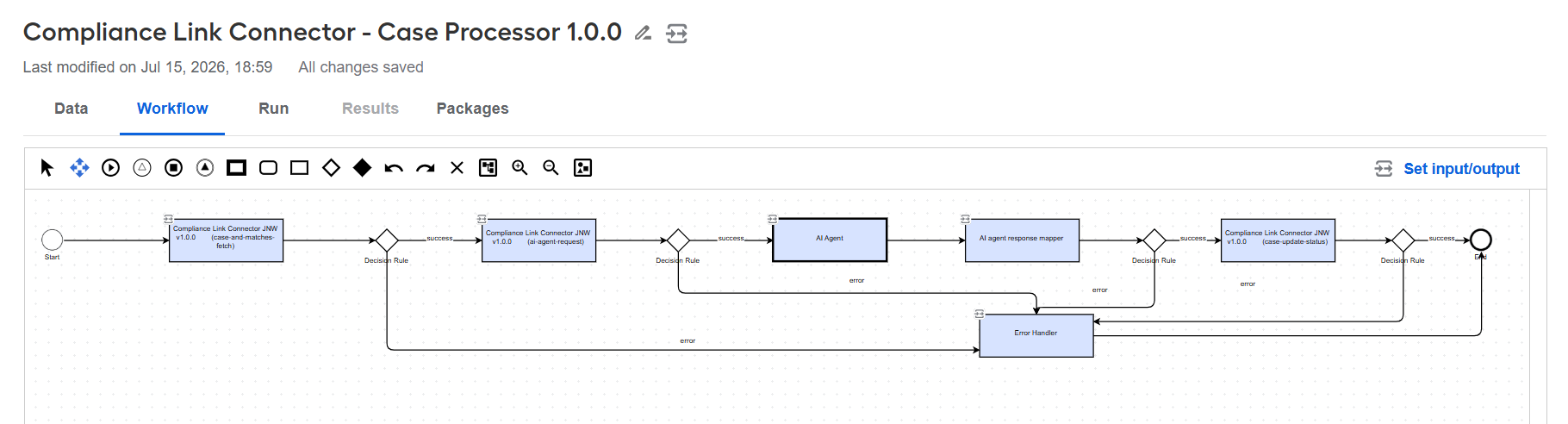
The BP steps contains the following processing steps:
case-and-matches-fetch retrieves the complete case and identifies matches whose current status is included in the CLink workflow's
assignedStatuses. It then collects details for those matches and obtains the workflow’s review statuses for use when returning decisions.ai-agent-request converts the case and match information into the request format required by the selected AI Agent.
AI Agent sends the request to Tara for PSS screening or Evelyn for NSS screening. The AI Agent analyzes the matches and returns a decision and explanation for each one.
AI Agent response mapper converts the AI Agent's response into the format required by CLink for case updates.
For NSS processing, a
FALSE_POSITIVEdecision is mapped to the workflow's False Positive review status. Any other outcome, includingMORE_INFORMATION_NEEDED, is mapped to the workflow's Escalate review status.The review statuses are determined by the CLink workflow configuration associated with the first subcase, allowing the connector to align AI Agent decisions with the statuses used in your CLink workflow.
case-update-status updates the corresponding CLink matches with the mapped status and the AI Agent’s review notes.
The decision rules route successful results to the next step and send errors to Error Handler.
Error Handler handles errors from the processing steps and returns standardized error information to the Case Search Poller BP. The poller then records the failure and releases the case from the in-process list.
Compliance Link Connector - Case Search Poller
The Compliance Link Connector - Case Search Poller BP runs continuously after it is started. It searches for cases assigned to the configured CLink agent user, selects the oldest eligible cases within the configured processing limits, and prevents cases that are already in progress from being started again.
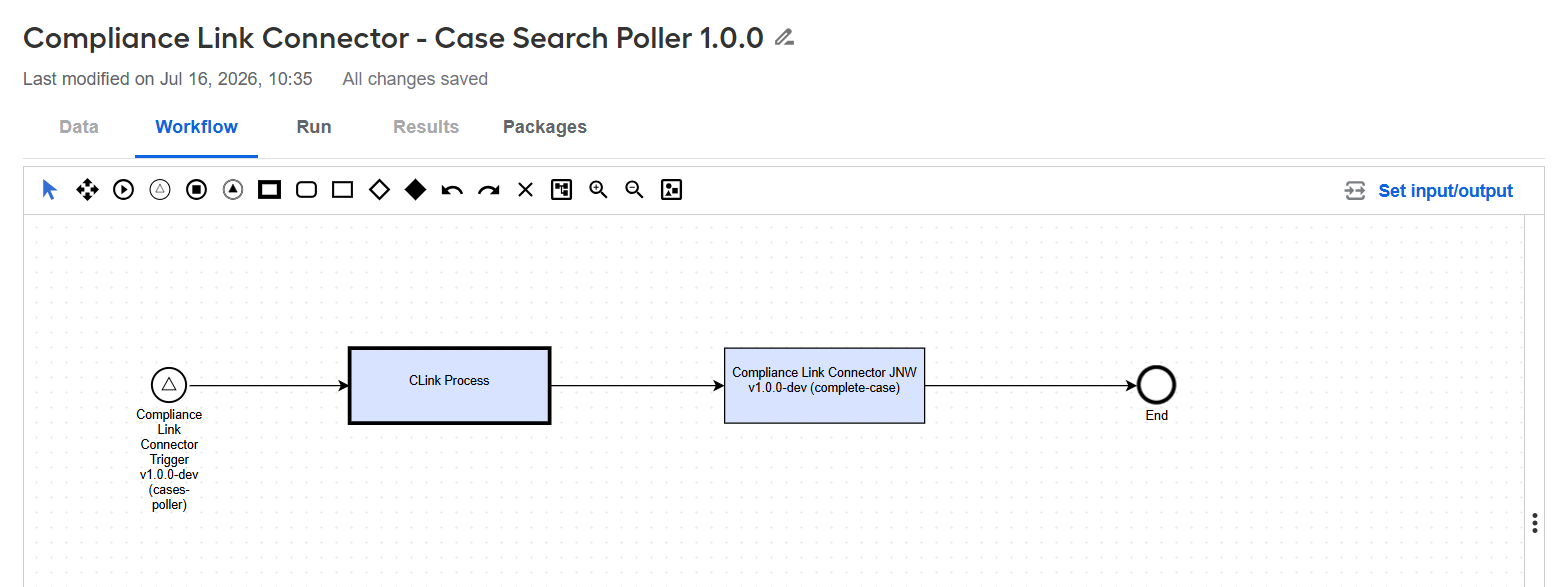
The BP contains the following steps:
Compliance Link Connector Trigger validates the connector configuration and checks CLink for eligible cases at the configured polling interval.
CLink Process starts the Compliance Link Connector - Case Processor BP for each selected case and passes the case record to it.
complete-case receives the result from the Case Processor, completes the case-processing cycle, and releases the case from the in-process list. If processing failed, it also records the returned error information.
Results
The connector updates each processed CLink match with:
The status corresponding to the AI Agent's decision
Review notes containing the AI Agent's explanation
For Evelyn NSS processing, the connector uses the reviewStatuses values from the first subcase's CLink workflow as follows:
| Evelyn result | CLink workflow status | Fallback status |
|---|---|---|
| False positive | First review status (reviewStatuses[0]) | False Positive |
| More information needed or any other result | Second review status (reviewStatuses[1]) | Escalate |
To return the intended statuses, ensure that both review statuses are configured in the correct order in the CLink workflow.
CLink API reference
All requests use the base URL configured in apiUrl.
Authentication
The connector authenticates all CLink API requests using OAuth2 client credentials and a bearer token.
POST {apiUrl}/AuthServer/oauth/token
Content-Type: application/x-www-form-urlencoded
The connector reads
client_idandclient_secretfrom Secrets Vault using the BP'sclientIdAliasandclientSecretAlias.Tokens are cached across JVMs. The
OAuthAuthenticationProcessoraddsAuthorization: Bearer <token>to each request.If a business endpoint returns a 401 response, the connector refreshes the cached token and retries the request. A 401 response from the token endpoint causes the request to fail immediately.
Search for cases
POST {apiUrl}/asm-cms-api/v2/case-search
The request body is generated using the case_search_request.ftl FreeMarker template:
{
  "accountId": "1394",
  "userIds": ["1394evelyn"],
  "dateType": "CREATEDDATE",
  "chunkSize": 20,
  "sortOrder": "ASC"
}
accountId: the configured CLink account ID.userIds: the configured agent user (userId). Only cases assigned to this user are returned.chunkSize: the maximum number of cases returned by each search, as specified in the configuration.Cases are returned by creation date in ascending order, so the oldest cases are processed first.
Get case details
GET {apiUrl}/asm-cms-api/v2/account/{accountId}/case/{caseId}
Returns the complete case, including its subCases. The connector uses workflow.assignedStatuses to determine which matches to process and workflow.reviewStatuses to map AI Agent decisions to CLink statuses.
Get match details
GET {apiUrl}/asm-cms-api/v2/account/{accountId}/match/{matchId}
The connector calls this endpoint once for each match whose matchStatus is included in its subcase's workflow.assignedStatuses. The responses are combined into a single JSON array.
Update match by match ID
PUT {apiUrl}/asm-cms-api/v2/update-match-by-match-id
The request body is generated using the nss_response_mapping.ftl FreeMarker template:
{
  "correlationId": 12345,
  "accountId": 1394,
  "caseId": "16076350",
  "userId": "1394evelyn",
  "matches": [
    {
      "matchId": "m-001",
      "reviewNotes": "Explanation produced by the AI Agent...",
      "status": "False Positive"
    }
  ]
}