MPES connector
The Multi-Provider Entity Screening (MPES) connector screens individuals and businesses against third-party risk and due-diligence data providers, consolidates the results into one standardized response, and delivers it to the Evan AI Agent (AMM), Evelyn AI Agent (NSS), or another configured target.
You can use MPES to perform the following actions:
Screen entities for sanctions, politically exposed persons (PEP), adverse media, criminal records, court records, and other risk-relevant information.
Receive one merged result per entity across the requested providers and search types.
Register entities for Portfolio Monitoring and receive alerts when new information appears.
Route results to the relevant AI Agent based on configurable rules.
Typical use cases include onboarding due diligence, ongoing monitoring, ad-hoc investigations, and bulk periodic screening.
Requirements
Make sure the following items are available before configuring MPES:
A WorkFusion environment with the MPES Business Processes (BP) deployed
Access to Secrets Vault
Access to Moody's RDC provider account credentials
For Moody's Portfolio Monitoring, an authentication client that Moody's can use to push alerts and a firewall rule that permits Moody's to reach the webhook endpoint
The MPES OpenAPI specification for complete request and response schema details
Configuration
To configure the MPES connector, complete the following steps:
In Control Tower, do the following based on the Work.AI version you are using:
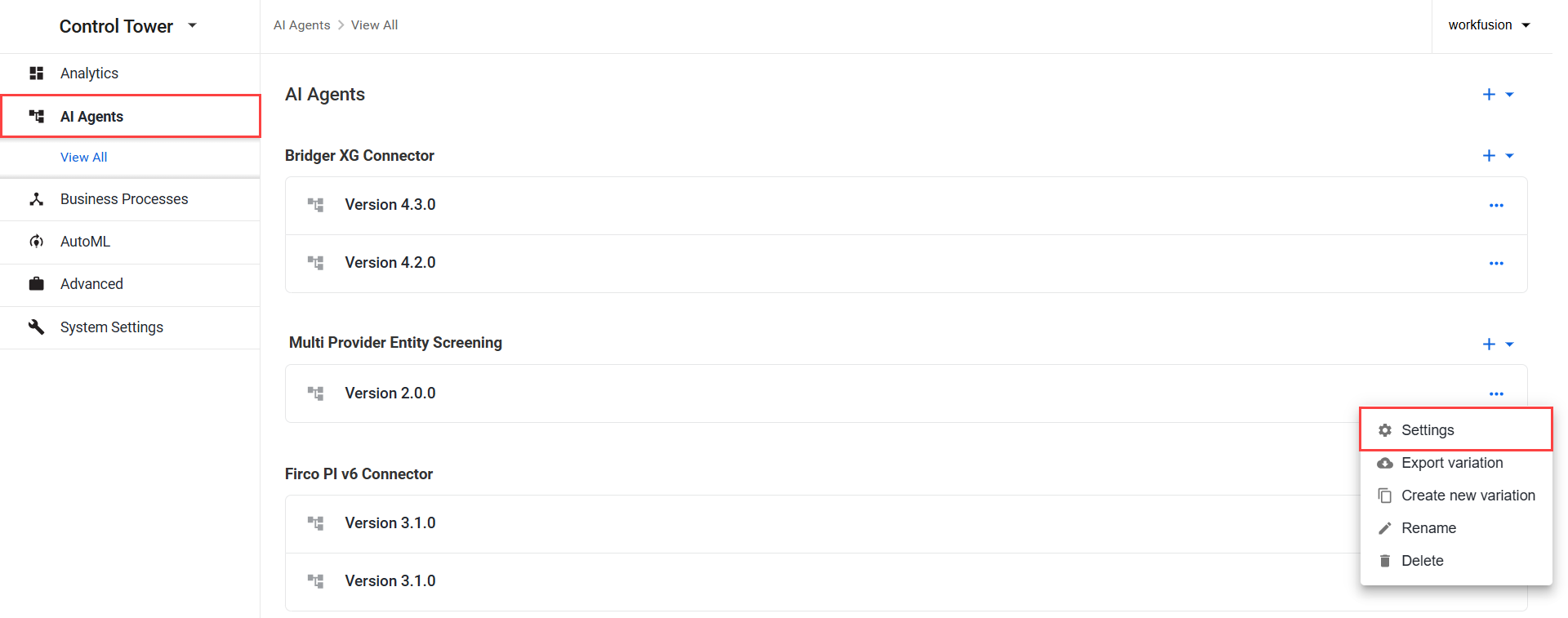
For Work.AI versions up to v10.2.9: go to the Digital Workers page, open the Actions menu next to the Multi Provider Entity Screening variation, and click Settings.
For Work.AI v10.3+: go to the AI Agents page, open the Actions menu next to the Multi Provider Entity Screening variation, and click Settings.
In the configuration form, сonfigure the settings as needed. The settings are grouped into panels that map to the BPs and provider features.
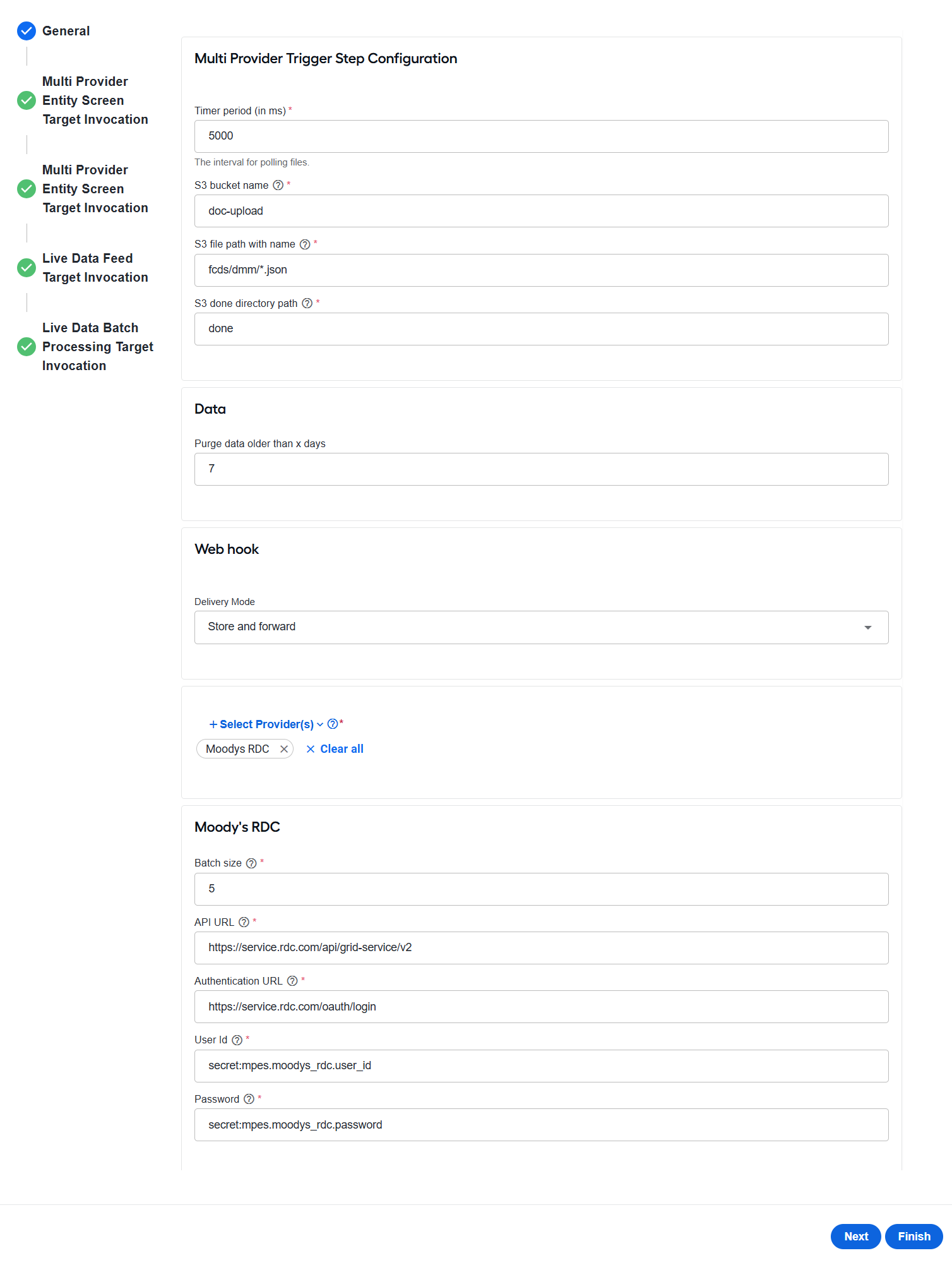
Configure general settings
On the General tab, configure the following settings:
In the Multi Provider Trigger Step Configuration configure how the File Processor retrieves batch request files from S3:
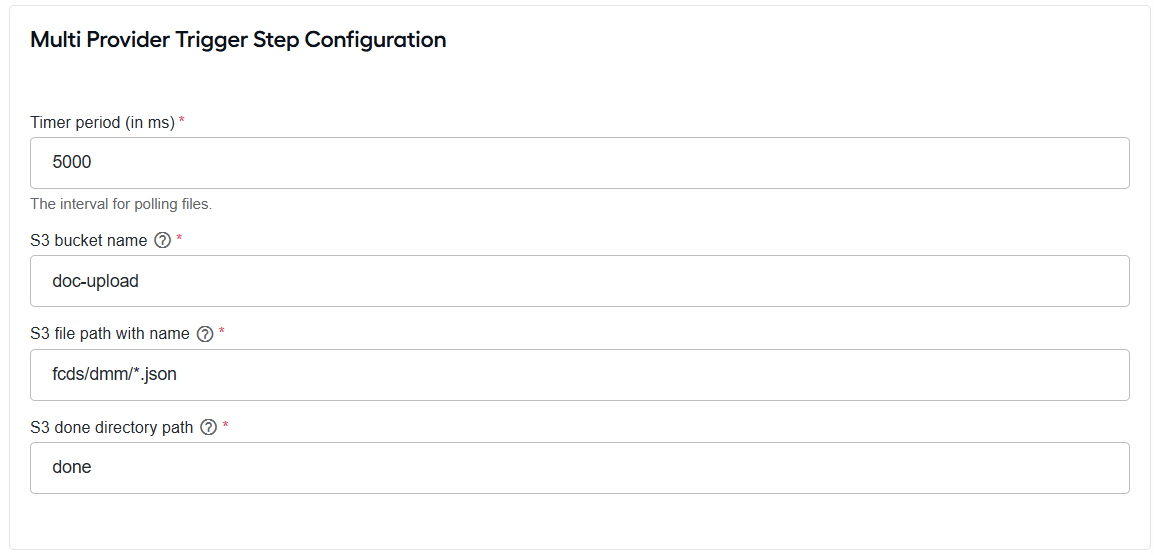
In the Timer period (in ms) field, specify how frequently the S3 location is polled for new files.
In the S3 bucket name field, enter the name of the S3 bucket to monitor.
In the S3 file path with name field, enter the file path or matching pattern, for example,
mpes/uploads/*.json. Ant-style patterns are supported.In the S3 done directory path field, enter the directory path where processed files are moved, for example,
mpes/done.
In the Data section, configure the data retention period. In the Purge data older than x days field, specify how many days processed data is retained before being deleted. The default value is
7.
In the Web hook section > Delivery mode, select how incoming Portfolio Monitoring alerts are handled by the Multi Provider Entity Screening Live Data - Feed BP:
Store saves incoming alerts in the alert store so they can be processed later by a scheduled batch run or an on-demand straight-through processing (STP) request.
Store and forward saves completed alerts in the alert store and immediately forwards them to the configured downstream AI Agent.
Configure scheduled processing of stored alerts in the Multi Provider Entity Screening Live Data - Batch Processor BP:
In Cron schedule, specify when the processor runs by using a cron expression.
In the Cron timezone field, enter the timezone used by the cron schedule. The default value is
UTC.In Throttle, enable or disable rate limiting for outbound requests. Throttling can be useful when a downstream AI Agent requires back-pressure. For example, with a throttle period of 1,000 ms and a maximum of 100 requests, MPES processes up to 100 entities per second.
In the Throttle period (ms) field, specify the duration of the rate-limiting window in milliseconds. This setting applies only when throttling is enabled. The default value is
1000.In the Max requests per period field, field, specify the maximum number of requests allowed within the throttle period. The default value is
100.
Select providers
MPES integrates with multiple third-party data providers. Each provider supports a specific set of search types, and MPES combines a provider and a search type into a single operation token that you use when submitting a request.
Moody's RDC
Moody's RDC is the primary provider in MPES and the only provider that supports Portfolio Monitoring—an ongoing monitoring service that generates provider-initiated alerts for registered entities. In addition to point-in-time screening, Moody's RDC supports registering an entity for monitoring, removing it from monitoring, and retrieving the alerts generated through monitoring.
The following Moody's RDC operation tokens are available:
moodys_rdcscreens the entity and registers it for Portfolio Monitoring.moodys_rdc_Loadregisters the entity for Portfolio Monitoring only. No screening is performed.moodys_rdc_Adhocperforms a one-time screening without registering the entity for monitoring.moodys_rdc_Deleteremoves the entity from Portfolio Monitoring. No screening is performed.moodys_rdc_STPreturns stored monitoring alerts for the entity that have not yet been processed.
A Moody's RDC response contains screening results or monitoring alert data for the entity, including risk-relevant categories such as sanctions, PEPs, watchlists, and adverse media. When output routing is configured for Evelyn or Evan, Moody's RDC risk codes determine where each result is routed. For the detailed Moody's RDC lifecycle, see View workflow.
TR Batch - Custom Workflow
TR Batch integrates with the Thomson Reuters custom batch workflow through encrypted file exchange over SFTP. It is a screening-only provider and does not support Portfolio Monitoring.
TR Batch operates as follows:
- MPES creates a request file containing the entities to be screened.
- The file is encrypted and uploaded to the Thomson Reuters SFTP site.
- Thomson Reuters processes the batch and uploads an encrypted response to the SFTP site.
- MPES retrieves and decrypts the response, then maps the results to the standard MPES response format.
As TR Batch uses a file-exchange workflow, results are returned asynchronously after Thomson Reuters completes processing. Individual and business screenings are handled as separate request types.
The following TR Batch search tokens are available:
tr_bcw_CourtDockets: Court Docketstr_bcw_CourtDocketsCriminal: Court Dockets - Criminaltr_bcw_CourtDocketsCivil: Court Dockets - Civiltr_bcw_CriminalRecords: Criminal Records
TR Clear S2S - Custom Workflow Search
TR Clear S2S integrates with Thomson Reuters CLEAR platform through a server-to-server REST API. It provides a broad range of search types and returns results synchronously. It is a screening-only provider that does not support Portfolio Monitoring.
TR Clear S2S is currently in beta and connects to a Thomson Reuters beta environment. Enable it for evaluation purposes only until it becomes generally available.
The supported TR Clear S2S search tokens are as follows:
tr_s2s_cws_AddressFinder: Address Findertr_s2s_cws_BankruptcyFilings: Bankruptcy Filingstr_s2s_cws_CorporateRegistrations: Corporate Registrationstr_s2s_cws_CourtDockets: Court Docketstr_s2s_cws_CourtDocketsCivil: Court Dockets - Civiltr_s2s_cws_CourtDocketsCriminal: Court Dockets - Criminaltr_s2s_cws_CriminalRecords: Criminal Recordstr_s2s_cws_DeathRecords: Death Recordstr_s2s_cws_FEINFinder: FEIN Findertr_s2s_cws_FictitiousBusinessNames: Fictitious Business Namestr_s2s_cws_HealthcareLicenseSanctions: Healthcare License Sanctionstr_s2s_cws_LawsuitFilings: Lawsuit Filingstr_s2s_cws_LiensAndJudgments: Liens and Judgmentstr_s2s_cws_NegativeNews: Negative Newstr_s2s_cws_PreForeclosureFilings: Pre-Foreclosure Filingstr_s2s_cws_ProfessionalLicenses: Professional Licensestr_s2s_cws_RealPropertyTransactions: Real Property Transactionstr_s2s_cws_TaxAssessor: Tax Assessortr_s2s_cws_UCCFilings: UCC Filings
In the MPES configuration form, go to General > Select Provider(s) and one or more providers. Then, click Apply. At least one provider must be enabled.
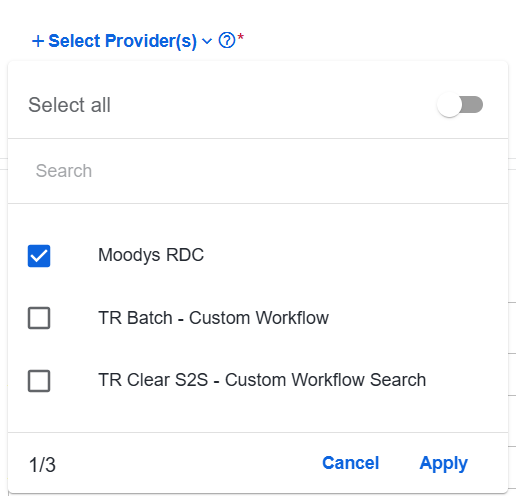
Once you select a provider, configure the following provider-specific settings:
- Moody's RDC
- TR Batch - Custom Workflow
- TR Clear S2S - Custom Workflow Search
To configure Moody's RDC, specify the following settings:
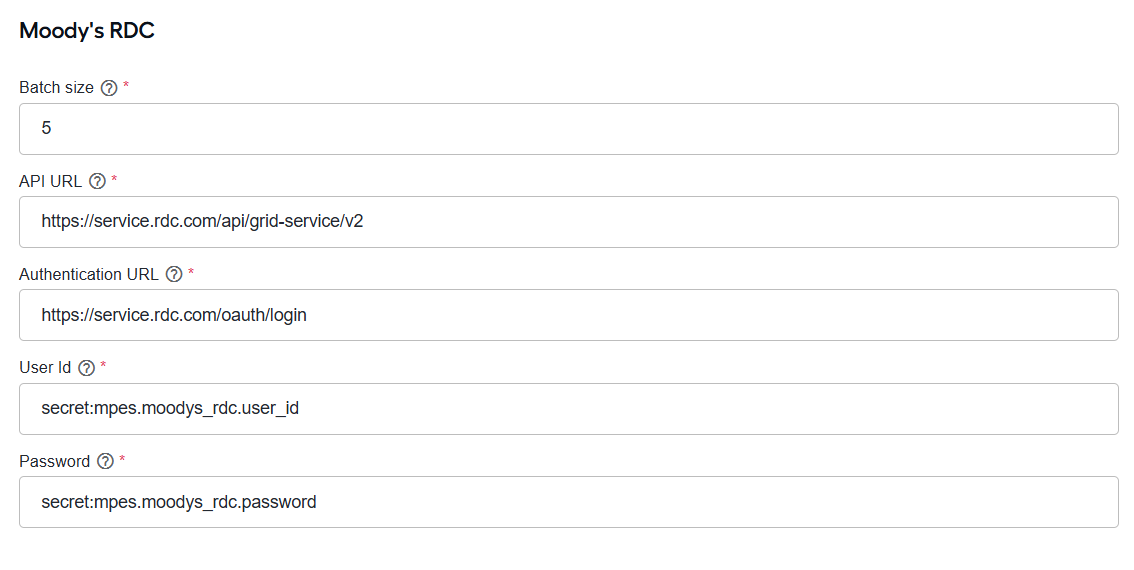
In the Batch size field, define the number of entities included in each request sent to Moody's RDC. The maximum value is
1000.In API URL, specify the base URL of the Moody's RDC API.
In Authentication URL, specify the Moody's RDC authentication endpoint URL.
In User ID, enter the service account user ID, such as
secret:mpes.moodys_rdc.user_id.In Password, enter the service account password, such as
secret:mpes.moodys_rdc.password.
TR Batch uses SFTP, encryption, and batch-processing settings to support the Thomson Reuters file-based workflow. To configure TR Batch - Custom Workflow, complete the following steps:
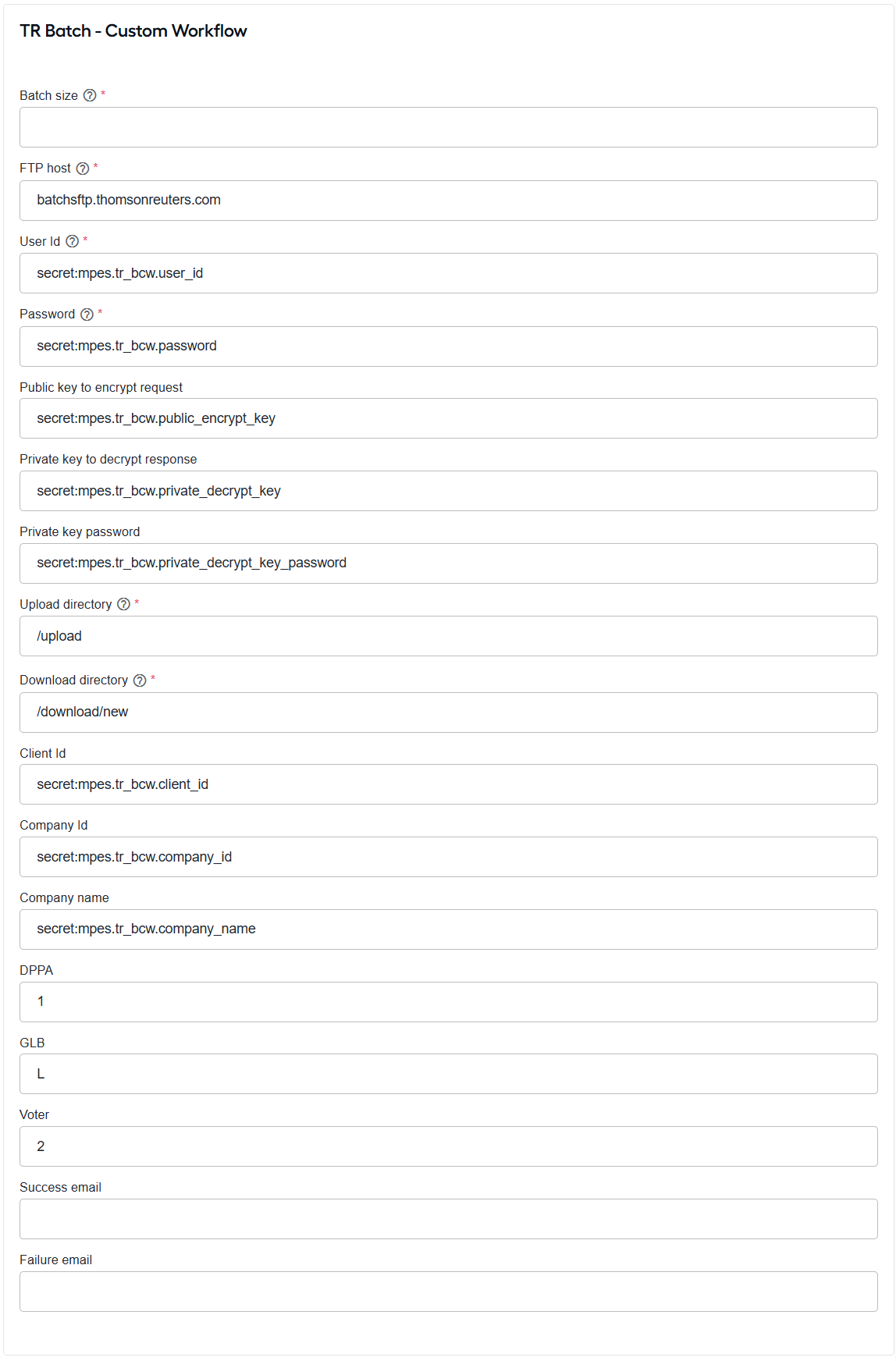
In the Batch size field, specify the number of entities included in each request sent to TR Batch. The maximum value is
1000.In FTP host, enter the SFTP host name. The default value is
batchsftp.thomsonreuters.com.In User Id, enter the SFTP user ID, such as
secret:mpes.tr_bcw.user_id.In Password, enter the SFTP password, such as
secret:mpes.tr_bcw.password.In Public key to encrypt request, specify the Thomson Reuters public key used to encrypt outbound files, such as
secret:mpes.tr_bcw.public_encrypt_key.In Private key to decrypt response, enter the MPES private key used to decrypt inbound files, such as
secret:mpes.tr_bcw.private_decrypt_key.In Private key password, enter the passphrase for the private key, such as
secret:mpes.tr_bcw.private_decrypt_key_password.In Upload directory, specify the SFTP directory for outbound files, for example,
/upload.In Download directory, specify the SFTP directory for inbound responses, for example,
/download/new.In Client Id, enter the Thomson Reuters client ID, such as
secret:mpes.tr_bcw.client_id.In Company Id, enter the Thomson Reuters company ID, such as
secret:mpes.tr_bcw.company_id.In Company name, enter the Thomson Reuters company name, such as
secret:mpes.tr_bcw.company_name.In DPPA, enter the Driver's Privacy Protection Act permissible-use code, for example,
1.In GLB, enter the Gramm-Leach-Bliley permissible-use code, for example,
L.In Voter, enter the voter data permissible-use code, for example,
1.In Success email, specify the email address that receives notifications for successfully processed batches.
In Failure email, specify the email address that receives notifications for failed batches.
TR Clear S2S uses REST API connection settings to communicate with the Thomson Reuters CLEAR platform. To configure TR Clear S2S - Custom Workflow Search, complete the following steps:
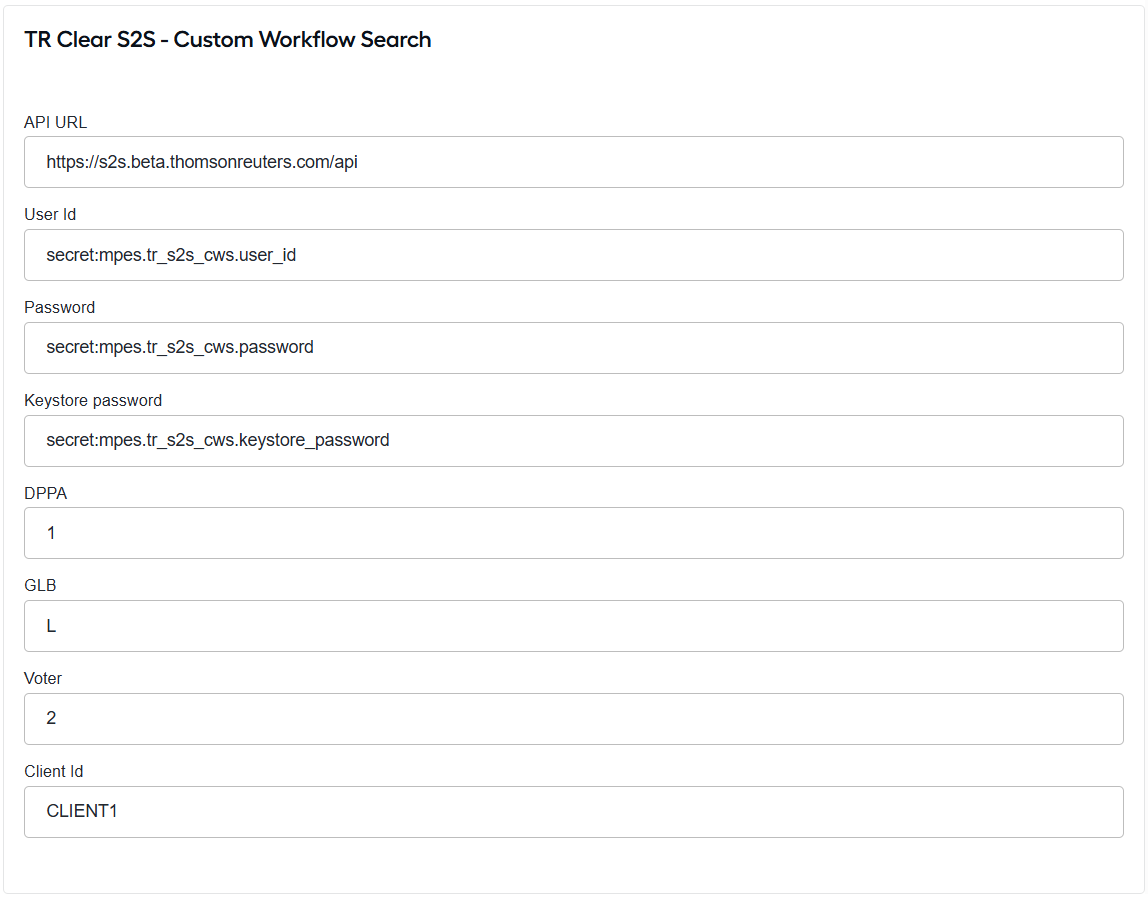
In the API URL field, enter the base URL of the CLEAR S2S API.
In User Id, enter the service account user ID, such as
secret:mpes.tr_s2s_cws.user_id.In Password, enter the service account password, such as
secret:mpes.tr_s2s_cws.password.In Keystore password, enter the password for the certificate keystore used to establish the secure connection, such as
secret:mpes.tr_s2s_cws.keystore_password.In DPPA, enter the Driver's Privacy Protection Act permissible-use code, for example,
1.In GLB, enter the Gramm-Leach-Bliley permissible-use code, for example,
L.In Voter, enter the Voter data permissible-use code, for example,
L.In Client Id, enter the Thomson Reuters client identifier, for example,
CLIENT1.
Configure target
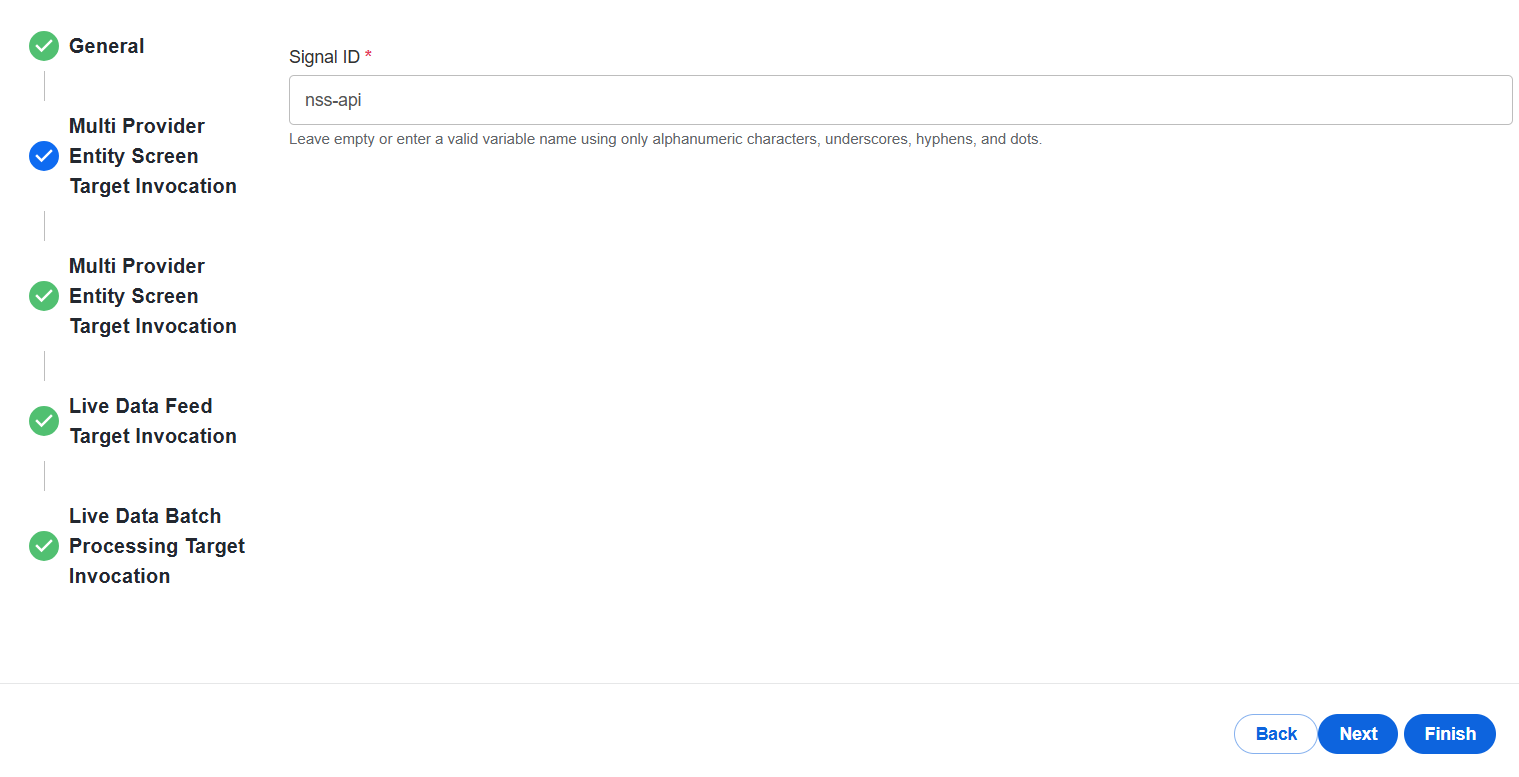
Use the Target Invocation tabs to set the target AI Agent within the corresponding BPs. In the Signal ID field, specify the signal ID for the AI Agent that receives the results. If no signal ID is specified, the results are not sent out.
For more details, refer to Route output.
Configure secret entries
Store sensitive values such as passwords, keys, and credentials in Secrets Vault based on the providers you intend to use:
| Alias | Provider | Description |
|---|---|---|
mpes.moodys_rdc.user_id | Moody's RDC | Service account user ID |
mpes.moodys_rdc.password | Moody's RDC | Service account password |
mpes.tr_bcw.user_id | TR Batch | SFTP user ID |
mpes.tr_bcw.password | TR Batch | SFTP password |
mpes.tr_bcw.public_encrypt_key | TR Batch | Public key used to encrypt outbound files |
mpes.tr_bcw.private_decrypt_key | TR Batch | Private key used to decrypt inbound files |
mpes.tr_bcw.private_decrypt_key_password | TR Batch | Passphrase for the private key |
mpes.tr_bcw.client_id | TR Batch | Thomson Reuters client ID |
mpes.tr_bcw.company_id | TR Batch | Thomson Reuters company ID |
mpes.tr_bcw.company_name | TR Batch | Thomson Reuters company name |
mpes.tr_s2s_cws.user_id | TR Clear S2S | Service account user ID |
mpes.tr_s2s_cws.password | TR Clear S2S | Service account password |
mpes.tr_s2s_cws.keystore_password | TR Clear S2S | Certificate keystore password |
Reference a stored value from a configuration field using the following syntax:
secret:<alias>
Business Processes
MPES is delivered as a set of several independently deployable BPs.
| Business Process | Type | Responsibility |
|---|---|---|
| Multi Provider Entity Screening | REST management endpoint | Exposes the /mpes endpoint, validates requests, queries the requested provider or search type, merges all responses for an entity into one result, and routes the output to the configured target. |
| File Processor | File batch processing | Watches an S3 location for batch request files, reads each file, and forwards its entities to the MPES API for processing. |
| Multi Provider Entity Screening Live Data - Feed | Webhook REST API endpoint | Exposes the /mpes-webhook endpoint, receives Portfolio Monitoring alert pushes from providers, and either stores or forwards them based on configuration. |
| Multi Provider Entity Screening Live Data - Batch Processor | Scheduled CRON BP | Drains stored monitoring alerts on the configured CRON schedule, merges them per entity, and forwards the batch results to the configured downstream target. |
| Multi Provider Entity Screening Data Purge | Scheduled timer BP | Removes processed alert data older than the configured retention period (the default is 7 days), keeping processing and alert-store tables from growing unbounded. Entities registered for Portfolio Monitoring remain registered; purging removes processed work records, not monitoring enrollment. |
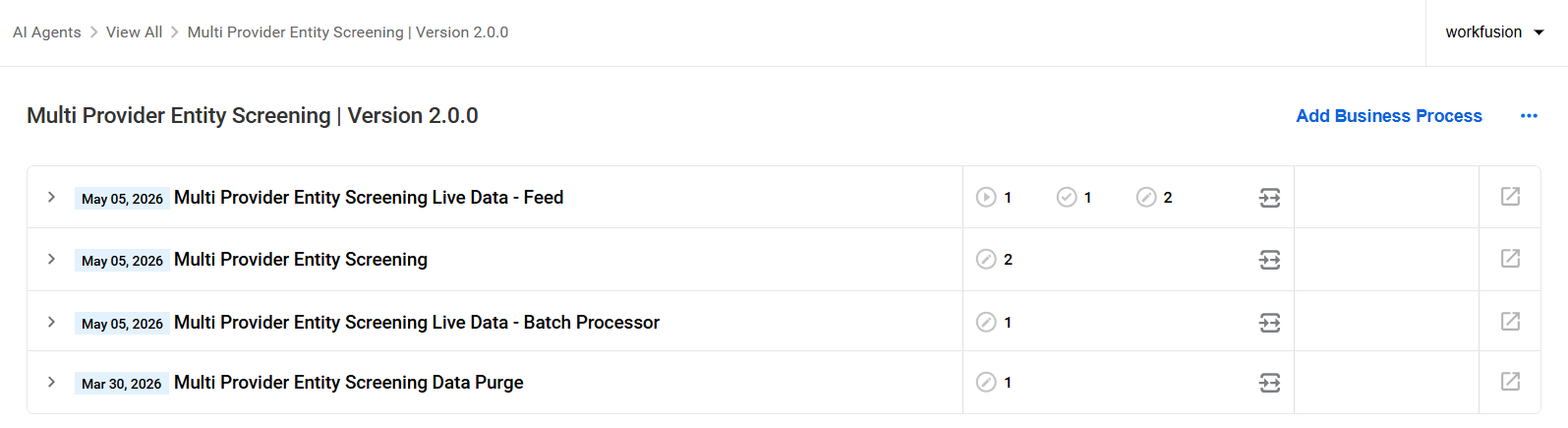
Not every BP is used. Enable only the BPs required for your workflow. For example, for on-demand screening, run the MPES API BP, optionally File Processor, and Data Purge. For ongoing monitoring, you can additionally run the Live Data – Feed BP.
Provide input
MPES accepts entities through two channels. Both channels use the same MPES API processing flow, so providers and downstream consumers behave the same way regardless of how the entity is submitted.
REST (single entity): Use this option for real-time, on-demand screening. Call /mpes directly with one entity and poll for the result.
File (S3 batch): Use this option for bulk screening. Place a JSON file with multiple entities in the configured S3 location. The File Processor reads the file and submits each entity to the MPES API.
Internally, MPES normalizes both into the same processing flow, so providers and downstream consumers behave identically regardless of how the entity was submitted.
The MPES connector exposes two secured endpoints:
/mpes: submits entities for screening and retrieves results./mpes-webhook: receives Portfolio Monitoring alert pushes from providers. This endpoint is used by the Live Data - Feed BP.Both endpoints are secured with OAuth2 using Keycloak client credentials.
View workflow
Moody's RDC is the primary provider and the only provider that supports Portfolio Monitoring. Other providers use a simpler flow: submit a request, run the search, and receive the results.
A typical Moody's RDC lifecycle includes the following stages:
Register. The entity is enrolled in Portfolio Monitoring. Use
moodys_rdcto screen and register the entity at the same time, ormoodys_rdc_Loadto register the entity without running a search.Monitor the entity. Moody’s sends alerts when new information appears. MPES receives these alerts through the Multi Provider Entity Screening Live Data - Feed BP.
Consume alerts. MPES processes stored alerts and delivers them to the configured downstream worker. The delivery method depends on the selected consumption pattern.
Store and batch: MPES stores alerts and the Multi Provider Entity Screening Live Data - Batch Processor BP drains them on a schedule. Use this for predictable, scheduled processing.
Store and forward: MPES forwards each alert immediately after it is received. Use this for near-real-time delivery.
Store and STP: MPES stores alerts until you call
moodys_rdc_STPto pull and deliver them on demand. Use this when alert delivery should be controlled by your own process or timing.
cautionUse only one consumption pattern per deployment. Combining patterns, such as Store and forward together with the Multi Provider Entity Screening Live Data - Batch Processor BP, can cause conflicts.
Run an ad-hoc search. Use
moodys_rdc_Adhocto run a one-off search without changing the entity’s monitoring status.Unregister the entity. Use
moodys_rdc_Deleteto remove the entity from Portfolio Monitoring.
Once Moody’s sends alerts, MPES receives them through the Multi Provider Entity Screening Live Data - Feed BP. The Feed handles alerts according to the selected consumption pattern:
In the Store and forward mode, each alert is forwarded immediately and marked as completed when received.
In the Store mode, alerts are kept in the alert store until they are consumed by one of these paths:
Batch Processor: drains stored alerts on a schedule, merges them by entity, and forwards them.
STP: returns stored alerts for the requested entities when you call
moodys_rdc_STP.
After alerts are processed, MPES marks them as completed so they are not delivered again. Processed alerts are later removed by the Multi Provider Entity Screening Data Purge BP.
Route output
After the MPES connector merges the results for an entity, it delivers them to a configured AI Agent. Custom Evan (AMM) or Evelyn (NSS) routing currently applies only to Moody's RDC results only. Results from all other providers are delivered using the default output mode.
The following output modes are available:
Default output sends the complete merged result to a single configured target. If no target is configured, the results are not delivered.
Custom output (AMM or NSS) splits results between AMM and NSS targets and maps them to the required target format. For Moody's RDC, monitoring alerts are routed based on risk codes. Configured codes, such as
PEP,SAN, andWLT, are sent to NSS, while all other codes are sent to AMM. A single entity can generate output for both targets.
API reference
The MPES OpenAPI specification is the source of truth for endpoints, request and response schemas, and field-level detail.
Set up base path and authentication
Before calling the MPES API, configure the API base path and obtain an access token.
Use the following endpoints to access the MPES API and obtain an authentication token. Mind to replace <host> with your environment hostname.
Base path:
https://<host>/input-connector-restToken URL:
https://<host>-auth.cloud.workfusion.com/auth/realms/WorkfusionRealm/protocol/openid-connect/token
All endpoints are secured with OAuth2 using the Keycloak client credentials flow. Include the obtained access token as a bearer token in each request.
Submit entities
The submit endpoint accepts either a single entity or a batch of entities. Internally, both are processed in the same way.
| Form | Shape | Correlation ID | Provider field |
|---|---|---|---|
| Single | A single entity_to_search object | Optional (generated if omitted) | provider (single token) |
| Batch | An entities_to_search array | Required | providers (array of tokens) |
Supported usage:
- Single search via REST: use this option to screen a single entity in real time.
- Batch processing via file: use this option to screen multiple entities. The File Processor reads a batch file and submits it on your behalf.
The provider or providers field carries a combined provider and search-type token, such as moodys_rdc_Load.
Monitoring and troubleshooting
Go to the BP Results > Event log to monitor MPES activity and identify issues. If a scheduled Multi Provider Entity Screening Live Data - Batch Processor run fails, the error is logged, and the schedule continues to run so that future runs are not blocked.
If an alert fails to process, MPES retains the alert together with the failure reason until it is reprocessed or removed by the configured Multi Provider Entity Screening Data Purge BP.