LSEG World-Check One connector
The LSEG World-Check One (WC1) connector integrates with the LSEG WC1 screening platform to automate compliance case processing. It periodically polls for new unresolved matches, submits them to the Evelyn AI Agent for analysis, and resolves cases in WC1 based on the resulting Evelyn's decision.
The connector provides the following capabilities:
Multi-tenant support, where each tenant maps to one or more WC1 groups
Periodic case discovery with configurable polling intervals and date-range filtering
Automatic case assignment during processing and configurable reassignment after resolution
Webhook notification support for push-based case updates
Configuration
Configure connector
To configure the connector, complete the following steps:
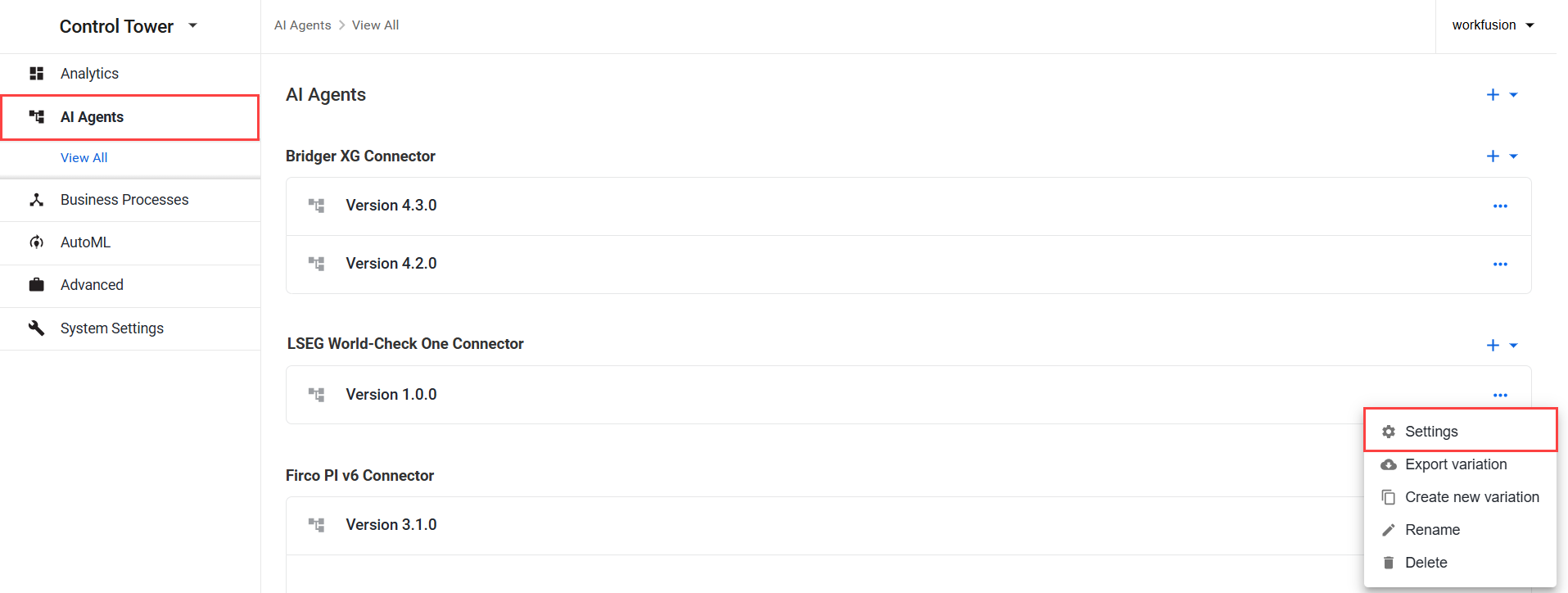
- In Control Tower, go to Digital Workers (Work.AI 10.2.9 or earlier) or AI Agents (Work.AI v10.3 or later) and find LSEG World-Check One Connector.
Open the Actions menu next to the connector variation and click Settings.
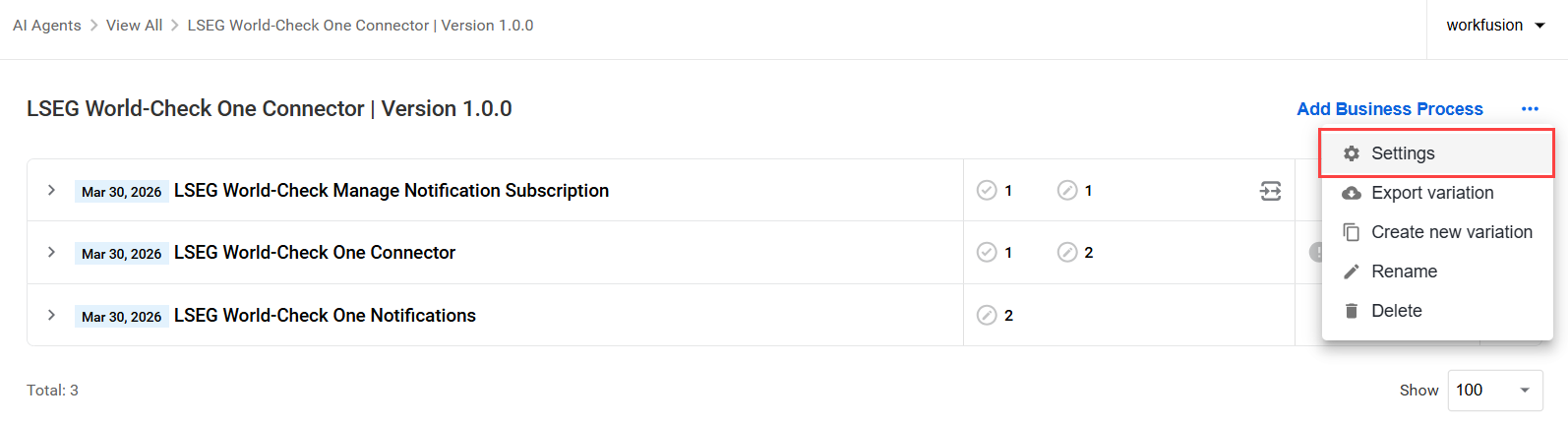
Open the connector variation and, next to Add Business Process, click the Actions menu, and select Settings.
On the General tab, configure the following settings. Note that the default properties are applied to all tenants of the AI Agent variation.
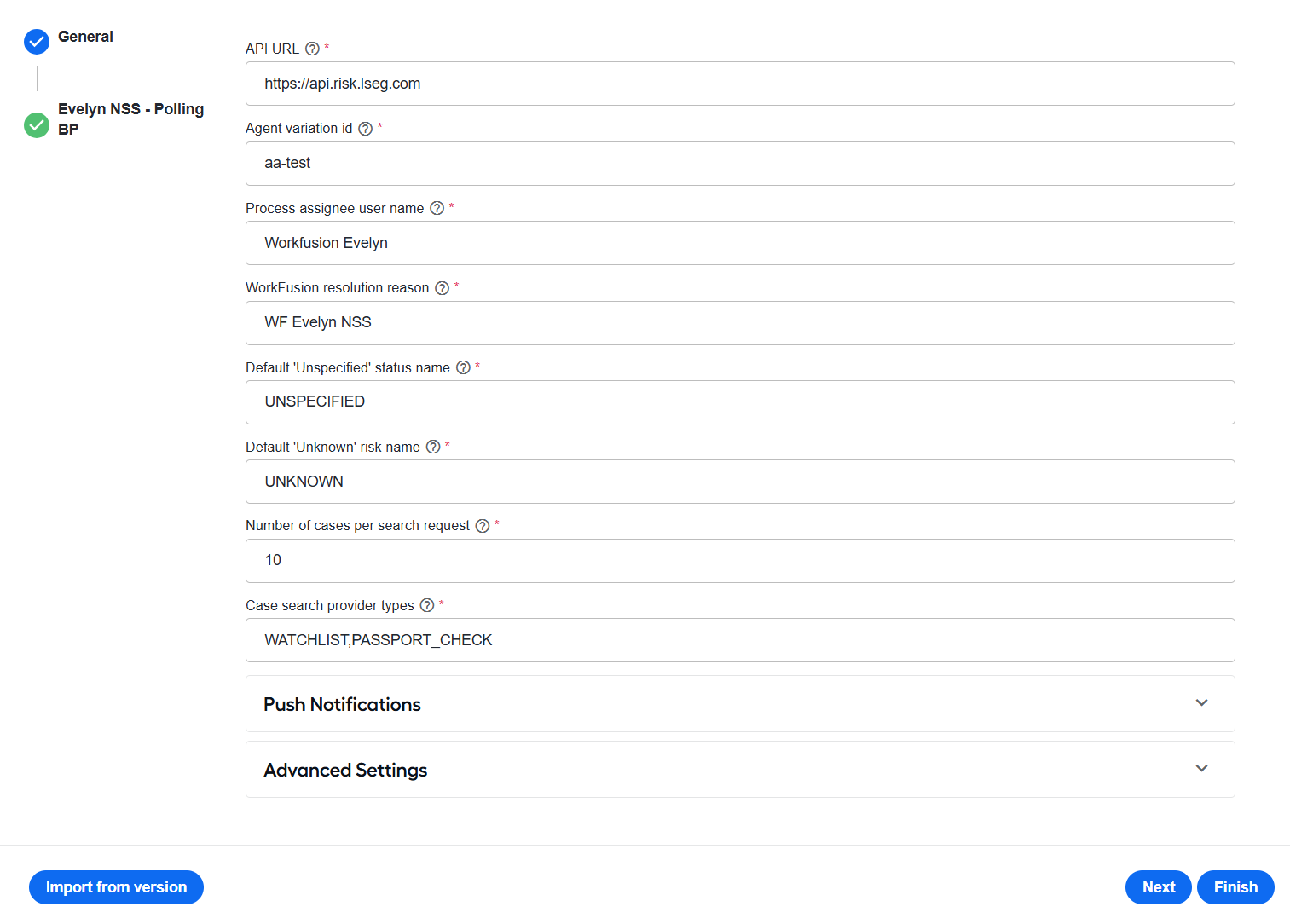
In the API URL field, specify the base URL of the WC1 API.
In Agent variation id, enter the AI Agent variation identifier. Only tenants with
agent_variation_idmatching this value are included in the Business Process (BP) execution.In Assign processed cases to, enter the default WC1 username to assign cases during processing. The user must exist on the WC1 side.
In Workfusion resolution reason, specify the resolution reason defined in the group's resolution toolkit. This value is used when resolving cases.
In Unspecified status value, enter the status from the group's resolution toolkit to use when the case status is unspecified.
In Unknown risk value, specify the risk level from the group's resolution toolkit to use when the case risk level is unknown.
In Number of cases per search request, enter the maximum number of cases to return for each search request.
In Case search provider types, enter a comma-separated list of WC1
providerTypevalues to include when polling for cases, for example,WATCHLIST,PASSPORT_CHECK,MEDIACHECK,CLIENT_WATCHLIST.Configure the Push Notifications section:
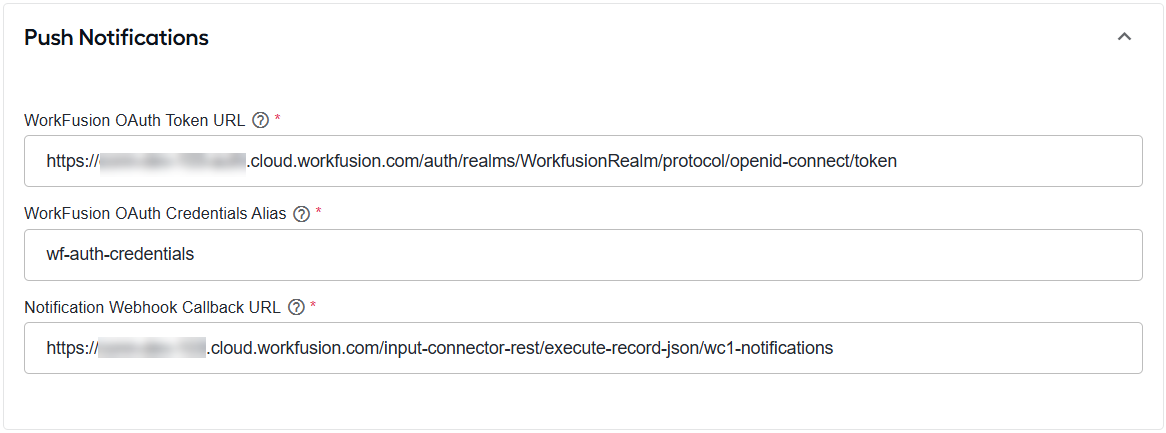
In the WorkFusion OAuth Token URL field, enter the OAuth token endpoint that WC1 uses to obtain an access token before sending notifications to the configured webhook. WC1 uses the OAuth 2.0 client credentials flow to authenticate its webhook requests.
In WorkFusion OAuth Credentials Alias, enter the Secrets Vault alias containing the OAuth credentials used for notification subscriptions. In the corresponding secret entry, store the OAuth client ID in Key and the OAuth client secret in Value.
In Notification Webhook Callback URL, enter the endpoint of the LSEG World-Check One Notifications BP. WC1 sends case update notifications to this endpoint.
Configure the advanced settings if your environment routes outbound API calls through a proxy. If your environment does not use a proxy, leave these fields empty.
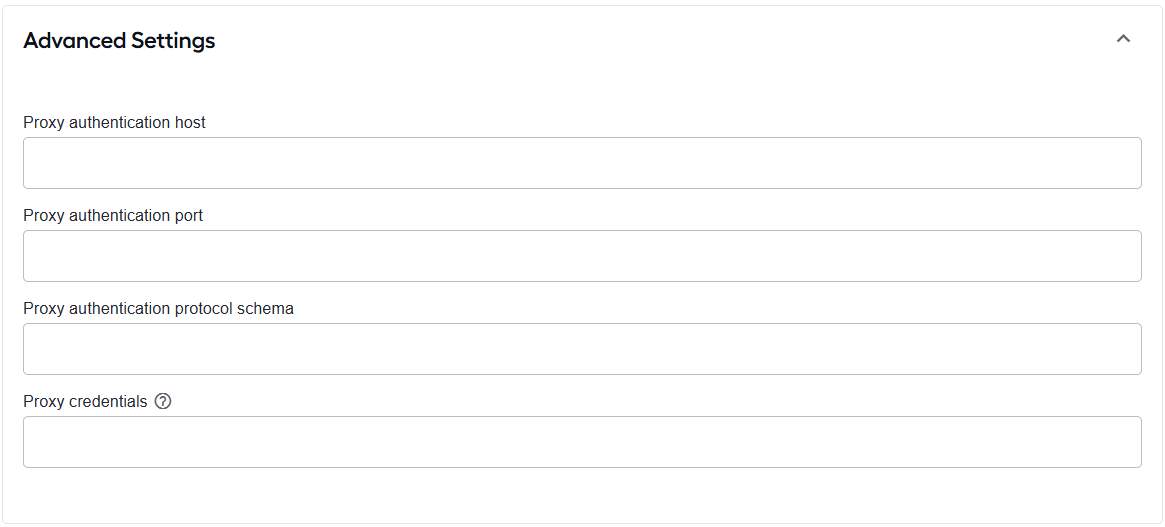
In Proxy authentication host, enter the hostname of the proxy server.
In Proxy authentication port, enter the port number used by the proxy server.
In Proxy authentication protocol schema, enter the protocol used to connect to the proxy.
In Proxy credentials, enter the credentials required to authenticate with the proxy.
On the Evelyn NSS - Polling BP tab, in the Signal ID field, enter the signal ID of the Evelyn BP invoked by the LSEG World-Check One Connector - Case Search Poller BP.
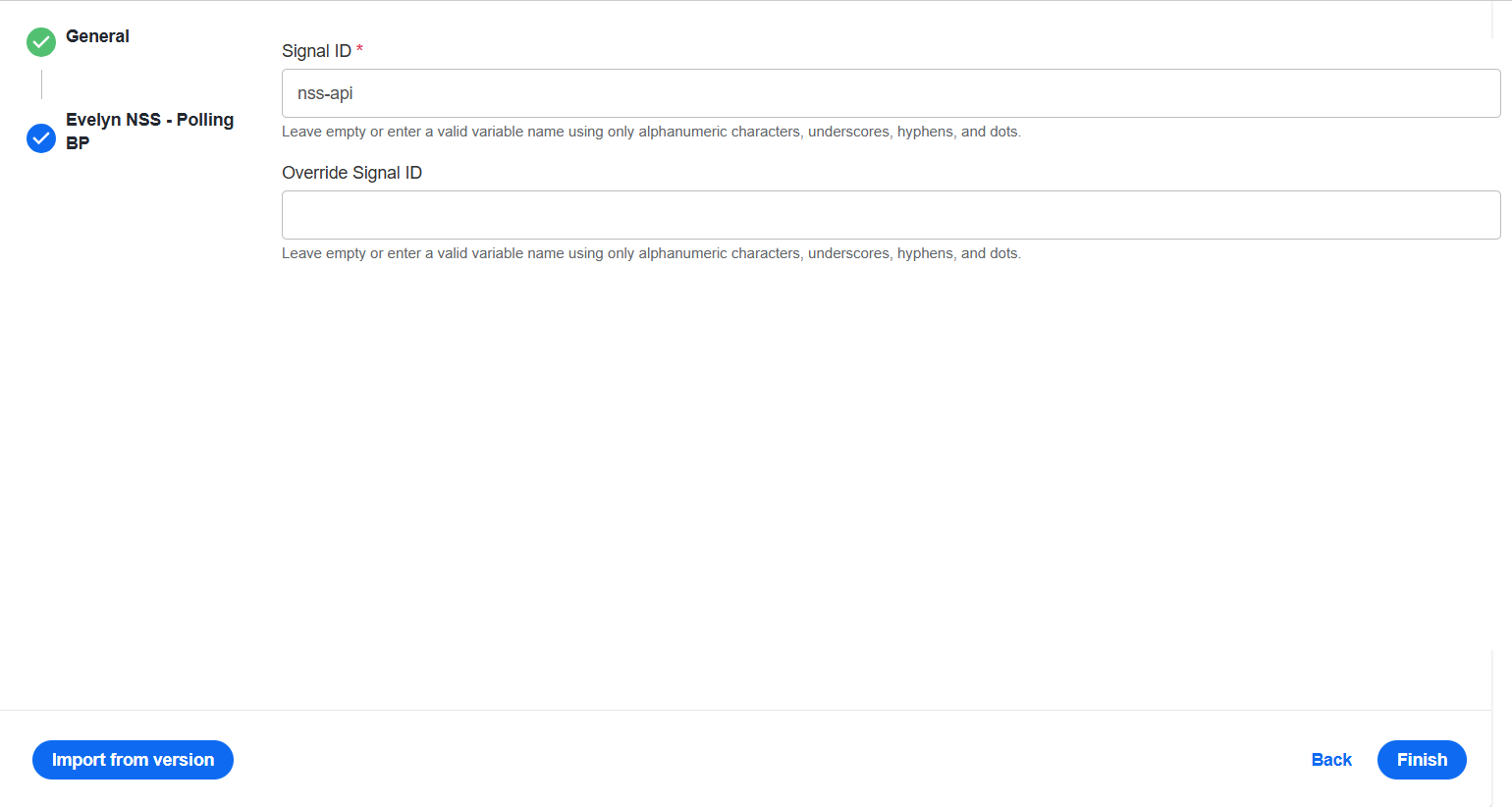
Click Finish.
Configure tenant
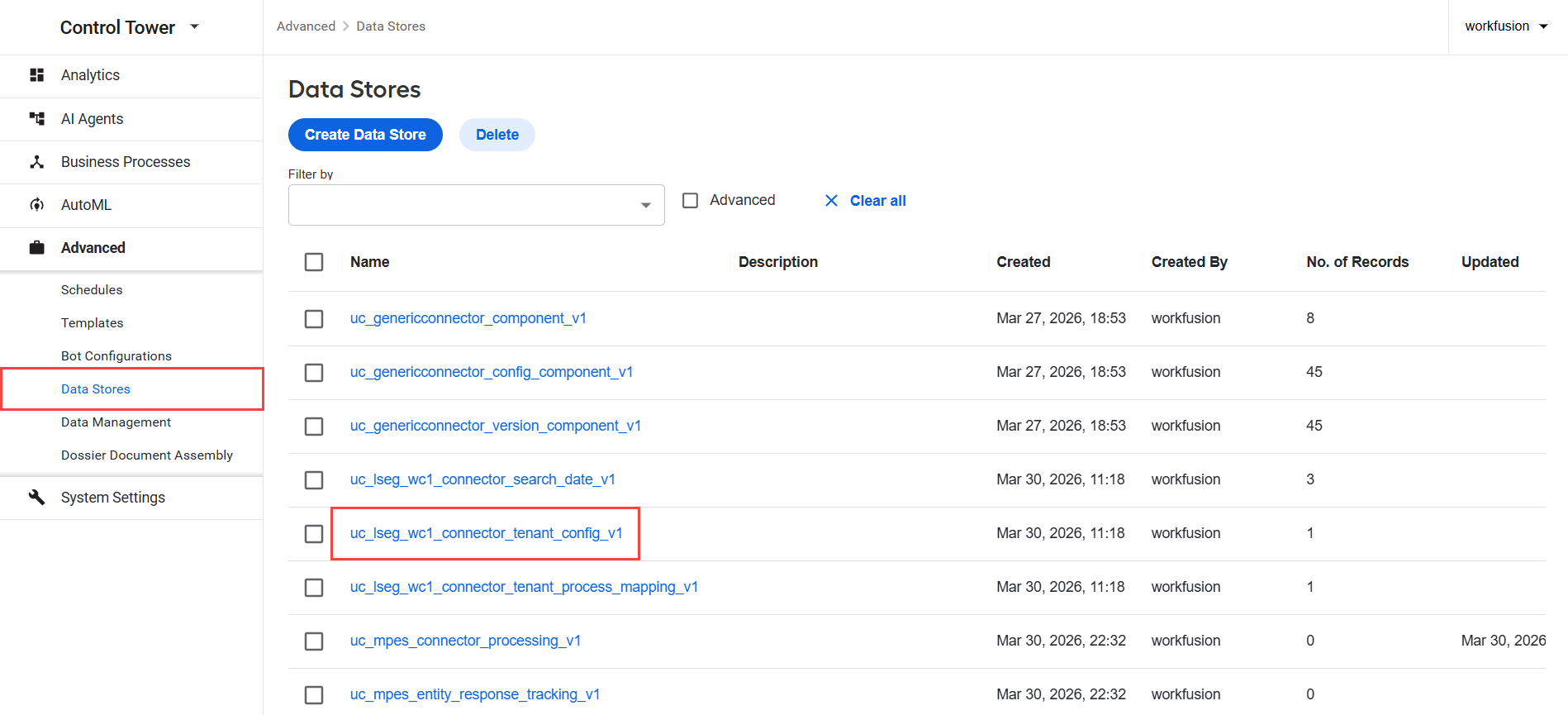
Tenants are stored in the uc_lseg_wc1_connector_tenant_config_v1 Data Store. Each tenant represents a separate WC1 account and contains its own credentials and group assignments. To configure tenant settings, complete the following steps:
Go to Advanced > Data Stores and select the uc_lseg_wc1_connector_tenant_config_v1 Data Store.
Open the record you want to edit and configure the following settings:
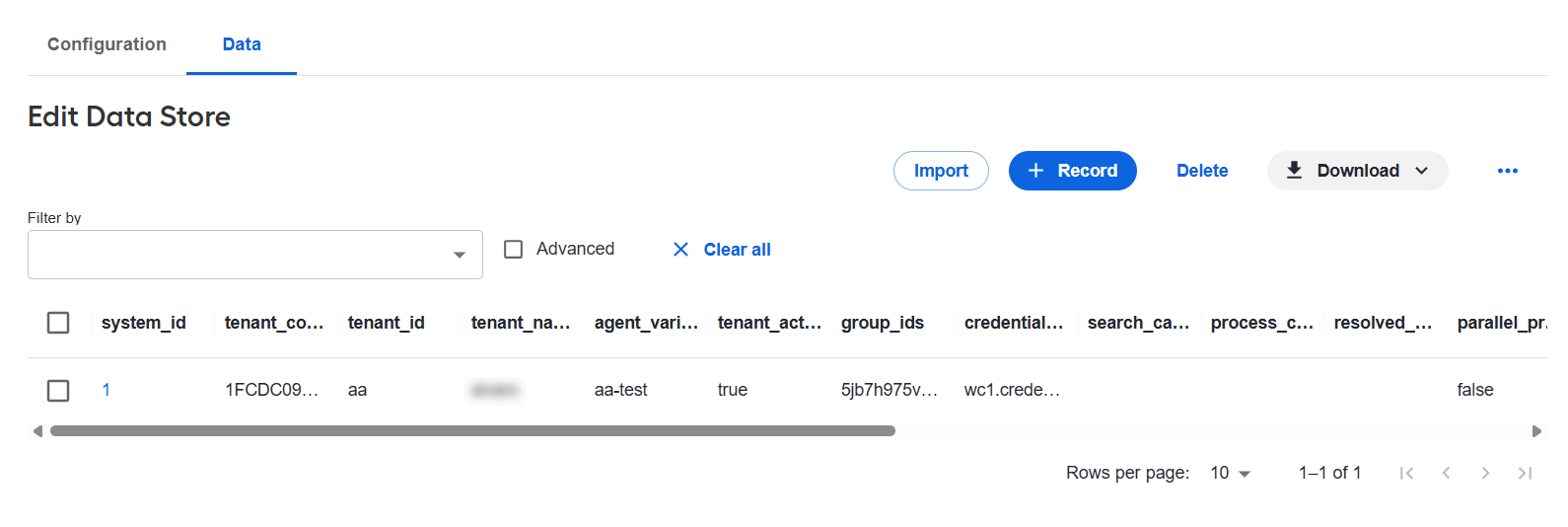
tenant_id: the LSEG WC1 tenant identifier.agent_variation_id: the identifier that links the tenant to a specific AI Agent variation. To include the tenant in BP execution, this value must match the Agent variation id in the configuration form.tenant_active: indicates whether the tenant is active. Set this value tofalseto disable the tenant.group_ids: a comma-separated list of WC1 group identifiers managed by the tenant.credential_alias: the Secrets Vault alias containing the tenant's WC1 credentials. In the corresponding secret entry, store the HMAC key ID in Key and the HMAC signing secret in Value.search_cases_assignee: if specified, the connector retrieves only cases assigned to this user. If not specified, the connector searches forUNASSIGNEDcases.process_cases_assignee: the user to whom cases are assigned during processing. If not specified, the connector uses the value set in the Assign processed cases to field.resolved_cases_assignee: determines who is assigned the case after it is resolved. If not specified, the case is unassigned. If specified, the case is reassigned to the configured user.parallel_production_execution: when enabled, the connector updates all alerts in WC1 with the status Unknown and risk level Unspecified instead of applying the actual Evelyn's decision.num_cases_per_search_request: overrides the value configured in the Number of cases per search request field.need_more_info_update_status: the status to apply for the Needs more information decision.need_more_info_update_risk: the risk level to apply for the Needs more information decision.false_positive_update_status: the status to apply for the False positive decision.false_positive_update_risk: the risk level to apply for the False positive decision.
- Click Save.
Set application properties
Set application properties in ZooKeeper at /config/application,lseg-wc1.
| Property | Default value | Description |
|---|---|---|
connector.config.tenant-loader.period-in-seconds | 86,400 seconds (1 day) | Frequency at which the tenant lifecycle manager runs to load active tenants, retrieve WC1 metadata, and start or stop polling routes. |
connector.config.tenant-loader.tenant-delay-seconds | 5 seconds | Delay between initializing polling routes for individual tenants to stagger startup operations. |
connector.config.tenant-search.period-in-seconds | 60 seconds | Frequency at which the connector searches for eligible cases for each tenant and group. |
connector.config.cache.purge-entries-days | 7 days | Duration after which cache entries are considered expired and removed. |
connector.config.s3-properties.cache-expire | 3,600 seconds (1 hour) | Duration for which FreeMarker templates are cached before being refreshed. |
connector.config.tenant-search.default-date-from-months-back | 12 months | Number of months to look back when determining the initial search start date if no timestamp is stored in ZooKeeper. |
connector.config.cache.expire-in-hours | 24 hours | Time that entries remain in the distributed Hazelcast cache before they expire. |
Workflow
The connector includes the following BPs:
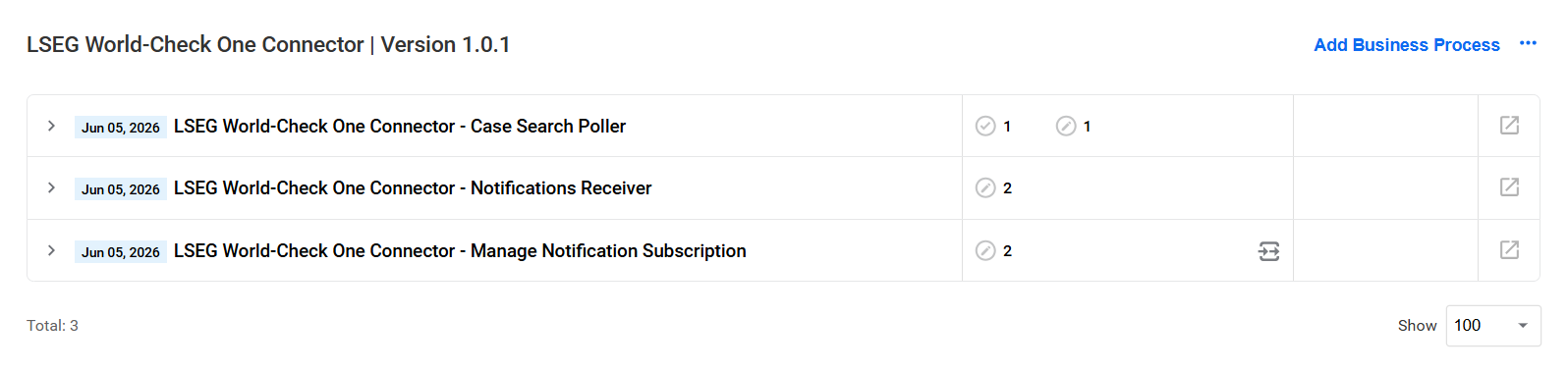
LSEG World-Check One Connector - Case Search Poller periodically searches configured WC1 groups for unresolved cases and sends eligible cases to Evelyn for analysis.
LSEG World-Check One Connector - Notifications Receiver receives case update notifications from WC1 through webhooks, providing an alternative to polling.
LSEG World-Check One Connector - Manage Notification Subscription manages notification subscriptions.
LSEG World-Check One Connector - Case Search Poller
The connector's polling routes search WC1 for eligible unresolved cases. When a case is found, the LSEG World-Check One Connector - Case Search Poller BP processes it as follows:
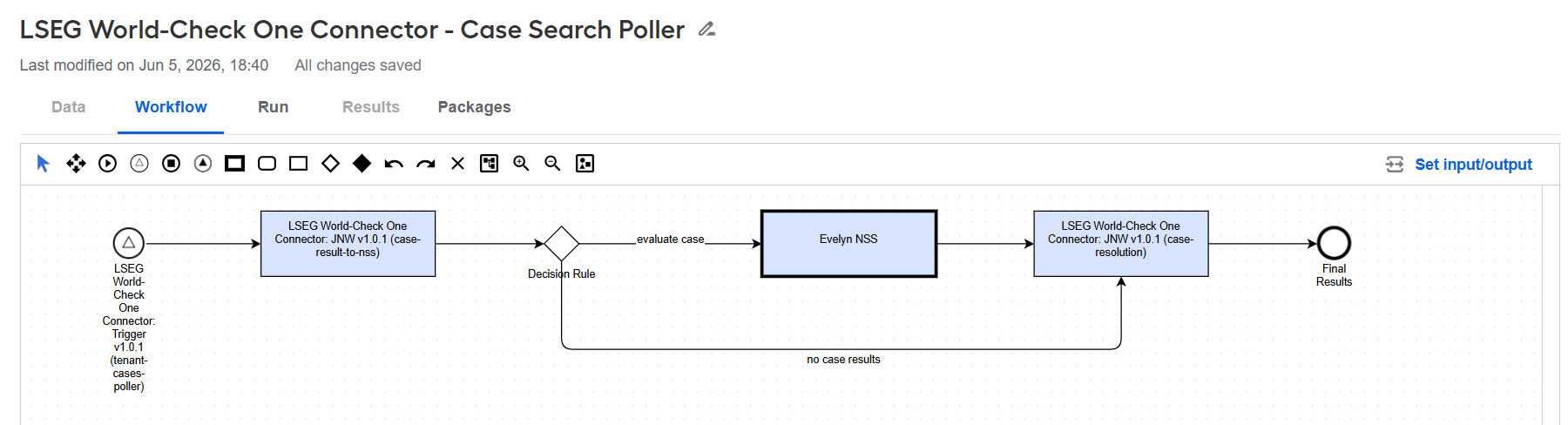
LSEG World-Check One Connector: Trigger starts a transaction for the case found by the polling route.
LSEG World-Check One Connector: JNW (case-result-to-nss) retrieves the case details and screening results and prepares a request for Evelyn.
Decision Rule checks whether the case contains screening results:
If results are available, the case is sent to Evelyn NSS for analysis.
If no results are available, the BP continues directly to the resolution step.
Evelyn NSS analyzes the screening results and returns a decision.
LSEG World-Check One Connector: JNW (case-resolution) completes the transaction. When Evelyn's decision is available, it updates the case status, risk, reason, and notes in WC1. It also manages the case assignee according to the connector configuration.
LSEG World-Check One Connector - Notifications Receiver
The Notifications Receiver BP receives WC1 webhook notifications about case updates. It validates each notification, identifies the corresponding tenant, loads any missing WC1 metadata, and sends valid cases to Evelyn for analysis.
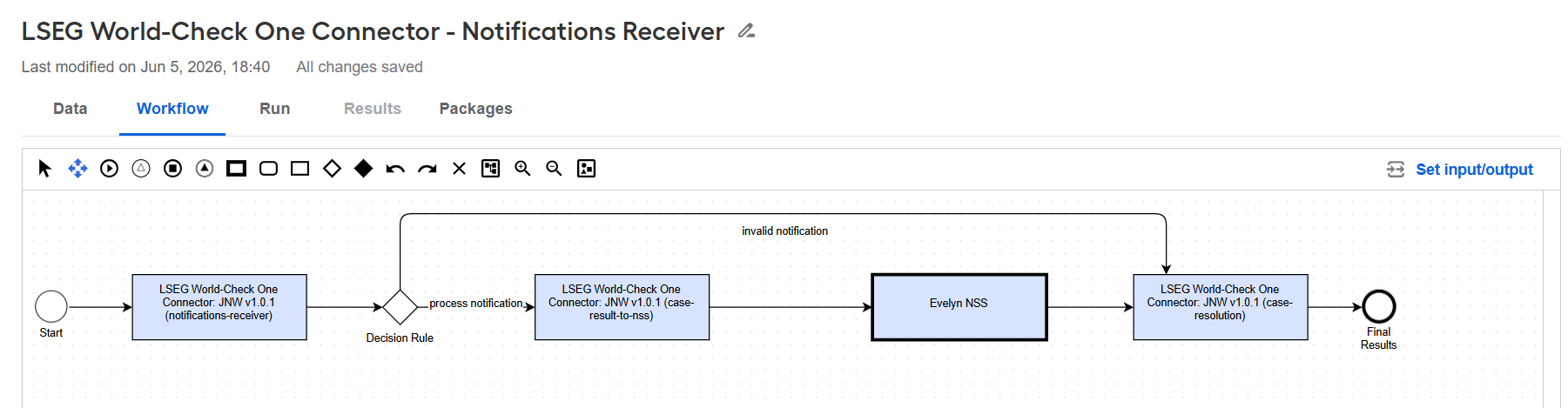
The BP processes each notification as follows:
LSEG World-Check One Connector: JNW (notifications-receiver):
Extracts the notification ID, case ID, and WC1 group ID from the notification payload.
Verifies that the case ID and group ID are present.
Uses the group ID to identify the corresponding tenant.
Loads any missing user, case-template, or resolution-toolkit metadata required to process the case.
Prepares the tenant, group, case, and AI Agent variation identifiers for the next step.
Decision Rule checks whether the notification can be processed:
If the notification is valid and its tenant is identified, the BP continues to case-result-to-nss.
If required information is missing or no tenant is associated with the group, the BP skips Evelyn and continues directly to case-resolution.
LSEG World-Check One Connector: JNW (case-result-to-nss) retrieves the case details and screening results and prepares a request for Evelyn.
Evelyn NSS analyzes the screening results and returns a decision.
LSEG World-Check One Connector: JNW (case-resolution) completes the transaction. When an Evelyn decision is available, it updates the case status, risk, reason, and notes in WC1. It also manages the case assignee according to the connector configuration.
LSEG World-Check One Connector - Manage Notification Subscription
The LSEG World-Check One Connector - Manage Notification Subscription BP contains a single step to manage notification subscriptions.
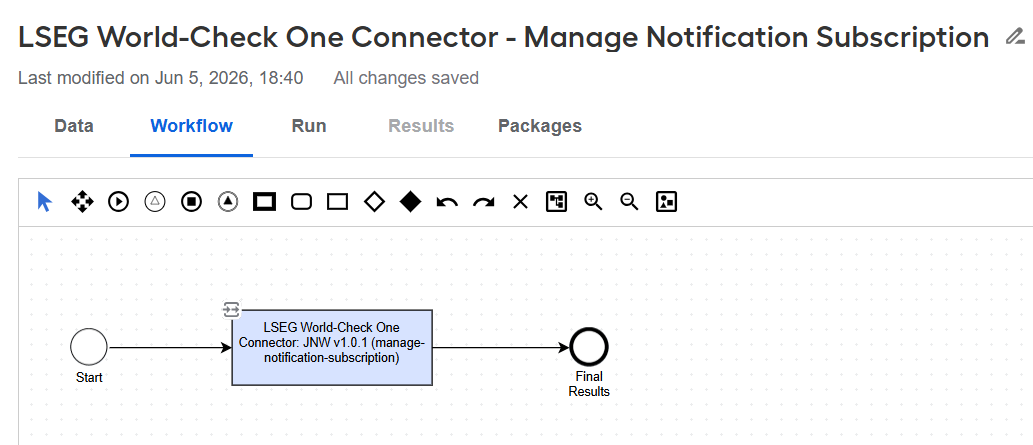
To create, update, delete, or list notification subscriptions, select the LSEG World-Check One Connector: JNW (manage-notification-subscription) step. On the Input/Output tab, ensure that Enable Input/Output connection is enabled.
Configure the input values for the operation you want to perform:
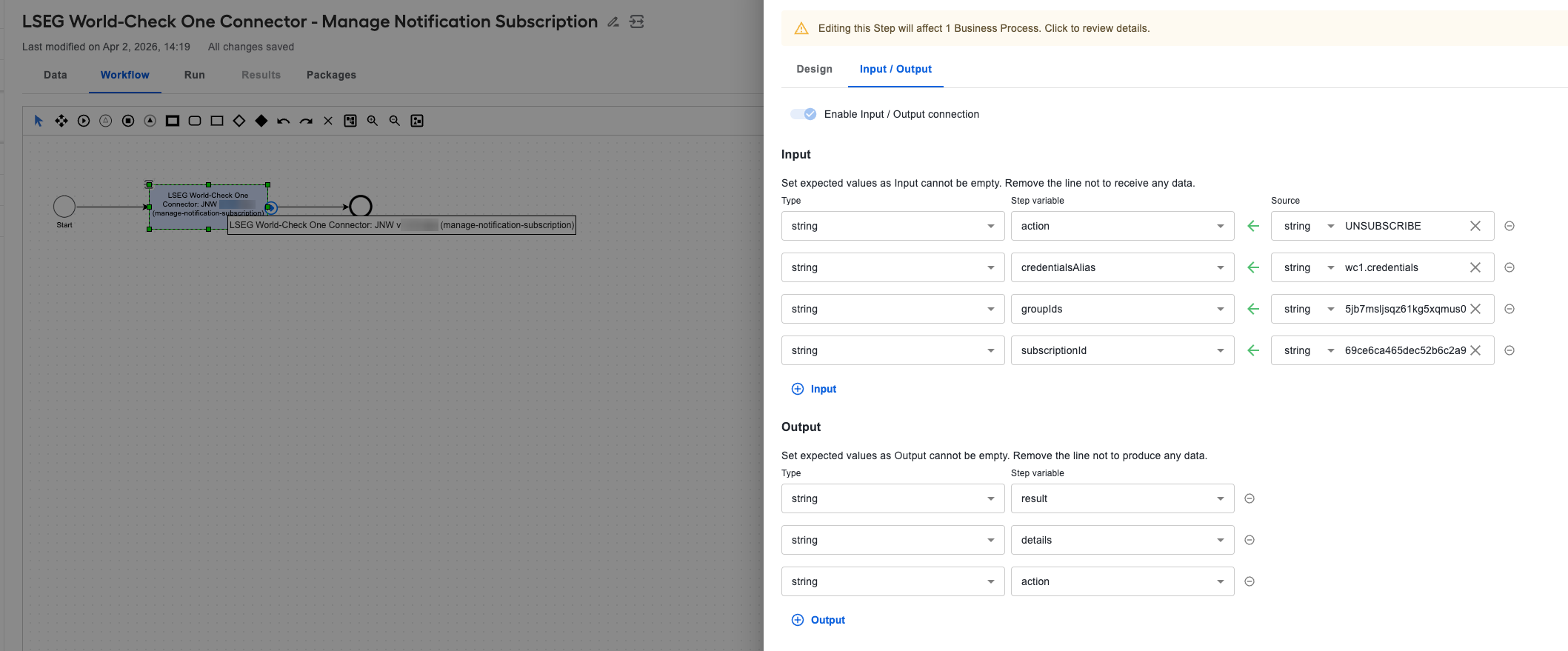
- To create a subscription for one or more WC1 groups, specify:
action:SUBSCRIBEcredentialsAlias: the Secrets Vault alias containing the WC1 API credentialsgroupIds: a comma-separated list of WC1 group IDsThe connector obtains the webhook callback URL and OAuth credentials from the configuration form.
- To update the WC1 groups associated with the existing subscription, specify:
action:UPDATEcredentialsAlias: the Secrets Vault alias containing the WC1 API credentialsgroupIds: a comma-separated list of WC1 group IDssubscriptionId: the ID of the subscription to update
- To delete a subscription, specify:
action:UNSUBSCRIBEcredentialsAlias: the Secrets Vault alias containing the WC1 API credentialssubscriptionId: the ID of the subscription to delete
- To list all configured subscriptions, specify:
action:GET_ALLcredentialsAlias: the Secrets Vault alias containing the WC1 API credentials
After the BP runs, the step provides the following output variables: action, result, and details.
WC1 API reference
The connector uses the following WC1 API endpoints. All requests use the base URL configured in the API URL field. For complete request and response schemas, see the LSEG World-Check One API v3 documentation.
Authentication
The connector handles authentication automatically:
Case-processing and metadata requests use the tenant-specific HMAC credentials referenced by
credential_alias, which is configured for each tenant.Notification-subscription requests use the OAuth 2.0 credentials referenced by the WorkFusion OAuth Credentials Alias field.
Case processing endpoints
Searches a WC1 group for unresolved cases:
POST {apiUrl}/screening/v3/cases/searchAssigns a case to the WC1 user configured to process cases. The request includes the WC1 user ID and an assignment note:
PUT {apiUrl}/screening/v3/cases/{caseSystemId}/assigneeReturns the screening results associated with the case:
POST {apiUrl}/screening/v3/cases/{caseSystemId}/resultsReturns the complete case record. The connector combines the case details with the screening results before sending the case to Evelyn:
GET {apiUrl}/screening/v3/cases/{caseSystemId}Resolves a case and updates it with Evelyn's decision:
PUT {apiUrl}/screening/v3/cases/{caseSystemId}/results/resolutionRemoves the current assignee after resolution when no resolved case assignee is configured:
DELETE {apiUrl}/screening/v3/cases/{caseSystemId}/assignee
Metadata endpoints
The connector uses the following endpoints to obtain the WC1 identifiers required for case processing.
Gets active WC1 users configured for case assignment:
GET {apiUrl}/screening/v3/usersReturns the field definitions required to interpret case details for the specified group:
GET {apiUrl}/screening/v3/groups/{groupId}/case-templateReturns the valid statuses, risk levels, and resolution reasons for the specified group:
GET {apiUrl}/screening/v3/groups/{groupId}/resolution-toolkits
Notification subscription endpoints
The connector uses these endpoints to manage webhook notifications for WC1 case updates.
Creates an
OGS_UPDATESwebhook subscription for one or more WC1 groups:POST {apiUrl}/screening/v3/notifications/subscriptionsUpdates the WC1 groups associated with the existing subscription:
PATCH {apiUrl}/screening/v3/notifications/subscriptions/{subscriptionId}Deletes the specified webhook subscription:
DELETE {apiUrl}/screening/v3/notifications/subscriptions/{subscriptionId}Returns the configured
OGS_UPDATESwebhook subscriptions:POST {apiUrl}/screening/v3/notifications/subscriptions/search