
Create Bot Task
Before getting into the details, let's take a quick overview how a simple Bot Task looks like in terms of the ODF 2 framework:
@BotTask
public class GenericTaskExample implements GenericTask {

    private final Logger logger;

    @Inject
    public GenericTaskExample(Logger logger) {
        this.logger = logger;
    }

    @Override
    public void run() {
        logger.info("Hello, World!");
    }

}
Here, you can see a pure Java class with two extra details:
- the
com.workfusion.odf2.compiler.BotTaskannotation - the
com.workfusion.odf2.core.task.generic.GenericTaskinterface implementation
The @BotTask annotation tells the compiler that the current Java class is essentially an ODF 2 Bot Task and should be treated accordingly. The GenericTask interface, in its turn, explains the framework of how exactly to execute a Bot Task. In this particular example, the framework calls the run method and prints the Hello, World! message into the logger.
@BotTask annotation
Considering that any class can be a Bot Task, you should separate ordinary Java classes and Bot Tasks. This is where the @BotTask annotation steps in. When you build your project, the Java compiler searches for the classes annotated with @BotTask. Then it automatically creates an XML file inside the configs/main folder for each found class. The created XML is basically a WebHarvest bot config that represents a single step in your Business Process.
Generally speaking, you will never deal with these XML files directly because they're not a part of the ODF 2 project source code but rather a compilation result. Anyway, it's good to understand how a Business Process step connected to the Java class is annotated with @BotTask.
Let's take a look at the generated XML file:
<?xml version="1.0" encoding="UTF-8"?>
<config xmlns="http://web-harvest.sourceforge.net/schema/1.0/config" scriptlang="groovy">
<script></script>
...
</config>
Here, you can see a part of the generic-task-example.xml file generated by the compiler. This is a pretty simple bot config that initializes the ODF 2 framework at line 8 and then delegates a call back to the class annotated with @BotTask—GenericTaskExample.class at line 10.
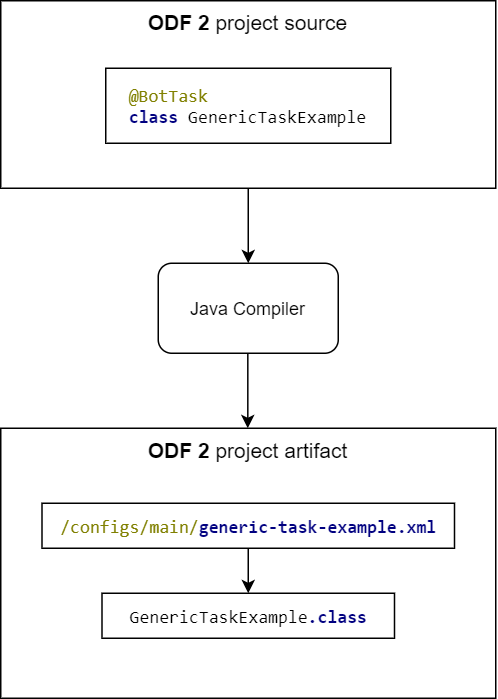
By default, the name of the XML file is generated according to the related class name. If, for some reason, you need a custom filename, specify the fileName attribute in the @BotTask annotation:
@BotTask(fileName = "custom-file-name.xml")
public class GenericTaskExample implements GenericTask {...}
Task Runner
Now, when you understand how a Business Process step is connected to a Java class, let's explore how exactly the ODF 2 framework executes a Bot Task. As you saw in the GenericTaskExample, there is the run method to execute. But where does this method come from? Can you declare other methods in your Bot Task?
At the bottom level, the ODF 2 framework works with the com.workfusion.odf2.core.task.OdfTask interface. GenericTask is just a successor of OdfTask. Any Bot Task must implement this interface directly or through inheritance.
public interface OdfTask {

    Class<? extends OdfTaskRunner<?>> getRunnerClass();

}
The main purpose of OdfTask is to specify a runner class—a special class that declares how exactly the framework should treat the task. Let's take a look, for example, at GenericTaskRunner:
public class GenericTaskRunner implements OdfSingleResultTaskRunner<GenericTask> {

    @Override
    public SingleResult run(GenericTask task) {
        task.run();
        ...
    }

}
As you can see, GenericTaskRunner receives an instance of GenericTask and then calls the run method.
A runner is an abstract concept and can basically do anything from simple method delegation, like in the example above, to very complex logic. In general, a task runner encapsulates common logic specific for a Bot Task of the current type. For example, it can obtain a variable from the input, extract the data associated with this variable from an external service, and delegate the extracted data directly to a Bot Task.
Custom Task Runner
ODF 2 comes with plenty of runners and corresponding Bot Task types. You can easily define your own task type with a custom task runner.
Let's imagine you need a special task with some fallback mechanism. First, define a task interface with all required methods. In our example, there are two methods—mainMethod and fallbackMethod to be called only if mainMethod fails with an exception.
public interface FallbackTask extends OdfTask {

    @Override
    default Class<FallbackTaskRunner> getRunnerClass() {
        return FallbackTaskRunner.class;
    }

    void mainMethod();

    void fallbackMethod();

}
Once you have a task interface, create a corresponding FallbackTaskRunner.
public class FallbackTaskRunner implements OdfTaskRunner<FallbackTask> {

    @Override
    public MultipleResults run(FallbackTask task) {
        try {
            task.mainMethod();
        } catch (Exception e) {
            task.fallbackMethod();
        }
        return TaskResult.empty();
    }

}
The runner tries to call mainMethod, and if it fails, it delegates execution to fallbackMethod. Now, you have FallbackTaskRunner and the FallbackTask interface. Let's create a new Bot Task from this interface.
@BotTask
public class FallbackTaskExample implements FallbackTask {

    private final Logger logger;

    @Inject
    public FallbackTaskExample(Logger logger) {
        this.logger = logger;
    }

    @Override
    public void mainMethod() {
        logger.info("inside main method");
    }

    @Override
    public void fallbackMethod() {
        logger.info("inside fallback method");
    }

}
As you can see, the ODF 2 framework doesn't limit you in terms of how a Bot Task should look like. You can use predefined task types, like GenericTask, or create your own type and easily embed it into the framework.
Bot Tasks with RPA
When it comes to an RPA task, there is a huge difference that distinguishes it from a regular task—an RPA bot requires a special environment with Windows OS and specific software installed. Consequently, the ODF 2 framework should somehow let the platform understand that this specific task contains RPA logic and should be executed in a specific environment. To address this, you have the requireRpa attribute in the @BotTask annotation.
@BotTask(requireRpa = true)
public class RpaTask implements GenericTask {...}
The requireRpa attribute guarantees that the current task will be executed on the RPA node. There is also an optional roboticsFleet attribute that specifies the RPA fleet to be used. Fleets stand for groups of bots that segregate tasks according to their business value or machines with specified software. If no fleet attribute is provided, a task is sent to the shared fleet.
@BotTask(requireRpa = true, roboticsFleet = "common-fleet")
public class RpaTask implements GenericTask {...}
Now let's put it all together and look at how a simple Bot Task with RPA logic looks like in terms of the ODF 2 framework.
@BotTask(requireRpa = true, roboticsFleet = "common-fleet")
public class RpaTask implements GenericTask {

    private final RpaRunner rpaRunner;

    @Inject
    public RpaTask(RpaRunner rpaRunner) {
        this.rpaRunner = rpaRunner;
    }

    @Override
    public void run() {
        rpaRunner.execute(driver -> {
            driver.switchDriver("desktop");

            open("notepad");
            window(".Notepad[title='Untitled - Notepad']");
            $(".Edit").sendKeys("Hello, World!");
        });
    }

}
Task input and output
The key concept of a Business Process is the data flow between steps while processing big amounts of uniform data. Input data for Business Processes is divided into items with a defined structure called records. Each record comes to a Bot Task in the form of a com.workfusion.odf2.core.webharvest.TaskInput object. The following code sample shows how to inject and get data from TaskInput inside a Bot Task:
@BotTask
public class GenericTaskExample implements GenericTask {

    private final TaskInput taskInput;

    @Inject
    public GenericTaskExample(TaskInput taskInput) {
        this.taskInput = taskInput;
    }

    @Override
    public void run() {
        Optional<String> variable = taskInput.getVariable("my_variable");
        String requiredVariable = taskInput.getRequiredVariable("my_required_variable");
        String transactionId = taskInput.getRequiredVariable(TaskVariable.TRANSACTION_ID);
    }

}
TaskInput provides several methods you should be aware of:
Optional<String> getVariable(String name)returns a variable by the name orOptional.empty()if the variable doesn't exist in the input data.String getRequiredVariable(String name)returns a variable by the name or throws an exception if the variable doesn't exist in the input data.String getRequiredVariable(TaskVariable variable)returns a variable by the constant name defined in thecom.workfusion.odf2.core.webharvest.TaskVariableenum or throws an exception if the variable doesn't exist in the input data.
Each Bot Task can also specify an output data—the data to be available on the next step (bot, manual, or business rule). You can do this by using the com.workfusion.odf2.core.webharvest.TaskOutput object.
@BotTask
public class GenericTaskExample implements GenericTask {

    private final TaskOutput taskOutput;

    @Inject
    public GenericTaskExample(TaskOutput taskOutput) {
        this.taskOutput = taskOutput;
    }

    @Override
    public void run() {
        taskOutput.setColumn("variable_name", "variable_value");
    }

}
TaskOutput provides the following method for specifying a variable:
void setColumn(String name, String value)sets the data to be available on the next step.
In more complex scenarios, you may need to put multiple arrays or objects into the task output—this way you can design “split data“ so that the next step is executed multiple times in parallel. To do that, your Bot task must implement the run() method returning the MultipleResults object. Refer to the example on the Creating and processing transactions page:
@Override
public MultipleResults run() {
    final List<Transaction> result = new ArrayList<>();

    for (int index = 0; index < 10; index++) {
        logger.error(this.getClass().getName() + " produced Transaction " + index);

        final Transaction newTransaction = transactionOperation.newTransaction();
        transactionOperation.doWithTransaction(() -> newTransaction, () -> {
            result.add(newTransaction);
        });
    }

    return TaskResult.of(result.stream().map(transaction -> OdfSingleResultTaskRunner
            .newTransaction(transaction, taskOutput))
            .collect(Collectors.toList()));
}
note
taskInput.asResult() generates <export> within the XML source of a Bot Task used by Control Tower. Starting from version 10.2.4, <export> is generated with include-original-data=“true”, which means that all input variables are automatically added to the output. That helps to transit a portion of variables through a number of Bot Tasks down to the Bot Task where these variables are expected to be used. Before version 10.2.4, <export> was generated with include-original-data=“false”.
WebHarvest context
Since every Bot Task uses WebHarvest under the hood, sometimes it can be useful to work with the WebHarvest context directly. The ODF 2 framework provides the following objects to inject into your Bot Task to get access to the WebHarvest context:
groovy.lang.Bindingprovides access to the Groovy binding object associated with the current task.com.workfusion.odf2.core.webharvest.BindingReaderis a utility class that provides the ability to read from a Groovy binding in a handy manner.org.webharvest.runtime.Scraperis a WebHarvest scraper associated with the current Bot Task.org.webharvest.runtime.ScraperContextis the scraper context associated with the current Bot Task. To get this context, first, injectScraperitself and then call thegetContextmethod.
The code sample below shows how to get access to the DatabaseProperties object from the underlying WebHarvest context:
@BotTask
public class GenericTaskExample implements GenericTask {

    private final BindingReader bindingReader;

    @Inject
    public GenericTaskExample(BindingReader bindingReader) {
        this.bindingReader = bindingReader;
    }

    @Override
    public void run() {
        DatabaseProperties properties = bindingReader.getRequiredVariable("dataStoreProperties", DatabaseProperties.class);
        String url = properties.getUrl();
        System.out.println("Connection URL = " + url);
    }

}
tip
For more details on the WebHarvest context and related variables, refer to Bot Tasks context.
Reserved words
The following reserved words cannot be used as output variables names as they will override ODF 2 internal variables or WebHarvest variables.
ODF 2 reserved words
_sys_transaction_id_sys_transaction_status_sys_new_transaction_status_sys_parent_transaction_uuid_sys_ocr_task_id_sys_ocr_type_sys_ocr_export_type
WebHarvest reserved words
hit_submission_data_itemitemprevDataassignmentsourcedataStorePropertiesincludedConfigsapplicationHostapplicationContextPathapplicationResourceUrluserInternalCredentialsseleniumDriverseleniumServerseleniumLoggerseleniumDriverRegistryselenium_node_idselenium_parent_browser_capabilitiescapabilityNodeIdexportResultreleaseDates3EndpointUrls3AccessKeys3SecretKeys3KeyMapsecureStorePasswordsecurityProviderMap