Enable Logstash logging for RPA Worker
The instruction describes how to enable RPA logs in ELK with bepworker-logs.
note
Use port 4570 for a connection from the RPA server to the APP server.
Replace $APP_HOSTNAME with your APP server hostname as specified in the hosts.yml file.
Apply all changes on the RPA server:
Modify
C:/RPA/bot-agent/conf/bot-agent-unit.ymland add the following lines to theprocesses: -id: rpa.workerpart:- Add to
Expressionbefore thestartblock:
set worker_unit_id=unit${unit_id} &&- Add to the end of the
Expressionblock:
--logging.logstash.endpoint=$APP_HOSTNAME:4570 --spring.profiles.include=logstash,execution-worker --bep.worker.logging.logstash.endpoints=$APP_HOSTNAME:4570 --bep.worker.logging.logstash.endpoint=$APP_HOSTNAME:4570"- Add to
Modify
C:/RPA/rpa-grid/logback.xml.- Add a new Spring profile and an appender:
<springProfile name="logstash"> <springProperty scope="context" name="logstash-logs-endpoints" source="bep.worker.logging.logstash.endpoints"/> <springProperty scope="context" name="spring-app-name" source="spring.application.name"/> <springProperty scope="context" name="worker-id" source="worker_unit_id" defaultValue="unknown-unit-id"/> <springProperty scope="context" name="rpa-fleet" source="rpa.fleet" defaultValue="unknown-fleet"/> <appender name="LOGSTASH" class="net.logstash.logback.appender.LogstashTcpSocketAppender"> <destination>${logstash-logs-endpoints}</destination> <includeCallerData>true</includeCallerData> <encoder class="net.logstash.logback.encoder.LogstashEncoder"> <includeMdc>true</includeMdc> <customFields>{ "app-name" : "${spring-app-name}" } </customFields> </encoder> </appender> </springProfile>- Add the
LOGSTASHappender to the root log level:
<root level="INFO">
    <appender-ref ref="STDOUT"/>
    <appender-ref ref="FILE"/>
    <appender-ref ref="LOGSTASH"/>
</root>
Restart RPA Worker. Close the Worker's CMD window in the Unit's RDP session.
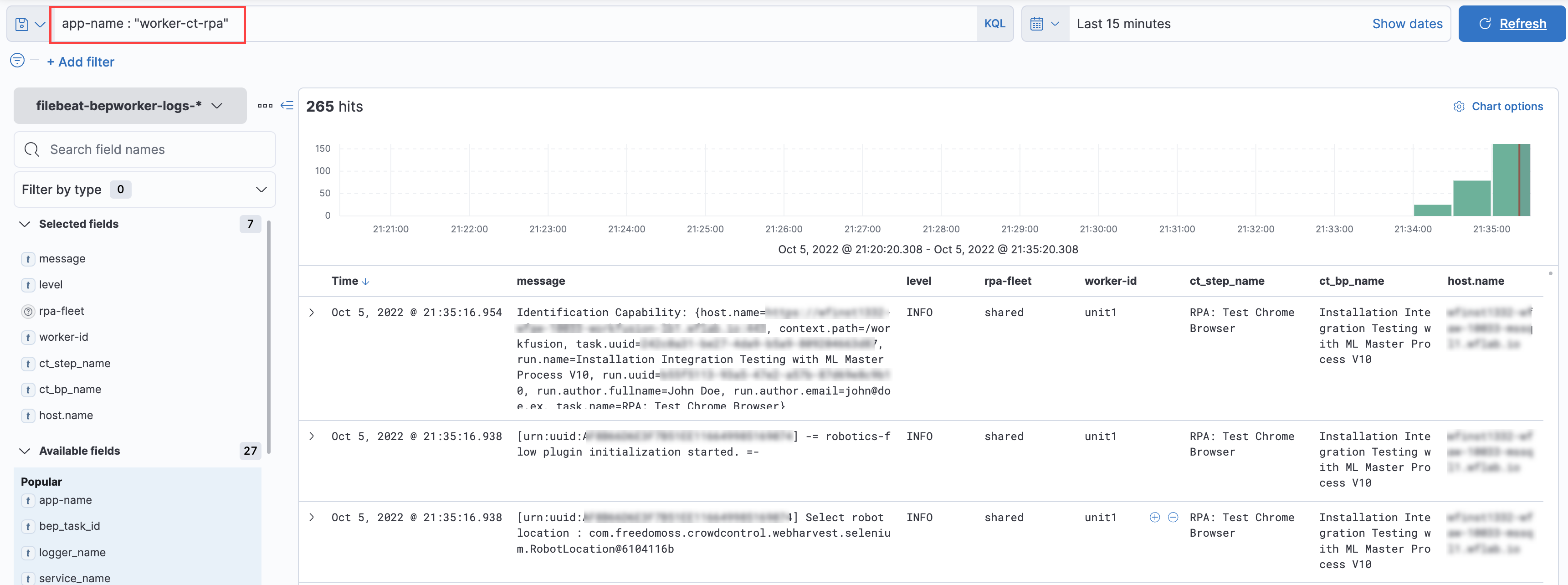
After the Worker startup, check RPA Worker's logs in the filebeat-bepworker-logs ELK index using Filter:
app-name : "worker-ct-rpa"Toggle needed fields according to your requirements for better visibility: