
Create and process user Transactions
To illustrate how user Transactions are created and processed, let's simulate a simple scenario for a Business Process (BP) consisting of two Bot Tasks:
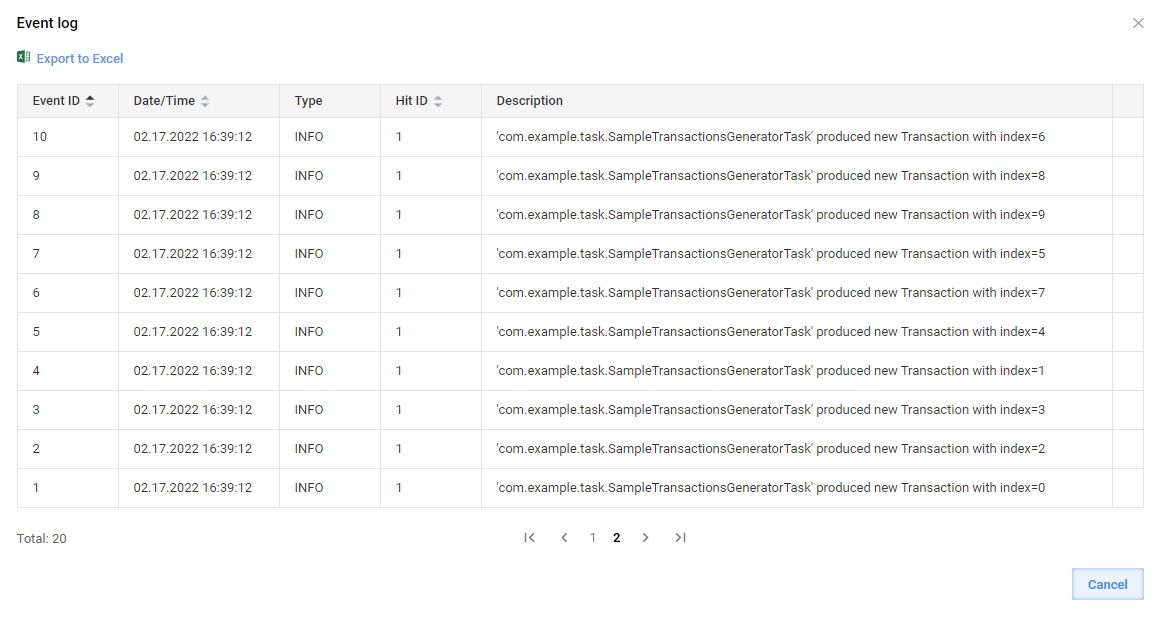
The first one generates ten dummy Transactions in a loop and splits data so that subsequent Bot Tasks are executed in parallel with the thread limits set in the Bot Source configuration. The trace of the Bot Task is visible via Events in Control Tower.
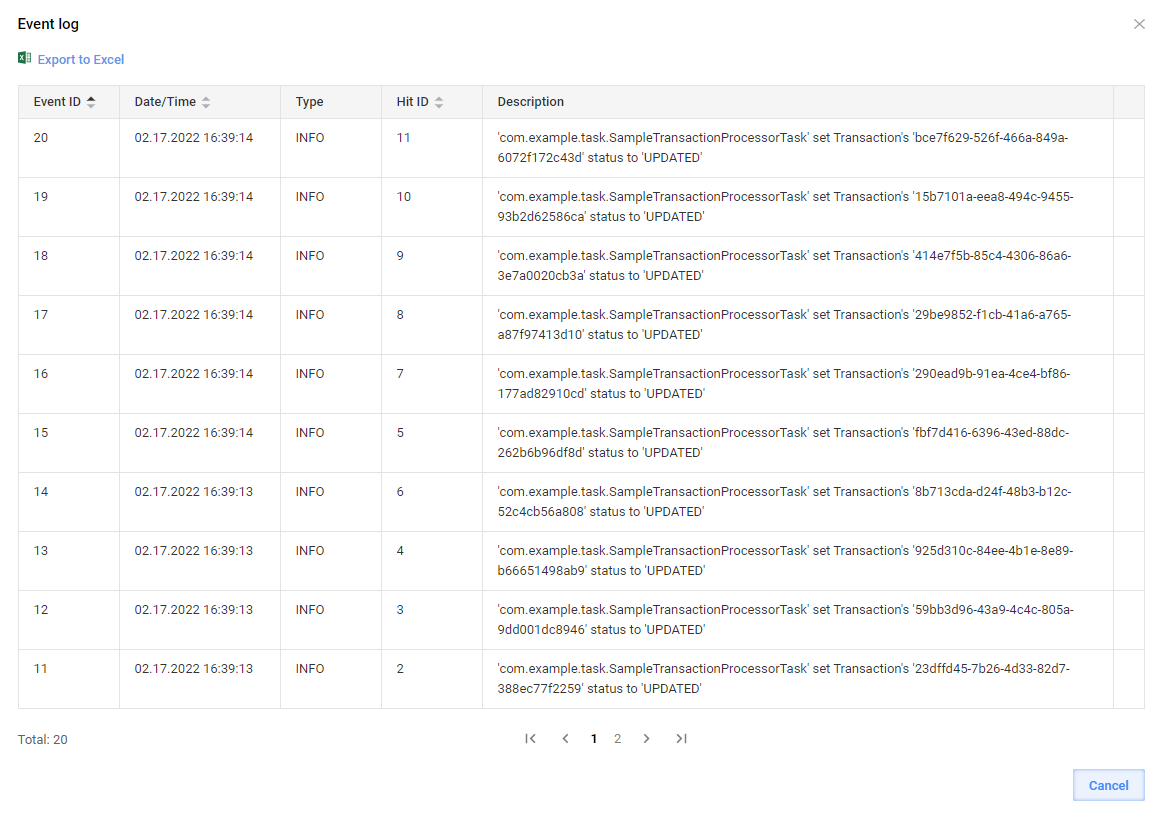
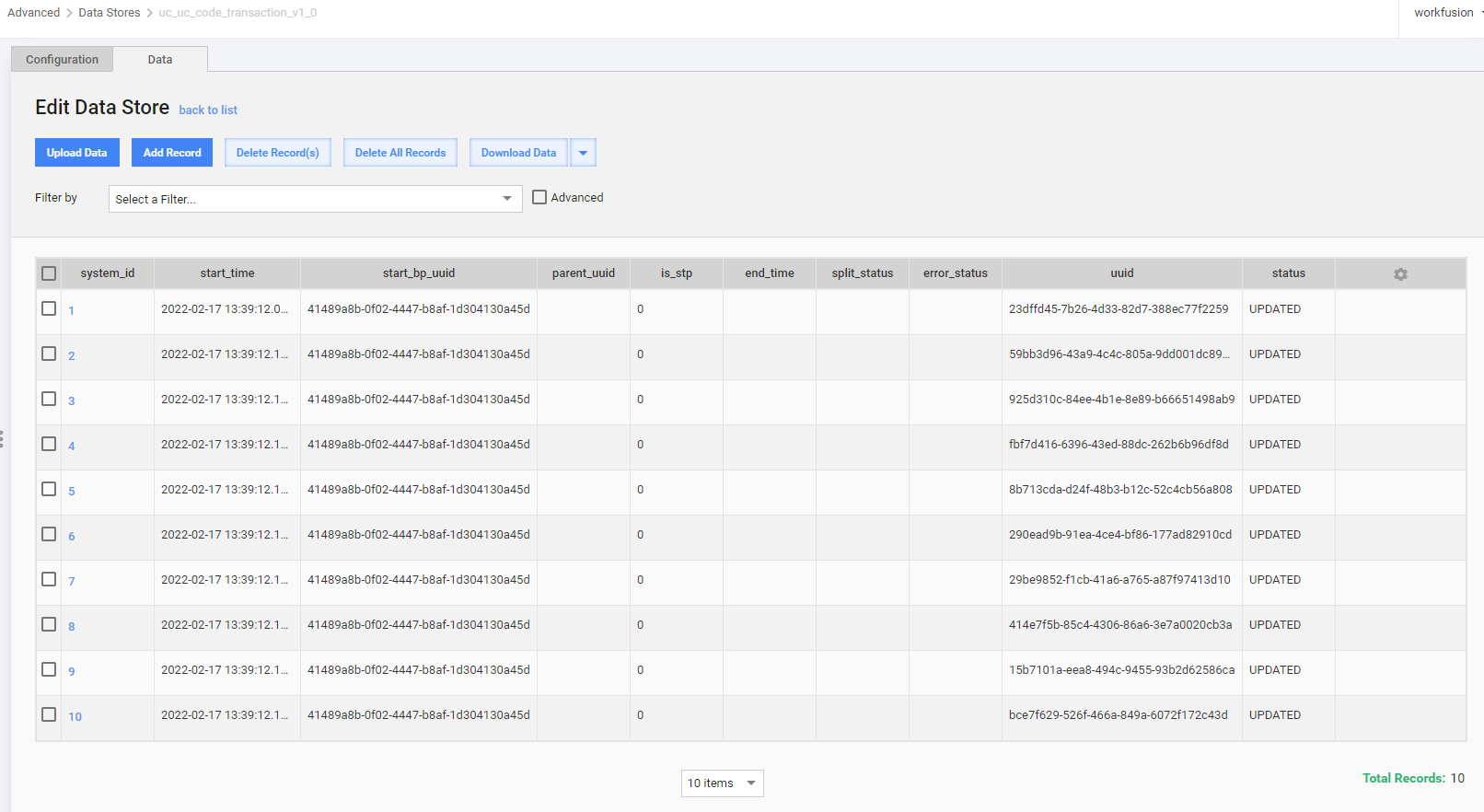
The second one contains the single Transaction code. For visibility, the Transaction status is set to a custom value. The trace of the Bot Task is visible via Events in Control Tower.
Design sample transaction generator
To design a custom runner for the sample transaction generator, follow the steps below:
Define an interface for the Bot Task to generate multiple arrays of output data.
OdfTaskis extended as each ODF task should have a compatible runner class implementingOdfTaskRunner.public interface SampleTransactionGenerator extends OdfTask { @Override default Class<? extends OdfTaskRunner<?>> getRunnerClass() { return SampleTransactionsGeneratorRunner.class; } MultipleResults run(); }Create a runner:
public class SampleTransactionsGeneratorRunner implements OdfTaskRunner<SampleTransactionGenerator> {
    @Override
    public MultipleResults run(SampleTransactionGenerator task) {
        return task.run();
    }
}
In the Bot Task, implement
SampleTransactionGenerator. Later, you can use it in Control Tower as the first step in a custom BP.@BotTask public class SampleTransactionsGeneratorTask implements SampleTransactionGenerator { private final TaskOutput taskOutput; private final TransactionOperation transactionOperation; private final Logger logger; @Inject public SampleTransactionsGeneratorTask(TransactionOperation transactionOperation, TaskOutput taskOutput, Logger logger) { this.transactionOperation = transactionOperation; this.taskOutput = taskOutput; this.logger = logger; } @Override public MultipleResults run() { final List<Transaction> result = new ArrayList<>(); for (int index = 0; index < 10; index++) { logger.error(this.getClass().getName() + " produced Transaction " + index); final Transaction newTransaction = transactionOperation.newTransaction(); transactionOperation.doWithTransaction(() -> newTransaction, () -> { result.add(newTransaction); }); } return TaskResult.of(result.stream().map(transaction -> OdfSingleResultTaskRunner .newTransaction(transaction, taskOutput)) .collect(Collectors.toList())); } }
Implement sample transaction processor
To enable working with an existing Transaction, implement the TransactionProcessorTask interface designed specifically for this scenario:
@BotTask
public class SampleTransactionProcessorTask implements TransactionProcessorTask {

    private final TaskInput taskInput;
    private final Logger logger;

    private final String CUSTOM_TRANSACTION_STATUS = "CUSTOM_SAMPLE_STATUS";

    @Inject
    public SampleTransactionProcessorTask(TaskInput taskInput, Logger logger) {
        this.taskInput = taskInput;
        this.logger = logger;
    }

    @Override
    public boolean shouldProcessTransaction(CurrentTransaction currentTransaction) {
        return Boolean.TRUE;
    }

    @Override
    public void doWithTransaction(Transaction transaction) {
        transaction.setStatus(CUSTOM_TRANSACTION_STATUS);
        logger.error(this.getClass().getName() + " set Transaction's " + transaction.getUuid() + " status to " + CUSTOM_TRANSACTION_STATUS);
    }

}
Build, deploy, and verify sample results
For simplicity, you can add the classes described above to a project generated from ODF 2 Full Archetype using the intake module. After building and deploying the project to Control Tower, proceed as follows:
Produce a simple two-step BP with two Bot Tasks generated from the classes annotated as
@BotTask: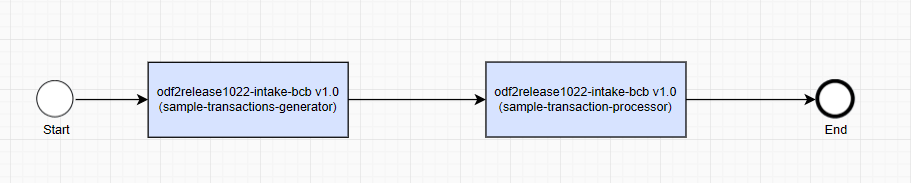
Execute the BP:

After successful completion, review the Event log popup and the Transaction Data Store for the test Use Case:
Operations with Transactions
For operations with Transactions, pay attention to the following essential considerations:
The out-of-the-box exception handling mechanism makes sense within the context of a Transaction. This is due to how ODF 2 handles exceptions: sets a transaction to a specific
HAS_ERRORstatus, createsErrorEntity, and thus routes execution to a separate Exception Handling BP.The
TransactionOperationhelper class provides two method types:doWithXXXX—assumed to be used within the current Transaction context, but the Transaction is needed only for proper exception handling. Otherwise, the Transaction is not essential; hence auto-save isn’t working.doAndUpdateXXX—methods aimed at situations when the code is to change the Transaction entity, and its persistence with exception handling needs to be wrapped properly.
The TransactionOperation helper class provides four aggregated methods to build various Runners—common utilities combining typical Bot Task group operations. To enable the usage of TransactionOperation in a Runner, inject the operation into the Runner first. The available TransactionOperation methods are described in the sub-sections below.
newTransaction
The method initializes a new Transaction entity and persists it into the Use Case Data Store:
public Transaction newTransaction() {
    return transactionRepository.startNewTransaction();
}

.......

// from com.workfusion.odf2.core.orm.repository.TransactionRepository
public Transaction startNewTransaction() {
    return create(transactionBuilder.byStatus(TransactionStatus.INTAKE_IN_PROGRESS.toString()));
}

........

// from com.workfusion.odf2.core.orm.repository.OrmLiteRepository
@Override
public T create(T entity) {
    try {
        dao.create(entity);
        return entity;
    } catch (SQLException e) {
        throw new OdfException(e);
    }
}
doWithTransaction
The method works with Transactions restored NOT from the input sys_transaction_id variable of a task. For instance, this can be the case when you created a Transaction. Another example is a task expected to work with multiple Transactions at the same time, such as a split or join operation. For such scenarios, there are methods that accept a Transaction as a parameter.
The method executes an action, passes it in a parameter as lambda, and returns unchanged output variables. In parameters, the method accepts the transaction object under which desired action (operation) is to be performed.
note
You can perform an operation with a Transaction in a lazy manner—without reading and writing back actual Transaction data from a Data Store and initializing an object. In some scenarios, it’s enough to know _sys_transaction_id and _sys_tansaction_status received by the Bot Task with input data.
Another case is when it is not clear from the context what is the current Transaction, so a specific transaction object is to be identified for specific action to be performed on it.
The value method brings is in standard try-catch wrappers providing proper exception handling. For explanations, see the Exception handling guide. In this method, a transaction object is needed only for proper exception handling: it sets the HAS_ERROR status, creates ErrorEntity, and links it to the failed Transaction.
public SingleResult doWithTransaction(Provider<Transaction> transaction, OperationInsideTransaction action) {
    try {
        action.doInsideTransaction();
        return unchangedTransactionOutput();

    } catch (RetryRequiredException e) {
        throw e; // so it would not be caught by the Exception catch block

    } catch (BusinessException e) {
        return businessExceptionOutput(transaction.get(), e);

    } catch (Exception e) {
        return exceptionOutput(transaction.get(), e);
    }
}
Usage example:
for (T input : producedInputs) {
    final Transaction newTransaction = transactionOperation.newTransaction();
    transactionOperation.doWithTransaction(() -> newTransaction, () -> {
        result.add(newTransaction);
        input.setTransaction(newTransaction);
        task.saveInputEntity(input);
    });
}
doWithCurrentTransaction
The method works within the context of the Transaction coming in a task if the task input contains sys_transaction_id. See the method code sample below:
public SingleResult doWithCurrentTransaction(OperationInsideTransaction action) {
    try {
        action.doInsideTransaction();
        return unchangedTransactionOutput();

    } catch (RetryRequiredException e) {
        throw e; // so it would not be caught by Exception catch block

    } catch (BusinessException e) {
        return businessExceptionOutput(currentTransaction.get(), e);

    } catch (Exception e) {
        return exceptionOutput(currentTransaction.get(), e);
    }
}
Usage example:
return transactionOperation.doWithCurrentTransaction(() -> {
    final Collection<I> inputs = task.findInputEntities(currentTransaction.getRequiredId());
    final Collection<O> businessEntities = task.processInputEntities(inputs);

    final Transaction transaction = currentTransaction.get();
    businessEntities.forEach(entity -> entity.setTransaction(transaction));

    task.saveBusinessEntities(businessEntities);
});
doAndUpdateTransaction
The method works with Transactions restored NOT from the input sys_transaction_id variable of the task. For instance, this can be the case when you created a Transaction. Another example is a task expected to work with multiple Transactions simultaneously, such as a split or join operation. For such scenarios, there are methods that accept a Transaction as a parameter.
The method is for the scenario when you are sure you need to update a given transaction object after an action passed in the parameter as lambda is performed on it. In the end, the method returns changed output variables of the given transaction. And again, the additional value method brings is in the standard try-catch wrappers providing proper exception handling.
public SingleResult doAndUpdateTransaction(Transaction transaction, OperationOnTransaction action) {
    try {
        action.doWithTransaction(transaction);
        transactionRepository.update(transaction);
        return transactionOutput(transaction);

    } catch (RetryRequiredException e) {
        throw e; // so it would not be caught by Exception catch block

    } catch (BusinessException e) {
        return businessExceptionOutput(transaction, e);

    } catch (Exception e) {
        return exceptionOutput(transaction, e);
    }
}
Usage example:
final List<Transaction> transactions = transactionRepository.findByStatus(task.getStatusToMonitor());

transactions.forEach(transaction -> transactionOperation.doAndUpdateTransaction(transaction, t -> {
    task.getStatusToSet().setTo(t);
    task.doWithTransaction(t);
}));
doAndUpdateCurrentTransaction
The method works within the context of a Transaction coming in a task if the task input contains sys_transaction_id. The method also persists the Transaction into its Data Store. See the sample method code below:
public SingleResult doAndUpdateCurrentTransaction(OperationOnTransaction action) {
    final Transaction transaction = currentTransaction.get();

    try {
        action.doWithTransaction(transaction);
        transactionRepository.update(transaction);
        return transactionOutput(transaction);

    } catch (RetryRequiredException e) {
        throw e; // so it would not be caught by Exception catch block

    } catch (BusinessException e) {
        return businessExceptionOutput(transaction, e);

    } catch (Exception e) {
        return exceptionOutput(transaction, e);
    }
}
Usage example:
if (currentTransaction.isPresent() && task.shouldProcessTransaction(currentTransaction)) {
    return transactionOperation.doAndUpdateCurrentTransaction(task::doWithTransaction);

} else {
    return transactionOperation.unchangedTransactionOutput();
}