
Testing (UAT) and go-live (production)
UAT
User Acceptance Testing is the last phase that takes place before process rollout to production and leads to end user sign off on the process both from technical and business logic perspectives. Consequently, this activity may or may not take place in smaller projects that do not lead to production rollout. In a POC the sign off is often received on the basis of a demo; still the end user can choose to test the outcome. In this case the aim of such testing would be more to ensure that the result meets their expectations and/or to check how end users feel about the product they potentially will have to work with. In a production project the aim of UAT as a final test includes both of these aims but also target to find and eliminate all the possible remaining bugs or flaws in logic, as well as all the corner cases and exceptions that could have been missed in implementation and developer/unit tests.
UAT is not only needed, but usually also officially required by customer's internal compliance. You will have to check with customer's Compliance Department their requirements to putting in production new products or changes and follow the process and format of documenting UAT that they demand. It might be the case that internal compliance requires documenting user acceptance testing but does not specify the format - then you can choose it yourself.
The checklist for UAT:
- Include sufficient time for UAT in your project plan (for example, a week).
- Start documenting test cases for UAT in advance with the help of a subject matter expert to cover all corner cases.
- Book the needed resources for UAT with customer in advance and for sufficient amount of time. UAT has to be done by end users and test cases for it should be written by the expert in each specific process.
- Make sure test data for UAT is available in test systems and is sufficient to cover test cases.
- Document the result of UAT and keep it as part of your project documentation.
- Receive sign off on UAT/approval for production from relevant responsible parties: internal compliance, process owner (or business, system, tech owner).
Presenting results
As a template for results debrief you can use Results Deck Short Template. You might also use an extended deck as an example of how results could be presented to the client: Results Deck Example. Note that you're encouraged to only pick slides relevant to your particular case.
Supervised production and go-live
To provide a smooth transition from the existing process workflow to the automated Bot system and give a proper experience and confidence to the Business Team with the new approach, the supervised production phase is used before the work is fully transitioned to bots.
Go-live requires intensive preparation and planning from technical, compliance and user training perspective. Typically a Rollout plan is prepared to keep all the involved parties aware of the planned activities and the dates. Depending on the organization scale and the compliance requirements the plan can be more detailed or high-level.
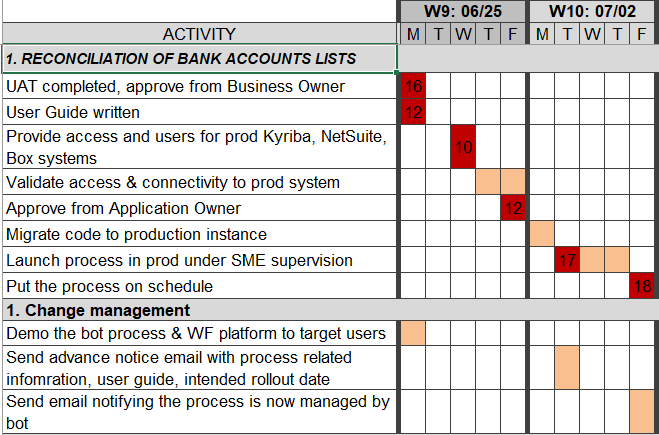
The technical prerequisites are as follows:
- Production environment installed.
- Access to production systems received.
- Code migrated to production.
- Testing and stress-testing completed where applicable.
Compliance:
- Get acquainted with internal compliance requirements to production rollouts.
- Prepare all needed documentation (technical, user; Jira tickets with corresponding approvals, and so on).
- Review with internal compliance team and receive their written sign off.
- Receive approval from all the stakeholders who have to provide it for the given process change, for example, process owner, business owner, application owner, and so on.
Change management (user preparation):
- Write user guide, including troubleshooting.
- Conduct user training sessions, including support model.
- Schedule user notifications of the coming changes.
- Ensure access to internal Support desk, WorkSpace, and so on.