
Project tracking
important
Do not read this section simply as hints for some helpful tools; project tracking is a must regardless of in which format you end up doing it.
Why is it necessary?
- You will not be able to structure and track all the events, plans and dependencies solely in your mind unless you possess super powers; thinking that you possess them will not help, either
- For each decision, issue, delay there must be a written proof that was shared with all the parties (dev team, customer, partner) involved at the time when event occurred
- Each project should produce a set of materials that would allow to make future use of its experience and outcomes
The below paragraphs describe project tracking components based on the project tracking template.
Project plan
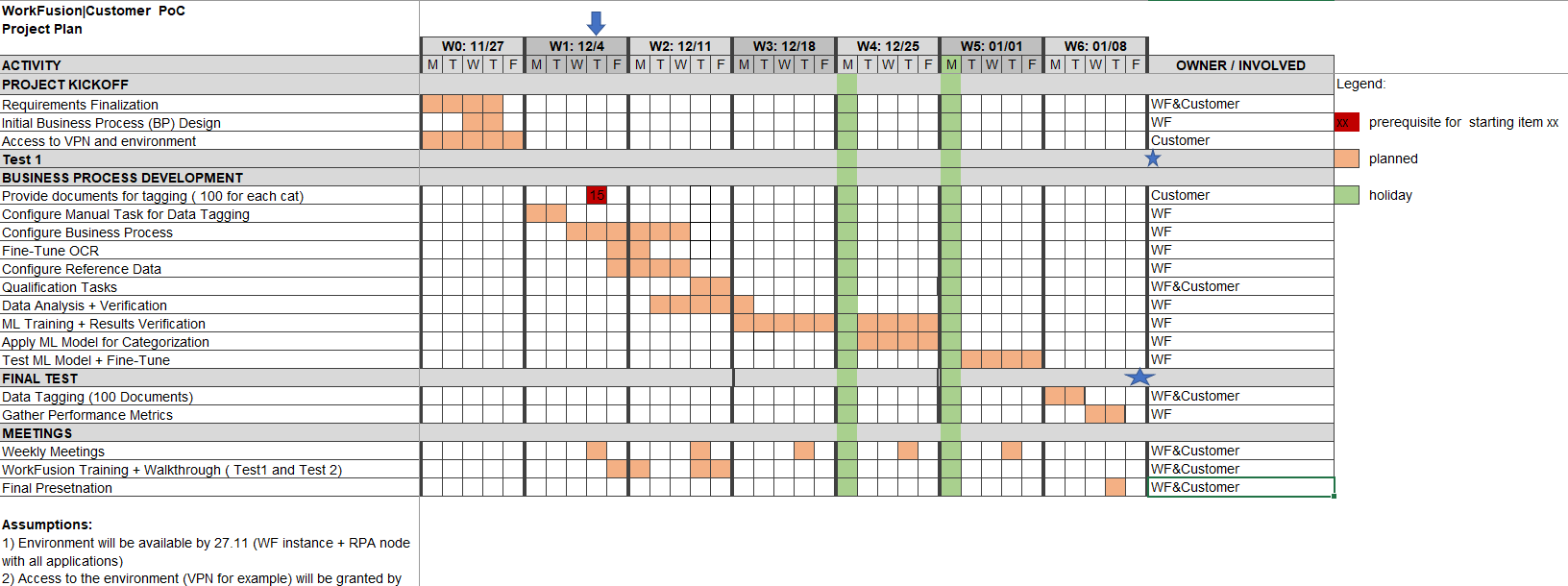
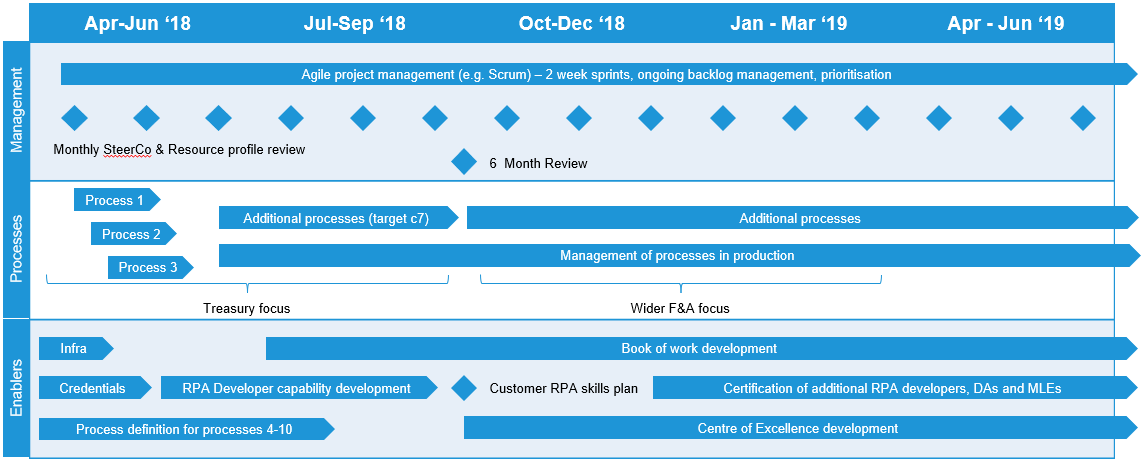
A project plan is a visual representation of each project task timeline with their dependencies like Gantt chart. It should be prepared before the project start and briefly presented on the kickoff.
The plan should be prepared by PM or DM with the help of the development team; all the timeline estimates should come from or be agreed by the developers who are going to implement the project. Apart from day to day tasks, it is useful to integrate holiday/team vacations schedule here as it is going to affect timelines and should be clarified in advance.
Milestones tracker
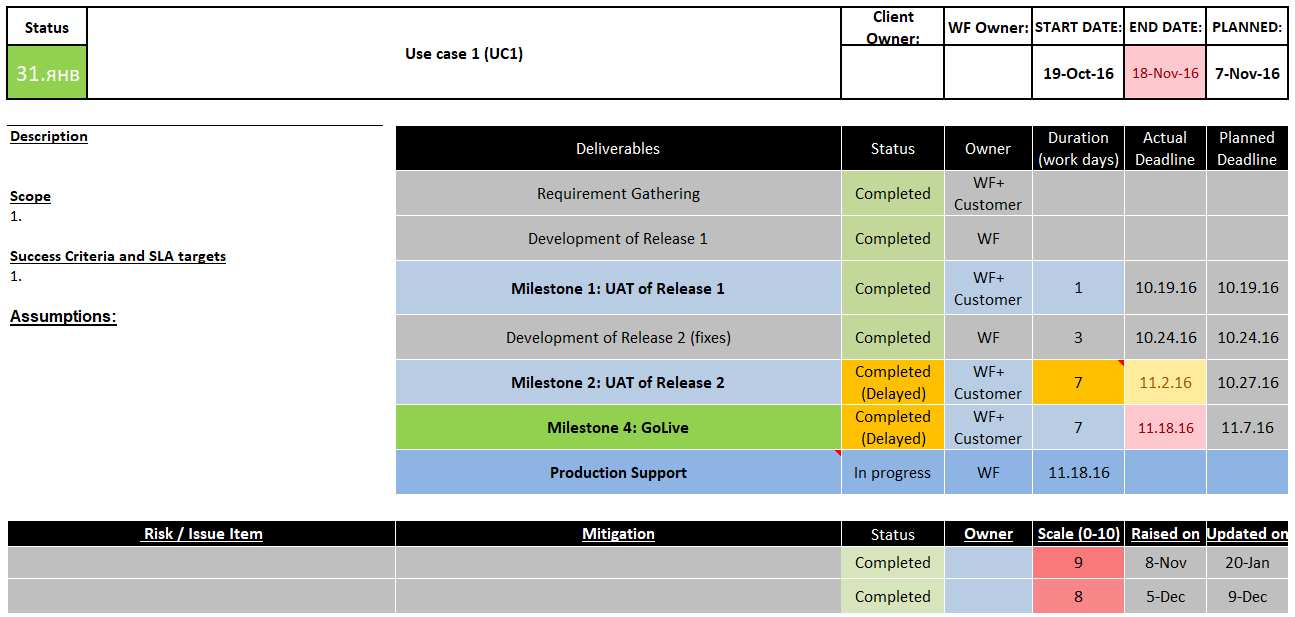
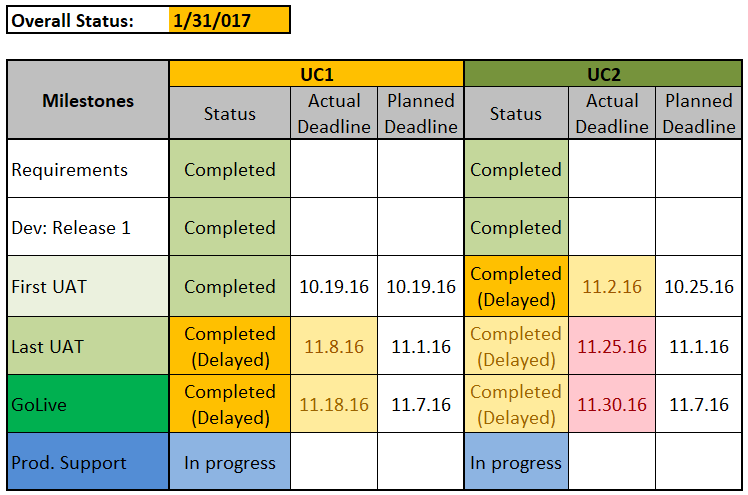
UC1/UC2 or Delivery Plan in the template lists milestones and dates in an easy to read format. A day-to-day plan is useful for the implementation team but contains too many details for executive-level stakeholders. List of milestones is useful for high-level tracking and for presenting to wider circle of stakeholders.
Weekly Monitor
A weekly monitor lists tasks for each week based on project plan and additional activities that arise. Weekly monitor is the most concise and useful way for DM to stay on track with the progress. With the help of a simple list on a weekly (for some projects - daily) call you can check status of each item, plan activities for next week. Each week's activities include:
Items based on the project plan.
Additional actions that came up in progress, for example, "organize call with IT team to resolve access problem", "contact X in another department to check on potential use case").
Items not completed last week and thus moving to the next week.
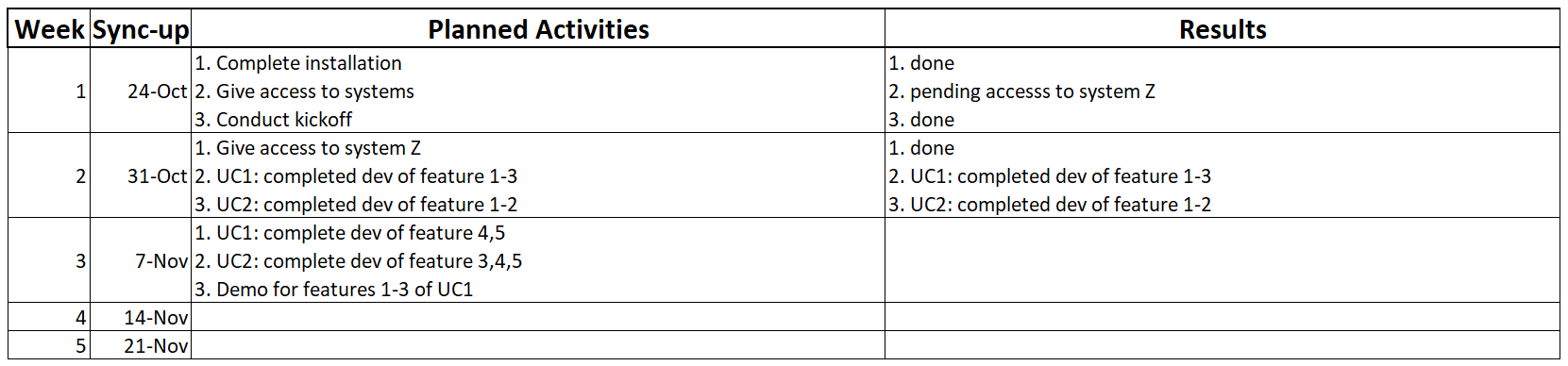
While high-level milestones can be set far in the future so it's hard to understand if you are on track to reach them until it becomes too late, such short-term aims allow to check the health of implementation and adjust the course regularly, for example, if at each status call you find some items not done as planned. If any of the planned items is not done, you need to clearly understand the reason and the impact.
Risks and issues log
The log lists all risks with their impact, mitigation, dates, owners. This list must be reviewed regularly, especially its top-priority items, and updated whenever something changes regarding its items. Every risk and issue should be tracked, none can be left without owner and mitigation.

Additional templates
Summary: another way to represent progress in concise and visual way, can be useful for high-level stakeholders.
Releases: can be used to plan and track process releases, along with their major features.
Features: can be used to list and present features that are planned or developed.
It is not necessary to use each and every of the trackers proposed here. All in all, as a DM you need to have a detailed plan and track risks and issues. In other respects just choose what formats fit best your purpose and your audience, balancing their visual appeal with their ease to use; after all you want not only to accurately reflect all that is happening on the project but also not turn it into a tedious task that occupies hours of work.
RAG status
RAG is a popular method of rating issues or status based on Red, Amber (yellow) or Green colours. In the above examples of documentation you can find it used both for issues rating and for reporting status in the tracker.
The GREEN status is applicable when:
- The project is on track and on budget.
- The quality is at expected levels and success criteria are likely to be met.
- Stakeholders and teams are generally satisfied.
- No issues or minor issues occur.
The AMBER status is applicable when:
- Overspend or delays take place.
- There are problems with quality.
- Customer or stakeholders are dissatisfied.
- Other risks and issues where mitigation and plan to resolve are identified.
The RED status is applicable when one or more of the following takes place:
- Significant time slippage
- Customer unhappiness, escalation
- Acceptance and success criteria not being met
- Legal risk or impact
- Financial impact
- Blocker (technical, organization, any other)
Often, assigning a red status means the situation is going beyond your control and you are asking for help from senior management.
The RAG status is provided along with other key information, including reasons for this status and, most importantly, mitigation plan (aka Path to Green) in case of red or amber. Also status report includes risks and issues, progress from the previous status and activities planned for the next time period. Here is a sample template of status report:
Status report
Status Update: RED, AMBER, GREEN If Red or Amber, why are we in Red or Amber status? And what is the Path to Green?
Risks/Issues: Are there any risks or issues that have a probability of arising that will impact the budget, scope, quality, resources or timelines of the project? If so, summarize the risk or issues, impact to the project or customer and mitigation strategy and action plan.
Progress this week/sprint/month: Summarize progress made since the last update.
Next week's plan: Summarize the key action items for the next period (week/sprint/month).
Cc: Executive Sponsor, Account Manager, Project Team