
Managing Assignments
An assignment is an object created when a Worker accepts or skips a Task. Assignments serve as connections between Workers and Tasks.
Assignment lifecycle
Initially, Workers can view all available Tasks (if they have the required Qualifications). When a Worker has accepted a Task, a new Assignment is created and nobody can accept this Task until it is Abandoned or Returned.
If a Worker has skipped a Task, this Task will not be shown to this Worker during a timeout (10 minutes).
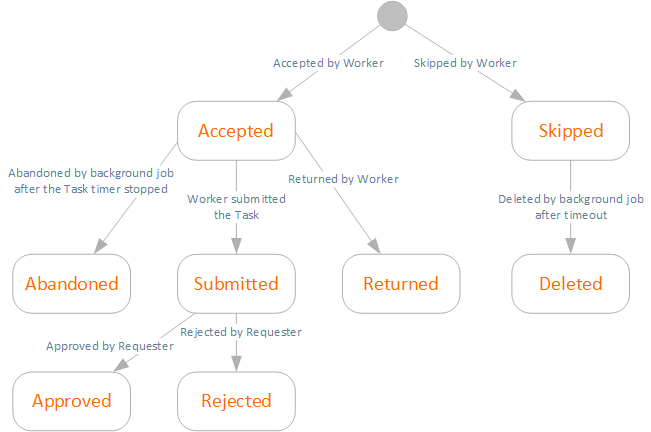
When an Assignment is Abandoned, Returned, Skipped, or Deleted, the Task itself is not removed and is still available for other Workers.
Assignments page
To start managing Assignments, click the Assignments item in the top menu. You will see the following grid with a filter.
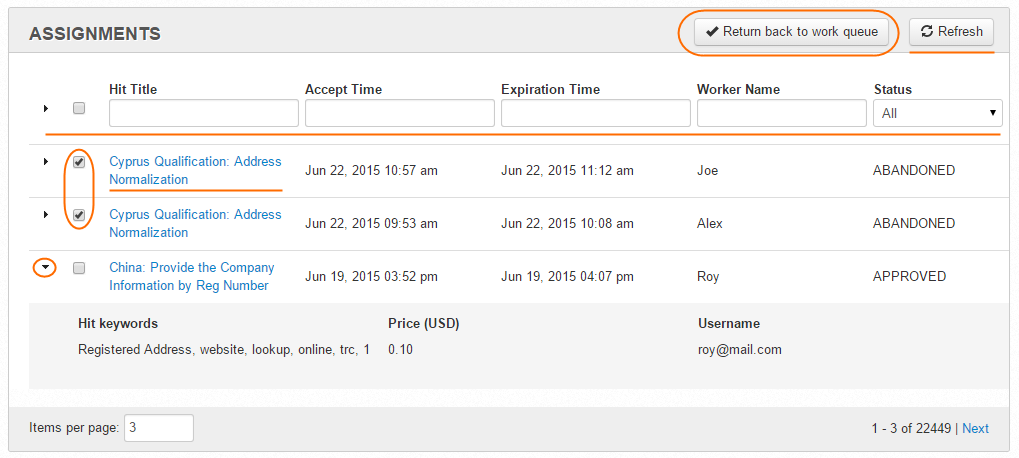
On the Assignments page, you can perform the following actions:
- filter Assignments—You can filter by Title, Accept Time, Expiration Time, Worker Name, and Status. To apply filters, click the Refresh button.
- view Assignment parameters—To expand and view the HIT Keywords, Price, and Username, click the corresponding arrow in the leftmost column.
- preview Tasks—Click the HIT Title link, and the Task preview will open in a new tab.
- Return back to work queue—Select Assignment(s) and click this button to return accepted Tasks (take away the Task from the current Worker and make it available for other Workers).