
Notifications
On the Notifications tab, you can set the following:
- templates sent to Crowds and workers
- notification frequency
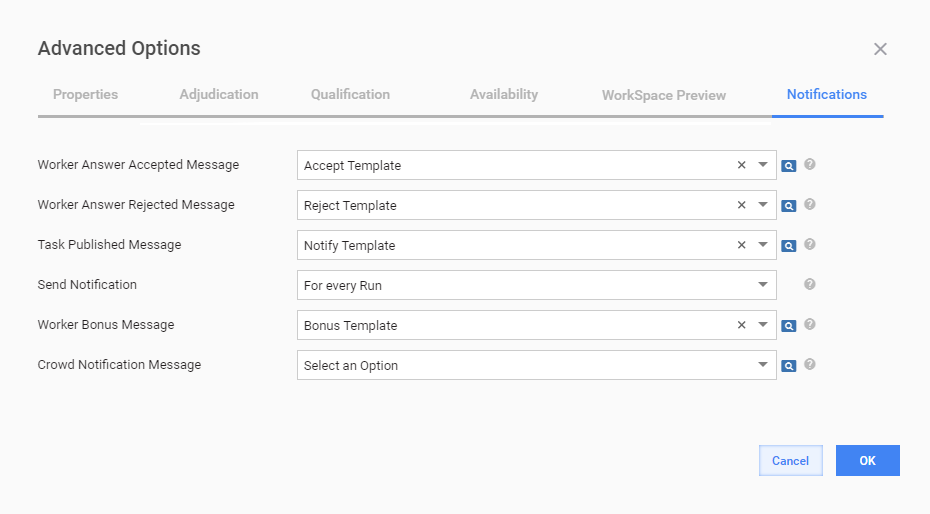
The table below lists available notification settings and their description.
| Field | Description |
|---|---|
| Worker Answer Accepted Message | The message is automatically sent to workers when their answers are accepted. |
| Worker Answer Rejected Message | The message is automatically sent to workers when their answers are rejected. |
| Task Published Message | The notification is automatically sent to workers (SMEs) from a specific Crowd when new assignments for a recently started Manual Task (MT) become available in WorkSpace. The message is based on the Notify template and displayed in the MESSAGES section on the Dashboard tab in WorkSpace. For the notification option to work properly, on the Application settings page in WorkSpace, select the Enable Task Notification option. For details, refer to the Application Settings article. |
| Send Notification | Notification frequency—once per day, for every Run. |
| Worker Bonus Message | The message is automatically sent to workers when a bonus is awarded. |
| Crowd Notification Message | The message is automatically sent to specific Crowd workers by email when new assignments for a recently started MT become available in WorkSpace. The notification is based on the Crowd notification template. To set the list of workers to get such email notifications, go to Workers > Workforces > Manage Crowds > Edit Crowd. For detailed info, see the Manage Workforces and Crowds topic. |
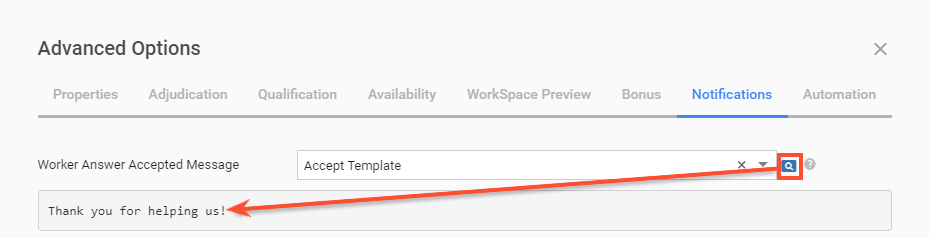
To preview a notification template, click the corresponding preview icon on the right, as shown in the figure below.
For information on creating or editing templates, go the Templates topic.