
Working on Tasks
After you have found an appropriate Task, you need to accept it before start completing the Task.
Accepting Tasks
- Carefully read all the Task instructions. You can expand or collapse the instructions section by using the Click to show/hide instructions link.
- Accept the Task by clicking the Accept button in the top right corner and start working on it. All accepted Tasks are displayed on your Dashboard as Active Tasks. Click the Automatically accept the next task checkbox, to accept all tasks and have them load automatically after you submit your answer.
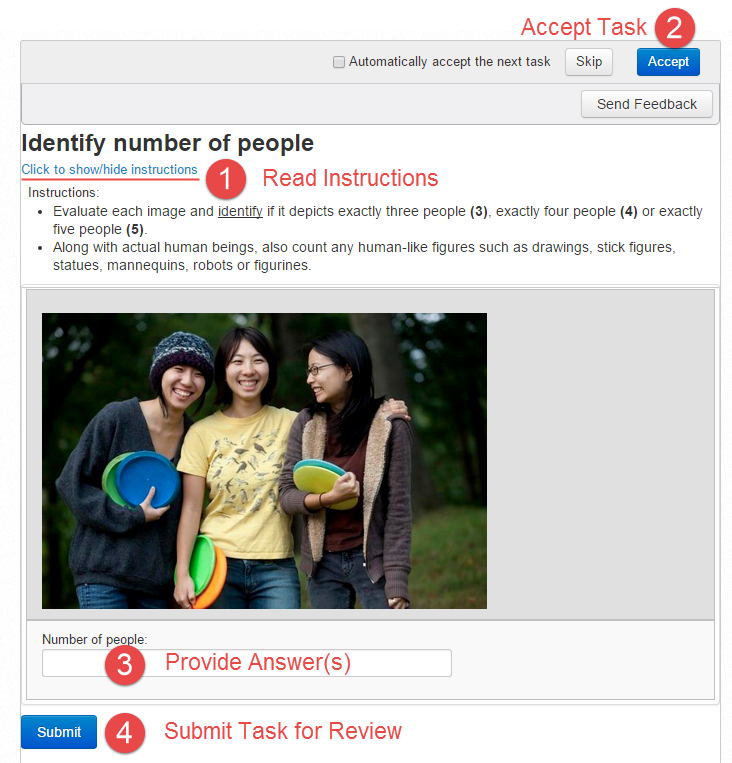
You have an option to Skip a Task by clicking the appropriate button. In that case, the Task will not be available for some time and you will be able to accept other Tasks in the same Task Group.
Executing Tasks

After you have accepted the Task, the Task Timer starts. Watch the timer to complete the Task in time.
If you cannot complete a Task (lack of time, Task is too complex, problems with internet, etc.), click the Return button.
It is better to return a Task than to submit wrong or incomplete answers.
Requester can reject inconsistent Tasks, and your Approval Rate will be reduced. Workers with a low Approval Rate cannot access interesting well-paid Tasks.
If you have any questions about the task, click the Send Feedback button and enter your name and message.
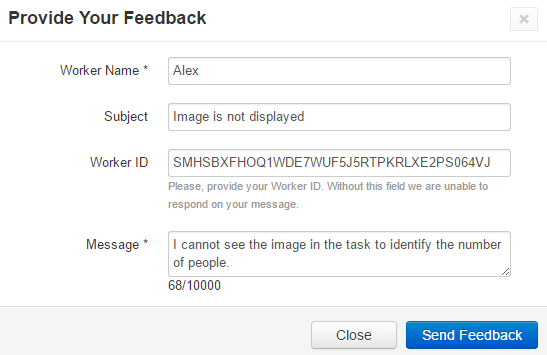
Submitting Tasks
When you have provided all the required Task answers, check yourself and click the Submit button in the bottom left corner.
Your submission will be reviewed, approved or rejected. You will receive a notification in your Messages and on your Dashboard.
Only approved Tasks are paid. You can check your statistics and earnings on your Dashboard.
You can accept and submit other Tasks of the same Task Group in succession, no need to search them again.