Basic concepts for Business Process implementation
A Business Process (BP) is an automation flow combining Manual Tasks, Bot Tasks, Model steps, decision or transformation rules, or nested processes. Work.AI allows you to implement two types of Business Processes (BP):
Schema-based Business Processes, where each step can have a contract defining variables expected as input for this step and those produced as its output.
In such BPs, all data is stored within the flow’s transactional context and sent to corresponding steps filtered by its input contracts. Such an approach significantly reduces the amount of data passed across steps, thus increasing the overall automation performance.
Schemaless Business Processes, the legacy type, designed without any contracts.
The article details a general sequence of steps to deliver an automation as a Business Process and gives tips on what to take into consideration while designing it.
Step-by-step implementation flow
The only difference between a schemaless BP and a schema-based one is the way they handle data. The implementation flow is essentially the same for both, with slight differences in the design stage. Schemaless BPs can be converted into schema-based one by enabling the Input / Output connection.
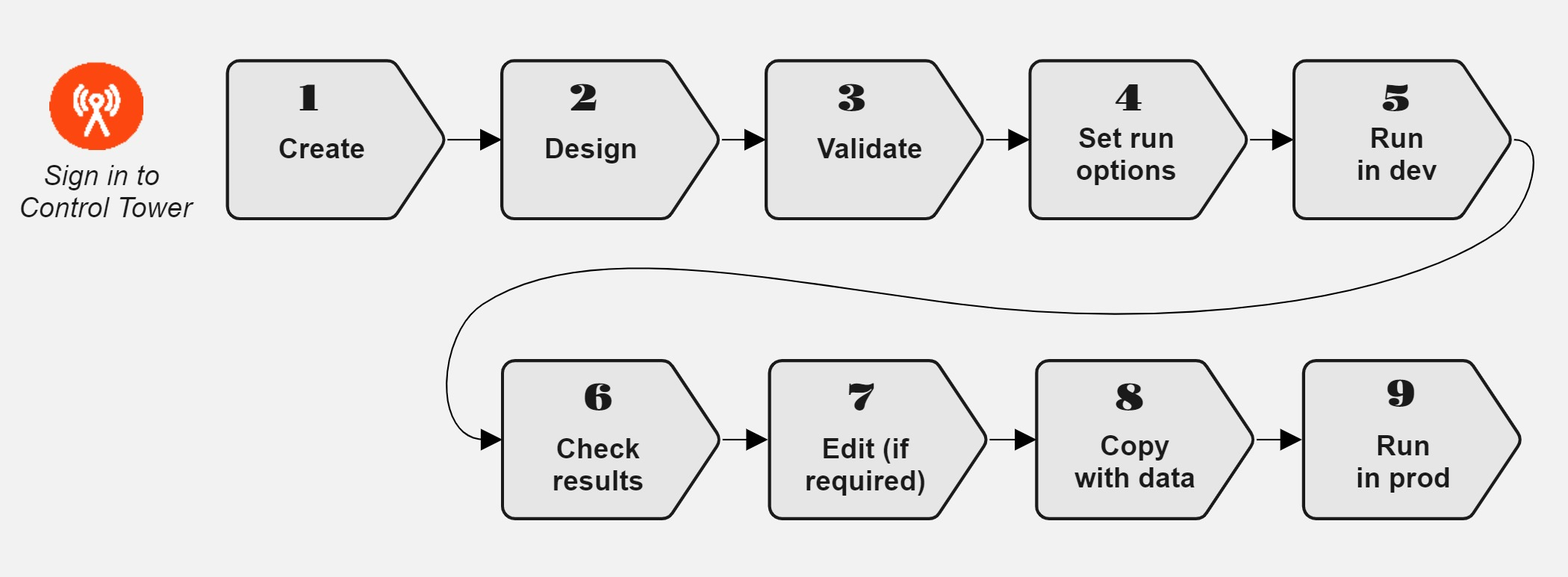
Create a Business Process in accordance with the instruction. Any BP you have created appears in the BP list.
Design the BP flow using no-code steps, Manual Tasks, and other workflow components, accounting for the implementation tips. For details, read the Build Business Process flow in Workflow designer topic.
If you design a schema-based flow, you will need not only to design the flow but also configure input and output contracts for each step in the flow.
Make sure the designed BP is valid using the guide.
Configure the options to run the BP as detailed in the guide.
Test-run the BP in the development production. For instructions, refer to the Run Business Process topic.
Monitor the BP progress and then check the BP results.
If required, edit the BP settings as described in Set run options. or change its design. Also, you can repair the BP and trace errors via logs. For details, refer to the View logs and repair Business Processes topic.
To rerun the BP, copy it with data as described in the guide.
Run the BP in production. For more information, refer to the Run Business Process topic.
Implementation tips
Determine tasks to include
To understand whether you need to include Manual Tasks or Bot Task, consider the following:
Bot Tasks are best suited for scraping, manipulating data, finding information with a permanent location, such as in forms, standard PDF files, SEC or at .org websites.
The output of one task can become the input for a subsequent one, so you need to know what the output of each task looks like.
Identify the Business Process threshold or streaming—whether an entire task has to be finished before the data moves on.
Use only tested and valid tasks: from Operations or the already available ones. Read also Validate Business Process to get to know the basic rules of creating a valid BP.
Monitor BP execution
To make sure the BP implementation is up to requirements, do as follows:
Watch the Business Process progress on the Workflow diagram.
Check the Summary page, BP output data, and worker statistics. For details, refer to the View Business Process results.
Pause or stop the BP if some issues occur. For troubleshooting tips, refer to one of the following sections:
When you notice the BP performance degrading, start with the Investigate Business Process performance degradation topic.
If the Business Process becomes non-operational, browse through Investigate non-operational Business Process topic.
In case a Business Process becomes non-operational or its performance degrades, look for troubleshooting tips in the following support guides: