Task trace by Business Process steps
[BEP][Tasks Time by Stage] By BP Steps
The graph displays BP steps with aggregation information by status.
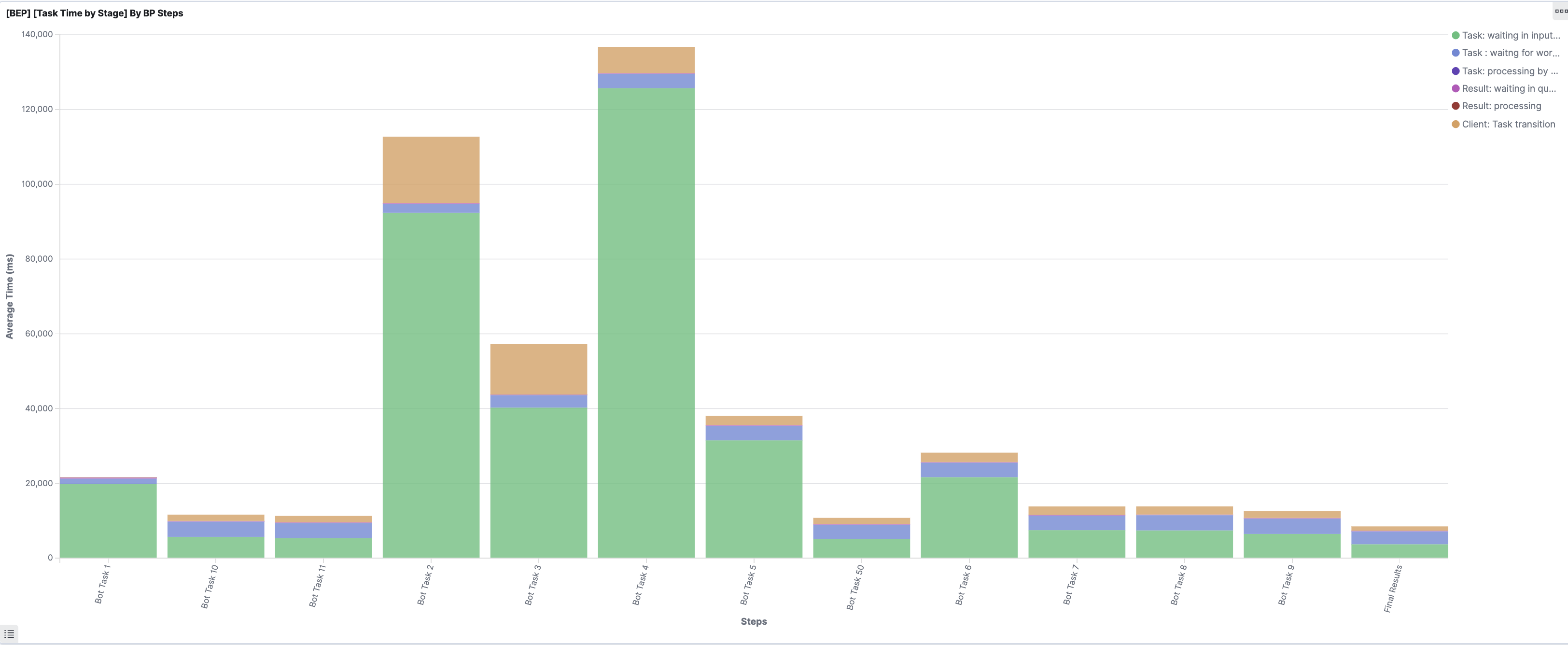
Each task in a step can have one of the following statuses at a point in time:
- Task: waiting in input queue shows how long a task is waiting until it is submitted to BEP and routed to a Worker pool queue.
- Task: waiting for worker displays how long a task is waiting for a free Worker after it is routed from the input queue to a Worker pool queue.
- Task: processing by worker lists how long a Worker executes a task on average.
- Result: waiting in queue shows how long a task is waiting in the result queue before a client begins to process it.
- Result: processing by client app displays how long a task is processed by a client app.
- Client: Task Transition lists how long a client spends to process the current result and generate a new input item.
info
If the dashboard includes the Task: processing by worker graph and the graph's interval is large, consider improving an associated Bot Config to enhance the overall BP performance.
You can analyze possible improvements to the application and BP or boost BP/Step if Task: processing by worker is not appropriate.
Monitor specific BP steps
To see only steps for specific BPs rather than all steps for all BPs, add a filter as described below:
- Above the dashboard, click + Add Filter.
- For Field, select bpUUID.keyword.
- For Operator, select is.
- For Value, select your BP UUID.
- Click the Save button.
Now, you can see steps with statistics that relate only to your BP.