
Grid
The Grid answer type allows Workers to enter answers in the grid with a defined column structure and a dynamic number of rows.
This feature is useful when the exact number of Answers is unknown.
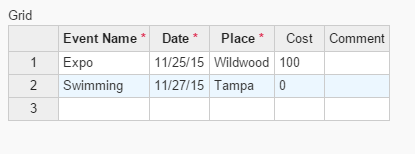
note
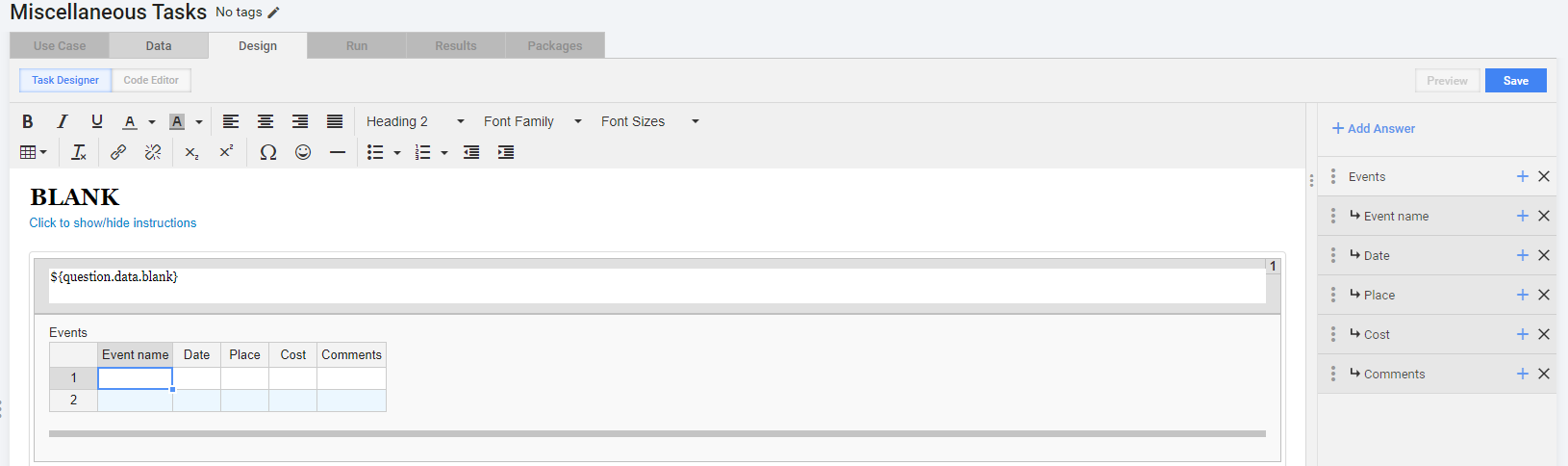
Task: "Find all events with their parameters (event name, date, time, place, cost) from news articles".
Each event corresponds to a new row; columns are named as event parameters (event name, date, time, place, cost).
The Grid Answer can be substituted with another dynamic Answer Type - Correlated Fields.
How to use
Click a cell in a corresponding column and enter the answer.
- If you need to pick a date from calendar, double click the cell.
- If the row you click is the last one, a new row will be appended automatically.
- When you hover over a cell, a tooltip with answer description is displayed.
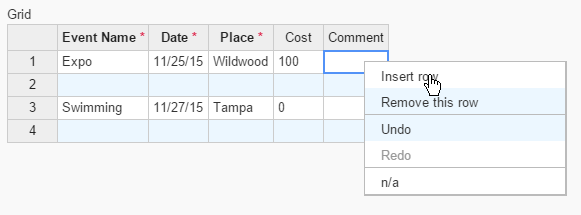
Context Menu (right click a cell):
- insert row
- remove row
- undo / redo
- n/a - mark question as "Not available"
"Excel" functionality:
- fill cells (fill data) - select an area, then drag the bottom right corner down. As a result, the selected pattern will be copied.
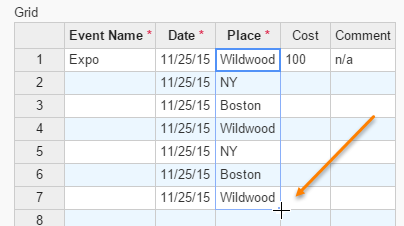
- copy (CTRL + C), cut (CTRL + X), paste (CTRL + V)
- table navigation using arrow keys (and also Home, End, Page Up, Page Down)
- SHIFT + click (SHIFT + arrow keys) for selection
How to set up
- Add a new Answer with Answer Type = "Grid"
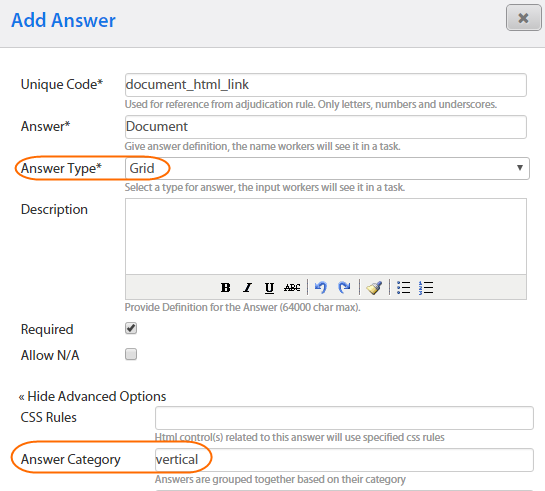
- (Optional) You can rotate grid (display columns as rows) by entering "vertical" into the Answer Category field.
- Add Sub-Answers to this Answer (see the list of supported Answer Types below). These Sub-Answers will be displayed as grid column headers. Sub-Answer description will be shown as a tooltip on hover over a cell.
Supported sub-answers for Grid
- FREE_TEXT
- MASKED_TEXT
- NUMBER
- SELECT_ONE
- SELECT_MULTI (supported for "Answer Category = Vertical" only)
- DATE (normalized to mm/dd/yyyy)
- TIME (normalized to hh:mmtt)
- DAYSOFWEEK (normalized to 2 letters format)
Output format
The Grid Answer provides output value in JSON format and records it in one column. Grid Output example:
{
  "grid":[
    {
      "event_name":"Expo",
      "date":"11/25/15",
      "place":"Wildwood",
      "cost":"100",
      "comment":""
    },
    {
      "event_name":"Swimming",
      "date":"11/27/15",
      "place":"Tampa",
      "cost":"0",
      "comment":""
    }
  ]
}