Configure no-code Generic Connector
Using the no-code Generic Connector, you can apply multiple configuration options to handle different connection scenarios and create custom connectors for the integration of external services into your automations.
Generic Connector types
There are several types of the no-code Generic Connector you can add to your Business Process (BP):
- Generic Connector: a standard Bot Task that receives data from an AI Agent and sends it to an external system (the producer connector).
- Generic Connector Trigger: a Trigger start element that retrieves data from an external system for processing by an AI Agent (the consumer connector).
Adding connector to Business Process workflow
To add the no-code Generic Connector to your BP workflow, perform the following steps:
In the Business Processes list, open a needed BP instance or create a BP by clicking the Create New button.
Add a Generic Connector of the required type:
Once you added the needed connector to your BP workflow, you can proceed to its configuration.
Add Generic Connector
To add the Generic Connector as a standard Bot Task to your BP, do as follows:
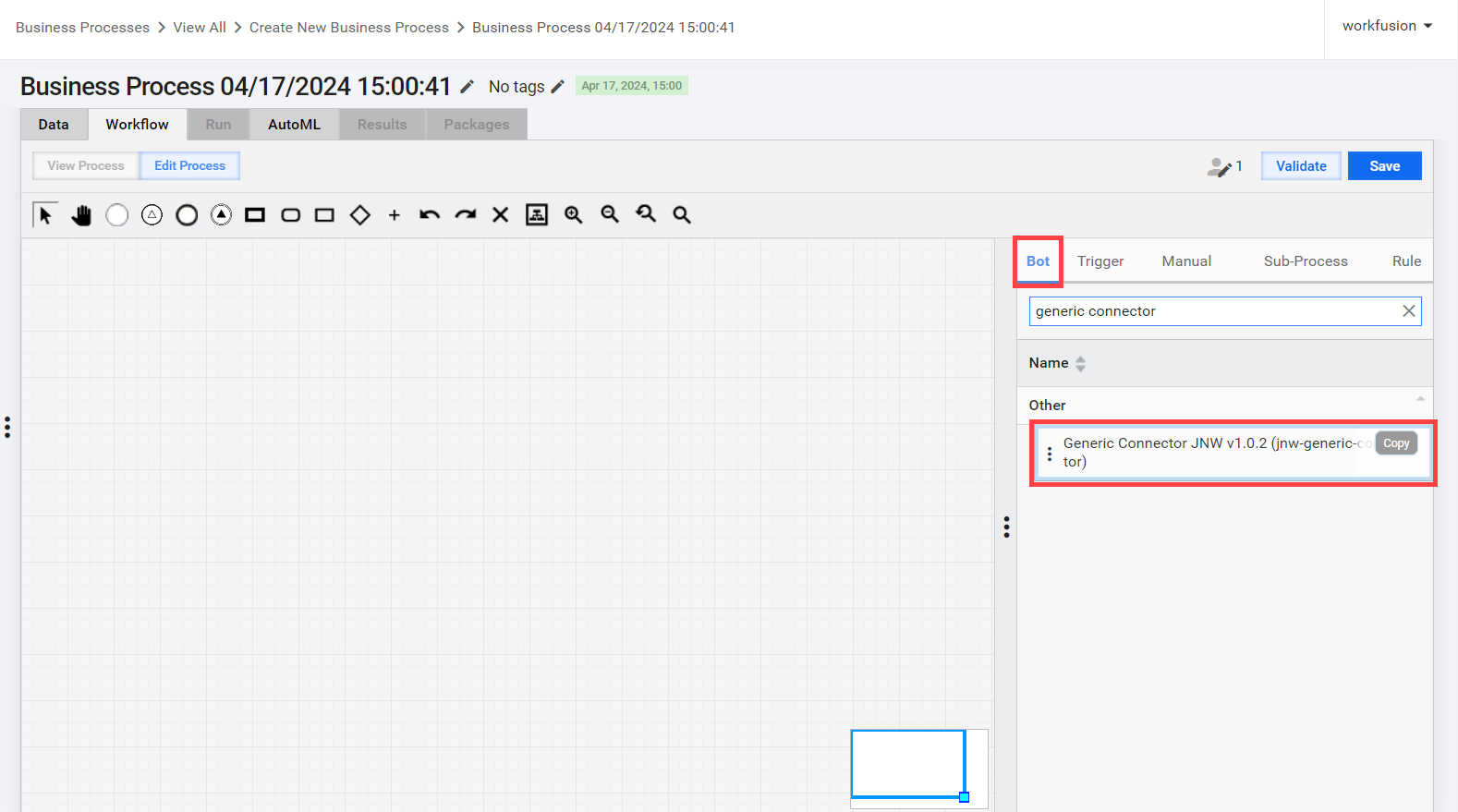
Navigate to the Workflow tab, go to the side panel, and select the Bot tab.
In the search field, enter Generic Connector as the desired connector.
Move the pointer over the Generic Connector bot step and click Copy.
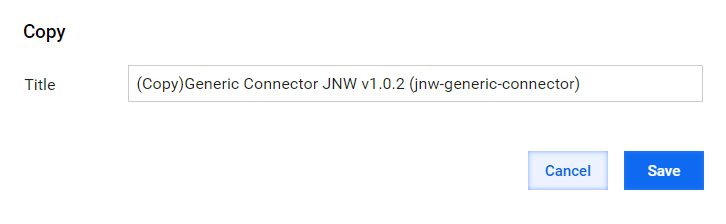
Specify a suitable name corresponding to the intended task and click Save.
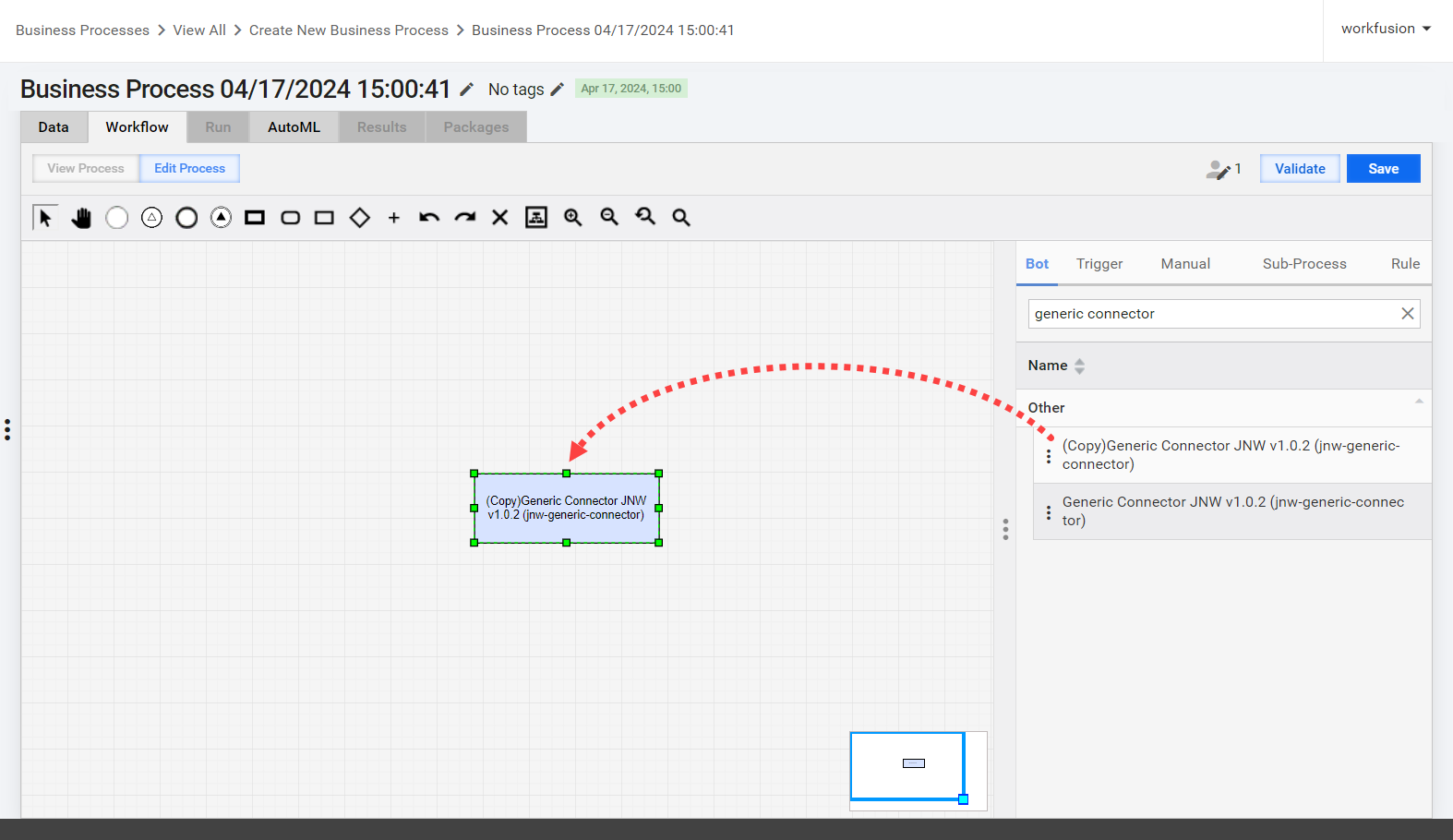
Drag a copied step to the canvas. As a result, you create an independent step instance: the changes you make in the copy are not synchronized with the source.
 warning
You must make a duplicate copy. Do not modify the original template.
Add Generic Connector Trigger
The Generic Connector Trigger or a Trigger step can only be the start element of your BP. To add it, do as follows:
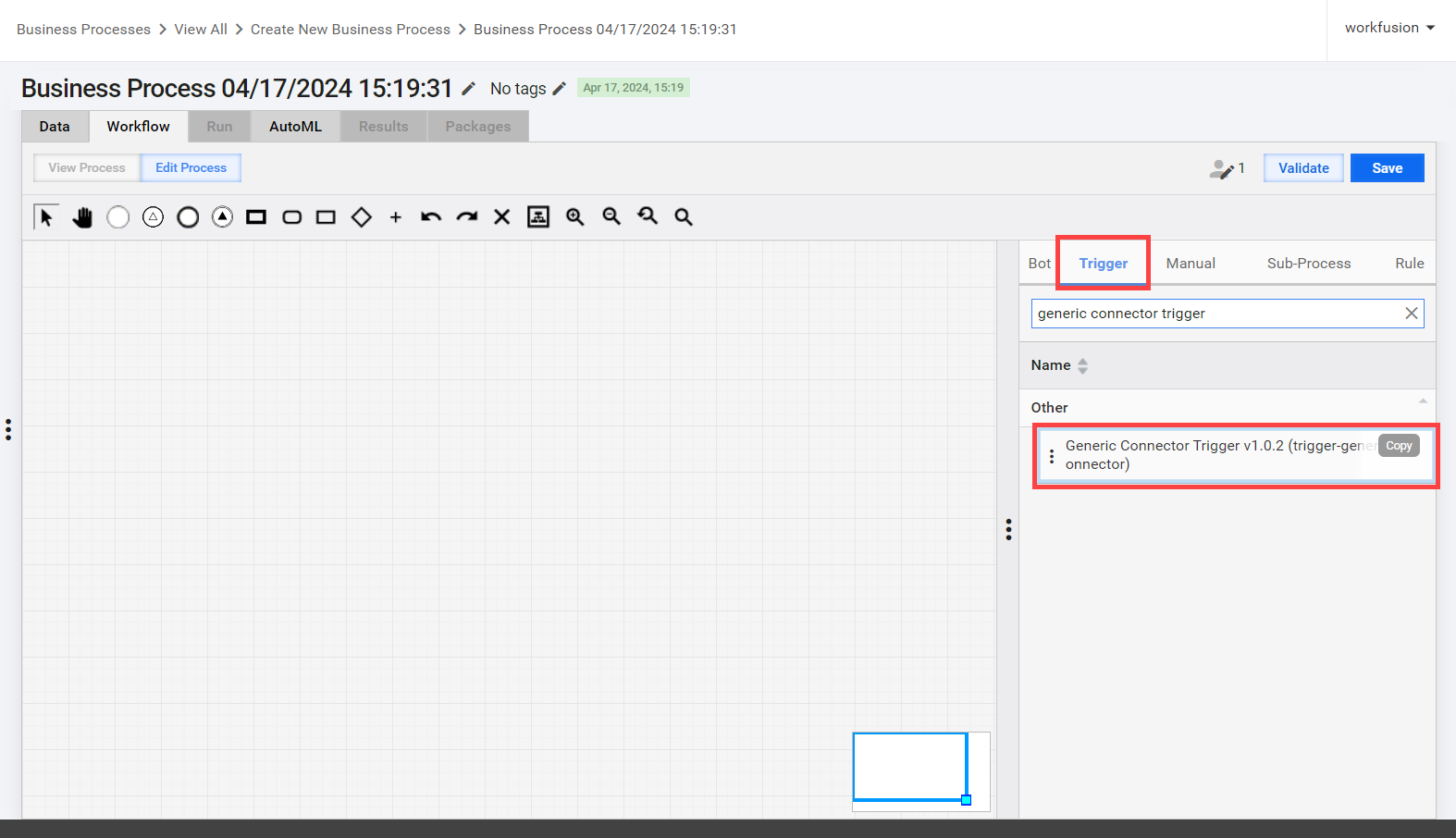
Navigate to the Workflow tab, go to the side panel, and select the Trigger tab.
In the search field, enter Generic Connector Trigger as the desired connector.
Move the pointer over the Generic Connector Trigger bot step and click Copy.
Specify a suitable name corresponding to the intended task and click Save.
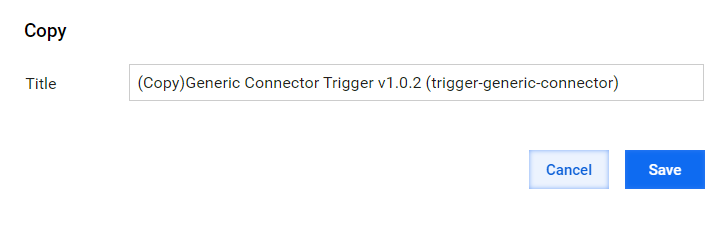
Drag a copied step to the canvas. As a result, you create an independent step instance: the changes you make in the copy are not synchronized with the source.
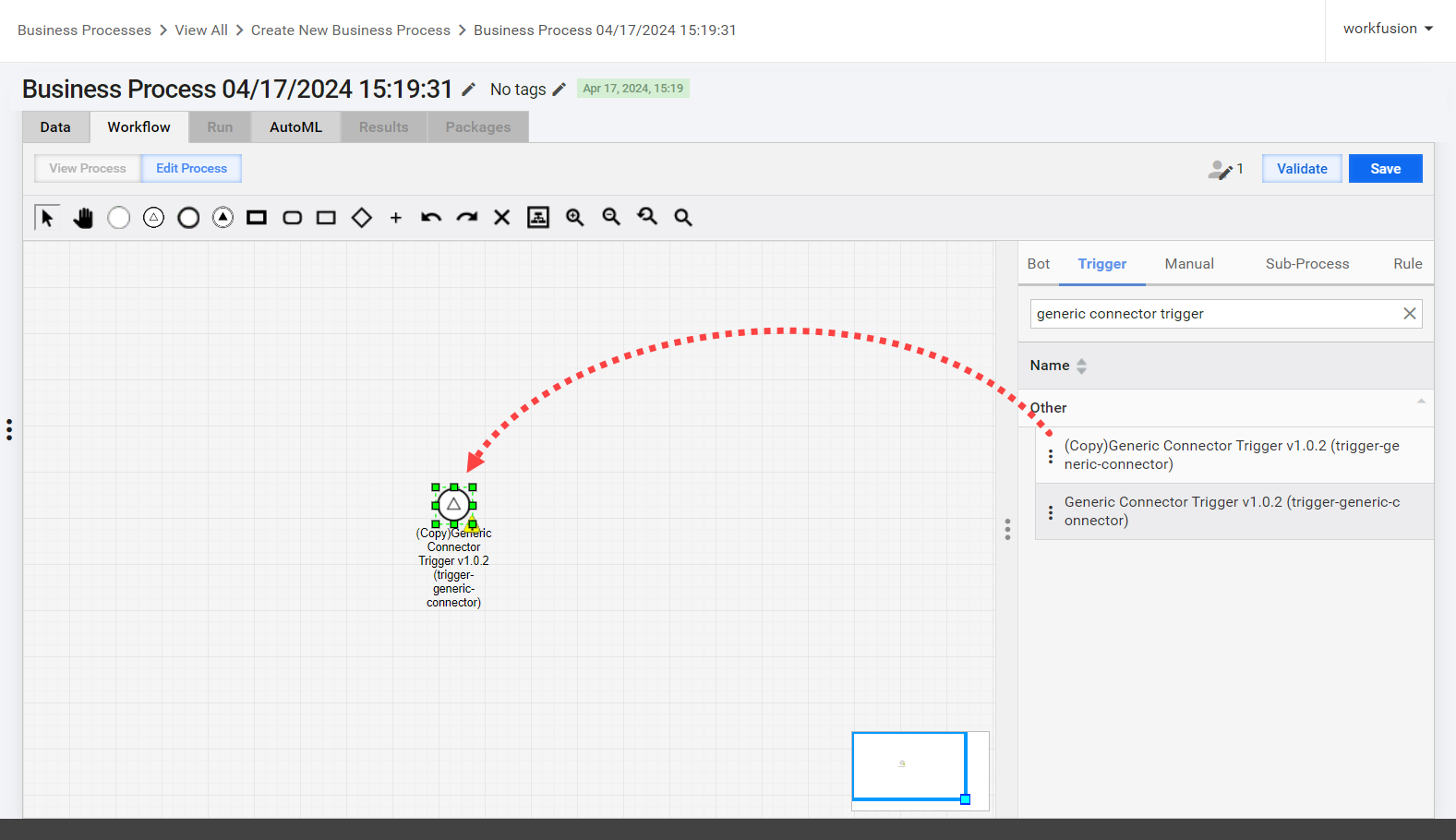 warning
You must make a duplicate copy. Do not modify the original template.
Configuration
When you add the Generic Connector to your BP workflow, configure its settings:
Double-click the Bot Task with the Generic Connector to open its configuration panel.
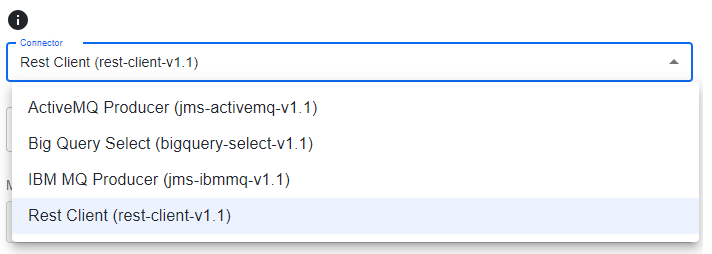
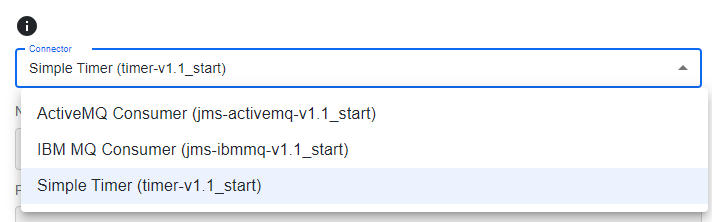
Go to the Design tab. In the Connector dropdown list, select a needed configuration. The list of available options is fetched from the Generic Connector metadata table via the Data Store REST API.
For a Bot Task, the options are as follows:
For a Trigger step, the options are as follows:
Fill in the needed fields and click Save. The configuration values, component dependencies, and the route template are injected into the Bot Task configuration to start the task execution.
You can add the Generic Connector functionality by entering the required metadata in the ds.ds_uc_genericconnector_component_v1 Data Store table.
ActiveMQ Producer
Configuration settings
Select ActiveMQ Producer (jms-activemq-v1.1) for the Bot Task to send messages to an active MQ queue. The step also passes the messages to the next step in the workflow.
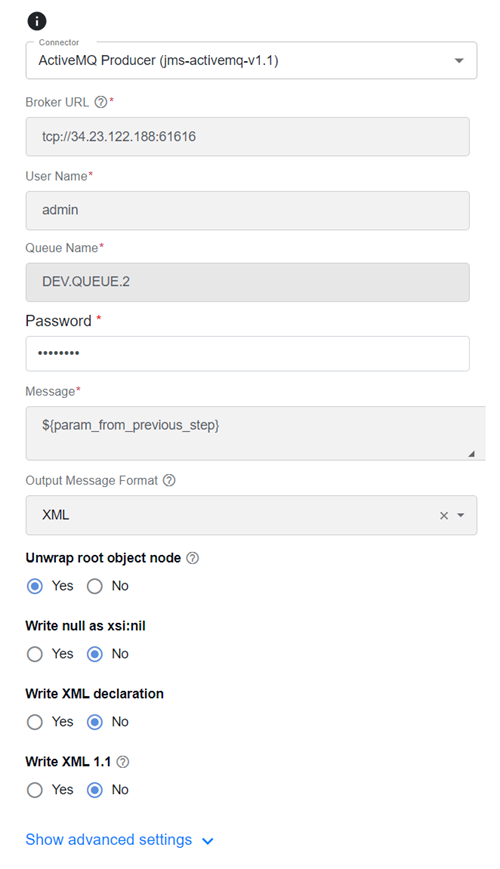
Fill in the following settings:
Broker URL. Establish a connection to the ActiveMQ message broker using a connection string or URI that specifies the location and configuration details of the broker. It includes information like the protocol (for example, TCP), hostname or IP address, and port number where the ActiveMQ broker is running.
User Name. Enter a username for authentication when connecting to the ActiveMQ broker. Typically, it is part of the authentication process to ensure that only authorized users or applications can access and interact with the broker. Depending on the configuration, it can be used with a password.
Queque Name. Specify the name of a specific queue in the ActiveMQ broker. Queues are destinations for messages, and they follow the point-to-point messaging pattern, meaning messages sent to a queue are typically consumed by a single consumer. Queue names are used to identify where messages are sent and retrieved.
Password. Enter a secret or a password used in combination with a username to authenticate and establish a secure connection to the ActiveMQ broker. It ensures that only authorized users or applications can connect and perform operations on the broker.
noteIn the screenshot above, the password and message are using parameter substitution to retrieve the data from Secrets Vault and the previous Bot Task.
Message. Typically, it is input from the previous step and can be referenced via the parameter substitution. In the context of Apache ActiveMQ, a message is a unit of data sent and received by applications through the message broker. ActiveMQ supports different message types, including text messages, binary messages, and more. Messages are published to topics or sent to queues and are consumed by consumers to facilitate communication and data exchange between applications.
Output Message Format (optional). Select the option to convert the message to one of the listed message formats before sending it to a queue:
- XML
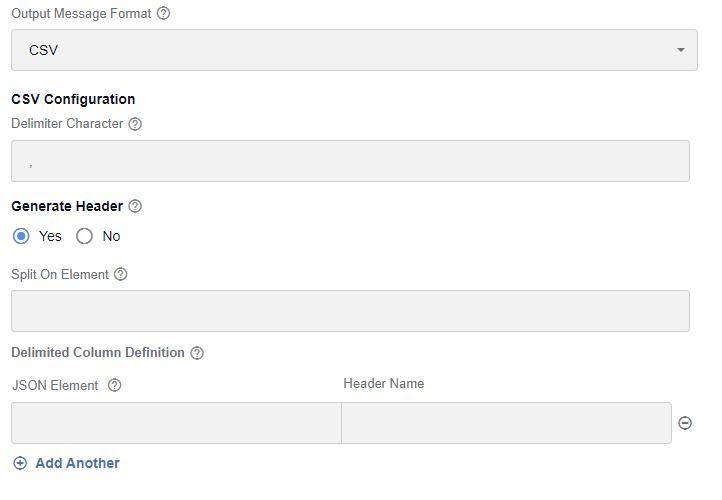
- CSV
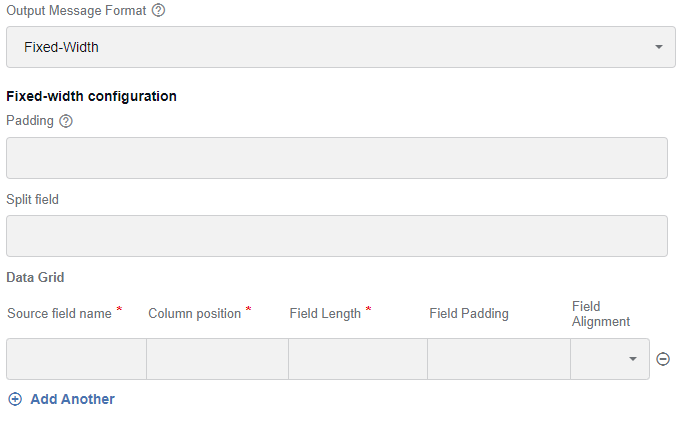
- Fixed-Width
Unwrap root object node. The feature determines the writing root values of the
ObjectNodetype (theJsonNodesubtype that representsObjectcontent values). IfObjectNodehas only one key and value entry, select Yes to use the key of that entry as the root element name. If the rootObjectNodehas any other number of key and value entries, select No to determine the root element name using the standard logic (either explicitly configured orObjectNodeotherwise).Write null as xsi:nil. Select Yes for a field in your data containing a null value to be represented in the resulting XML as an element with the
xsi:nilattribute set totrue. It means the element has a null value and is not equivalent to an empty or missing element.Write XML declaration. Select Yes to add the XML declaration at the beginning of an XML document.
Write XML 1.1. Select Yes to apply XML 1.1 for the output. In this case, certain aspects can differ from the default processing (1.0). For example, an XML declaration is automatically added (no matter if you enabled the Write XML declaration option) to define if the XML 1.1 compliant handling is used. You can apply XML 1.1 to allow quoted control characters (ASCII codes 0 through 31), additional line feeds, and name characters.

Delimiter Character. Specify a character to be used as a delimiter between values in the output data (defaults to a comma).
Generate Header. Select Yes to include a header in the output. In this case, the Delimited Column Definition grid contains the Header Name column.
Split On Element. Specify a JSON element in the data to perform splitting on.
Delimited Column Definition:
- JSON Element. Specify a JSON element to be used as the source data for the column definition. You can define one or more JSON elements.
- Header Name. Indicate the header name for the column if you previously selected Yes for the Generate Header option.
Padding. Specify a character to be used for padding values (defaults to a space).
Split field. Specify a JSON element to perform splitting on.
Data Grid:
Source field name. Specify a JSON element to be used as the source data for the field.
Column position. Specify the start position of the column.
Field Length. Specify the size or length of the column.
Field Padding (optional). Define the padding to apply.
Field Alignment. Select how to align the column data. The options are Left, Right, and Center.
Big Query Select
Configuration settings
Select Big Query Select (bigquery-select-v1.1) for the Bot Task to execute a Big Query Select statement against BigQuery. The result is sent to the next step.
Specify the following required parameters:
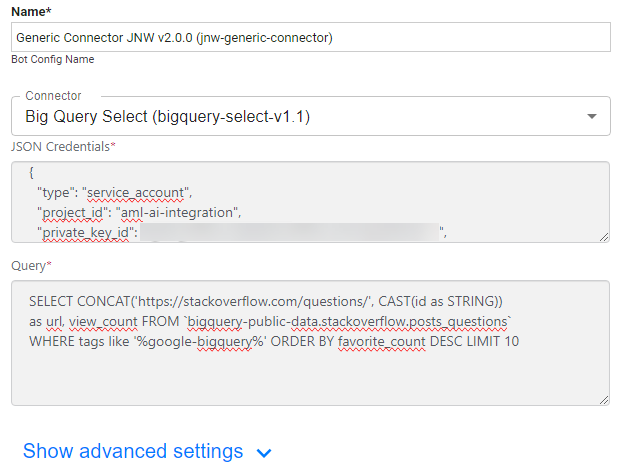
- JSON Credentials. Enter your JSON credentials for authentication in BigQuery. In the example below, the credentials are associated with a service account. For more details, see Create and delete service account keys | IAM Documentation | Google Cloud.
- Query. A query in BigQuery is an SQL (Structured Query Language) statement used to interact with and analyze data stored in the BigQuery platform. It allows you to extract, transform, and analyze large datasets for various purposes, such as reporting, data exploration, and machine learning.
IBM MQ Producer
Configuration settings
Select IBM MQ Producer (jms-ibmmq-v1.1) for the Bot Task to send messages to an IBM MQ queue. The step also passes the messages to the next step in the workflow.
Specify the following required parameters:
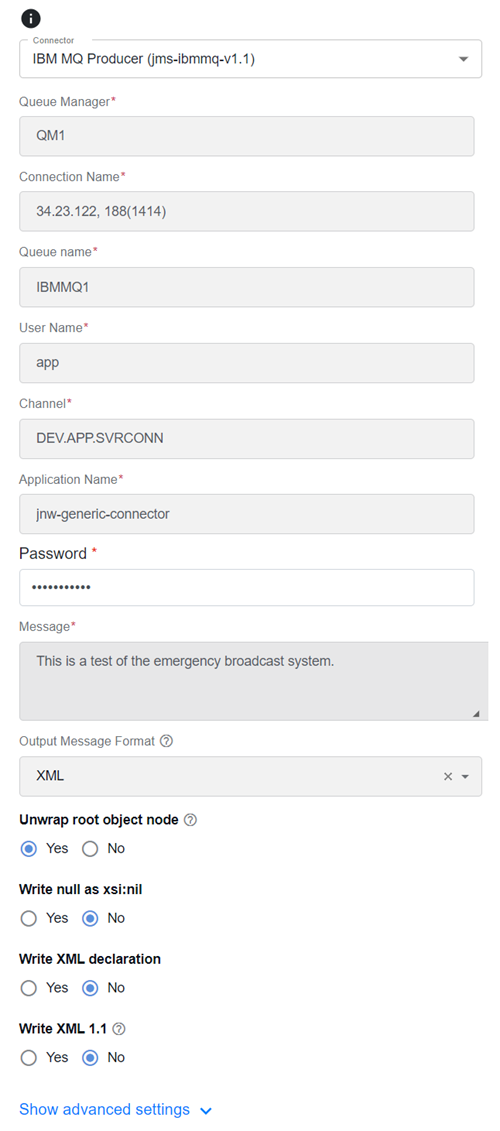
Queue Manager. Specify the MQ queue manager name. The queue manager is a fundamental component in IBM MQ responsible for managing message queues. It controls the creation, administration, and routing of messages to and from various queues. Typically, each IBM MQ installation has one or more queue managers.
Connection Name. Enter the network address or hostname along with the port number used to establish a network connection between two queue managers through a communication channel. It specifies the destination queue manager to which messages are sent.
Queue Name. Enter the name of a specific queue within an IBM MQ queue manager. Applications can send messages to a queue or retrieve them from it using the queue name. Queue names are used to identify the destination of messages.
User Name. Enter the identification used for authentication when connecting to an IBM MQ queue manager. It is often used with a password to ensure secure access to the message queuing system.
Channel. Enter a communication pathway that allows messages to flow between two queue managers, whether on the same system or connected over a network. Channels are configured to establish connections and transmit data between queue managers. There are different channel types, such as sender, receiver, server, and client channels, each serving a specific purpose.
Application Name. Enter a user-defined identifier for the application or program that connects to the IBM MQ queue manager. It can help identify and monitor the source of connections in the queue manager's logs and monitoring tools.
Password. Enter a secret or credentials required for authentication when connecting to an IBM MQ queue manager, especially if authentication and security measures are in place. It is used with a username to establish a secure connection.
Message. Typically, it is input from the previous step and can be referenced via the parameter substitution. A message is the fundamental data unit in IBM MQ. It contains the actual data that applications send and receive through the messaging system. Messages can have various attributes and data types, and they are placed in queues for processing or transmission between applications.
Output Message Format (optional). Select the option to convert the message to one of the listed message formats before sending it to a queue:
- XML
- CSV
- Fixed-Width
For more details, see ActiveMQ Producer | Output Message Format.
Rest Client
Configuration settings
Rest Client (rest-client-v1.1) allows you to configure the Bot Task to connect to any available REST API, retrieve the data, and make it available for the next step. Using the connector, you can manually enter information about a REST endpoint or select one from the existing Swagger- or OpenAPI 2.0-compatible API.
Specify the following settings:
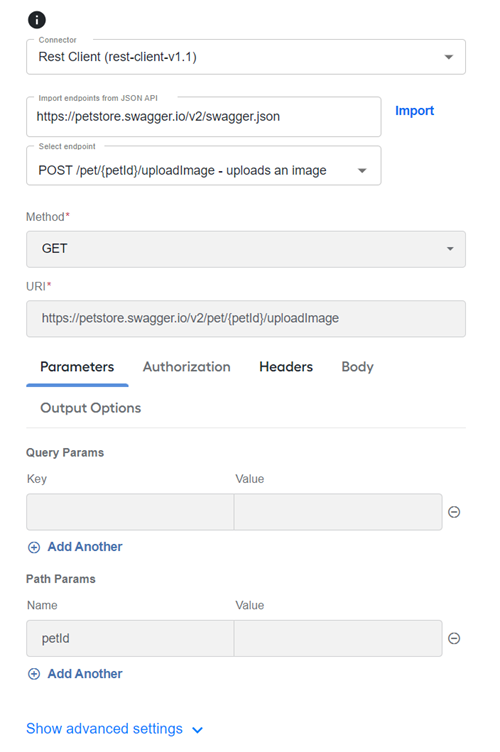
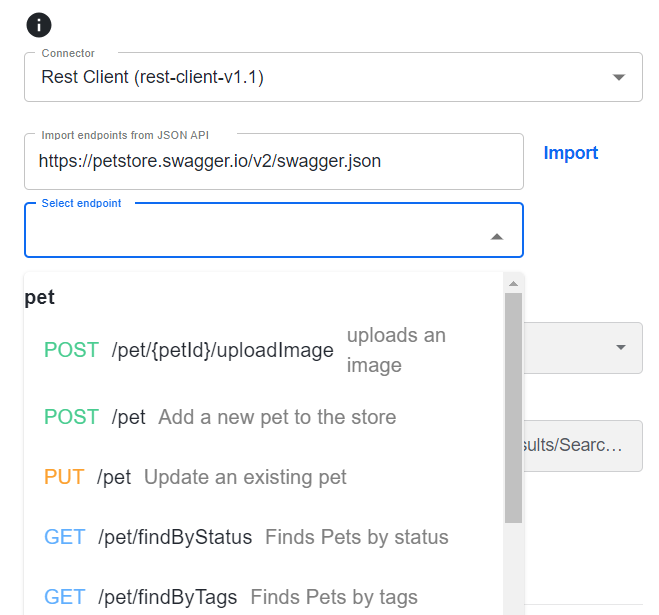
Import endpoints from JSON API (optional). Provide the API URL to load an existing API specification and click Import. Once endpoints are imported, more settings become available.
- Select endpoint. Select an endpoint from the dropdown list to prepopulate the form with available parameters for the selected endpoint.
Method. Enter an HTTP method.
URI. Specify the REST URL.
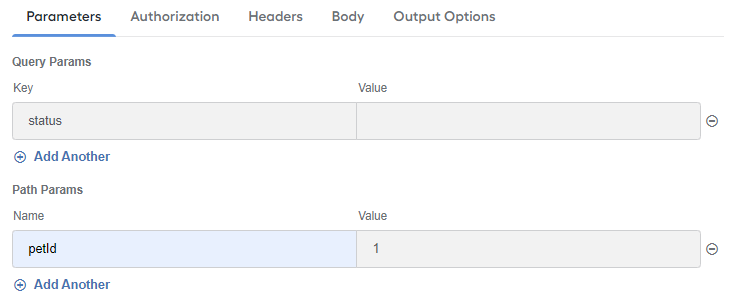
Parameters:
Query Params: parameters located in the URL after the question mark. Specify one or more optional parameters to make your requests to the service more specific. Add Key-Value pairs.
Path Params: parameters that are part of the URL path. Specify the exact entity to which you want to refer the request. Add Name-Value pairs.
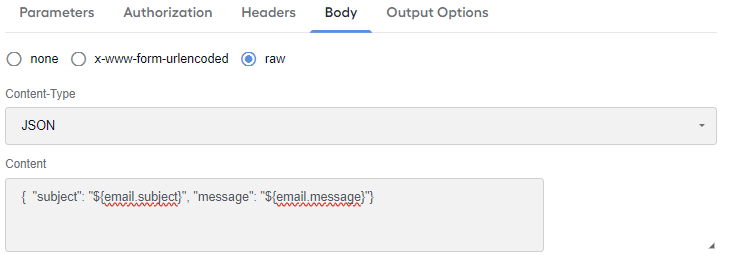
Body. Select a body data type and specify the exact data content to be sent with the request to the connected service.
none. Select not to send a body with a request.
x-www-form-urlencoded. Select to send Key-Value pairs encoded using the same pattern as that of URL parameters.
raw. Use raw body data to send anything you can enter as text.
- Content-Type: the HTTP header content type, for example,
application/json. - Content: a string representation of the body to be sent. It can also be a substitution parameter or contain substitution parameters.
- Content-Type: the HTTP header content type, for example,
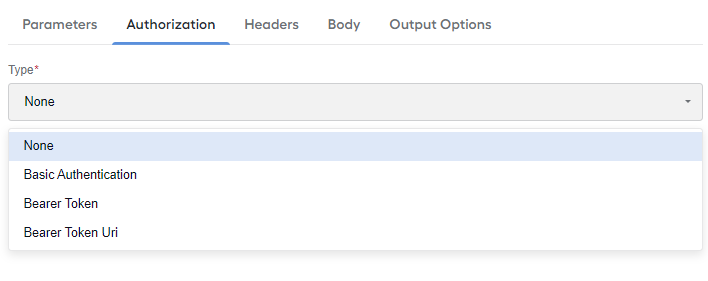
Authorization. Set up the authorization type. The supported types are as follows:
None (no authorization)
Basic Authentication
Bearer Token
Bearer Token Uri

Headers. Set one or more headers if additional security checks are required for executing requests to the service. Add Key-Value pairs.

Output Options. Choose how to handle the results of connecting to the service.
- Success options. Select how to handle the output for the next step in case of a successful connection.
- Failure options. Select the option for a failed connection scenario.

ActiveMQ Consumer
Configuration settings
Select ActiveMQ Consumer (jms-activemq-v1.1_start) for the Trigger step to retrieve messages from the configured ActiveMQ queue.
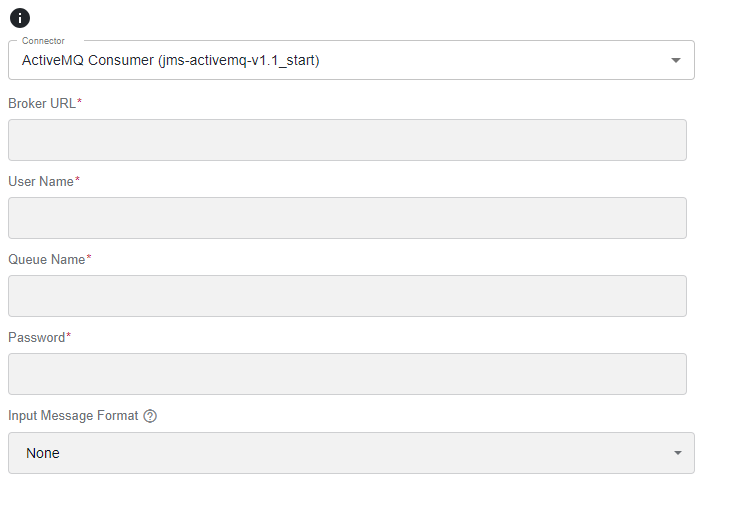
The configuration properties are the same as for ActiveMQ Producer, except for having Input Message Format instead of Output Message Format:
Input Message Format (optional). Specify the format of messages read from the queue:
- XML
- CSV
- Fixed-Width
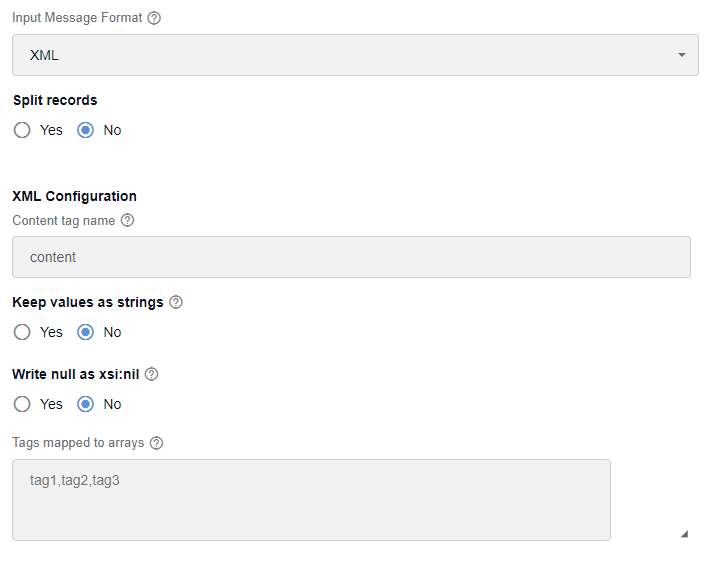
Split records. Select Yes to split the input data into multiple output records.
Content tag name. Specify a JSON element to be used as the content in XML.
Keep values as strings. Select Yes not to convert the values. In this case, they are retained as strings.
Write null as xsi:nil. Select Yes if you want the data field containing a null value to be represented in the resulting XML as an element with the
xsi:nilattribute set totrue. It means the element has a null value and is not equivalent to an empty or missing element.Tags mapped to arrays. Add XML tags that should be converted to JSON arrays.
Split records. Select Yes to split the input data into multiple output records.
Column separator. Define a character to be used as a separator between columns.
Escape character. Specify the character that indicates that the character immediately following it should be treated as a literal character and not as a special character or delimiter.
First row as header. Select Yes to indicate if the first row in the input data should be considered as the header.
Skip the first row. Select Yes to skip the first row during processing.
Quote character. In CSV files, the quote character is the double quotation mark (
""). It is used to enclose text fields or values that might contain special characters, such as commas or line breaks. It allows the CSV parser to correctly interpret and distinguish the field content from the actual delimiters used in the file.Null value. Set a String representation of a null value (defaults to null).
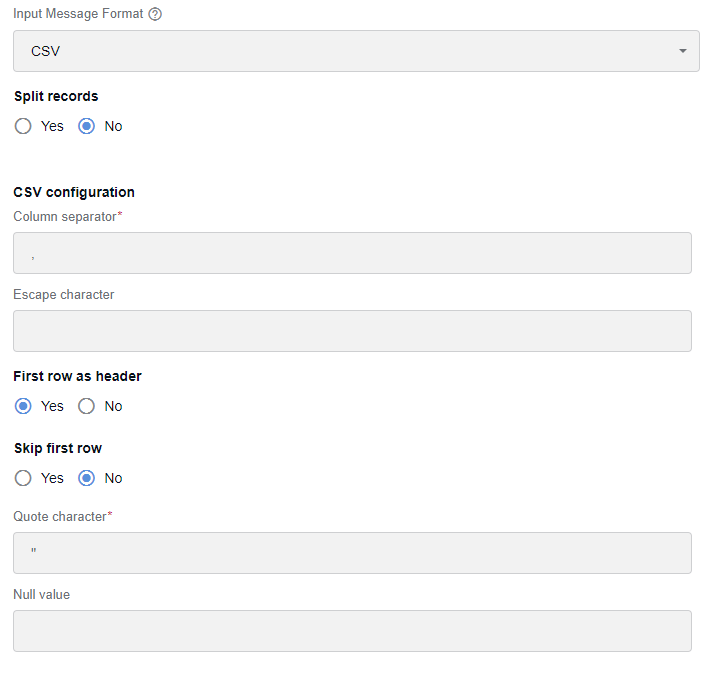
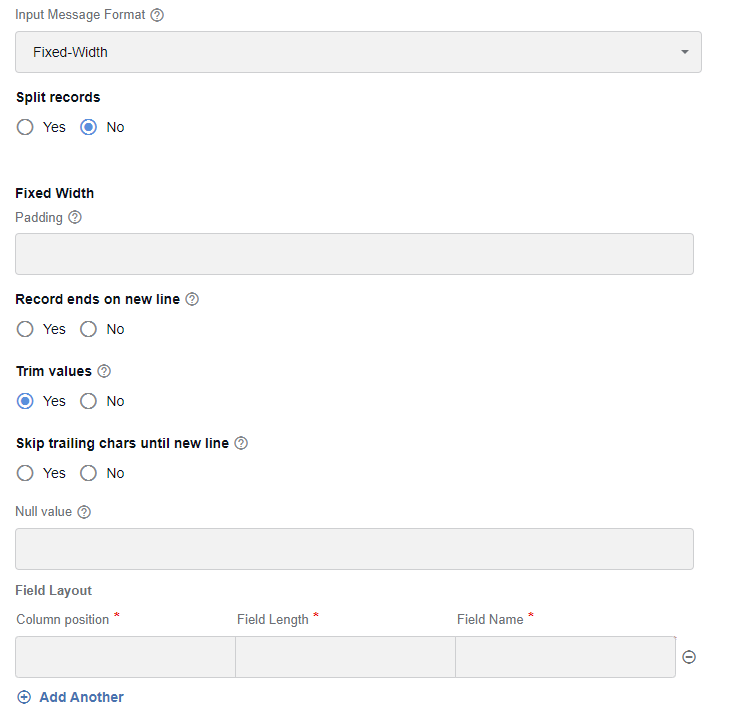
Split records. Select Yes to split the input data into multiple output records.
Padding. Define the padding character to be used to represent unwritten spaces (defaults to
' ').Record ends on a new line. Select Yes to consider a record parsed when a new line is reached.
Trim values. Select Yes to trim values of white spaces.
Skip trailing chars until new line. Select Yes to skip trailing characters beyond the record's length until a new line is reached (defaults to No).
Null value. Set a String representation of a null value (defaults to null).
Field Layout:
Column position. Specify the start position of the field.
Field length. Specify the size of the field.
Field Name. Specify the name of the field in the JSON output.
IBM MQ Consumer
Configuration settings
Select the IBM MQ Consumer (jms-ibmmq-v1.1_start) for the Trigger step to retrieve messages from the configured IBM MQ queue.
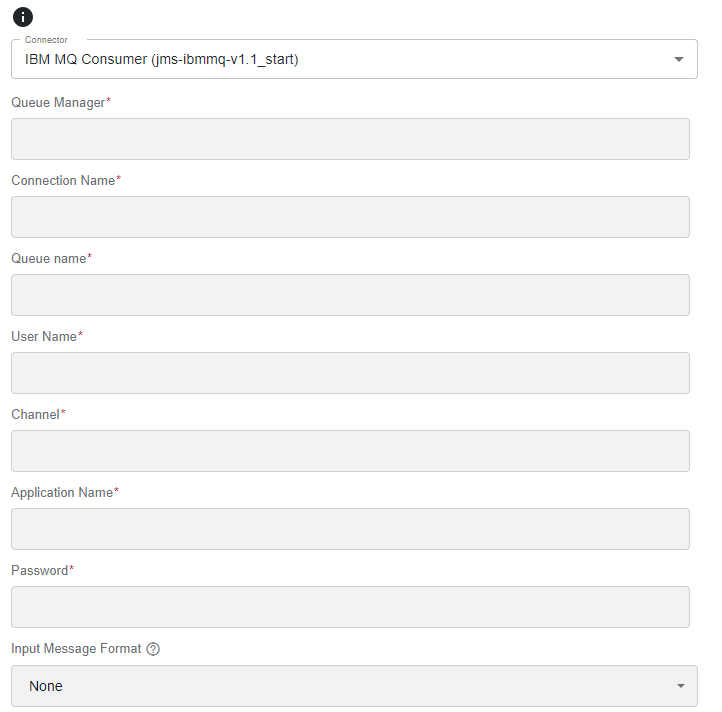
The configuration properties are the same as for IBM MQ Producer, except for having Input Message Format instead of Output Message Format.
- Input Message Format (optional). Specify the format of messages read from the queue. For more details, see ActiveMQ Consumer | Input Message Format.
Simple Timer
Configuration settings
Simple Timer (timer-v1.1_start) is based on the Camel simple timer. Specify the following settings:
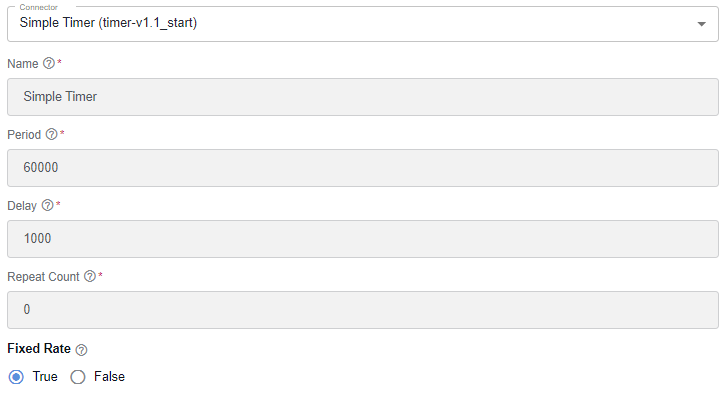
Name. Enter a user-defined identifier for the timer event. Give a meaningful name to the timer that you can use to manage and reference timers when defining the timer's behavior in your Camel routes.
Period. Specify the time interval the timer event should trigger (in milliseconds). It defines the gap between successive occurrences of the timer event. For example, if you set the period to 5,000 milliseconds, the timer triggers every 5 seconds.
Delay. Spet up the time to wait before the first occurrence of the timer event (in milliseconds). It specifies the initial delay before the timer starts triggering events. If you set a delay of 1,000 milliseconds and a period of 5,000 milliseconds, the first timer event occurs 1 second after the timer is started, and subsequent events occur every 5 seconds.
Repeat Count. Specify how many times the timer event should be triggered. If you set the repeat count to a specific number, the timer triggers that many times. If the repeat count is not set or set to a negative value, the timer triggers indefinitely until stopped.
Fixed Rate.
- Select True for the timer to trigger events at a fixed rate based on the period, even if the processing of timer events takes longer than the specified period.
- Select False for the timer to maintain a fixed interval between the start times of each event, allowing events to overlap if processing takes longer.
Advanced settings
Define Connector via metadata
The Generic Connector allows for manually defining new types of connectors and adding them to the list of options. To do this, you should have a good understanding of the following concepts:
- Camel routes
- Form.io
- SQL
- YAML
To add a new row to the database, perform the following steps:
In Control Tower, go to Advanced > Data Stores and select the
uc_genericconnector_component_v1Data Store.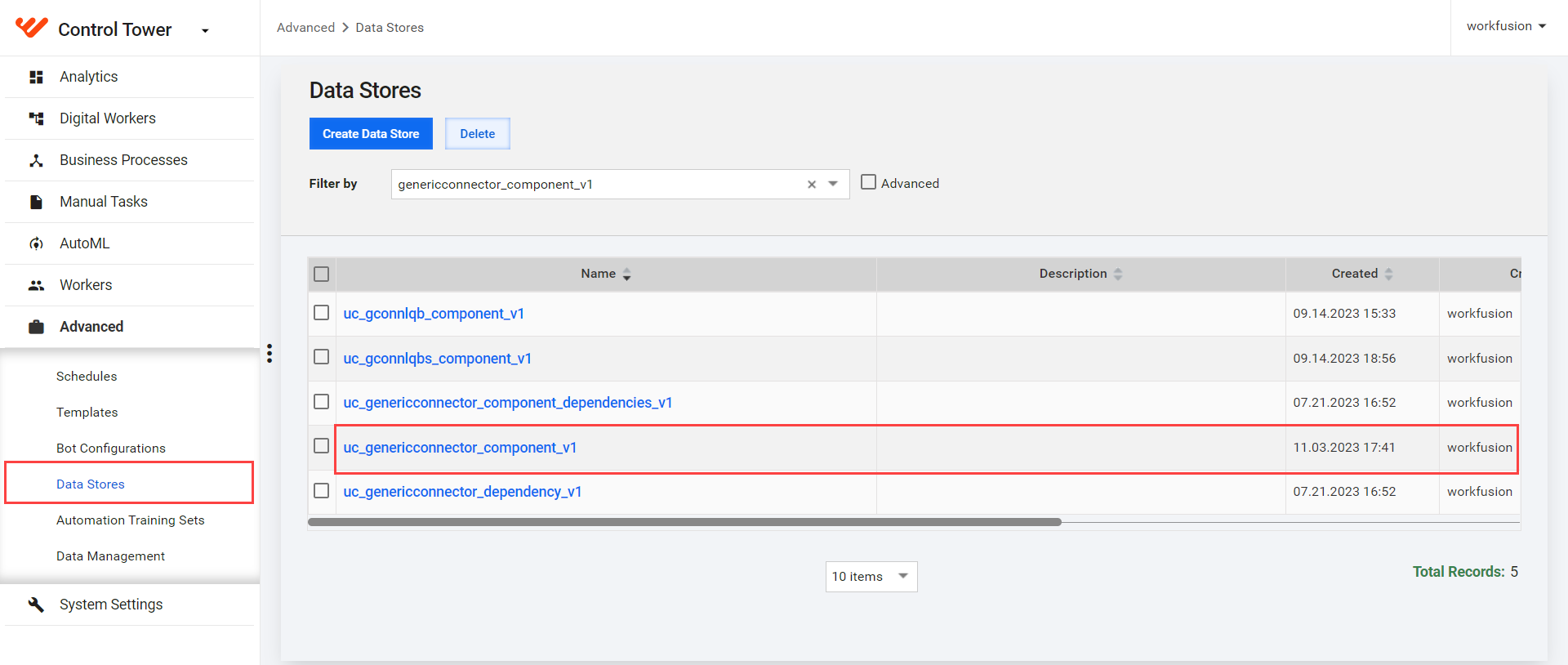
Click Add Record.
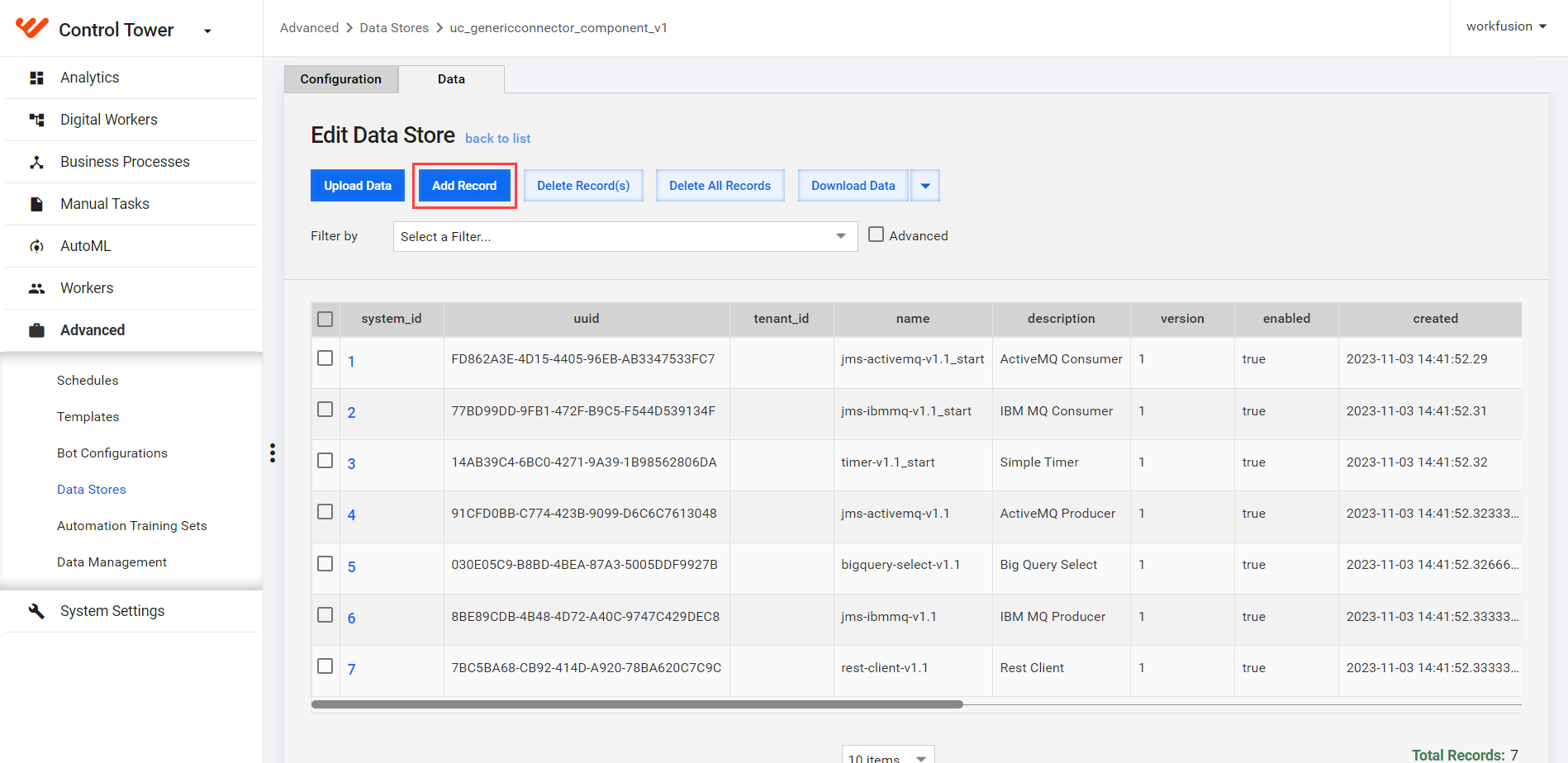
In the Record # window, fill in the following fields:
- uuid: a unique identifier.
- tenant_id: the tenant ID; can be left empty.
- name: the component name. The value must contain no spaces and have only lower-case characters. It is recommended that you add a suffix with a version separated by a dash, for example,
jms-ibmmq-v1.1. - description: the component description.
- version: the component version.
- enabled: enter
trueto enable the component. Otherwise, enterfalse. - created: the date when the component was created.
- task_config: a specially formatted YAML structure representation of the component's routes and dependencies to be executed by the execution engine.
See the example of task_config
<![CDATA[
{
  "component": "jms-activemq-v1.1",
  "config": {
    "queueName": "",
    "username": "",
    "password": "",
    "brokerURL": "",
    "requestBody": ""
  },
  "dependencies": [
    "org.apache.activemq:activemq-broker:5.16.5",
    "org.apache.activemq:activemq-client:5.16.5",
    "org.apache.activemq:activemq-openwire-legacy:5.16.5",
    "org.apache.camel:camel-activemq:3.20.6",
    "org.apache.camel:camel-jms:3.20.6",
    "org.apache.commons:commons-pool2:jar:2.11.1",
    "org.apache.geronimo.specs:geronimo-j2ee-management_1.1_spec:1.0.1",
    "org.apache.geronimo.specs:geronimo-jms_1.1_spec:1.1.1",
    "org.fusesource.hawtbuf:hawtbuf:1.11",
    "org.springframework:spring-jms:5.3.23"
  ],
  "route": "[{beans: [{type: org.apache.activemq.ActiveMQConnectionFactory, name: connectionFactory, properties: {brokerURL: '${brokerURL}', username: '${username}', password: '${password}'}}]}, {route: {id: generic-connector, from: {uri: 'direct:start', steps: [{to: {uri: 'jms:queue:${queueName}?connectionFactory=#connectionFactory'}}, {process: {ref: dataTypeTransformer}}]}}}]"
}
]]>
Where:
component: the component name; must be the same as the name in the table.config: parameters to be used by the component. You can put the default values here.dependencies: dependencies required to run the component. The JARs must exist in the local Nexus. If they do not exist, you must add them.route: the Camel route to be executed. In the example above, the parameters in theconfigsection are used as placeholders.
- type:
jnwortrigger. - ui_form: the JSON representation of the form created with the help of Form Builder.
- ui_form_type: the type of the form library to be used to render the form. Currently, only Form.io is supported.
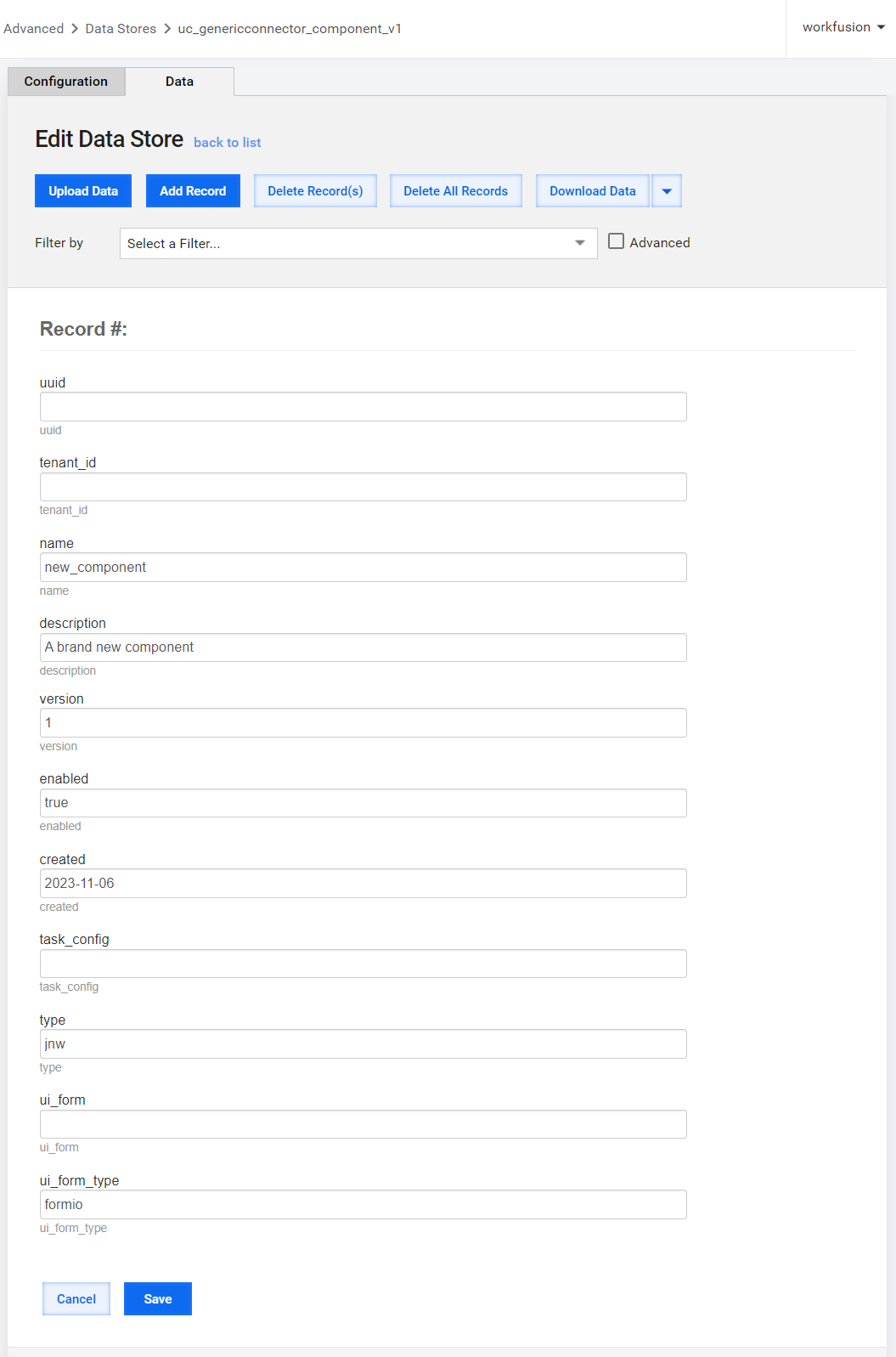
Click Save.
Set up routing
A dynamic component configuration system consists of a user interface (UI) and a backend processing system. The UI allows you to select components, configure parameters, and schedule recurring processing. The backend system generates Camel YAML routes based on your inputs, executes the routes, and returns responses.
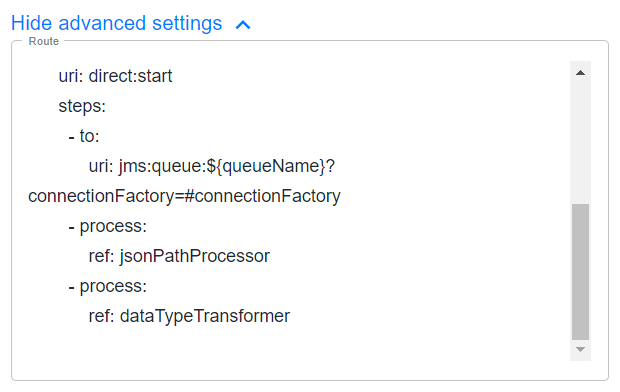
Every option in the Generic Connector has its own configuration form. The Route text area is the only component common to all options. It shows the Camel route executed by a Worker.
If you are familiar with Camel routing, you can modify this route, for example, add additional logging for debugging purposes.
Expand the Show advanced settings in the configuration form.
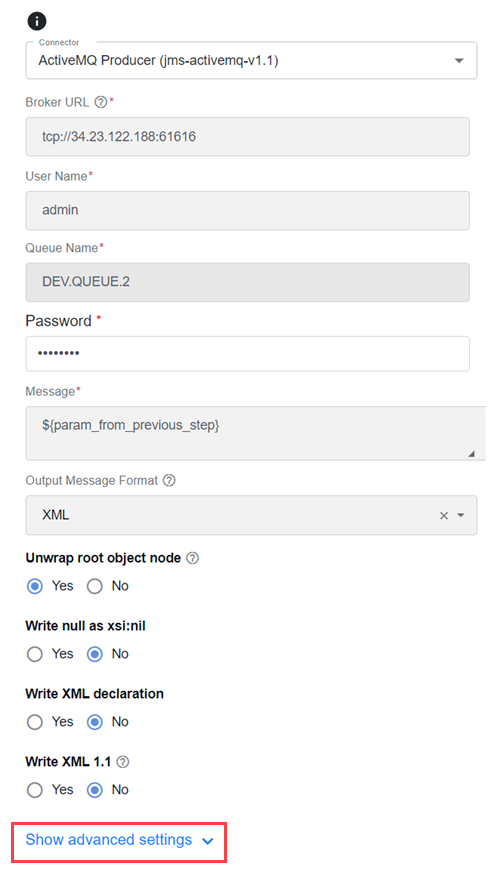
In the Route text area, add the required edits.
Define runtime JAR dependencies
Before you add a new Generic Connector, you need to identify the additional runtime dependencies required during the execution of your Business Process. In Work.AI v10.2.8, the Generic Connector framework uses Apache Camel v3.20.6, and all the dependencies must be compatible with this version.
The Generic Connector already contains the following dependencies out of the box. You do not need to include them in the list.
Out-of-the-box runtime dependencies
[INFO] com.workfusion.connectors:common-generic-connector:jar:1.1.0-dev
[INFO] +- com.google.cloud:google-cloud-bigquery:jar:2.31.1:compile
[INFO] |  +- com.google.cloud:google-cloud-core:jar:2.22.0:compile
[INFO] |  +- com.google.protobuf:protobuf-java-util:jar:3.23.2:compile
[INFO] |  +- com.google.api.grpc:proto-google-common-protos:jar:2.23.0:compile
[INFO] |  +- com.google.api.grpc:proto-google-iam-v1:jar:1.18.0:compile
[INFO] |  +- com.google.auth:google-auth-library-credentials:jar:1.19.0:compile
[INFO] |  +- com.google.cloud:google-cloud-core-http:jar:2.22.0:compile
[INFO] |  +- com.google.api-client:google-api-client:jar:2.2.0:compile
[INFO] |  +- com.google.oauth-client:google-oauth-client:jar:1.34.1:compile
[INFO] |  +- com.google.http-client:google-http-client-apache-v2:jar:1.43.3:compile
[INFO] |  +- com.google.http-client:google-http-client-appengine:jar:1.43.3:compile
[INFO] |  +- com.google.api:gax-httpjson:jar:2.32.0:compile
[INFO] |  +- io.opencensus:opencensus-api:jar:0.31.1:compile
[INFO] |  +- io.opencensus:opencensus-contrib-http-util:jar:0.31.1:compile
[INFO] |  +- com.google.http-client:google-http-client-gson:jar:1.43.3:compile
[INFO] |  +- com.google.http-client:google-http-client:jar:1.43.3:compile
[INFO] |  +- org.apache.httpcomponents:httpclient:jar:4.5.14:compile
[INFO] |  +- org.apache.httpcomponents:httpcore:jar:4.4.15:compile
[INFO] |  +- com.google.j2objc:j2objc-annotations:jar:2.8:compile
[INFO] |  +- org.checkerframework:checker-compat-qual:jar:2.5.5:compile
[INFO] |  +- org.checkerframework:checker-qual:jar:3.33.0:compile
[INFO] |  +- com.google.auth:google-auth-library-oauth2-http:jar:1.19.0:compile
[INFO] |  +- com.google.code.findbugs:jsr305:jar:3.0.2:compile
[INFO] |  +- com.google.apis:google-api-services-bigquery:jar:v2-rev20230520-2.0.0:compile
[INFO] |  +- com.google.api:api-common:jar:2.15.0:compile
[INFO] |  +- javax.annotation:javax.annotation-api:jar:1.3.2:compile
[INFO] |  +- com.google.guava:guava:jar:31.1-jre:compile
[INFO] |  +- com.google.guava:failureaccess:jar:1.0.1:compile
[INFO] |  +- com.google.guava:listenablefuture:jar:9999.0-empty-to-avoid-conflict-with-guava:compile
[INFO] |  +- com.google.api:gax:jar:2.32.0:compile
[INFO] |  +- org.threeten:threetenbp:jar:1.6.8:compile
[INFO] |  +- com.google.code.gson:gson:jar:2.9.1:compile
[INFO] |  +- org.threeten:threeten-extra:jar:1.7.2:compile
[INFO] |  +- com.google.protobuf:protobuf-java:jar:3.23.2:compile
[INFO] |  +- com.google.cloud:google-cloud-bigquerystorage:jar:2.41.1:compile
[INFO] |  +- io.grpc:grpc-api:jar:1.56.1:compile
[INFO] |  +- io.grpc:grpc-context:jar:1.56.1:compile
[INFO] |  +- io.grpc:grpc-stub:jar:1.56.1:compile
[INFO] |  +- io.grpc:grpc-protobuf:jar:1.56.1:compile
[INFO] |  +- io.grpc:grpc-protobuf-lite:jar:1.56.1:compile
[INFO] |  +- com.google.auto.value:auto-value:jar:1.10.2:compile
[INFO] |  +- com.google.api.grpc:proto-google-cloud-bigquerystorage-v1beta1:jar:0.165.1:compile
[INFO] |  +- com.google.api.grpc:proto-google-cloud-bigquerystorage-v1beta2:jar:0.165.1:compile
[INFO] |  +- com.google.api:gax-grpc:jar:2.32.0:compile
[INFO] |  +- io.grpc:grpc-alts:jar:1.56.1:compile
[INFO] |  +- io.grpc:grpc-grpclb:jar:1.56.1:compile
[INFO] |  +- org.conscrypt:conscrypt-openjdk-uber:jar:2.5.2:compile
[INFO] |  +- io.grpc:grpc-auth:jar:1.56.1:compile
[INFO] |  +- io.grpc:grpc-netty-shaded:jar:1.56.1:compile
[INFO] |  +- io.grpc:grpc-googleapis:jar:1.56.1:runtime
[INFO] |  +- io.grpc:grpc-core:jar:1.56.1:compile
[INFO] |  +- com.google.android:annotations:jar:4.1.1.4:runtime
[INFO] |  +- org.codehaus.mojo:animal-sniffer-annotations:jar:1.23:runtime
[INFO] |  +- io.perfmark:perfmark-api:jar:0.26.0:runtime
[INFO] |  +- commons-logging:commons-logging:jar:1.2:compile
[INFO] |  +- commons-codec:commons-codec:jar:1.15:compile
[INFO] |  +- com.google.api.grpc:grpc-google-cloud-bigquerystorage-v1beta1:jar:0.165.1:compile
[INFO] |  +- com.google.api.grpc:grpc-google-cloud-bigquerystorage-v1beta2:jar:0.165.1:compile
[INFO] |  +- com.google.api.grpc:grpc-google-cloud-bigquerystorage-v1:jar:2.41.1:compile
[INFO] |  +- com.google.api.grpc:proto-google-cloud-bigquerystorage-v1:jar:2.41.1:compile
[INFO] |  +- org.apache.arrow:arrow-vector:jar:12.0.1:compile
[INFO] |  +- org.apache.arrow:arrow-format:jar:12.0.1:compile
[INFO] |  +- com.fasterxml.jackson.core:jackson-core:jar:2.14.3:compile
[INFO] |  +- com.fasterxml.jackson.core:jackson-annotations:jar:2.14.3:compile
[INFO] |  +- com.fasterxml.jackson.core:jackson-databind:jar:2.14.3:compile
[INFO] |  +- com.fasterxml.jackson.datatype:jackson-datatype-jsr310:jar:2.13.5:compile
[INFO] |  +- io.netty:netty-common:jar:4.1.92.Final:compile
[INFO] |  +- com.google.flatbuffers:flatbuffers-java:jar:1.12.0:compile
[INFO] |  +- org.slf4j:slf4j-api:jar:1.7.36:compile
[INFO] |  +- org.apache.arrow:arrow-memory-core:jar:12.0.1:compile
[INFO] |  +- org.apache.arrow:arrow-memory-netty:jar:12.0.1:runtime
[INFO] |  +- io.netty:netty-buffer:jar:4.1.92.Final:runtime
[INFO] |  \- com.google.errorprone:error_prone_annotations:jar:2.18.0:compile
[INFO] +- org.yaml:snakeyaml:jar:2.1:compile
[INFO] +- com.jayway.jsonpath:json-path:jar:2.8.0:compile
[INFO] |  \- net.minidev:json-smart:jar:2.4.11:runtime
[INFO] |     \- net.minidev:accessors-smart:jar:2.4.11:runtime
[INFO] |        \- org.ow2.asm:asm:jar:9.3:runtime
[INFO] +- commons-io:commons-io:jar:2.13.0:compile
[INFO] +- org.apache.commons:commons-text:jar:1.10.0:compile
[INFO] |  \- org.apache.commons:commons-lang3:jar:3.12.0:compile
[INFO] +- com.fasterxml.jackson.dataformat:jackson-dataformat-csv:jar:2.13.0:compile
[INFO] +- com.univocity:univocity-parsers:jar:2.9.1:compile
[INFO] +- org.json:json:jar:20230618:compile
[INFO] +- com.fasterxml.jackson.dataformat:jackson-dataformat-xml:jar:2.15.3:compile
[INFO] |  +- org.codehaus.woodstox:stax2-api:jar:4.2.1:compile
[INFO] |  \- com.fasterxml.woodstox:woodstox-core:jar:6.5.1:compile
[INFO] +- com.workfusion.connectors:connectors-core:jar:2.1.0:compile
[INFO] |  +- com.workfusion.connectors:connectors-core-parent:pom:2.1.0:compile
[INFO] |  +- com.workfusion.spa.java.native.worker:module-secrets:jar:1.0.0.28:compile
[INFO] |  +- commons-collections:commons-collections:jar:3.2.2:compile
[INFO] |  +- com.workfusion:nexus-client:jar:1.0.100:compile
[INFO] |  |  +- io.github.openfeign:feign-gson:jar:10.2.3:compile
[INFO] |  |  |  \- io.github.openfeign:feign-core:jar:10.2.3:compile
[INFO] |  |  +- io.github.openfeign:feign-slf4j:jar:10.2.3:compile
[INFO] |  |  \- io.github.openfeign.form:feign-form:jar:3.3.0:compile
[INFO] |  |     \- com.google.code.findbugs:annotations:jar:3.0.1:compile
[INFO] |  |        \- net.jcip:jcip-annotations:jar:1.0:compile
[INFO] |  +- org.springframework.retry:spring-retry:jar:1.3.4:compile
[INFO] |  +- javax.el:javax.el-api:jar:2.2.5:compile
[INFO] |  +- org.eclipse.aether:aether-connector-basic:jar:1.1.0:compile
[INFO] |  |  +- org.eclipse.aether:aether-api:jar:1.1.0:compile
[INFO] |  |  +- org.eclipse.aether:aether-spi:jar:1.1.0:compile
[INFO] |  |  \- org.eclipse.aether:aether-util:jar:1.1.0:compile
[INFO] |  +- org.eclipse.aether:aether-transport-http:jar:1.1.0:compile
[INFO] |  |  \- org.slf4j:jcl-over-slf4j:jar:1.7.36:compile
[INFO] |  +- org.apache.maven.resolver:maven-resolver-util:jar:1.9.13:compile
[INFO] |  |  \- org.apache.maven.resolver:maven-resolver-api:jar:1.9.13:compile
[INFO] |  +- org.apache.maven:maven-aether-provider:jar:3.3.9:compile
[INFO] |  |  +- org.apache.maven:maven-model:jar:3.3.9:compile
[INFO] |  |  +- org.apache.maven:maven-model-builder:jar:3.3.9:compile
[INFO] |  |  |  +- org.codehaus.plexus:plexus-interpolation:jar:1.21:compile
[INFO] |  |  |  +- org.apache.maven:maven-artifact:jar:3.3.9:compile
[INFO] |  |  |  \- org.apache.maven:maven-builder-support:jar:3.3.9:compile
[INFO] |  |  +- org.apache.maven:maven-repository-metadata:jar:3.3.9:compile
[INFO] |  |  +- org.eclipse.aether:aether-impl:jar:1.0.2.v20150114:compile
[INFO] |  |  +- org.codehaus.plexus:plexus-component-annotations:jar:1.6:compile
[INFO] |  |  \- org.codehaus.plexus:plexus-utils:jar:3.0.22:compile
[INFO] |  +- co.elastic.apm:apm-agent-attach:jar:1.33.0:compile
[INFO] |  |  +- net.java.dev.jna:jna:jar:5.3.1:compile
[INFO] |  |  \- net.java.dev.jna:jna-platform:jar:5.3.1:compile
[INFO] |  +- co.elastic.apm:apm-agent-api:jar:1.33.0:compile
[INFO] |  \- jakarta.validation:jakarta.validation-api:jar:2.0.2:compile
[INFO] +- org.projectlombok:lombok:jar:1.18.28:compile
[INFO] +- org.apache.camel.springboot:camel-spring-boot-starter:jar:3.20.6:compile
[INFO] |  +- org.apache.camel.springboot:camel-spring-boot:jar:3.20.6:compile
[INFO] |  |  +- org.apache.camel:camel-spring:jar:3.20.6:compile
[INFO] |  |  |  +- org.springframework:spring-aop:jar:5.3.27:compile
[INFO] |  |  |  +- org.springframework:spring-beans:jar:5.3.27:compile
[INFO] |  |  |  +- org.springframework:spring-expression:jar:5.3.27:compile
[INFO] |  |  |  \- org.springframework:spring-tx:jar:5.3.27:compile
[INFO] |  |  +- org.apache.camel:camel-spring-main:jar:3.20.6:compile
[INFO] |  |  |  \- org.apache.camel:camel-main:jar:3.20.6:compile
[INFO] |  |  |     \- org.apache.camel:camel-core-languages:jar:3.20.6:compile
[INFO] |  |  +- org.apache.camel:camel-util-json:jar:3.20.6:compile
[INFO] |  |  +- org.apache.camel:camel-xml-jaxb-dsl:jar:3.20.6:compile
[INFO] |  |  |  \- org.apache.camel:camel-xml-jaxb:jar:3.20.6:compile
[INFO] |  |  |     +- com.sun.xml.bind:jaxb-core:jar:2.3.0:compile
[INFO] |  |  |     \- com.sun.xml.bind:jaxb-impl:jar:2.3.3:compile
[INFO] |  |  |        \- com.sun.activation:jakarta.activation:jar:1.2.2:runtime
[INFO] |  |  +- org.apache.camel:camel-spring-xml:jar:3.20.6:compile
[INFO] |  |  |  \- org.apache.camel:camel-core-xml:jar:3.20.6:compile
[INFO] |  |  +- org.apache.camel:camel-cloud:jar:3.20.6:compile
[INFO] |  |  +- org.apache.camel:camel-cluster:jar:3.20.6:compile
[INFO] |  |  \- org.apache.camel:camel-health:jar:3.20.6:compile
[INFO] |  +- org.apache.camel.springboot:camel-core-starter:jar:3.20.6:compile
[INFO] |  +- org.apache.camel.springboot:camel-bean-starter:jar:3.20.6:compile
[INFO] |  +- org.apache.camel.springboot:camel-browse-starter:jar:3.20.6:compile
[INFO] |  |  \- org.apache.camel:camel-browse:jar:3.20.6:compile
[INFO] |  +- org.apache.camel.springboot:camel-controlbus-starter:jar:3.20.6:compile
[INFO] |  |  \- org.apache.camel:camel-controlbus:jar:3.20.6:compile
[INFO] |  +- org.apache.camel.springboot:camel-dataformat-starter:jar:3.20.6:compile
[INFO] |  |  \- org.apache.camel:camel-dataformat:jar:3.20.6:compile
[INFO] |  +- org.apache.camel.springboot:camel-dataset-starter:jar:3.20.6:compile
[INFO] |  |  \- org.apache.camel:camel-dataset:jar:3.20.6:compile
[INFO] |  +- org.apache.camel.springboot:camel-direct-starter:jar:3.20.6:compile
[INFO] |  |  \- org.apache.camel:camel-direct:jar:3.20.6:compile
[INFO] |  +- org.apache.camel.springboot:camel-directvm-starter:jar:3.20.6:compile
[INFO] |  |  \- org.apache.camel:camel-directvm:jar:3.20.6:compile
[INFO] |  +- org.apache.camel.springboot:camel-file-starter:jar:3.20.6:compile
[INFO] |  +- org.apache.camel.springboot:camel-language-starter:jar:3.20.6:compile
[INFO] |  |  \- org.apache.camel:camel-language:jar:3.20.6:compile
[INFO] |  +- org.apache.camel.springboot:camel-log-starter:jar:3.20.6:compile
[INFO] |  +- org.apache.camel.springboot:camel-mock-starter:jar:3.20.6:compile
[INFO] |  |  \- org.apache.camel:camel-mock:jar:3.20.6:compile
[INFO] |  +- org.apache.camel.springboot:camel-ref-starter:jar:3.20.6:compile
[INFO] |  |  \- org.apache.camel:camel-ref:jar:3.20.6:compile
[INFO] |  +- org.apache.camel.springboot:camel-rest-starter:jar:3.20.6:compile
[INFO] |  |  \- org.apache.camel:camel-rest:jar:3.20.6:compile
[INFO] |  |     \- org.apache.camel:camel-tooling-model:jar:3.20.6:compile
[INFO] |  +- org.apache.camel.springboot:camel-saga-starter:jar:3.20.6:compile
[INFO] |  |  \- org.apache.camel:camel-saga:jar:3.20.6:compile
[INFO] |  +- org.apache.camel.springboot:camel-scheduler-starter:jar:3.20.6:compile
[INFO] |  |  \- org.apache.camel:camel-scheduler:jar:3.20.6:compile
[INFO] |  +- org.apache.camel.springboot:camel-seda-starter:jar:3.20.6:compile
[INFO] |  |  \- org.apache.camel:camel-seda:jar:3.20.6:compile
[INFO] |  +- org.apache.camel.springboot:camel-stub-starter:jar:3.20.6:compile
[INFO] |  |  \- org.apache.camel:camel-stub:jar:3.20.6:compile
[INFO] |  +- org.apache.camel.springboot:camel-timer-starter:jar:3.20.6:compile
[INFO] |  +- org.apache.camel.springboot:camel-validator-starter:jar:3.20.6:compile
[INFO] |  |  \- org.apache.camel:camel-validator:jar:3.20.6:compile
[INFO] |  +- org.apache.camel.springboot:camel-vm-starter:jar:3.20.6:compile
[INFO] |  |  \- org.apache.camel:camel-vm:jar:3.20.6:compile
[INFO] |  +- org.apache.camel.springboot:camel-xpath-starter:jar:3.20.6:compile
[INFO] |  |  \- org.apache.camel:camel-xpath:jar:3.20.6:compile
[INFO] |  +- org.apache.camel.springboot:camel-xslt-starter:jar:3.20.6:compile
[INFO] |  |  \- org.apache.camel:camel-xslt:jar:3.20.6:compile
[INFO] |  \- org.apache.camel.springboot:camel-xml-jaxp-starter:jar:3.20.6:compile
[INFO] |     \- org.apache.camel:camel-xml-jaxp:jar:3.20.6:compile
[INFO] |        \- org.apache.camel:camel-xml-io-util:jar:3.20.6:compile
[INFO] +- org.apache.camel:camel-yaml-dsl:jar:3.20.6:compile
[INFO] |  +- org.apache.camel:camel-yaml-dsl-common:jar:3.20.6:compile
[INFO] |  |  \- org.snakeyaml:snakeyaml-engine:jar:2.3:compile
[INFO] |  +- org.apache.camel:camel-yaml-dsl-deserializers:jar:3.20.6:compile
[INFO] |  \- org.apache.camel:camel-dsl-support:jar:3.20.6:compile
[INFO] |     \- org.apache.camel:camel-core-model:jar:3.20.6:compile
[INFO] |        \- org.apache.camel:camel-core-processor:jar:3.20.6:compile
[INFO] +- org.apache.camel:camel-timer:jar:3.20.6:compile
[INFO] +- org.apache.camel:camel-bean:jar:3.20.6:compile
[INFO] +- org.apache.camel.springboot:camel-http-starter:jar:3.20.6:compile
[INFO] |  \- org.apache.camel:camel-http:jar:3.20.6:compile
[INFO] |     +- org.apache.camel:camel-http-common:jar:3.20.6:compile
[INFO] |     |  +- org.apache.camel:camel-http-base:jar:3.20.6:compile
[INFO] |     |  \- org.apache.camel:camel-attachments:jar:3.20.6:compile
[INFO] |     |     \- com.sun.activation:javax.activation:jar:1.2.0:compile
[INFO] |     \- javax.servlet:javax.servlet-api:jar:3.1.0:compile
[INFO] +- org.apache.camel:camel-jsonpath:jar:3.20.6:compile
[INFO] |  \- org.apache.camel:camel-file:jar:3.20.6:compile
[INFO] +- org.apache.camel:camel-log:jar:3.20.6:compile
[INFO] +- org.apache.camel:camel-jackson:jar:3.20.6:compile
[INFO] |  \- org.apache.camel:camel-core-engine:jar:3.20.6:compile
[INFO] |     +- org.apache.camel:camel-base-engine:jar:3.20.6:compile
[INFO] |     |  \- org.apache.camel:camel-base:jar:3.20.6:compile
[INFO] |     \- org.apache.camel:camel-core-reifier:jar:3.20.6:compile
[INFO] +- org.apache.camel:camel-fastjson:jar:3.20.6:compile
[INFO] |  \- com.alibaba:fastjson:jar:1.2.83:compile
[INFO] +- org.apache.camel.springboot:camel-fastjson-starter:jar:3.20.6:compile
[INFO] \- org.apache.camel:camel-support:jar:3.20.6:compile
[INFO]    +- org.apache.camel:camel-api:jar:3.20.6:compile
[INFO]    +- org.apache.camel:camel-management-api:jar:3.20.6:compile
[INFO]    \- org.apache.camel:camel-util:jar:3.20.6:compile
To identify additional runtime dependencies required during the Business Process execution, perform the following steps:
Create a Maven project with the following
pom.xmlfile:<project xmlns="http://maven.apache.org/POM/4.0.0" xmlns:xsi="http://www.w3.org/2001/XMLSchema-instance" xsi:schemaLocation="http://maven.apache.org/POM/4.0.0 https://maven.apache.org/xsd/maven-4.0.0.xsd">
<modelVersion>4.0.0</modelVersion>
<groupId>com.workfusion.test</groupId>
<artifactId>dependency</artifactId>
<version>0.0.1-SNAPSHOT</version>
<name>dependency</name>
<properties>
<camel.springboot.version>3.20.6</camel.springboot.version>
</properties>
<dependencies>
<dependency>
<groupId>org.apache.camel.springboot</groupId>
<artifactId>camel-spring-boot-starter</artifactId>
<version>${camel.springboot.version}</version>
</dependency>
<!-- Add dependencies after this -->
</dependencies>
</project>Execute the following Maven command to capture the existing dependency tree:
mvn dependency:tree -Dscope:runtimeAdd the required runtime dependencies for your new Generic Connector component, for example, camel-kafka to
pom.xml:<!-- Add dependencies after this -->
<dependency>
<groupId>org.apache.camel</groupId>
<artifactId>camel-kafka</artifactId>
<version>${camel.springboot.version}</version>
</dependency>Execute the Maven command from step 2 to capture the updated dependency tree.
Compare the output and identify the list of dependencies added to the project, ignoring any ordering changes in a particular JAR. Be sure to also eliminate any dependencies that are already available through the out-of-box list of dependencies.
List the dependencies in the
group:artifact:versionformat, one per row. For Apache Kafka, the format resembles the following example:"org.apache.camel:camel-kafka:3.20.6",
"org.apache.kafka:kafka-clients:3.3.2",
"com.github.luben:zstd-jni:1.5.2-1",
"org.lz4:lz4-java:1.8.0",
"org.xerial.snappy:snappy-java:1.1.8.4"The above list is then referenced in the
task_configentry in the"dependencies"section. For more details, see Define Connector via metadata | task_config.
Add dependencies to Control Tower
After you identifying the runtime JAR dependencies, make them available in your Control Tower instance. To create a dependency bundle, do as follows:
Create a zip file with the following structure. It should include all the previously described dependencies.
|____component-dependencies-bundle-1.1.0-SNAPSHOT.zip
| |____meta-info.json
| |____artifactory-dependency
| | |____wf-dependencies
| | | |____org
| | | | |____lz4
| | | | | |____lz4-java
| | | | | | |____1.8.0
| | | | | | | |____lz4-java-1.8.0.jar
| | | | |____xerial
| | | | | |____snappy
| | | | | | |____snappy-java
| | | | | | | |____1.1.8.4
| | | | | | | | |____snappy-java-1.1.8.4.jar
| | | | |____apache
| | | | | |____camel
| | | | | | |____camel-kafka
| | | | | | | |____3.20.6
| | | | | | | | |____camel-kafka-3.20.6.jar
| | | | | |____kafka
| | | | | | |____kafka-clients
| | | | | | | |____3.3.2
| | | | | | | | |____kafka-clients-3.3.2.jar
| | | |____com
| | | | |____github
| | | | | |____luben
| | | | | | |____zstd-jni
| | | | | | | |____1.5.2-1
| | | | | | | | |____zstd-jni-1.5.2-1.jar
The
meta-info.jsonfile should contain the following information:{
"WF_VERSION" : "X.X.X.X",
"TARGET_VERSION" : "X.X.X",
"DESCRIPTION" : "component-dependencies-bundle 1.1.0-SNAPSHOT",
"NAME" : "component-dependencies-bundle",
"USE_CASE_CODE" : "component-dependencies-bundle",
"USE_CASE_VERSION" : "1.1.0-SNAPSHOT",
"INSTANCE" : "your.instance.name",
"AUTHOR" : "author",
"PACKAGE_DATE" : "2024-03-15 11:38:54"
}In the example above, sample data is used.
Upload the created zip file to Control Tower > Digital Workers > Upload new. You can upload multiple JARs using a single zip file, or you can create a zip file per each dependency.
Substitute parameters
You can substitute any parameters within any part of the configuration via the ${parameter_name} syntax. To look up the substitution value, do as follows:
Check the data of the previous steps and find a parameter with the matching name. If none is found, move on to step 2.
Check Secrets Vault for an alias that matches the parameter name and get its value. If none is found, move on to step 3.
Check its own configuration or parameter list for a matching parameter.
Getting output
All data processed by the connector step are placed in the Bot Task results and are available for the next step to process as connector_response.