
Availability
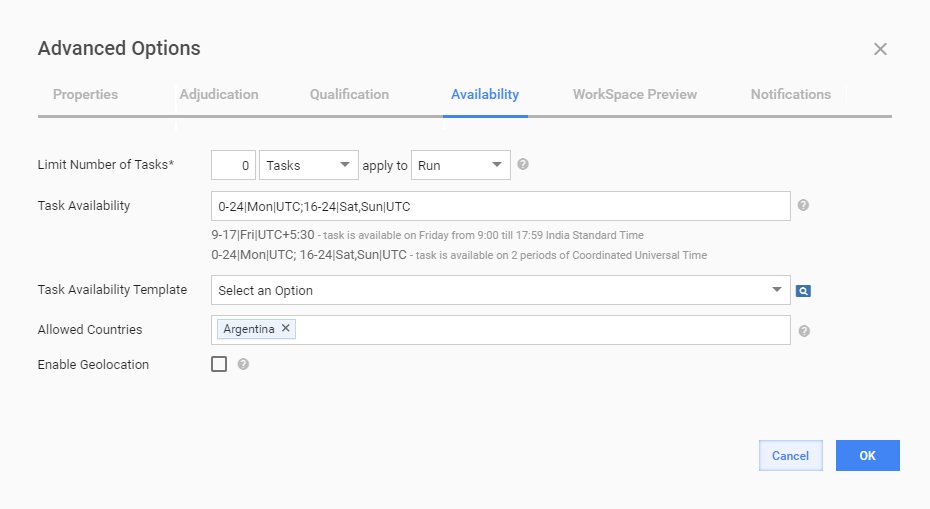
On the Availability tab, you can restrict access to the Task depending on number of already completed Tasks, current time, country, and geolocation of Workers.
| Field | Description |
|---|---|
| Limit Number of Tasks | The maximum number of Tasks a Worker can complete. Set to 0 for unlimited number of Tasks. You can set the exact number of Tasks or Percent of the total Endpoint Task amount. The limit number can be applied to:
|
| Task Availability | The time during which the Task will be available to Workers on target Endpoints. If you want to show the Task during business hours: 8-17|Sun,Mon,Tue,Wed,Thu,Fri,Sat By default, time is set in the UTC Timezone. You can specify multiple time frames and your Timezone: 8-17|Mon,Tue,Wed,Thu,Fri|UTC-4; 16-20|Sat,Sun|UTC-7 |
| Task Availability Template | This message is displayed to Workers when they try to view or accept the unavailable Task. |
| Allowed Countries | Text input field with country look-up. Start typing the country name and select a suitable item from autocomplete suggestion. You can add several countries or delete data if needed. |
Enabling Geolocation
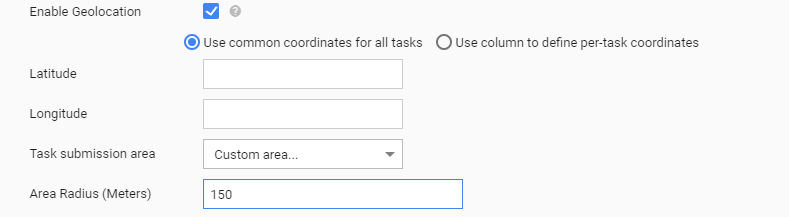
Enabling this option will cause Worker to see only Tasks that are geographically close to his/her current location. Workers will be asked for their location by browser.
| Field | Description |
|---|---|
| Use common coordinates for all tasks | When this option is selected, input the Latitude and Longitude values that will be used for all Task Records. |
| Use column to define per-task coordinates | When this option is selected, map the Latitude and Longitude fields to the corresponding columns of the Input Data file. In this case, each Task Record will have unique coordinates. |
| Task Submission Area | Select one of the following options:
|