
LDAP and AD integration
Overview
LDAP: Lightweight Directory Access Protocol is an open, vendor-neutral, industry standard application protocol for accessing and maintaining distributed directory information services over an IP network. Directory services play an important role in developing intranet and Internet applications by allowing the sharing of information about users, systems, networks, services, and applications throughout the network. As examples, directory services may provide any organized set of records, often with a hierarchical structure, such as a corporate email directory. Similarly, a telephone directory is a list of subscribers with an address and a phone number.
AD: Active Directory is a directory service that Microsoft developed for Windows domain networks. It is included in most Windows Server operating systems as a set of processes and services. Initially, Active Directory was only in charge of centralized domain management. Starting with Windows Server 2008, however, Active Directory became an umbrella title for a broad range of directory-based identity-related services.
WorkFusion Control Tower and WorkSpace can provide security (authentication and authorization) through LDAP / AD integration. Authentication is based on Spring Security standard provider.
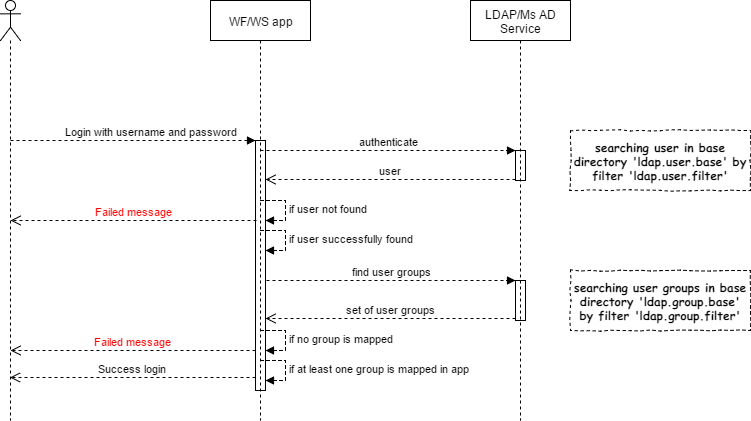
Control Tower configuration
By default, Control Tower provides local user/groups/role management. LDAP / AD integration can be enabled by setting the following parameters in:
<TOMCAT_HOME>/conf/workfusion.properties:# ldap properties ldap.enabled=true # to activate LDAP with WF roles switch this property to true. No groups from LDAP will be used. #Properties ldap.group.base and ldap.group.filter will be ignored ldap.internal.authorization.enabled=false # container of corporate user database used for authentication # support several base directories pipe separated <baseDN1>|<baseDN2>|... ldap.user.base=ou=People,dc=somecompanydomain,dc=com # container of corporate user groups used for authorization # support several base directories pipe separated <baseDN1>|<baseDN2>|... ldap.group.base=ou=Groups,dc=somecompanydomain,dc=com # user filter for search, optional, alternative = (uid={0}) ldap.user.filter=(sAMAccountName={0}) # group filter for search, optional, alternative = (memberUid={1}) ldap.group.filter=(member={0})Secure properties:
# ldap server url
ldap.server.url=ldaps://{host}:{port}

# system user cridentials
ldap.bind.dn=<User distinguished name>
ldap.bind.password=<User password>
tip
See the following page to manage secure storage: Manage secure properties.
The same properties are configured in the application.properties file.
External authorization
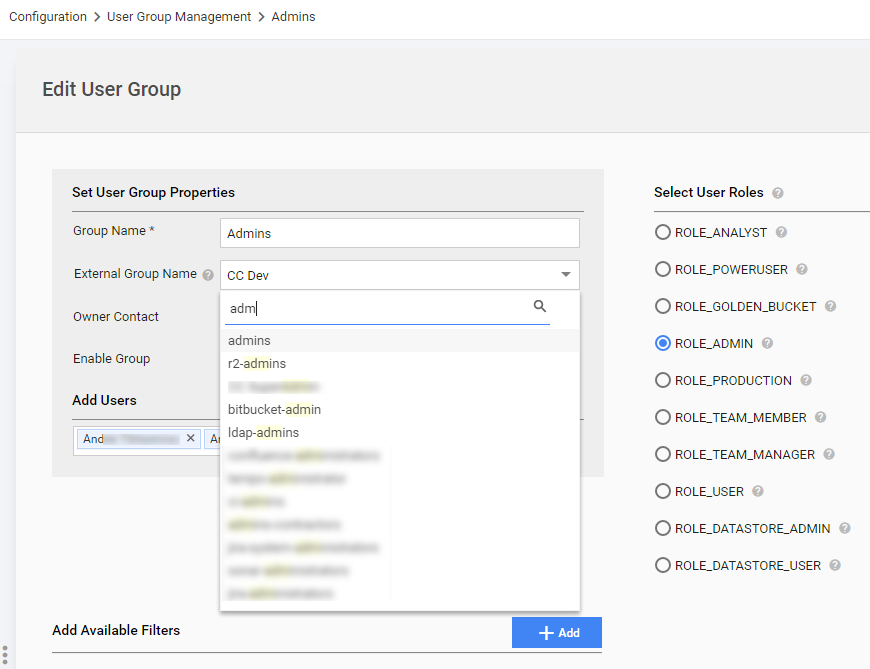
User groups are mapped in Control Tower during creating or editing a User Group:
- After successful login a user will be created/updated with data fetched from LDAP / AD.
- The user properties cannot be changed in Control Tower, if LDAP configuration is enabled, only available filters can be added. The direct role selection is unavailable too.
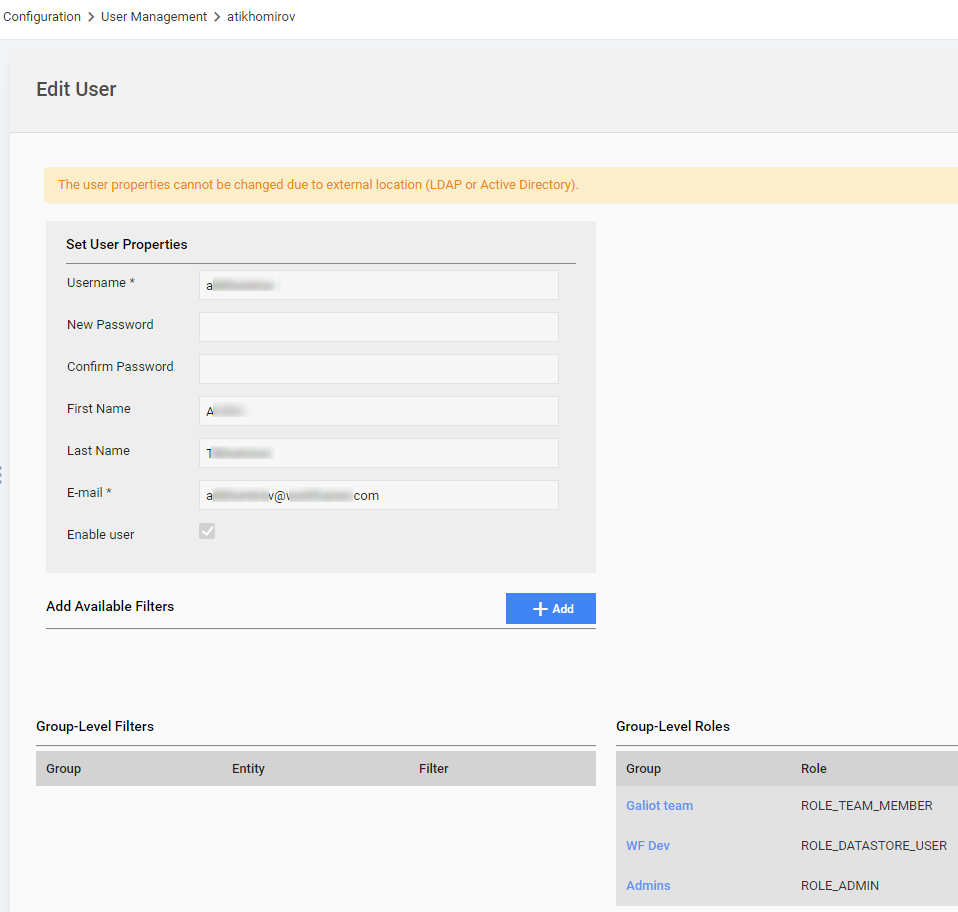
- A user cannot be created, deleted, and disabled in Control Tower. The Create, Delete and Disable buttons are unavailable, if LDAP is enabled.
- System Preferences > User Settings : the Account Details and Change Password sections are disabled too.
Internal authorization
To enable internal authorization, set the ldap.internal.authorization.enabled property to true.
Common assumptions:
If LDAP authentication is passed successfully, a user is checked for existence in Control Tower, and Control Tower Roles are applied to the user, if such user exists. Otherwise, unable to login.
User Properties cannot be changed in Control Tower, if LDAP Internal configuration is enabled. You can only edit roles and enable/disable the user.
User can be created, deleted, and disabled in Control Tower. The Create, Delete and Disable buttons on the User Management page are available, if LDAP with internal authorization is enabled.
System Preferences > User Settings: the Account Details and Change Password sections are disabled too.
The following properties are not used, if LDAP with internal authorization is enabled:
ldap.group.baseldap.group.filter
How to
This is an example to give an overview of LDAP / AD integration.
Mind to have
distinqueshedNameandpasswordof the System User to initialize the connection properties. It can be any user with priviliges to read the directory tree and the object attributes.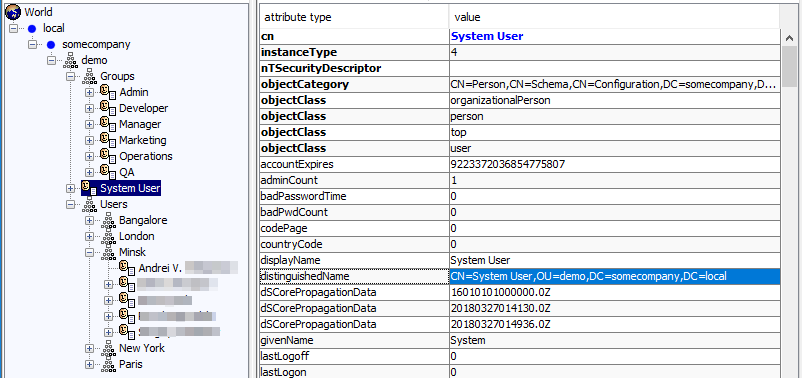
ldap.bind.dn=CN=System User,OU=demo,DC=somecompany,DC=local
ldap.bind.password=********
Configure the base directories for users and groups.

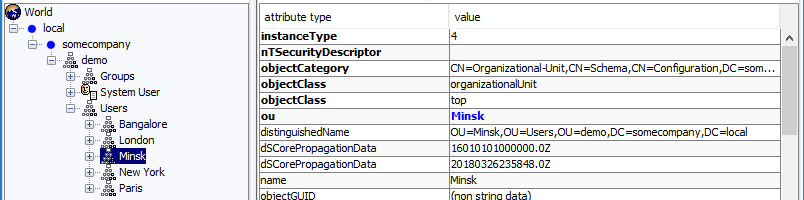
ldap.group.base=OU=Groups,OU=demo,DC=somecompany,DC=local
ldap.user.base=OU=Minsk,OU=Users,OU=demo,DC=somecompany,DC=local
It supports multi values with pipe separator for users and groups.
Example for users
ldap.user.base=OU=Minsk,OU=Users,OU=demo,DC=somecompany,DC=local|OU=New York,OU=Users,OU=demo,DC=somecompany,DC=localWhen the base directories are configured properly, it can help reducing time for searching users and/or groups.
ldap.group.baseis a base directory for loading user's groups during login and a list of groups for the External Group Name mapping on the Edit User Group page.Configure a user filter.
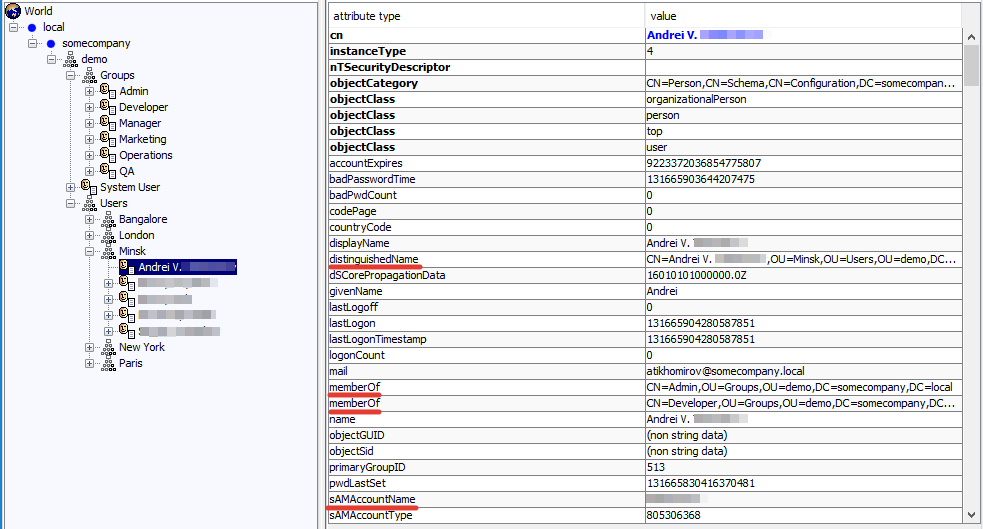
Usually, a username attribute for Microsoft Active Directory is
sAMAccountName. In this case, it isldap.user.filter=(sAMAccountName={0}. For example, if we are going to use the email for login, so the filter looks asldap.user.filter=(mail={0}). Keep in mind, that a user filter must return a unique result. Otherwise, it is configured incorrectly.Configure a group filter.
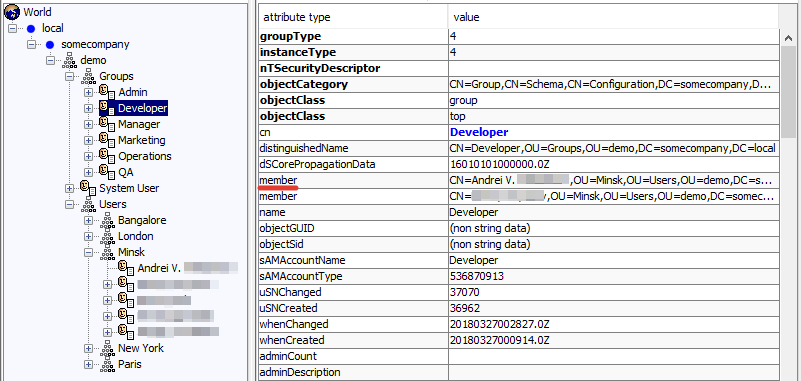
ldap.group.filter=(member={0}). In this case, the{0}parameter isdistinqueshedNameof the logging in user. For example, an alternative filterldap.group.filter=(memberUid={1}). In this case, the{1}parameter isusernameof the logging in user.
WorkSpace configuration
By default, WorkSpace provides local user/role management. LDAP / AD integration can be enabled by setting the following parameters:
In
<TOMCAT_HOME>/conf/workspace.properties(orworkspace-sandbox.properties):# ldap properties ldap.enabled=true # activate internal authorization if swithed to true with ldap.enabled ldap.internal.authorization.enabled=false # Comma separated group names from LDAP for mapping to worker users ldap.worker.groups=CC Dev,Galiot,CC Ops # Comma separated group of roles from LDAP which are mapped to the WorkSpace Requester role ldap.requester.groups=CC Admin # Name of license that is set to requester if new requester is created ldap.requester.license=license_name # container of corporate user database used for authentication # support several base directories pipe separated <baseDN1>|<baseDN2>|... ldap.user.base=ou=People,dc=crowdcomputingsystems,dc=com # container of corporate user groups used for authorization # support several base directories pipe separated <baseDN1>|<baseDN2>|... ldap.group.base=ou=Groups,dc=crowdcomputingsystems,dc=com # user filter for search, optional, alternative= (uid={0}) ldap.user.filter=(sAMAccountName={0}) # group filter for search, optional, alternative = (memberUid={1}) ldap.group.filter=(member={0}) # optional block ldap.user.attribute.email=mail ldap.user.attribute.firstName=givenname ldap.user.attribute.lastName=sn ldap.user.attribute.country=countryUser group mapping is configured through
ldap.worker.groups.Secure properties:
ws.secure.ldap.server.url=ldaps://{host}:{port}
# system user cridentials
ws.secure.ldap.bind.dn=<User distinguished name>
ws.secure.ldap.bind.password=<User password>
External authorization
After successful login a user will be created/updated with data fetched from LDAP / AD.
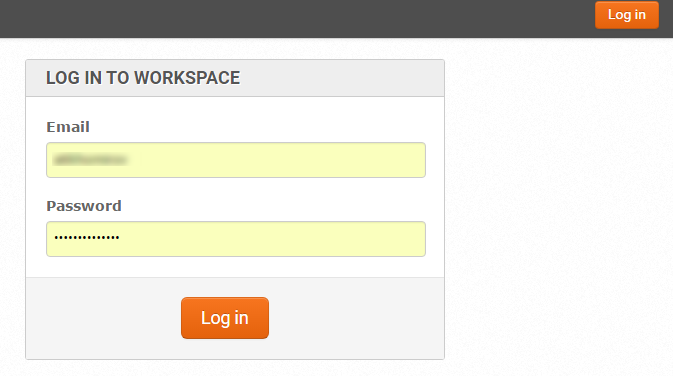
The Register and Forgot password functionality is unavailable, if LDAP / AD is integrated.
Internal authorization
To enable it internal authorization, set the ldap.internal.authorization.enabled property to true.
Common assumptions:
- If LDAP authentication is passed successfully, a user is checked for existence in WorkSpace, and WorkSpace Roles are applied to the user, if such user exists. Otherwise, unable to login.
- User Properties cannot be changed in WorkSpace, if LDAP Internal configuration is enabled. You can only enable or disable the user.
- User can be created, deleted, and disabled in WorkSpace. The Create, Delete and Disable buttons on the Workers and Requesters pages are available for requesters.
- The following properties are not used, if LDAP with internal authorization is enabled:
ldap.group.baseldap.group.filter