Platform Monitor for RPA - architecture
Introduction
Platform Monitor for RPA helps in maintaining RPA processes within a cluster.
Primary features:
- Manage RPA processes from UI (start, stop, restart).
- Automatically start Active GUI sessions on Windows servers after reboot.
- Automatically restart RPA processes (Bot Relay, Bot) in case of a failure.
- Monitor RPA Server health.
Deployment architecture
There are two scenarios how to deploy Platform Monitor for managing the RPA infrastructure.
- 1 RPA Bot per server (VDI)
- Multiple RPA Bot's per server (RDP-in-RDP)
1 RPA Bot per server (VDI)
In this aproach, each RPA Server has all RPA componets in a single active session. No additional RDP connections are created.
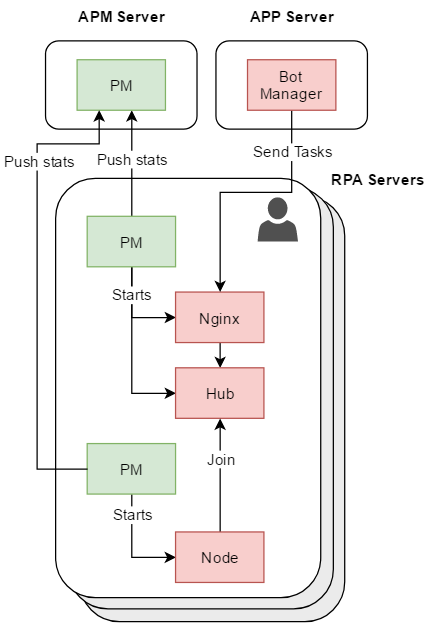
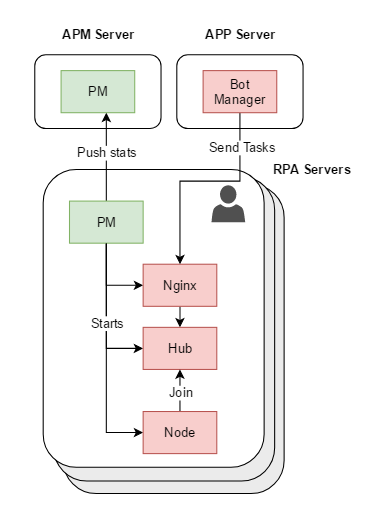
You can configure to allow a single PM to manage all processes in the following manner:
Multiple RPA Bot's per server (RDP-in-RDP)
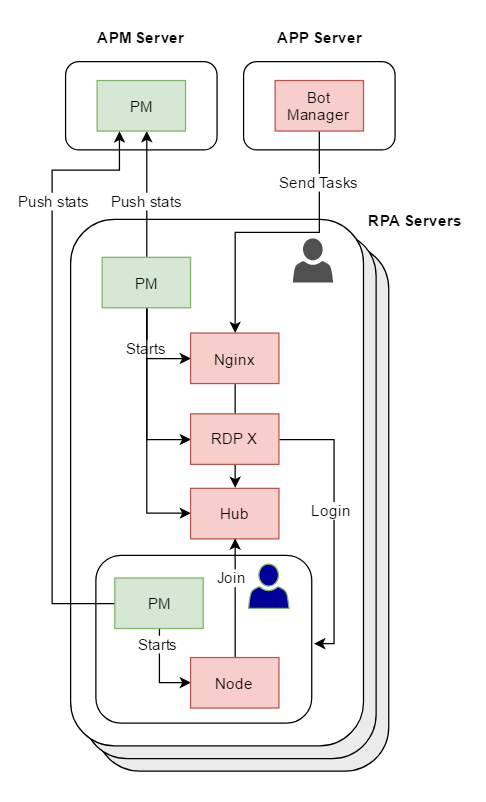
In this approach each RPA Server bootstraps 2 local RDP connections. There is default limit in Windows Servers: 2 active RDP connections at a time. After primary Platform Monitor is started, it will maintain two active RDP connections to the same host.