
ZooNavigator API
Service overview
| Software owner | Elasticsearch BV |
|---|---|
| Version | 0.2.1 |
| Management | wfmanager (start | stop | restart | status) zoonavigator-api |
| Log files | Access logs: ${install_dir}/supervisord/log/zoonavigator-api.out.log |
| Startup scripts | ${install_dir}/supervisord/apps/zoonavigator-api.ini ${install_dir}/zoonavigator/bin/zoonavigator-play ${install_dir}/ zoonavigator/run.sh |
| Configuration files | ${install_dir}/zoonavigator/conf/application.conf |
| Default Ports | tcp 8000, local port - 9000 |
Default parameters
| Configuration file | Name | Default value | Description |
|---|---|---|---|
| config.yml | install_dir | /opt/workfusion | Directory to put user files, logs and configs |
Troubleshooting
Check if TCP port 4567 is available.
Ports may be custom:
netstat command output
$ netstat -lntp | grep 9000
tcp6       0      0 127.0.0.1:9000          :::*                    LISTEN      981/java
ss command output
ss -ltn | grep 9000
LISTEN     0      100       ::ffff:127.0.0.1:9000                    :::*
lsof command output
$ lsof -P -n -i :9000 | grep LISTEN
java    981 wfuser   95u  IPv6  22966      0t0  TCP 127.0.0.1:9000 (LISTEN)
Check the default main log files:
- Access logs:
${install_dir}/supervisord/log/zoonavigator-api.out.log - Error logs:
${install_dir}/supervisord/log/zoonavigator-api.err.log
$ tail -f ${install_dir}/supervisord/log/zoonavigator-api.err.log ${install_dir}/supervisord/log/zoonavigator-api.out.log- Access logs:
Check zoonavigator-api out (access) log using the Wfmanager util.
wfmanager tail zoonavigator-api
Configure settings
Settings can be configured via ZooNavigator (Web-based editor for ZooKeeper). To open ZooNavigator UI in on-premise, use the following URL: http://:8000/zoonavigator/connecSettings are divided into two groups:
- Mesos job limiting settings
- HPO limiting settings applied to the eval process for a model with HPO
Edit settings
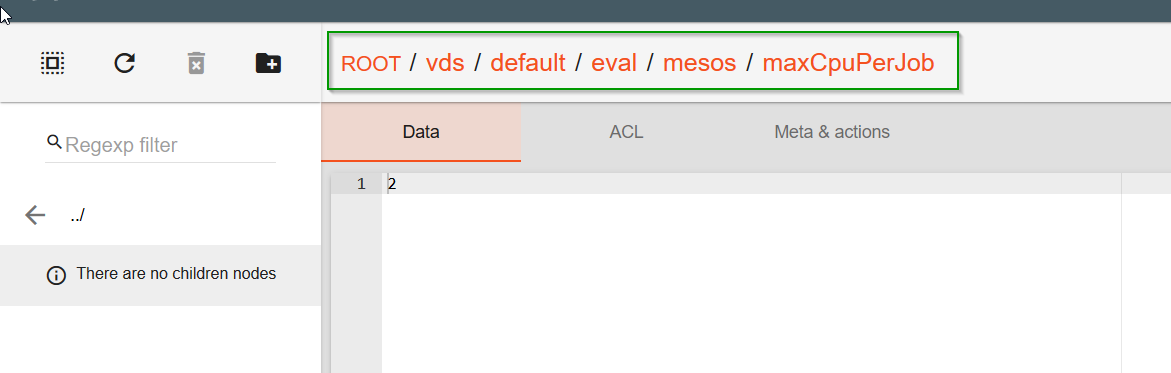
Navigate to vds > default > eval > mesos or hpo.
Edit the value and click Save. No need to restart the container as settings will be applied on the fly for all the new jobs.
Click the setting name (it should be visible in the full path on the top).
Add setting
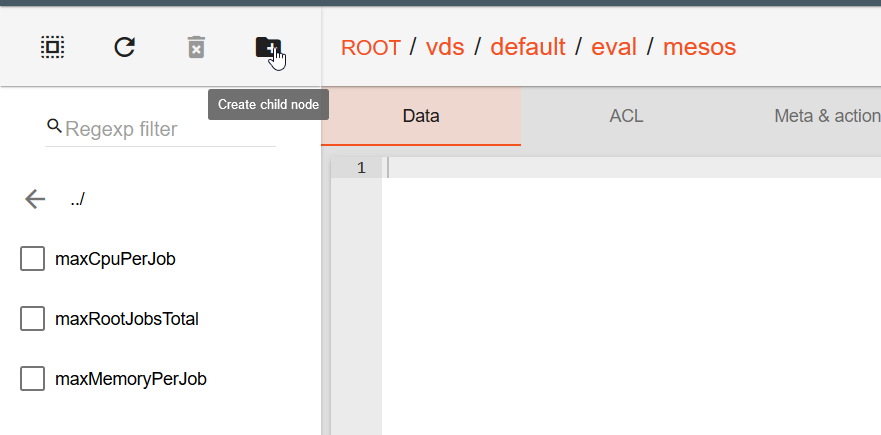
Navigate to folder where setting should be added, for example to add /eval/mesos/maxPendingDeployments, navigate to vds > default > eval > mesos folder.
Click the Create child node icon.
Enter the setting name.
Click created. As a result, the value appears in the list.
To add a value, click a newly added setting and click Save. The changes are applied without restart.
Settings description
Mesos job limiting settings
| Name | Default Value | Description/example |
|---|---|---|
| /eval/mesos/maxPendingDeployments | Maximum pending job (i.e. pending deployments) that allow to submit new jobs. If pending jobs count exceed that limit then all new job submission will be postponed until pending jobs count will drop below limit Used for cluster under high load |
|
| /eval/mesos/maxRootJobsTotal | Root job limitation for evaluation. If reached, new job won't be started Can be used for on-premise instances with the lack of resources |
|
| /eval/mesos/maxRootJobsPerUser | Max root jobs limitation for a single user that starts evaluation Used for shared cluster |
|
| /eval/mesos/maxMemoryPerJob | Maximum memory allowed for a single job | |
| /eval/mesos/maxCpuPerJob | Maximum CPU allowed for a single job |
HPO limiting settings
Name |
Default Value |
Description/example |
|---|---|---|
/eval/hpo/experiment/limitByTotalJobs |
Maximum user's running job that allow to submit new experiment job (not affected "leaf" jobs). If users's jobs count exceed that limit then all new experiment submission will be postponed until user's jobs count will drop below limit. Note: all jobs are counted (main, hpo-main, etc.) |
|
/eval/hpo/experiment/limitByUserJobs |
Maximum user's running job that allow to submit new experiment job (not affected "leaf" jobs). If users's jobs count exceed that limit then all new experiment submission will be postponed until user's jobs count will drop below limit. |
|
/eval/hpo/model/maxParallelModels |
Maximum number of parallel sub-models (HPO threads) running in single eval process per train. |
|
/eval/hpo/model/maxParallelExperiments |
8 |
Maximum number of parallel experiments in single sub-model per train. |
/eval/hpo/model/timeLimit |
10h |
Time limit per sub-model HPO. If added manually > time must be set in seconds, for example 10800 for 3h limit |
/eval/hpo/global/maxParallelExperiments |
128 |
Maximum number of parallel HPO experiments for the whole cluster. |