
Task Comparator for Manual Task sorting
Task Comparator is intended to sort Manual Tasks with the same template (Campaign) and enable Workers to complete them in a custom order.
Enable Task Comparator
To enable the feature, act as follows:
Go to Configuration > System Preferences and select a Task Comparator. The feature is available separately for development and production environments.
Go to Run Task > Advanced Options > Properties and select the Enable Dynamic Task Rendering checkbox.
Go to Manual Tasks, click a Manual Task, go to the Run tab, select a Task Priority.
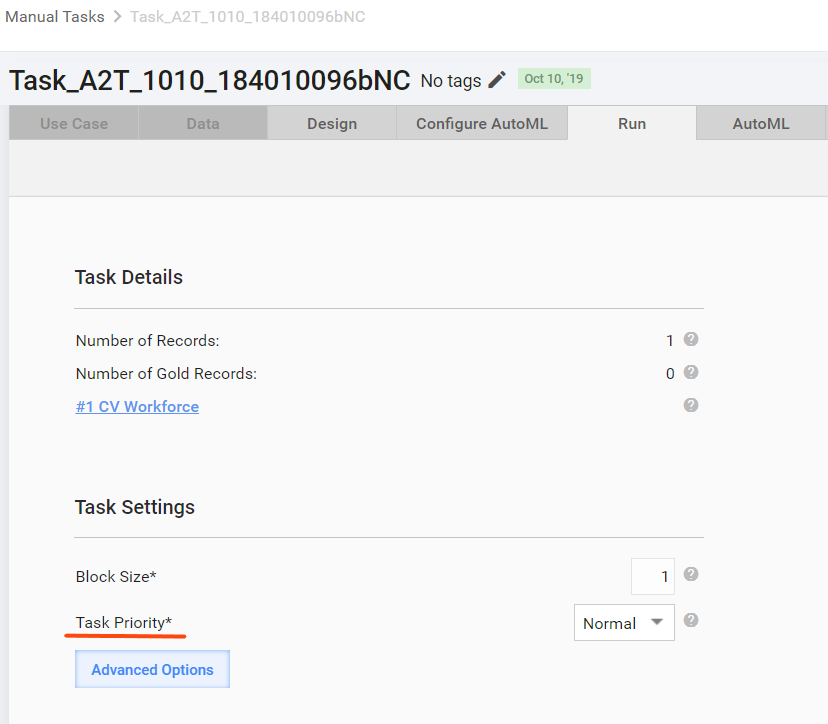
The priority works by default for both endpoints. It allows you to decide which tasks are to be displayed for Workers in the first turn.
 **Example**:

 You have two similar Manual Tasks (MT) with different input data files. You want Workers to complete the second MT in the first turn. To allow that, set the priority to **Max** for the 2nd MT. When a Worker finds the MT type and clicks the **View** link, he or she sees the MT with the highest priority on top.
- Optionally, set other MT parameters as Task Comparator attributes: Due Date, # of Max Assignments, and so on.
Sort by attributes
You can deliver the Task Comparator code in MVEL or Groovy. To enable sorting, use the following attributes:
prioritydueDatemaxAssignmentscreationTimeexpirationTime- data from the input file columns
important
To sort the incoming data correctly, use the 24-hour time format.
To sort Manual Tasks by the attributes, modify the Task Comparator rule accordingly. See the examples below:
Sorting Manual Tasks by priority, due date, and creation date
Click to see the example
// Sort by priority desc, due date asc, creation date asc
// This method is expected to be reusable. For the given two objects (usually, simple java.util.Map) and the array of attributes, it returns -1, 0, or 1, comparing fields consecutively.
// Attributes are compared one by one in the order in which they are specified in the list.
// This method is expected to be reusable unless you need a more advanced comparison logic.
// Call the sorting method for the given objects— 'first' (task1) and 'second' (task2)—and the list of attributes to compare.
// Please, note you can use custom attributes specified in CCF and three task properties: 'maxAssignments', 'creationTime', and 'expirationTime'.
task1 = first;
task2 = second;
// Entire list of attributes for sorting
attributes = ["priority", "dueDate", "creationTime"];
// The 'dates' variable defines a list of field names in the date format. These fields require a special comparison logic.
dates = ["dueDate", "creationTime"];
integers = ["priority"];
// Tne default sorting direction is ascending. For the descending order, set required attributes in the 'desc' direction.
desc = ["priority"];
result = 0;
  for (Object attribute : attributes) {
    if (task1[attribute] == null && task2[attribute] != null) {
      return 1;
    } else if (task1[attribute] != null && task2[attribute] == null) {
      return -1;
    } else if (task1[attribute] != null && task2[attribute] != null) {
      if (dates.contains(attribute)) {
        date1 = new java.text.SimpleDateFormat('MM-dd-yyyy HH:mm:ss').parse(task1[attribute]);
        date2 = new java.text.SimpleDateFormat('MM-dd-yyyy HH:mm:ss').parse(task2[attribute]);
        result = date1.compareTo(date2);
      } else if (integers.contains(attribute)) {
        int1 = new Integer(Integer.parseInt(task1[attribute]));
        int2 = new Integer(Integer.parseInt(task2[attribute]));
        result = int1.compareTo(int2);
      } else {
        result = task1[attribute].compareTo(task2[attribute]);
      }
      if (result != 0) {
        if (desc.contains(attribute)) {
          result = -result;
        }
        return result;
      }
    }
  }
  return 0;
Sorting by creation time only
Click to see the example
// Sort by creation date asc
// The method is expected to be reusable. For the given two objects (usually, simple java.util.Map) and the array of attributes, it returns -1, 0, or 1, comparing fields consecutively.
// Attributes are compared one by one in the order in which they are specified in the list.
// This method is expected to be reusable unless you need a more advanced comparison logic.
// Call the sorting method for the given objects— 'first' (task1) and 'second' (task2)—and a list of attributes to compare.
// The particular implementation works only with the creation date of the implemented FIFO behavior.
task1 = first;
task2 = second;
// Entire list of attributes for sorting
attributes = ["creationTime"];
// The 'dates' variable defines a list of field names in the date format. These fields require a special comparison logic.
dates = ["creationTime"];
// The default sorting direction is ascending. For the descending order, set required attributes in the 'desc' direction.

result = 0;
  for (Object attribute : attributes) {
    if (task1[attribute] == null && task2[attribute] != null) {
      return 1;
    } else if (task1[attribute] != null && task2[attribute] == null) {
      return -1;
    } else if (task1[attribute] != null && task2[attribute] != null) {
      if (dates.contains(attribute)) {
        date1 = new java.text.SimpleDateFormat('MM-dd-yyyy HH:mm:ss').parse(task1[attribute]);
        date2 = new java.text.SimpleDateFormat('MM-dd-yyyy HH:mm:ss').parse(task2[attribute]);
        result = date1.compareTo(date2);
      } else {
        result = task1[attribute].compareTo(task2[attribute]);
      }
      if (result != 0) {
        return result;
      }
    }
  }
  return 0;
Sorting by the Y/N input field and creation time
Click to see the example
//#include INPUT_DATA(y_or_n_field)

// Sort by is_expedited asc and creation date asc. If a task doesn't have the is_expedited input field, sort by the creation date only
// This method is expected to be reusable. For the given two objects (usually simple java.util.Map) and the array of attributes, it returns -1, 0, or 1, comparing fields consecutively.
// Attributes are compared one by one in the order in which they are specified in the list.
// The method is expected to be reusable unless you need a more advanced comparison logic.
// Call the sorting method for given objects— 'first' (task1) and 'second' (task2)—and the list of attributes to compare.
// Please, note you can use custom attributes specified in CCF and three task properties: 'maxAssignments', 'creationTime' and 'expirationTime'.
task1 = first;
task2 = second;
// Entire list of attributes for sorting
attributes = ["y_or_n_field","creationTime"];

//The 'dates' variable defines a list of field names in the date format. These fields require a particular comparison logic.
dates = ["creationTime"];

//The 'y_or_n' variable defines a list of field names with Y or N values. These fields require a particular comparison logic.
y_or_n = ["y_or_n_field"];

int res = 0 ;

for (Object attribute : attributes) {
    boolean isDateFilled = (task1[attribute]!= null && !task1[attribute].isEmpty()) && (task2[attribute]!= null && !task2[attribute].isEmpty());

    if (y_or_n.contains(attribute)) {
        // In the Y and N comparison string, N < Y, but the aim is the Y > N result, so the comparison order is inverted.
        res = org.apache.commons.lang3.ObjectUtils.compare(task2[attribute], task1[attribute], true);
    } else if (dates.contains(attribute) && isDateFilled) {
       date1 = new java.text.SimpleDateFormat('MM-dd-yyyy HH:mm:ss').parse(task1[attribute]);
       date2 = new java.text.SimpleDateFormat('MM-dd-yyyy HH:mm:ss').parse(task2[attribute]);
       res = date1.compareTo(date2);
    } else {
        res = org.apache.commons.lang3.ObjectUtils.compare(task1[attribute], task2[attribute], true);
    }

    if (res != 0) {
        return res;
    }
}

return 0;
Sorting by data from the input file is in ascending order. See the CSV file.
To include the input data into the context, add the following line: // #include INPUT_DATA.
For better performance, specify particular columns explicitly, for example, when comparison is based on the following attributes: some_date, some_priority: // #include INPUT_DATA(some_date,some_priority).
Create Task Comparator
To create a Task Comparator, follow the steps:
- Navigate to Campaigns > Rules.
- Click the Create button.
- Add your code and enter the rule parameters. The Rule Type must be Task Comparator.
// #include INPUT_DATA(country,city)
task1 = first;
task2 = second;
attributes = ["country", "city"];

for (Object attribute : attributes) {
    int res = org.apache.commons.lang3.ObjectUtils.compare(task1[attribute], task2[attribute], true);
    if (res != 0) {
        return res;
    }
}

return 0;
Explore Task Comparator life cycle
Get to know default behavior
Manual Task sorting is a scheduled process. Once tasks are posted to WorkSpace, they are sorted only after the next sorting cycle. By default, the posting interval is every 2 minutes (120,000 ms).
Once you change the Task Comparator behavior, changes appear in one or two sorting cycles.
Change behavior
Before changing the Task Comparator's default posting interval, it is good to know how much time the sorting of Manual Tasks actually takes. The exact duration always depends on the number of Manual Tasks.
To find out the sorting duration, locate the performance-metrics.log file and check the HitSortingService.processHitSorting data. If it already takes two minutes, there is no reason to decrease the default parameter.
To change the time interval between two sorting cycles, follow the steps:
- In the
workfusion.propertiesfile, add or update thetask.delay.processHitSortingparameter next totask.delay. Possible file location:/opt/workfusion/apps/webapps/apache-tomcat-8.0.33/conf/workfusion.properties. - Restart Tomcat.