
Set up Qualification Task with IE Answers
Using the WorkFusion platform, you can create a Qualification Task with Information Extraction (IE) Answers.
You can also enable the Training Mode for the task and provide explanatory messages in the Gold file.
Obtain Gold Data
To obtain Gold Data, follow the steps below:
- Create a regular Manual Task with an IE Answer and run it.
- Complete the task in the development environment.
- Generate a snapshot of the task or download the Result Data file.
- Copy your task without data.
- Load the snapshot as Gold Data for the new Manual Task. If the Training Mode is enabled, add appropriate columns with gold messages.
- Set an Accuracy Based Qualification for the task.
Set IE Answer
To configure IE Answers, perform the actions below:
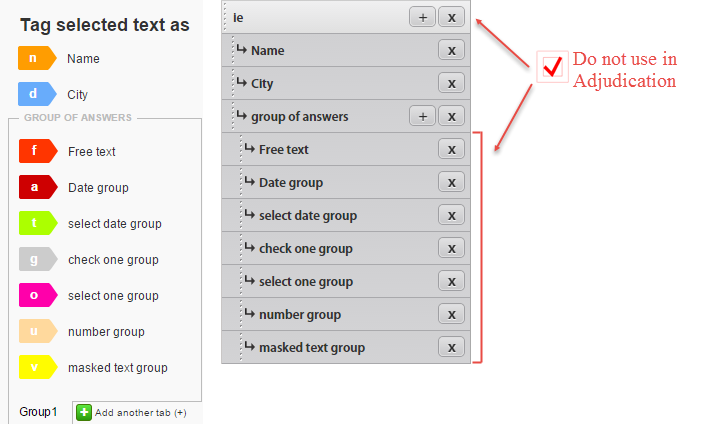
- Check the Do not use in Adjudication option:
- for the IE answer
- for all Sub Answers in the Group of Answers
- Uncheck the Do not use in Adjudication option:
- for Group of Answers
- for IE Sub Answers that are not in the Group of Answers
Map columns
Map the columns in the Gold Data file to all Answers with the deselected Do not use in Adjudication option. If the Training Mode is enabled, add appropriate columns with gold messages.
The Group of Answers columns must contain JSON where key is answer_code, and the value is an array of elements where keys are the Sub Answer code, and values correspond to gold Answers.
Group of Answers—Gold
{"group_of_answers":
    [{"multi_free_text":"Cleaning","multi_free_text_2":"Environmental"},
     {"multi_free_text":"Purification","multi_free_text_2":"Process"}]
}
You do not need to create separate gold_ and gold_..._message columns for each Sub Answer in the Group of Answers because the Gold Data is already included in the JSON code for the Group of Answers.
When you see mapping warnings for Sub Answers in the Group of Answers, ignore them.
Handle Training Tasks with IE Answers
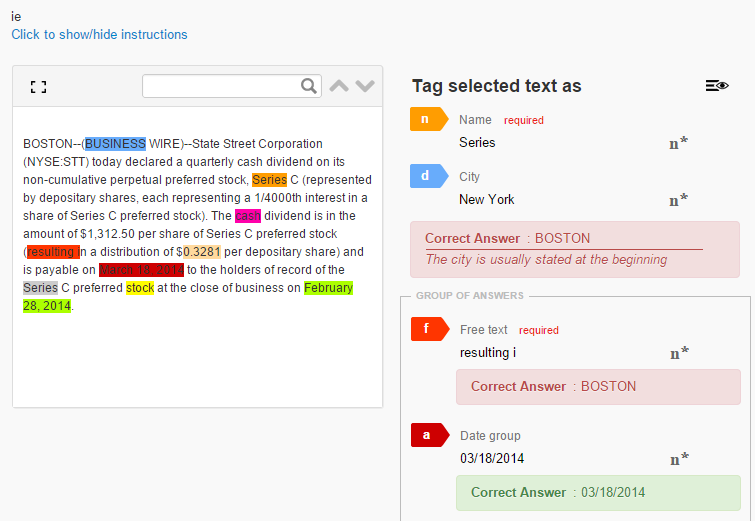
After submitting a Training Task with an IE Answer, workers see the following explanatory messages and correct answers:
Calculate Qualification Score
A Group of Answers is considered correct only when all Group Sub Answers are answered correctly.