
Configure RSS feed monitoring
The RSS Feed Monitoring Business Process is intended for aggregating the latest and unique financial news from different RSS feeds, extracting ETF Tickers and Names from these articles, and sending emails to customers with all extracted data and source links.
Input data
The input data is as follows:
- Data Store with RSS feeds
- Data Stores with keywords
- Data Store with unique news URLs
Goal
- Extract and validate all links from RSS feeds.
- Extract text from all valid URLs.
- Find specific Keywords in the extracted texts.
- If a text contains target keywords, internal Worker should read this text and find ETF Tickers and ETF Names.
- All the found info (RSS feed, link, ETF Tickers, and Names) is sent to the client's email.
Examples
The RSS feed monitoring workflow is as follows:
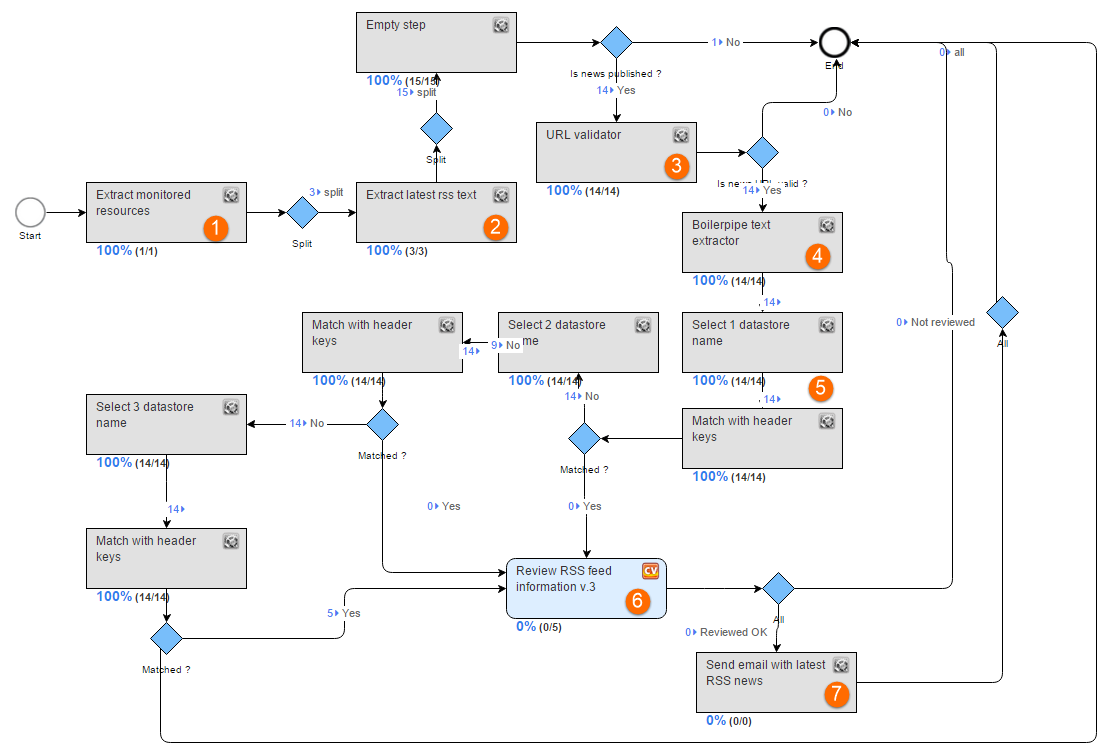
Proсess steps
The process contains Split rules for adding new Records (split one record into multiple). We need to split Records because one Data Store contains multiple RSS feeds, and each RSS feed contains multiple links to financial news articles.
1. Extract monitored resources
The step reads the following options from the Data Store:
- RSS feed URLs
- Last check dates
- XPath selectors for feeds, links, and text
- Email address and names
2. Extract latest RSS text
The step extracts all links from the RSS feed using XPath from the Data Store and checks if the link is unique. Records with non-unique links go to the process End.
All unique news article links are stored in a Data Store.
3. URL validator
The step checks the availability of links extracted from the RSS feed on the previous step.
Records with invalid links go to the process End.
4. Boilerpipe text extractor
The step extracts text from HTML news article content and saves it to an Amazon S3 bucket.
The Bot step also extracts article headers and ETF links and appends these columns to the snapshot.
5. Find keywords
These two steps (Select N Data Store Name, Match with Header Keys) are intended to search specific keywords in the news headers and descriptions.
In this process, the keywords are searched consequently in three predefined Data Stores.
If no keyword match was found, the record goes to the process End. Records with keywords are routed to the Manual step.
6. Review RSS information (Manual)
In this step, a human Worker needs to review the news article and extract the following fields, if available:
- ETF name
- ETF ticker
There can be multiple ETF names and tickers.
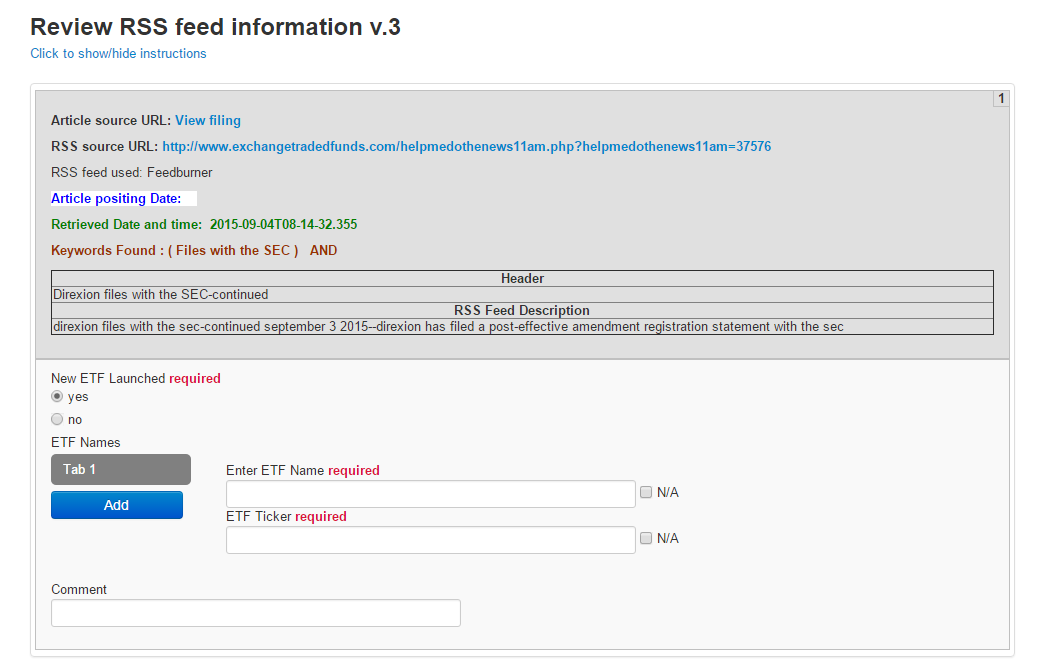
If an article does not contain information about the new ETF launch, a human Worker answers No, and the record goes to the process End.
Otherwise, an automatic email is sent to an address taken from the Data Store.
7. Send email with RSS news
The email contains the following information:
- ETF tickers
- ETF names
- RSS feed
- Article URL and header