
Work with DA Bot Steps
Get data-value and original text from CSV file with HTML links
A bot collects values of tag (data-value) and original data (text tagged in a document, without normalization).
Input: CSV with the link_to_file column that is a link to tagged HTML. Output: CSV with _original and _extracted columns for all extracted tags.

Tag renaming
A bot renames a specified tag. Usually used at integration TC, when similar fields of different suppliers or countries are tagged as not common. For example: client_address and address_client; worker_id and worker_name, and so on.
Input: CSV with the link_to_file column that is a link to tagged HTML. Output: CSV with the renamed_links column.
Before usage, you should change in Bot Configuration values of:
old_tag_name: Tag you want to change.new_tag_name: Name that the tag should be updated to.bucket_name: Bucket where you want to place an updated file with a newtag_name.path_to_folder(optional): Path to an exact location of a new file.

Also, the name of a new file with an updated tag name will be <original_file_name_form_url>_renamed_tag_to_<new_tag_name>.html.
download
Business Process Package: [BP][DA]+Tag+renaming.zip
Counting tag occurrences
A bot counts how many times each tag is present in TS.
Input: CSV with the link_to_file column that is a link to a tagged HTML file. Output: the temp_counting_tag_in_TS DS (the tag_name and tag_count columns).
Mind the following conditions:
- If a DS does not exist, it is be created automatically.
- The DS is cleaned up with each new run.
- The BP works fine for single answer types. If you want to count tags for the multi-value answer type, replace lines 49-51 and update it to
line_of_tags << it.tagName();. In that case, the BP counts all values that tagged in a document. Make sure that the rest single values are tagged once in the document.
download
Business Process Package:[BP][DA]+Counting+of+tag+how+much+times+meet+it+in+TS.zip
Convert HTML content into HTML files
A bot converts the content from the link_to_file_tagged column to an HTML file.
Input: CSV with tagged text and filename values. Output: CSV with links to HTML documents.
Before usage, you should change in Bot Configuration values of:
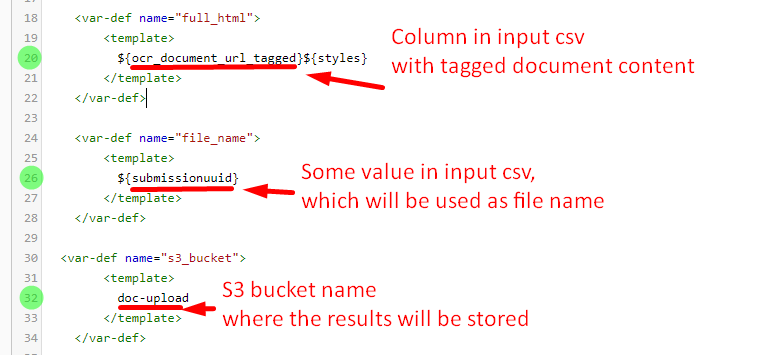
download
Business Process Package: Save+tagged+text+to+S3+18-10-2019.zip
Look for broken tags (separated by table)
A bot marks documents where a tag is broken by the table based on logic: when the tag is broken, it is displayed in the structure of document as two tags with the same name and data-value but different original text.
Input: CSV with the links_to_tagged_html column.
Output: CSV with the is_broken column flagged true or false.
download
Business Process Package: [BP][DA]+Looking+for+broken+tags+separated+by+table.zip