
Data Purge settings
Data Purge Settings
The Data Purge job deletes obsolete operational data from WorkFusion SPA instance according to the following settings.
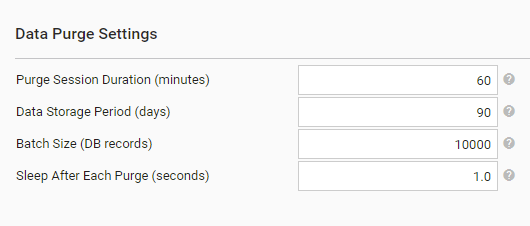
Data Purge increases load on the DB server disk.
| Parameter | Default | Description |
|---|---|---|
| Purge Session Duration (minutes) | 60 | Defines how long each purge session lasts after the purge is triggered by the Scheduler. Set to 0 to disable data purge. |
| Data Storage Period (days) | 90 | Defines the number of days to keep business process data after the business process completes. Only data of business process exceeded the period is purged. |
| Batch Size (DB records) | 10,000 | Number of DB records to purge at once. |
| Sleep After Each Purge (seconds) | 1 | Make pause after each Business Process being purged to minimize an impact to performance. |
Data Purge results
The Data Purge job clears the data of completed (or marked as deleted) business processes:
- Business process and business process steps input data
- Business process and business process steps output data
- Output data snapshots
- Generated events
The Data Purge job does not delete the following:
- Any data of Active, Draft, Not-started or Failed business processes
- Data stores
- S3 file storage data
- Activity logs
The example of a Business Process after the Data Purge operation:
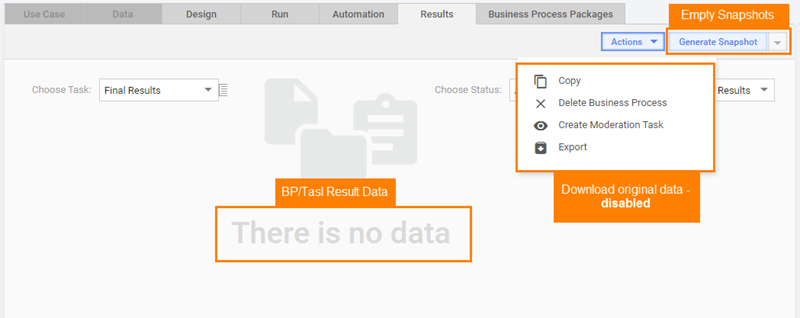
- Results Data: empty
- Snapshots: empty
- Download original data: disabled
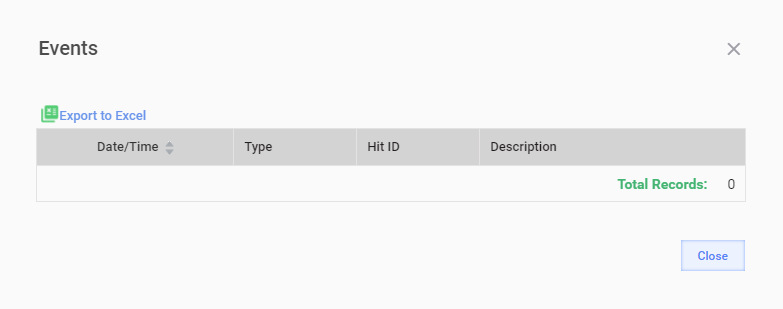
- Events: empty
Role Management
Perform the following steps to grant a user the Manage Data Purge permission
- Open Configuration > Role Management.
- Open a Role to which the user belongs, for example,
ROLE_SUPER_ADMINISTRATOR. - Select the Manage Data Purge permission.
- Save changes.
- Re-log in to Control Tower.
- Go to Configuration > System Preferences > Schedule settings.
- Data Purge Settings should be available.
Space utilization
Affected tables
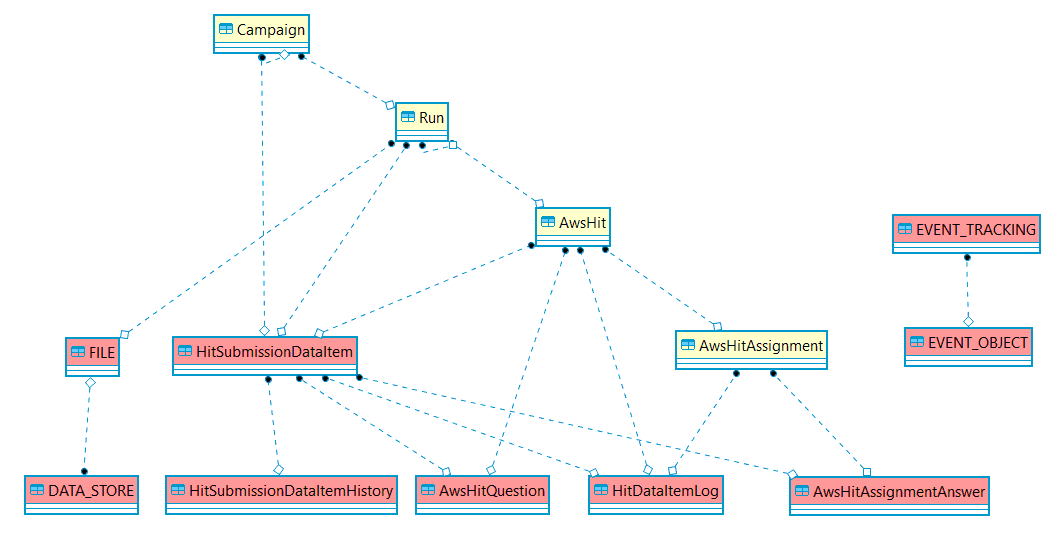
The following MySQL tables in the wfdb database are affected by the Data Purge function when the Purge Data function is enabled.
The affected tables are as follows:
AwsHitQuestion: contains JSON with output of a record answers processing.AwsHitAssignmentAnswer: contains raw answers given by worker to a record.HitSubmissionDataItem: contains JSON with a record input data.HitSubmissionDataItemHistory: contains snapshots of existing record input data if it is modified by step transition, for example, two records are merged.HitDataItemLog: contains a log of record life cycle events, for example, posting, submission, approval.FILE: contains file description, for example, name and type.DATA_STORE: contains the binary content of files.EVENT_TRACKING: contains text description of event, for example, a message or exception stacktrace.EVENT_OBJECT: contains reference to object induced event, for example, a BP step or definition.
The entity relationship diagram is as follows:
Disk space
Data Purge operation will not release the freed space to the OS file system. Instead the freed space will become available for new data inserts.
Force return disk space
MySQL doesn't shrink files after row deleting, and just marks them as "free" for reusing. To return space to the system you may want to run:
optimize table TABLE_NAME;
The optimize command must be executed during the maintenance time frame because the tables are either locked or fully reloaded.
MySQL InnoDB doesn't support in-place optimize and fulfills table recreating instead:
mysql> optimize table EVENT_TRACKING_EVENT_OBJECT;
+----------------------------------+----------+----------+-------------------------------------------------------------------+
| Table                            | Op       | Msg_type | Msg_text                                                          |
+----------------------------------+----------+----------+-------------------------------------------------------------------+
| wfdb.EVENT_TRACKING_EVENT_OBJECT | optimize | note     | Table does not support optimize, doing recreate + analyze instead |
| wfdb.EVENT_TRACKING_EVENT_OBJECT | optimize | status   | OK                                                                |
+----------------------------------+----------+----------+-------------------------------------------------------------------+
The full optimization script is as follows:
optimize table FILE;
optimize table DATA_STORE;
optimize table HitSubmissionDataItem;
optimize table HitSubmissionDataItemHistory;
optimize table HitDataItemLog;
optimize table AwsHitQuestion;
optimize table AwsHitAssignmentAnswer;
optimize table EVENT_TRACKING;
optimize table EVENT_OBJECT;
optimize table EVENT_TRACKING_EVENT_OBJECT;
For more details, refer to MySQL InnoDB deletion statement behavior.
FAQ
How much data volume is generated by business processes?
Every business process step accepts input data and produced output data. Output data of one business process step is then copied to the input of the next business process step.
Adjudication plays additional role in this process. The same task can be performed by several workers and then the final result derived using majority rule. To accommodate this functionality - output (answers) of each worker needs to be saved before deriving final output.
Generally amount of data written to the database can be estimated as the following:
| Parameter | Description |
|---|---|
| S | Number of stateful steps of the business process. |
| T | Number of transactions processed by the business process. |
| V | Amount of data passed through the steps of the business process. |
Estimate of data stored = S * T * V * 4
Calculation example
- A business process with 20 steps
- 100 000 transactions processed per day
- Every transaction has several data points:
- ~128 KB: input document (a few page long document: greyscale PDF or image; OCR result; tagging or labeling result)
- ~4 KB in total for intermediate data points generated by the business process logic.
Estimate of data stored = S * T * V * 4 = 20 * 100000 * (128000 B + 4000 B) * 4 = 1056 GB per day Keep reading how to decrease this number 100+ times.
How to reduce data volume stored by business processes?
Let's take our example and see how we can reduce the business process's disk appetite.
Disable snapshots generation
As a rule there is no-one who downloads it, disable snapshot generation by default (it is still possible to generate it on demand). For more details, see Schedule settings | Automatic calculations.
Store big data points in File Storage
For example, in S3 Object Storage coming with WorkFusion SPA out-of-the-box.
The example: now, instead of passing the whole file content through all the step, you can past just a link to the document.
~128kb: input document is replaced with ~200b bytes: link to the input document
Estimate of data stored = S * T * V * 4 = 20 * 100000 * (200 B + 1000 B) * 4 = 9.6 GB per day
Do not pass unnecessary data points between steps
There is no need to pass all the data to every step to the very end of the business process.
Just pass what is actually needed on the next step.
Always use <export include-original-data="false"> and include only the required data points.
Our example: now instead of passing ~4kb of all data points we pass let's say about ~1kb of required data points only****
Estimate of data stored = S * T * V * 4 = 20 * 100000 * (200 B + 1000 B) * 4 = 9.6 GB per day
Use stateless execution of tasks
When possible utilize Stateless Execution of Bot Tasks. This way the step data will be stored in-memory only without writing to the database.
Example: instead of saving data for every step - we mark most of the steps as stateless, so for example 5 out 20 remain stateful.
Estimate of data stored = S * T * V * 4 = 5 * 100000 * (200 B + 1000 B) * 4 = 2.4 GB per day
Enable data purge
When data flow is in proper order, enable the data purge.
It will let us keep the disk of the constant size, without need to provision bigger disks too often.
Example: setting data storage period to 30 days, we end up with:
2.4 GB of data generated, and about the same amount of data purged every day with total amount of 72 GB of 30 days historical data stored at any given point in time.