
Create new manual task
Manual task overview
The main goal of a Task is to take initial raw data (.csv file) and to structure, enrich, or check this data according to some rules. Tasks are differentiated as follows.
- Manual Task - Task completed by a human.
- Bot Task - Task completed by some type of computer automation (data parsing, extraction, transformation, loading).
The Tasks area of the Control Tower allows you to create new Tasks, manage existing Tasks, monitor the progress of active Tasks, and view the results of completed Tasks.
Basic task workflow
- Create a Task and start designing and configuring it. To prevent losing your data, occasionally save the Task (Task Status = Draft).
- Run the Task (Task Status = Processing).
- Check the results and edit the Task parameters if needed.
- Copy the Task with Data.
- Run the copied Task and monitor its execution.
You can optionally pause/resume or stop the Task execution. When the Task is no longer needed you can delete it.
Task data flow
The main idea of a Task is to:
- Prepare the initial Data file.
- Enrich the data or transform it according to some rules during the Task execution. These actions are done by human Workers or Bot Configs.
- (Optional) Get intermediate results by generating Snapshots.
- Get the final Result Data file. This file can be used as an input file for another Task in a Business Process Overview.
Create manual task
There are two ways to create a new manual task:
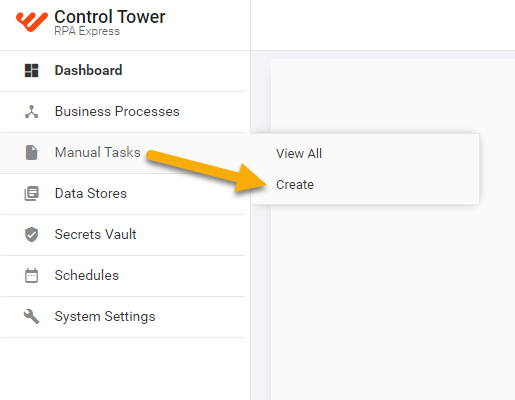
- Click Dashboard > Manual Tasks > Create Manual Task
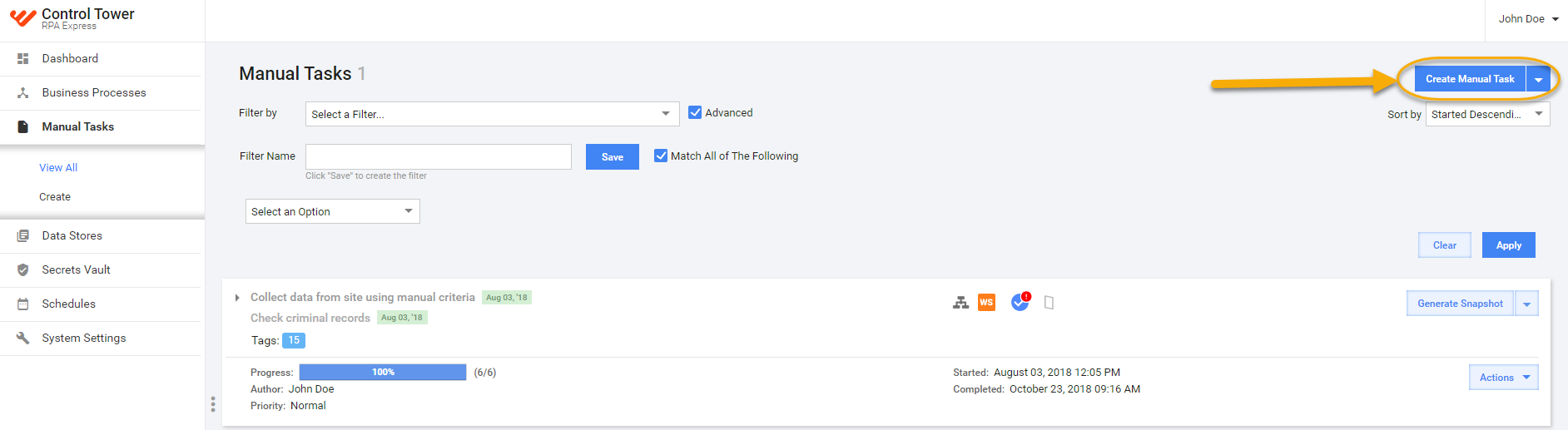
- or click the Create Manual Task button from the View All
Manual Tasks menu.
tip
See here for further instructions.